


- Posts: 2
- Thank you received: 0
3 Post Moderation Rule for New Boarders (25 Jan 2021)
New boarders will have their posts moderated - Don't worry if you cannot see your post immediately.
Convert from 59.* fps to 30
- quantumpotato
-
 Topic Author
- Offline
- New Member
-

Less
More
25 Dec 2014 00:45 #57657
by quantumpotato
Convert from 59.* fps to 30 was created by quantumpotato
Ok, I found this thread
www.fcp.co/component/users/?view=reset
I made a new project with custom settings: original video width, original video height, (640x1136), 30p. I imported my 59+fps media into the project. I open the media in Timeline. I go to video settings. I click frame rate -- it shows "smoothed to 60". But when I press cmd+j and view project info, my project says 30p.
How do I convert from 60fps to 30fps?
Thanks and Merry Christmas!!
www.fcp.co/component/users/?view=reset
I made a new project with custom settings: original video width, original video height, (640x1136), 30p. I imported my 59+fps media into the project. I open the media in Timeline. I go to video settings. I click frame rate -- it shows "smoothed to 60". But when I press cmd+j and view project info, my project says 30p.
How do I convert from 60fps to 30fps?
Thanks and Merry Christmas!!
Please Log in to join the conversation.
- Tom Wolsky
-

- Offline
- Moderator
-

25 Dec 2014 01:32 #57658
by Tom Wolsky
Replied by Tom Wolsky on topic Convert from 59.* fps to 30
Just put the 60fps media into the 30fps project. Done.
Please Log in to join the conversation.
- quantumpotato
-
Topic Author
- Offline
- New Member
-
Less
More
- Posts: 2
- Thank you received: 0
25 Dec 2014 06:03 #57662
by quantumpotato
Replied by quantumpotato on topic Convert from 59.* fps to 30
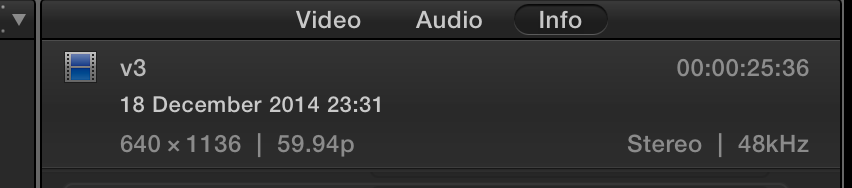
Tom, this info panel shows 60 FPS. How do I verify it is at 30 FPS?
Please Log in to join the conversation.
- Tom Wolsky
-
- Offline
- Moderator
-
25 Dec 2014 08:21 #57663
by Tom Wolsky
Replied by Tom Wolsky on topic Convert from 59.* fps to 30
That's the info inspector for the clip. That's not going to change. The frame rate of the project is used. Every other frame is discarded to make it 29.97.
Please Log in to join the conversation.

25 Dec 2014 13:28 #57669
by BenB
Replied by BenB on topic Convert from 59.* fps to 30
Select the Project in the Browser, go to the Inspector, and there you'll click the Settings button if necessary to make changes. But that will tell you the frame rate of the Project tilmeine, not the individual clip, like Tom said.
Please Log in to join the conversation.
