


- Posts: 5
- Thank you received: 0
3 Post Moderation Rule for New Boarders (25 Jan 2021)
New boarders will have their posts moderated - Don't worry if you cannot see your post immediately.
Multi Cam editing- Dual audio Channels
- justinbrown19
-
 Topic Author
- Offline
- New Member
-

Less
More
19 Dec 2014 20:33 #57546
by justinbrown19
Multi Cam editing- Dual audio Channels was created by justinbrown19
I have just started learning multi cam editing and can only find how to switch from one audio file to another. My subjects are recorded on separate Lavs and I would like to use 2 audio files. Right now I can only switch between the 2, does anyone know how I would be able to select both?
Thanks
Thanks
Please Log in to join the conversation.
- Tom Wolsky
-

- Offline
- Moderator
-

19 Dec 2014 20:42 #57547
by Tom Wolsky
Replied by Tom Wolsky on topic Multi Cam editing- Dual audio Channels
You should have the channel configuration set to dual mono. You can expand audio components in the multicam clip to see both channel. It sounds as if you want both channels active and not cut the audio, but I'm not clear on what you're asking. Screen shots of the expanded audio components might be helpful.
Please Log in to join the conversation.
- justinbrown19
-
Topic Author
- Offline
- New Member
-
Less
More
- Posts: 5
- Thank you received: 0
19 Dec 2014 20:58 - 19 Dec 2014 20:59 #57548
by justinbrown19
Replied by justinbrown19 on topic Multi Cam editing- Dual audio Channels
Thanks Tom
Yes I want both channels active. I have 4 cameras and 2 audio files recorded off of 2 separate lavs. I want to use the audio from the 2 lavs and not the camera mics. Here is a picture

I want Zoom002-tr1 and zoom002-tr2 active.
Yes I want both channels active. I have 4 cameras and 2 audio files recorded off of 2 separate lavs. I want to use the audio from the 2 lavs and not the camera mics. Here is a picture
I want Zoom002-tr1 and zoom002-tr2 active.
Last edit: 19 Dec 2014 20:59 by justinbrown19.
Please Log in to join the conversation.
- Tom Wolsky
-
- Offline
- Moderator
-
19 Dec 2014 21:15 #57549
by Tom Wolsky
Replied by Tom Wolsky on topic Multi Cam editing- Dual audio Channels
Cut your multicam clip into a project and expand the audio components.
Please Log in to join the conversation.
- justinbrown19
-
Topic Author
- Offline
- New Member
-
Less
More
- Posts: 5
- Thank you received: 0
19 Dec 2014 21:29 #57550
by justinbrown19

I can choose to cut to either zoom003_Tr1 or Zoom0003_tr2, I don't want to cut between the 2. I want to have both running at all times.
Replied by justinbrown19 on topic Multi Cam editing- Dual audio Channels
I can choose to cut to either zoom003_Tr1 or Zoom0003_tr2, I don't want to cut between the 2. I want to have both running at all times.
Please Log in to join the conversation.
- Tom Wolsky
-
- Offline
- Moderator
-
19 Dec 2014 21:46 - 19 Dec 2014 21:54 #57551
by Tom Wolsky
Replied by Tom Wolsky on topic Multi Cam editing- Dual audio Channels
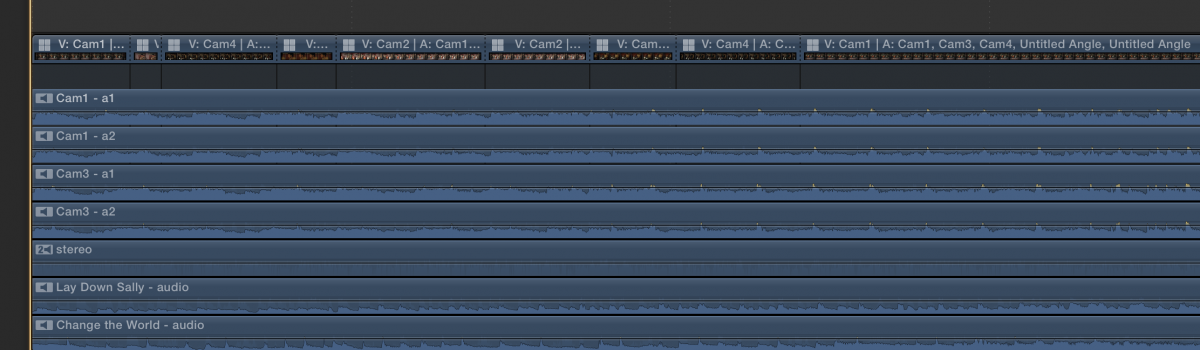
You keep showing the angle editor. Edit the multicam clip into a project and then expand the audio components.
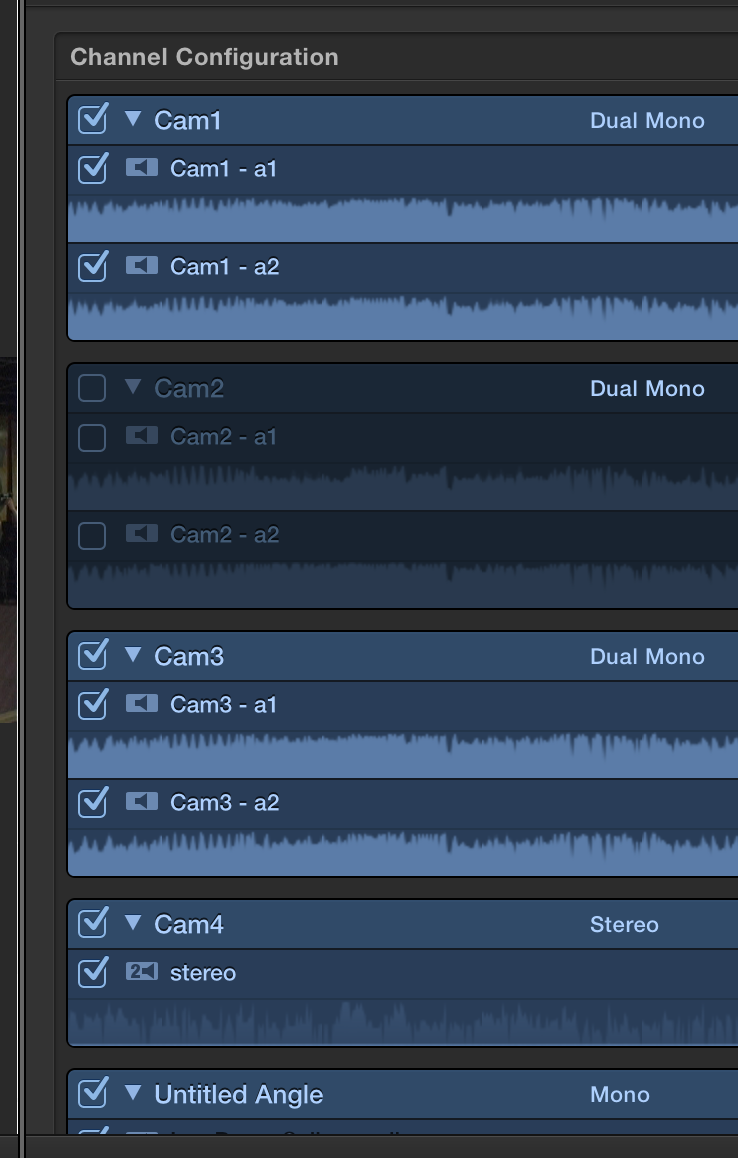
Select the multicam clip and in the audio pane in channel configurations switch
Select the video and with cutting set to edit video only cut the video.
You can also detach the audio, which sometimes works better for mixing purposes, or do a split edit of the audio so that it is continuous and doesn't get cut.
I don't know why the images aren't loading. The forum software is really dreadful in handling graphics.
Select the multicam clip and in the audio pane in channel configurations switch
Select the video and with cutting set to edit video only cut the video.
You can also detach the audio, which sometimes works better for mixing purposes, or do a split edit of the audio so that it is continuous and doesn't get cut.
I don't know why the images aren't loading. The forum software is really dreadful in handling graphics.
Last edit: 19 Dec 2014 21:54 by Tom Wolsky.
Please Log in to join the conversation.
- Tom Wolsky
-
- Offline
- Moderator
-
19 Dec 2014 21:55 #57552
by Tom Wolsky
Replied by Tom Wolsky on topic Multi Cam editing- Dual audio Channels
Expanded audio components
Channel configurations
Split edit to extend audio uncut
Channel configurations
Split edit to extend audio uncut
Please Log in to join the conversation.
- Tom Wolsky
-
- Offline
- Moderator
-
19 Dec 2014 21:56 #57553
by Tom Wolsky
Replied by Tom Wolsky on topic Multi Cam editing- Dual audio Channels
I guess two out of three ain't bad.
Please Log in to join the conversation.
- justinbrown19
-
Topic Author
- Offline
- New Member
-
Less
More
- Posts: 5
- Thank you received: 0
19 Dec 2014 22:26 #57554
by justinbrown19
Replied by justinbrown19 on topic Multi Cam editing- Dual audio Channels
Ok thanks, Im just trying to figure out how to get to channel configuration. Heres what I have when i expand the audio components.

Please Log in to join the conversation.
- Tom Wolsky
-
- Offline
- Moderator
-
19 Dec 2014 22:33 #57555
by Tom Wolsky
Replied by Tom Wolsky on topic Multi Cam editing- Dual audio Channels
You have only expanded the audio. You have not expanded the audio components. Look in the Clip menu. Select the multicam clip and in the audio pane of the inspector at the bottom you'll see channel configurations.
Please Log in to join the conversation.
- justinbrown19
-
Topic Author
- Offline
- New Member
-
Less
More
- Posts: 5
- Thank you received: 0
19 Dec 2014 22:52 #57556
by justinbrown19
Replied by justinbrown19 on topic Multi Cam editing- Dual audio Channels
Ok I have it working now, Thanks a lot!
Please Log in to join the conversation.
