


- Posts: 6
- Thank you received: 0
3 Post Moderation Rule for New Boarders (25 Jan 2021)
New boarders will have their posts moderated - Don't worry if you cannot see your post immediately.
Convex background
16 Dec 2014 08:40 #57408
by joenah
Convex background was created by joenah
Hi guys,
I'm using Motion 5 in FCP X to create a background. This background contains several video's, placed in dropzones.
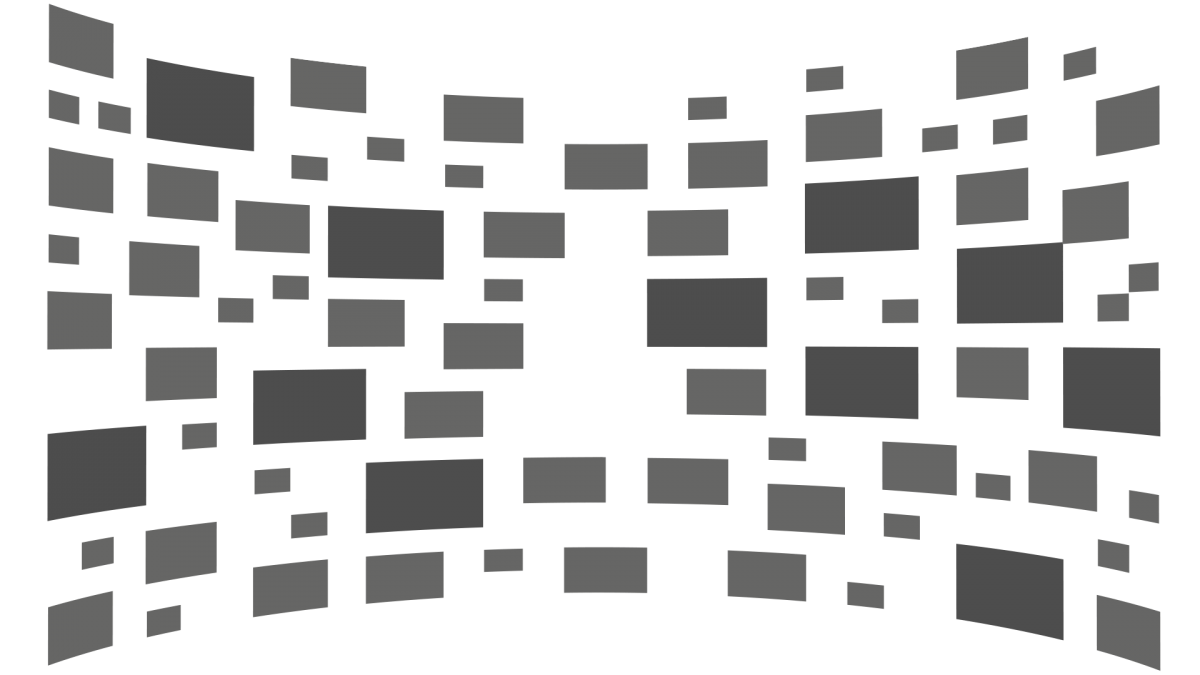
When I'm then making this background, I want to convex the background in Motion 5 or FCP X, like this example (this example was made in Illustrator):
discussions.apple.com/servlet/JiveServle...-grid-ronding-v2.png
(the video's will appear in the patches)
I tried using the fisheye filter, but doens't give the effect I want.
Who have the magic trick for me?
Thanks!
I'm using Motion 5 in FCP X to create a background. This background contains several video's, placed in dropzones.
When I'm then making this background, I want to convex the background in Motion 5 or FCP X, like this example (this example was made in Illustrator):
discussions.apple.com/servlet/JiveServle...-grid-ronding-v2.png
(the video's will appear in the patches)
I tried using the fisheye filter, but doens't give the effect I want.
Who have the magic trick for me?
Thanks!
Please Log in to join the conversation.
- ronny courtens
-

- Offline
- Moderator
-

Less
More
- Posts: 4455
- Thank you received: 962
17 Dec 2014 10:23 #57437
by ronny courtens
Replied by ronny courtens on topic Convex background
Hoi Jeroen, welcome to the forum.
Unfortunately this is not possible with the standard tools inside FCP X or Motion 5. Motion 5 really needs a simple bezier distort tool.
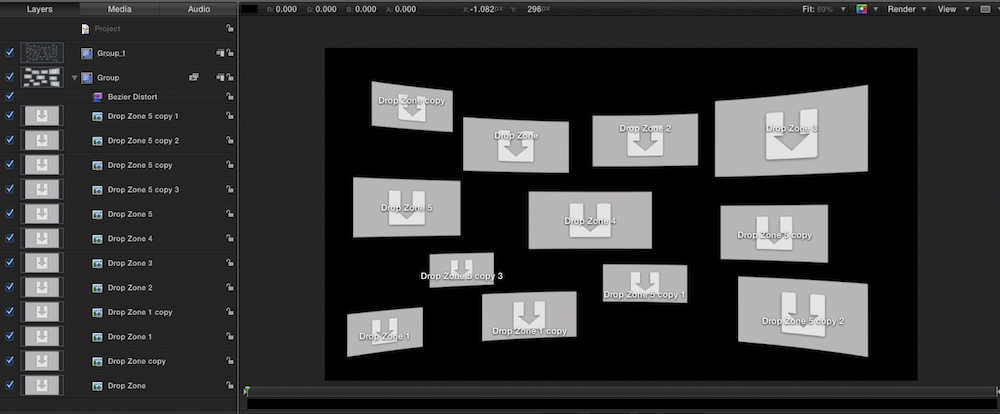
But if you have Fx Factory Pro you can use the Bezier Distort filter to create exactly what you want, and much more:
The FX Factory package is not cheap, so if you only need it for this specific effect it might be overkill. But it also has many other really good effects that you could use on any other projects.
Groeten uit België
- Ronny
Unfortunately this is not possible with the standard tools inside FCP X or Motion 5. Motion 5 really needs a simple bezier distort tool.
But if you have Fx Factory Pro you can use the Bezier Distort filter to create exactly what you want, and much more:
The FX Factory package is not cheap, so if you only need it for this specific effect it might be overkill. But it also has many other really good effects that you could use on any other projects.
Groeten uit België
- Ronny
Please Log in to join the conversation.
- Karsten Schlüter
-

- Offline
- Moderator
-
Less
More
- Posts: 3790
- Thank you received: 718
17 Dec 2014 10:54 #57438
by Karsten Schlüter
Replied by Karsten Schlüter on topic Convex background
Instead of Fisheye, have you tried the Bulge Filter (from Motion5) to your whole group?
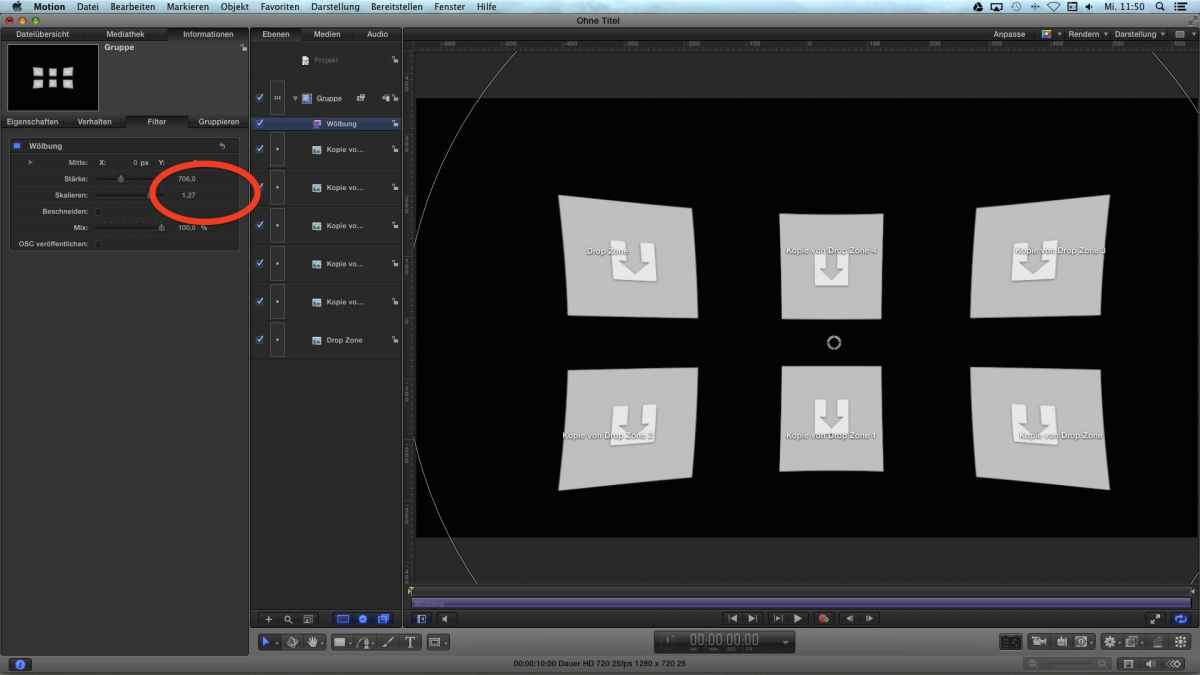
... you have to apply a positive value (red circle) it then convexes ... sot-of
... you have to apply a positive value (red circle) it then convexes ... sot-of
Please Log in to join the conversation.

17 Dec 2014 14:25 - 17 Dec 2014 14:28 #57455
by BenB
Replied by BenB on topic Convex background
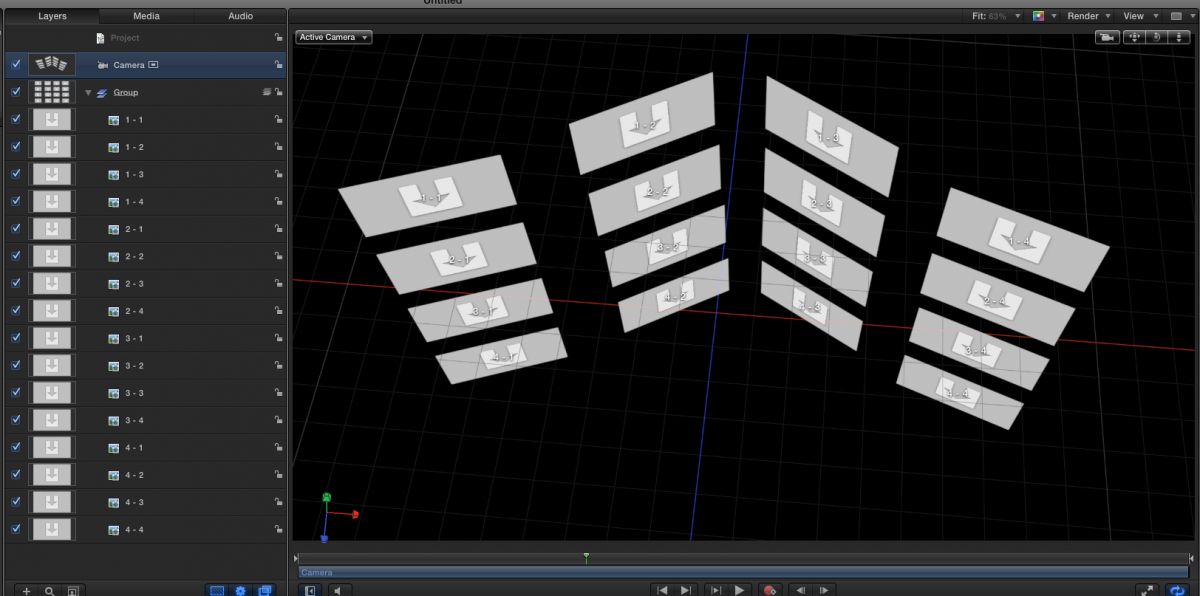
Actually you CAN do this in Motion, using a 3D group and adding a camera. You could manually place the drop zones in 3D space and angle as needed. Bulge and Sphere both could be applied to the Group. But Bulge tends to warp the drop zones, and Sphere rounds it out, not back. I'd actually put each column of drop zones into sub-groups, and angle/position each sub-group to save time and work.
Last edit: 17 Dec 2014 14:28 by BenB.
Please Log in to join the conversation.
- ronny courtens
-
- Offline
- Moderator
-
Less
More
- Posts: 4455
- Thank you received: 962
17 Dec 2014 14:40 - 17 Dec 2014 14:46 #57457
by ronny courtens
Replied by ronny courtens on topic Convex background
While the Bulge, Sphere and Fisheye filters and are all interesting approaches, none of these can give the effect seen on the posted screenshot. The Bulge effect is close, but it warps the object in the wrong way. If you can live with this you can use this. But we have to honest and say that Motion simply does not have a real bezier distort functionality. Only third-party plugins can give the exact result. This has been discussed many times before.
- Ronny
- Ronny
Last edit: 17 Dec 2014 14:46 by ronny courtens.
Please Log in to join the conversation.
17 Dec 2014 14:46 #57459
by BenB
Replied by BenB on topic Convex background
I'm building one with no plugins used, and will post it.
Please Log in to join the conversation.
17 Dec 2014 14:49 #57460
by joenah
Replied by joenah on topic Convex background
Hey Ronny,
Thanks for your reply. In the plugin from FXFactory Pro I used the Bulge Distort effect. But I only can set 4 Control Points.
Do you know if it's possible to add control points? I want six actually.
Thanks!
Jeroen
Thanks for your reply. In the plugin from FXFactory Pro I used the Bulge Distort effect. But I only can set 4 Control Points.
Do you know if it's possible to add control points? I want six actually.
Thanks!
Jeroen
Please Log in to join the conversation.
- ronny courtens
-
- Offline
- Moderator
-
Less
More
- Posts: 4455
- Thank you received: 962
17 Dec 2014 15:09 - 17 Dec 2014 15:13 #57462
by ronny courtens
Replied by ronny courtens on topic Convex background
Hi Jeroen,
Add the Bezier Distort filter from Fx Factory Pro to your group and in the Inspector choose the Widescreen preset (see screenshot).
Then you can manipulate every detail of your warp distortion using the controls. The Left and Right "X" parameters control the image curving on the right and left. The Top and Bottom Y parameters control the curving of the top and bottom of your image.
For very quick results you just can use the on-screen Position knobs to modify the L,R, T and Bottom curving. Done in a minute and fully customizable:
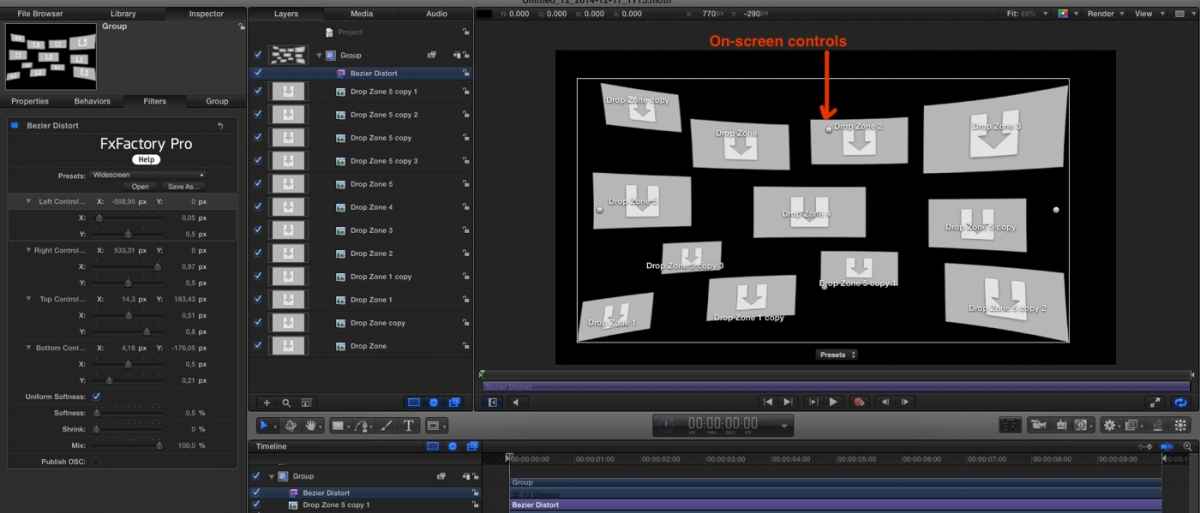
As Ben said, once you have added the filter to the group you can add a camera to animate the curved screens in space.
- Ronny
Add the Bezier Distort filter from Fx Factory Pro to your group and in the Inspector choose the Widescreen preset (see screenshot).
Then you can manipulate every detail of your warp distortion using the controls. The Left and Right "X" parameters control the image curving on the right and left. The Top and Bottom Y parameters control the curving of the top and bottom of your image.
For very quick results you just can use the on-screen Position knobs to modify the L,R, T and Bottom curving. Done in a minute and fully customizable:
As Ben said, once you have added the filter to the group you can add a camera to animate the curved screens in space.
- Ronny
Last edit: 17 Dec 2014 15:13 by ronny courtens.
Please Log in to join the conversation.
17 Dec 2014 15:11 #57463
by joenah
Replied by joenah on topic Convex background
Thanks Ronny, but I want to add two extra control points, besides the four which are already available. How can I do this?
Please Log in to join the conversation.
- ronny courtens
-
- Offline
- Moderator
-
Less
More
- Posts: 4455
- Thank you received: 962
17 Dec 2014 15:19 #57464
by ronny courtens
Replied by ronny courtens on topic Convex background
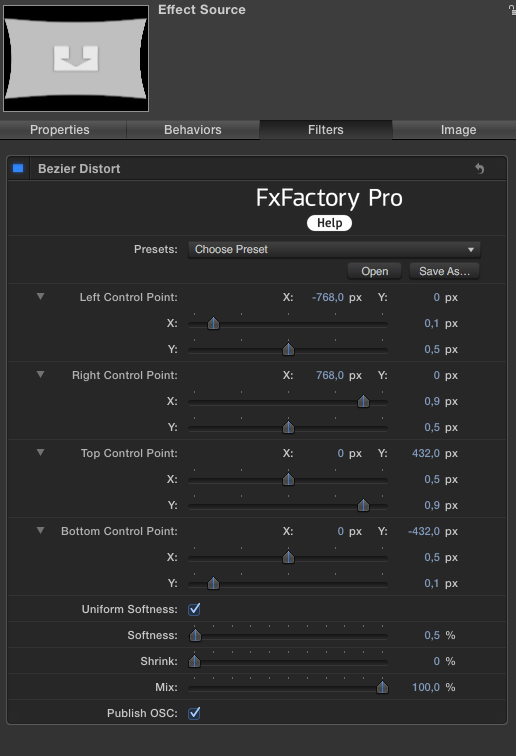
Sorry, I had added the wrong screenshot. Look at the new one and you will see that, besides the 4 on-screen controls, you have a dozen more controls in the Inspector that allow you to warp and bend the image anyway you want.
- Ronny
- Ronny
Please Log in to join the conversation.
17 Dec 2014 15:22 #57465
by joenah
Replied by joenah on topic Convex background
Hi Ronny,
Thanks. But I mean something else.
I want the following control points:
- Left on top
- Left bottom
- Centre on top
- Centre bottom
- Right on top
- Right bottom
Now I only can choose between right, left and centre up and bottom.
Thanks. But I mean something else.
I want the following control points:
- Left on top
- Left bottom
- Centre on top
- Centre bottom
- Right on top
- Right bottom
Now I only can choose between right, left and centre up and bottom.
Please Log in to join the conversation.
- ronny courtens
-
- Offline
- Moderator
-
Less
More
- Posts: 4455
- Thank you received: 962
17 Dec 2014 15:25 - 17 Dec 2014 15:25 #57466
by ronny courtens
Replied by ronny courtens on topic Convex background
Select the effect in the layers pane and post a screenshot of the Inspector.
- Ronny
- Ronny
Last edit: 17 Dec 2014 15:25 by ronny courtens.
Please Log in to join the conversation.
17 Dec 2014 15:27 #57467
by joenah
Replied by joenah on topic Convex background
Please Log in to join the conversation.
- ronny courtens
-
- Offline
- Moderator
-
Less
More
- Posts: 4455
- Thank you received: 962
17 Dec 2014 15:49 #57469
by ronny courtens
Replied by ronny courtens on topic Convex background
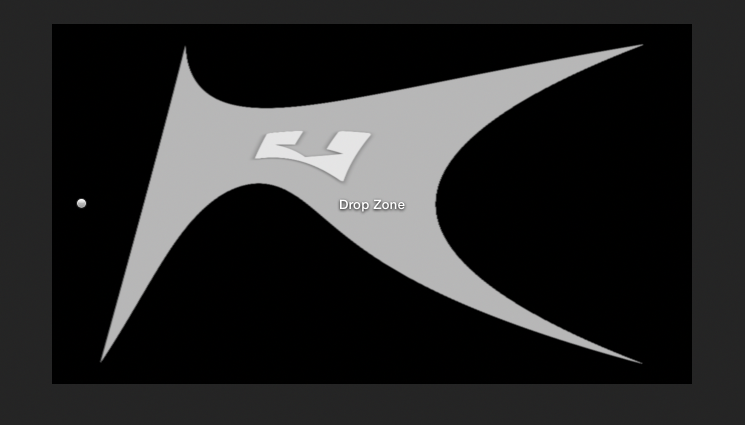
To change the centre values you can use the X and Y parameters in the Top, Bottom, Right and Left parameters in the Inspector. With these you can warp the image any way you want.
- Ronny
- Ronny
Please Log in to join the conversation.
17 Dec 2014 15:52 #57470
by joenah
Replied by joenah on topic Convex background
Ronny,
I'm afraid you don't understand my question. I want six control points, for six serveral points in the group.
I don't want to know how to adjust the four which al already in the inspector.
So: how can I add two EXTRA control points, besides the four which al already in the inspector?
I'm afraid you don't understand my question. I want six control points, for six serveral points in the group.
I don't want to know how to adjust the four which al already in the inspector.
So: how can I add two EXTRA control points, besides the four which al already in the inspector?
Please Log in to join the conversation.
- ronny courtens
-
- Offline
- Moderator
-
Less
More
- Posts: 4455
- Thank you received: 962
17 Dec 2014 16:07 #57472
by ronny courtens
Replied by ronny courtens on topic Convex background
Hi Jeroen,
This effect is an FxPlug filter. To create or modify FxPlug filters you need the FxPlug SDK and program the effect.
developer.apple.com/library/mac/document...lug_SDK_Overview.pdf
There is no way you can add these options in Motion. Nor can you create such an effect in Motion because, as I've said before, Motion has no bezier distort functionality.
Your question was to have effect that would give you the look of the screenshot you had posted. This filter can give you exactly what you have asked. Adding more parameters to an existing filter is a completely different issue. Motion does not have the controls to create or modify this kind of filter.
- Ronny
This effect is an FxPlug filter. To create or modify FxPlug filters you need the FxPlug SDK and program the effect.
developer.apple.com/library/mac/document...lug_SDK_Overview.pdf
There is no way you can add these options in Motion. Nor can you create such an effect in Motion because, as I've said before, Motion has no bezier distort functionality.
Your question was to have effect that would give you the look of the screenshot you had posted. This filter can give you exactly what you have asked. Adding more parameters to an existing filter is a completely different issue. Motion does not have the controls to create or modify this kind of filter.
- Ronny
Please Log in to join the conversation.
