


- Posts: 2
- Thank you received: 0
3 Post Moderation Rule for New Boarders (25 Jan 2021)
New boarders will have their posts moderated - Don't worry if you cannot see your post immediately.
Problems with color dulling
12 Dec 2014 23:38 - 12 Dec 2014 23:43 #57293
by TiffanyH
Problems with color dulling was created by TiffanyH
Let me preface this with saying that I'm fairly new to FCPX, so I apologize if any of this sounds downright stupid.
The issue I'm having is with the color quality changing. In the thumbnails in the event browser and storyline, the color looks great. However, in playback, it looks awful. In addition, when I actually save the master file, some turn out matching the thumbnails while others end up matching the crappy playback quality.
Any advice?


The issue I'm having is with the color quality changing. In the thumbnails in the event browser and storyline, the color looks great. However, in playback, it looks awful. In addition, when I actually save the master file, some turn out matching the thumbnails while others end up matching the crappy playback quality.
Any advice?
Last edit: 12 Dec 2014 23:43 by TiffanyH.
Please Log in to join the conversation.
- haysoos123
-

- Offline
- Platinum Member
-

Less
More
- Posts: 402
- Thank you received: 72
13 Dec 2014 00:00 #57294
by haysoos123
Replied by haysoos123 on topic Problems with color dulling
What version of FCPX are you running? There was a problem in one of the versions (I think version 10.1.2) where the color correction would randomly not render when you made a master. Subsequent versions have fixed this bug.
Please Log in to join the conversation.
13 Dec 2014 00:12 #57295
by TiffanyH
Replied by TiffanyH on topic Problems with color dulling
I'm using 10.0.8, but I will search around to see if there are any color issues with this version.
Please Log in to join the conversation.

13 Dec 2014 05:31 #57296
by BenB
Replied by BenB on topic Problems with color dulling
What are your hardware specs?
And do you have Playback Quality set to Better Quality or Better Playback? It is found in the Viewer Settings menu, top right of the Viewer.
FCPX can degrade an image slightly during playback if the system has to do too much work to playback. When it stops, and you're looking at a single frame, you're seeing full quality. I'd export the Timeline and see how it looks exported. That's your final proof. But my guess is that you're seeing FCPX do some playback quality stuff to keep up with hardware strain somewhere.
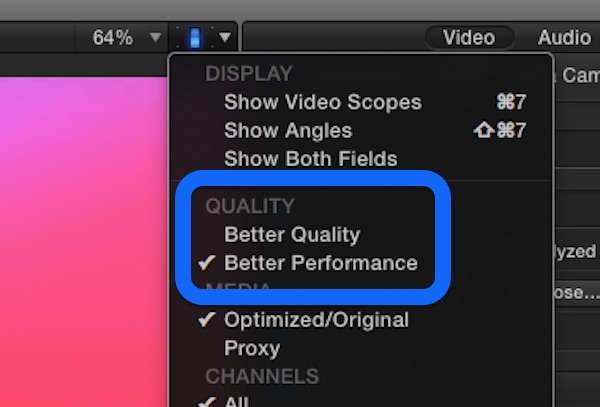
And do you have Playback Quality set to Better Quality or Better Playback? It is found in the Viewer Settings menu, top right of the Viewer.
FCPX can degrade an image slightly during playback if the system has to do too much work to playback. When it stops, and you're looking at a single frame, you're seeing full quality. I'd export the Timeline and see how it looks exported. That's your final proof. But my guess is that you're seeing FCPX do some playback quality stuff to keep up with hardware strain somewhere.
Please Log in to join the conversation.
- Karsten Schlüter
-

- Offline
- Moderator
-

Less
More
- Posts: 3790
- Thank you received: 718
13 Dec 2014 09:08 #57303
by Karsten Schlüter
Replied by Karsten Schlüter on topic Problems with color dulling
Would be interesting to see the timeline/Info pane corresponding to both screenshots.
'cause it looks - imho! - like
top) is the 'raw' shot with a 'flat' color profile, without applying a LUT
bottom) is the 'prepped' version, now with a LUT.
'cause it looks - imho! - like
top) is the 'raw' shot with a 'flat' color profile, without applying a LUT
bottom) is the 'prepped' version, now with a LUT.
Please Log in to join the conversation.
