


- Posts: 80
- Thank you received: 5
3 Post Moderation Rule for New Boarders (25 Jan 2021)
New boarders will have their posts moderated - Don't worry if you cannot see your post immediately.
10.1.4 MXF Import
- Bluebicycle
-
 Topic Author
- Offline
- Premium Member
-

Less
More
11 Dec 2014 16:58 #57242
by Bluebicycle
10.1.4 MXF Import was created by Bluebicycle
I welcome all the MXF export options in this new release, but X has long been able to import MXF files using Sony, Canon plugins etc. So does this release add support for Avid type MXF files or not?
Apple allude to Avid in their support document:http://support.apple.com/en-us/HT6423, but there's no detail. Scott Simmons Tweeted saying he can play Avid MXF (video only) right out of the Avid Media Files folder: pic.twitter.com/4dd0PLJXBq.
I couldn't get it to work, the import window displays MXF files of zero duration. Anyone else tried? Avid use OP Atom MXF with separate files for audio and as far as I know ,nothing else plays these files, sound and vision together, only Avid. I would love it if this is indeed a feature of the new release, as it would open up a whole world of possibilities.
Apple allude to Avid in their support document:http://support.apple.com/en-us/HT6423, but there's no detail. Scott Simmons Tweeted saying he can play Avid MXF (video only) right out of the Avid Media Files folder: pic.twitter.com/4dd0PLJXBq.
I couldn't get it to work, the import window displays MXF files of zero duration. Anyone else tried? Avid use OP Atom MXF with separate files for audio and as far as I know ,nothing else plays these files, sound and vision together, only Avid. I would love it if this is indeed a feature of the new release, as it would open up a whole world of possibilities.
Please Log in to join the conversation.

12 Dec 2014 03:13 #57258
by whitemax
Replied by whitemax on topic 10.1.4 MXF Import
The new version X can natively support MXF files , no rewrappong or something , which means you don't need any other expensive third-party software.
Please Log in to join the conversation.
- ronny courtens
-

- Offline
- Moderator
-

Less
More
- Posts: 4455
- Thank you received: 962
12 Dec 2014 12:03 - 12 Dec 2014 12:08 #57270
by ronny courtens
Replied by ronny courtens on topic 10.1.4 MXF Import
1. MXF import
As whitemax said, MXF is now supported natively without any re-wrapping or transcoding. And we don't depend on Canon or Sony anymore to update their import plugins every time they introduce a new proprietary weird format wrapped in some form of MXF. Can you imagine that even Sony's own NLE Media 100 cannot import their new XAVCL codec properly without an external app (!).
2. Working with Avid OP-Atom files
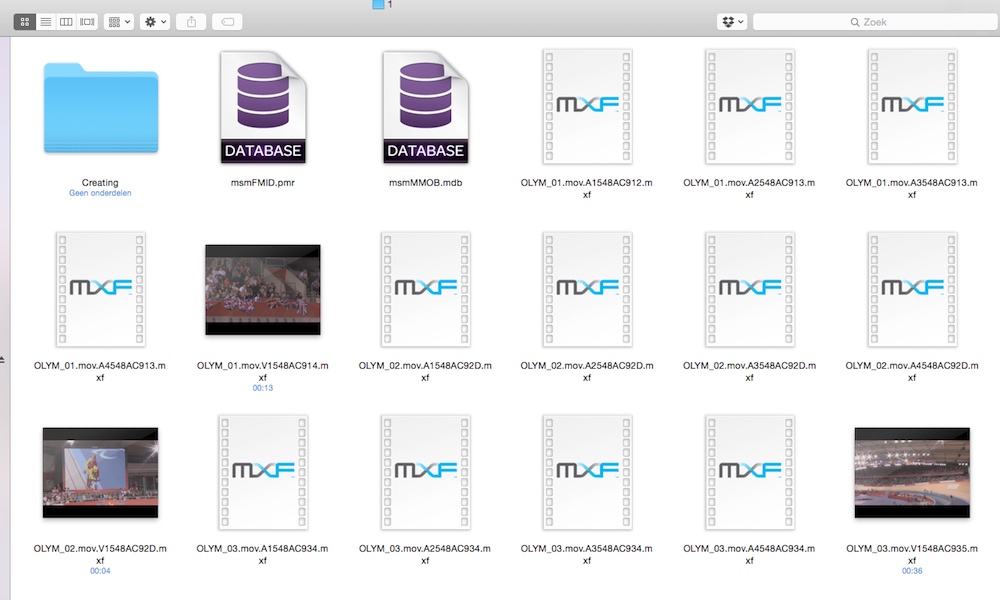
OP-Atom is not an Avid format, it's just one more iteration of MXF. It's also used by Panasonic, EVS, Ikegami - just to name a few. You can import any Avid OP-Atom files straight from the AvidMediaFiles folder into FCP X, but OP-Atom separates the audio from the video. So if your original media has 4 audio channels (even if 3 of them are mute) you will get 1 video file and 4 audio files in Avid and in FCP X. That's the way OP-Atom works.
I have imported 3 HDCAM 422 clips with 4-channel audio in Avid MC 8 using the DnxHD setting. As you see, Avid has created 3 individual video MXF files and 3x4 audio MXF files:
I import the files from the AvidMediaFiles folder into FCP X (you also can drag the files into the FCP X browser) and I get exactly what I have in the Avid folder: 3 video clips and their corresponding audio clips. All time codes are correct:
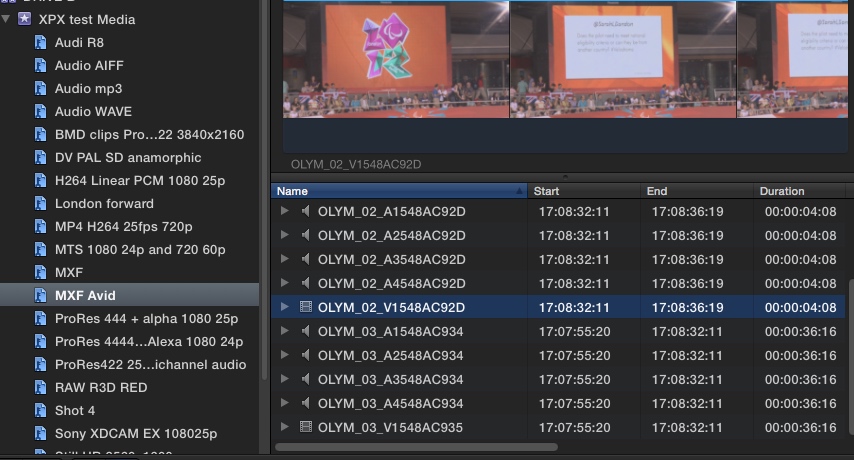
So yes, MXF OP-Atom files created in Avid can be imported without any issues in FCP X.
- Ronny
As whitemax said, MXF is now supported natively without any re-wrapping or transcoding. And we don't depend on Canon or Sony anymore to update their import plugins every time they introduce a new proprietary weird format wrapped in some form of MXF. Can you imagine that even Sony's own NLE Media 100 cannot import their new XAVCL codec properly without an external app (!).
2. Working with Avid OP-Atom files
OP-Atom is not an Avid format, it's just one more iteration of MXF. It's also used by Panasonic, EVS, Ikegami - just to name a few. You can import any Avid OP-Atom files straight from the AvidMediaFiles folder into FCP X, but OP-Atom separates the audio from the video. So if your original media has 4 audio channels (even if 3 of them are mute) you will get 1 video file and 4 audio files in Avid and in FCP X. That's the way OP-Atom works.
I have imported 3 HDCAM 422 clips with 4-channel audio in Avid MC 8 using the DnxHD setting. As you see, Avid has created 3 individual video MXF files and 3x4 audio MXF files:
I import the files from the AvidMediaFiles folder into FCP X (you also can drag the files into the FCP X browser) and I get exactly what I have in the Avid folder: 3 video clips and their corresponding audio clips. All time codes are correct:
So yes, MXF OP-Atom files created in Avid can be imported without any issues in FCP X.
- Ronny
Last edit: 12 Dec 2014 12:08 by ronny courtens.
Please Log in to join the conversation.
