


- Posts: 25
- Thank you received: 0
3 Post Moderation Rule for New Boarders (25 Jan 2021)
New boarders will have their posts moderated - Don't worry if you cannot see your post immediately.
FCPX 10.1.4 - range export from timeline - render stops
10 Dec 2014 15:36 #57181
by vfxwolf
FCPX 10.1.4 - range export from timeline - render stops was created by vfxwolf
Good people,
Just noticed an issue - when I try to export a range from the timeline, the background render seems to stop part way through. I can open the BG tasks and cancel it, but when I try again, it happens again. Stops at different percentages.
Plenty of space not the drive, so thats not it.
Tried with different ranges, same thing happens.
Anyone have a clue whats causing this?
Just noticed an issue - when I try to export a range from the timeline, the background render seems to stop part way through. I can open the BG tasks and cancel it, but when I try again, it happens again. Stops at different percentages.
Plenty of space not the drive, so thats not it.
Tried with different ranges, same thing happens.
Anyone have a clue whats causing this?
Please Log in to join the conversation.
- ronny courtens
-

- Offline
- Moderator
-

Less
More
- Posts: 4455
- Thank you received: 962
10 Dec 2014 19:01 #57197
by ronny courtens
Replied by ronny courtens on topic FCPX 10.1.4 - range export from timeline - render stops
A good starting-point for solving this would be to delete your FCP X preferences and try again.
- Ronny
- Ronny
Please Log in to join the conversation.
10 Dec 2014 19:07 #57198
by vfxwolf
Replied by vfxwolf on topic FCPX 10.1.4 - range export from timeline - render stops
Thanks Ronny, I'll give that a try. What will I lose with deleting preferences? I honestly thought the days of trashing your prefs to solve problems were gone with FCP 7...
**sigh**
**sigh**
Please Log in to join the conversation.
- ronny courtens
-
- Offline
- Moderator
-
Less
More
- Posts: 4455
- Thank you received: 962
10 Dec 2014 19:17 - 10 Dec 2014 19:18 #57199
by ronny courtens
Replied by ronny courtens on topic FCPX 10.1.4 - range export from timeline - render stops
Deleting preferences is a typical troubleshooting process in MacOS and it applies to any application that runs on MacOS, not only to FCP7 or X. Windows users would jump with joy if hey had such an easy way to fix preference problems.
You can delete FCP X preferences automatically by closing the app and relaunching it while holding the ALT+CMD keys pressed down. Couldn't be easier.
When FCP X launches you will have to select the Library you want to open, and if you have any special settings in the Preference pane you will have to re-enter them. This usually takes 10 seconds.
As I said, this is only the first step you can try to fix unexpected issues like this.
- Ronny
You can delete FCP X preferences automatically by closing the app and relaunching it while holding the ALT+CMD keys pressed down. Couldn't be easier.
When FCP X launches you will have to select the Library you want to open, and if you have any special settings in the Preference pane you will have to re-enter them. This usually takes 10 seconds.
As I said, this is only the first step you can try to fix unexpected issues like this.
- Ronny
Last edit: 10 Dec 2014 19:18 by ronny courtens.
Please Log in to join the conversation.

10 Dec 2014 21:43 #57207
by BenB
Replied by BenB on topic FCPX 10.1.4 - range export from timeline - render stops
And maybe try trashing all the render files, too.
Please Log in to join the conversation.
12 Dec 2014 03:16 #57259
by vfxwolf
Replied by vfxwolf on topic FCPX 10.1.4 - range export from timeline - render stops
That seemed to do the trick, Ronny.. thanks. Manifesto still not working though.. weird.
Please Log in to join the conversation.
- ronny courtens
-
- Offline
- Moderator
-
Less
More
- Posts: 4455
- Thank you received: 962
12 Dec 2014 07:31 #57265
by ronny courtens
Replied by ronny courtens on topic FCPX 10.1.4 - range export from timeline - render stops
Manifesto is working here (10.1.4/10.1.1).
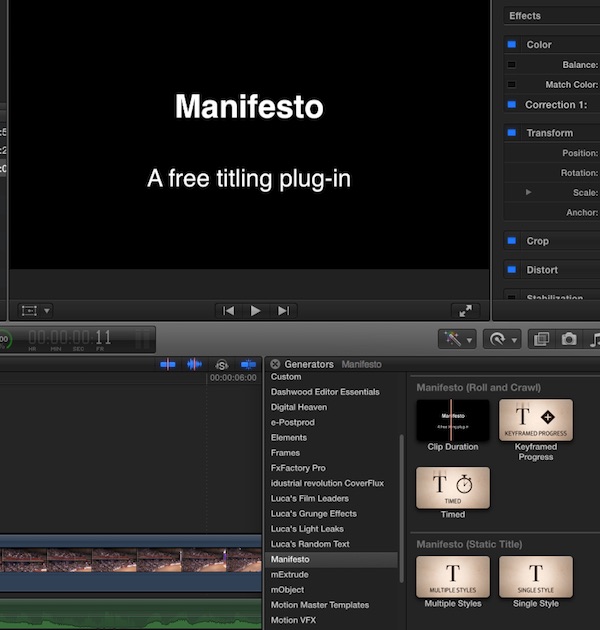
Make sure that you have updated FxFactory to the latest version and that Manifesto is checked in the FxFactory app.
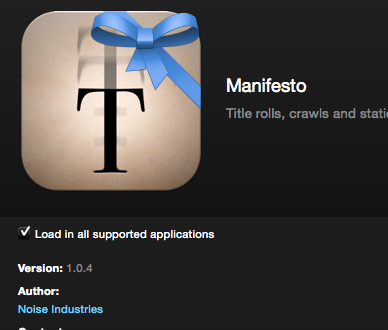
Or re-install the latest version from here: www.noiseindustries.com/fxfactory/manifesto/
- Ronny
Make sure that you have updated FxFactory to the latest version and that Manifesto is checked in the FxFactory app.
Or re-install the latest version from here: www.noiseindustries.com/fxfactory/manifesto/
- Ronny
Please Log in to join the conversation.
