


3 Post Moderation Rule for New Boarders (25 Jan 2021)
New boarders will have their posts moderated - Don't worry if you cannot see your post immediately.
How to handle DPX ? And shall I ?


09 Dec 2014 17:19 #57134
by Emmanuel
How to handle DPX ? And shall I ? was created by Emmanuel
Hi guys
I know that the topic has been discussed before but I read a lot of different things about it online, so I need you experts to get your opinion. (Ronny, I think it's your specialty)
I have a VFX guy who is doing some work on my shortfilm using Nuke on a PC. He works with the original RED files, and he has an app to export in Prores 4444 but the colours were never accurate.
He told me that the most stable way to preserve color information is to exchange DPX files.
Compressor seems to be able to compress the DPX sequence into a ProRes file.
* Do I lose quality doing this ?
* Most important: I've read that only Gluetools can ensure me an accurate color (both for export and import), and that Compressor alone is not to be trusted. Is it the case ? Do I need it ?
* With Gluetools is there a way to import a DPX sequence directly into FCPX ?
By the way: I have no special hardware like AJA or so. Only a Mac mini.
THANK YOU in advance!
Manu
I know that the topic has been discussed before but I read a lot of different things about it online, so I need you experts to get your opinion. (Ronny, I think it's your specialty)
I have a VFX guy who is doing some work on my shortfilm using Nuke on a PC. He works with the original RED files, and he has an app to export in Prores 4444 but the colours were never accurate.
He told me that the most stable way to preserve color information is to exchange DPX files.
Compressor seems to be able to compress the DPX sequence into a ProRes file.
* Do I lose quality doing this ?
* Most important: I've read that only Gluetools can ensure me an accurate color (both for export and import), and that Compressor alone is not to be trusted. Is it the case ? Do I need it ?
* With Gluetools is there a way to import a DPX sequence directly into FCPX ?
By the way: I have no special hardware like AJA or so. Only a Mac mini.
THANK YOU in advance!
Manu
Please Log in to join the conversation.
- ronny courtens
-

- Offline
- Moderator
-

Less
More
- Posts: 4455
- Thank you received: 962
09 Dec 2014 23:39 #57147
by ronny courtens
Replied by ronny courtens on topic How to handle DPX ? And shall I ?
Hi Manu,
Unfortunately color fidelity has always been a problem with VFX roundtripping, especially with cross-platform workflows and even when rendering to DPX. Format conversion is the most frequent cause for color shifts. In a recent production we shot with the Alexa in ProRes 4444 QX instead of ARRIRAW and we used an all-ProRes QX workflow. The VFX renders came back from Nuke and we didn't have any issues with color shifts at all. Grading was done in QX as well. The images were just beautiful. We probably will never use any RAW formats again when there is VFX involved.
If you have shot with RED, you are editing on a Mac and you are going to Nuke on a PC I'm afraid there is little chance to get a perfectly accurate color roundtrip. It is very possible that the app he uses to export 4444 is the weak link, plus the dreaded PC to Mac QuickTime gamma shift.
That's why I agree it would be better if he would deliver the rendered VFX shots to you in DPX.
Compressor 4 as well as Resolve Lite will open DPX files and convert them to ProRes 4444. GlueTools is an excellent plugin, but is is only required when you need to export to DPX with a specific color space. It has no real advantage when converting DPX to ProRes. Gluetools does not allow you to work with DPX files into FCP X, and even if it did you would need a powerful computer to playback native DPX image sequences.
Mind you, you probably will still have a slight color shift in the 4444 files. But that's quite easy to fix in FCP X. Use the scopes and the Event Viewer to compare the originals with the VFX shots side by side and use the color corrector to match the scopes on both viewers.
- Ronny
Unfortunately color fidelity has always been a problem with VFX roundtripping, especially with cross-platform workflows and even when rendering to DPX. Format conversion is the most frequent cause for color shifts. In a recent production we shot with the Alexa in ProRes 4444 QX instead of ARRIRAW and we used an all-ProRes QX workflow. The VFX renders came back from Nuke and we didn't have any issues with color shifts at all. Grading was done in QX as well. The images were just beautiful. We probably will never use any RAW formats again when there is VFX involved.
If you have shot with RED, you are editing on a Mac and you are going to Nuke on a PC I'm afraid there is little chance to get a perfectly accurate color roundtrip. It is very possible that the app he uses to export 4444 is the weak link, plus the dreaded PC to Mac QuickTime gamma shift.
That's why I agree it would be better if he would deliver the rendered VFX shots to you in DPX.
Compressor 4 as well as Resolve Lite will open DPX files and convert them to ProRes 4444. GlueTools is an excellent plugin, but is is only required when you need to export to DPX with a specific color space. It has no real advantage when converting DPX to ProRes. Gluetools does not allow you to work with DPX files into FCP X, and even if it did you would need a powerful computer to playback native DPX image sequences.
Mind you, you probably will still have a slight color shift in the 4444 files. But that's quite easy to fix in FCP X. Use the scopes and the Event Viewer to compare the originals with the VFX shots side by side and use the color corrector to match the scopes on both viewers.
- Ronny
Please Log in to join the conversation.
10 Dec 2014 13:57 #57171
by Emmanuel
Replied by Emmanuel on topic How to handle DPX ? And shall I ?
Thank you so much Ronny, the fog around me is slowly starting to dissipate. I owe you already 324923490234 beers.
Currently it seems that the DPX he has sent me have more difference than just a Gamma shift, and it's quite frustrating. But we'll sort it out.
Question 1: In general, is the VFX guy supposed to work on already graded shots, or on the original R3D footage ?
Question 2: Also, I am still hoping to find a colorist to help me finish the film: I've done some grading in FPCX using the colour "wheel", as well as LUT Utility + Osiris, and FilmConvert. I suppose that those changes will be lost when passing to DaVinci ?
Thanks a lot !
Currently it seems that the DPX he has sent me have more difference than just a Gamma shift, and it's quite frustrating. But we'll sort it out.
Question 1: In general, is the VFX guy supposed to work on already graded shots, or on the original R3D footage ?
Question 2: Also, I am still hoping to find a colorist to help me finish the film: I've done some grading in FPCX using the colour "wheel", as well as LUT Utility + Osiris, and FilmConvert. I suppose that those changes will be lost when passing to DaVinci ?
Thanks a lot !
Please Log in to join the conversation.
- ronny courtens
-
- Offline
- Moderator
-
Less
More
- Posts: 4455
- Thank you received: 962
10 Dec 2014 17:06 - 10 Dec 2014 17:09 #57191
by ronny courtens
Replied by ronny courtens on topic How to handle DPX ? And shall I ?
1. Ha, the million-dollar question 
Books have been written, lectures have been given and lengthy forum discussions have been held on this topic. And there is only one answer: it depends. And it depends on so many factors that it is impossible to answer this in a thread. Just google "VFX or grading first" and you will see that there are many different opinions on this. And they are all right and wrong at the same time. Because every production is totally different and every production requires a custom approach.
When I get asked to organize a post pipeline for a feature, a series or a commercial the first thing I do is carefully read the script. Then I talk with all parties involved in the production - from start to finish - to see what hardware and software they use, what formats they handle or prefer, what kind of information and media they would like to receive from everyone below the pipeline and how they would like to receive it. Finally I try to create a seamless post-production workflow without any format or workflow conflicts. It's during this process that I decide when the VFX will be integrated in the pipeline. Involving a post-production expert in the production process can save producers tons of money. That's why it gets done more and more these days, even for smaller productions. You cannot image how much time and money get waisted in the end stages of a production due to workflow conflicts between different teams, that could have perfectly been avoided from the start.
2. Just like a serious audio engineer will prefer to do his work from scratch, any serious colorist will prefer you to give him your untouched media to work with. If you are happy with the things you have done in FCPX there is no need to send it to a grading artist. If you are not perfectly happy with your result, let a grading artist do it from scratch. If he works with Resolve on the native R3D, the changes you have made with the FCP X color tool will be preserved on the Resolve timeline. But not the third-party plugins you have used.
- Ronny
Books have been written, lectures have been given and lengthy forum discussions have been held on this topic. And there is only one answer: it depends. And it depends on so many factors that it is impossible to answer this in a thread. Just google "VFX or grading first" and you will see that there are many different opinions on this. And they are all right and wrong at the same time. Because every production is totally different and every production requires a custom approach.
When I get asked to organize a post pipeline for a feature, a series or a commercial the first thing I do is carefully read the script. Then I talk with all parties involved in the production - from start to finish - to see what hardware and software they use, what formats they handle or prefer, what kind of information and media they would like to receive from everyone below the pipeline and how they would like to receive it. Finally I try to create a seamless post-production workflow without any format or workflow conflicts. It's during this process that I decide when the VFX will be integrated in the pipeline. Involving a post-production expert in the production process can save producers tons of money. That's why it gets done more and more these days, even for smaller productions. You cannot image how much time and money get waisted in the end stages of a production due to workflow conflicts between different teams, that could have perfectly been avoided from the start.
2. Just like a serious audio engineer will prefer to do his work from scratch, any serious colorist will prefer you to give him your untouched media to work with. If you are happy with the things you have done in FCPX there is no need to send it to a grading artist. If you are not perfectly happy with your result, let a grading artist do it from scratch. If he works with Resolve on the native R3D, the changes you have made with the FCP X color tool will be preserved on the Resolve timeline. But not the third-party plugins you have used.
- Ronny
Last edit: 10 Dec 2014 17:09 by ronny courtens.
Please Log in to join the conversation.
10 Dec 2014 19:40 #57202
by Emmanuel
Replied by Emmanuel on topic How to handle DPX ? And shall I ?
1. Ha ha. OK. Thanks for the explaination! I always thought that Post production experts were for expensive Hollywood films, but when I see that I deal into problems for my little shortilm... Fascinating!
2. I totally understand, it makes sense. I can go to the colorist with an export of mine as a reference, and then indeed he'll probably start from scratch and suggest things I never thought of.
2. I totally understand, it makes sense. I can go to the colorist with an export of mine as a reference, and then indeed he'll probably start from scratch and suggest things I never thought of.
Please Log in to join the conversation.
13 Dec 2014 14:31 #57310
by Emmanuel
Replied by Emmanuel on topic How to handle DPX ? And shall I ?
Salut Ronny,
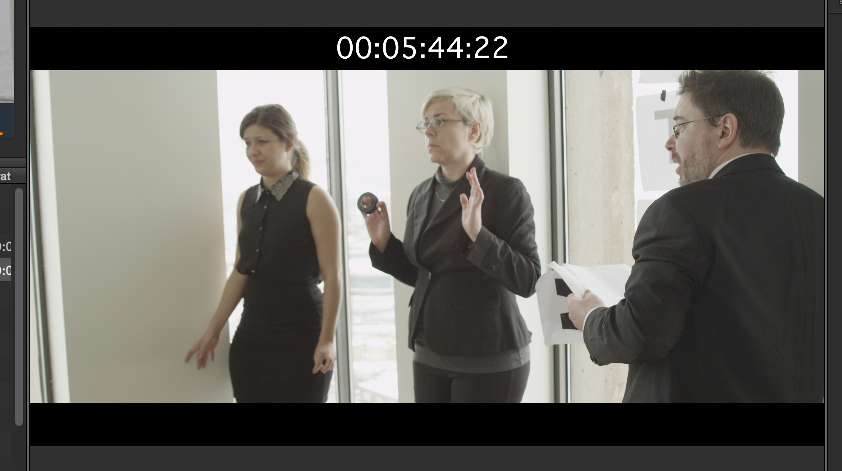
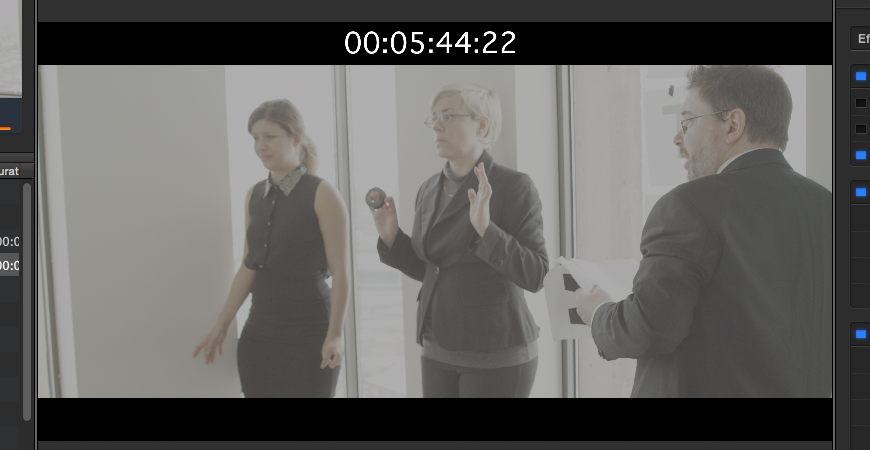
My VFX guy has sent me some Cineon DPX files, but they look extremely washed out on my Mac.
On his PC though, they look perfectly identical to the original R3D file. Can it be that Gamma shift issue ?
My VFX guy has sent me some Cineon DPX files, but they look extremely washed out on my Mac.
On his PC though, they look perfectly identical to the original R3D file. Can it be that Gamma shift issue ?
Please Log in to join the conversation.


13 Dec 2014 15:31 #57312
by Francois
Replied by Francois on topic How to handle DPX ? And shall I ?
Cineon DPX are usually in "log" color space typical of film emulsions scans, video is "linear" color space so probably a log to lin LUT will do the trick...
my 2 cents
my 2 cents
Please Log in to join the conversation.
13 Dec 2014 16:15 #57313
by Emmanuel
Replied by Emmanuel on topic How to handle DPX ? And shall I ?
Thanks François. I'm actually using RED footage, which is also log. And actually the image is so white that I need to apply 2 log to lin to start getting something usable.
Please Log in to join the conversation.
- ronny courtens
-
- Offline
- Moderator
-
Less
More
- Posts: 4455
- Thank you received: 962
14 Dec 2014 19:53 #57352
by ronny courtens
Replied by ronny courtens on topic How to handle DPX ? And shall I ?
I agree with François. This is not a gamma issue, it's because the DPX files are in Log color space. Have you converted the DPX files to an editable format yet?
- Ronny
- Ronny
Please Log in to join the conversation.
14 Dec 2014 20:49 #57354
by Emmanuel
Replied by Emmanuel on topic How to handle DPX ? And shall I ?
Thanks Ronny. Actually we've tried another DPX color space, and it seems to be working out pretty well!
Please Log in to join the conversation.
- ronny courtens
-
- Offline
- Moderator
-
Less
More
- Posts: 4455
- Thank you received: 962
14 Dec 2014 20:53 #57356
by ronny courtens
Replied by ronny courtens on topic How to handle DPX ? And shall I ?
Well, that's great news. Good luck with the project!
- Ronny
- Ronny
Please Log in to join the conversation.


03 Mar 2015 17:37 #60758
by imax
Replied by imax on topic How to handle DPX ? And shall I ?
Hi!
Hello to All! this is my first post, anyway i was reading the forum from years.
Anyway.. I 've a similar question...
I shot with FS700 and Odyssey 7Q : i reordered RAW cDNG 4K and 2K in log2 Sony
I imported the DNG into DaVinci and I exported Prores XQ files.
Now I've to give file to FX guys (Mac-After Effects/Nuke) and after the FX correction all the film to the colorist (PC - DaVinci)
The last time I exported the DPX directly from FCPX.. I had only a few issue with the log and the colorist had to fix it.
Can you suggest me the best workflow?
Can I export the clips of the timelines with handles? sometime happen that the other software eat some frames, and I prefer gave more frames.
Thank you!
ciao
Hello to All! this is my first post, anyway i was reading the forum from years.
Anyway.. I 've a similar question...
I shot with FS700 and Odyssey 7Q : i reordered RAW cDNG 4K and 2K in log2 Sony
I imported the DNG into DaVinci and I exported Prores XQ files.
Now I've to give file to FX guys (Mac-After Effects/Nuke) and after the FX correction all the film to the colorist (PC - DaVinci)
The last time I exported the DPX directly from FCPX.. I had only a few issue with the log and the colorist had to fix it.
Can you suggest me the best workflow?
Can I export the clips of the timelines with handles? sometime happen that the other software eat some frames, and I prefer gave more frames.
Thank you!
ciao
Please Log in to join the conversation.
