


- Posts: 47
- Thank you received: 1
3 Post Moderation Rule for New Boarders (25 Jan 2021)
New boarders will have their posts moderated - Don't worry if you cannot see your post immediately.
Selecting edit points with key commands in a compound clip
09 Dec 2014 08:22 #57119
by funkpost
Hi
I have a compound clip that starts with a fade in. I swap the first clip a lot, as I use it as a template.
Everytime I drop the new clip into the beginning of the compound clip, I need to trim the beginning of the clip in either one of two directions.
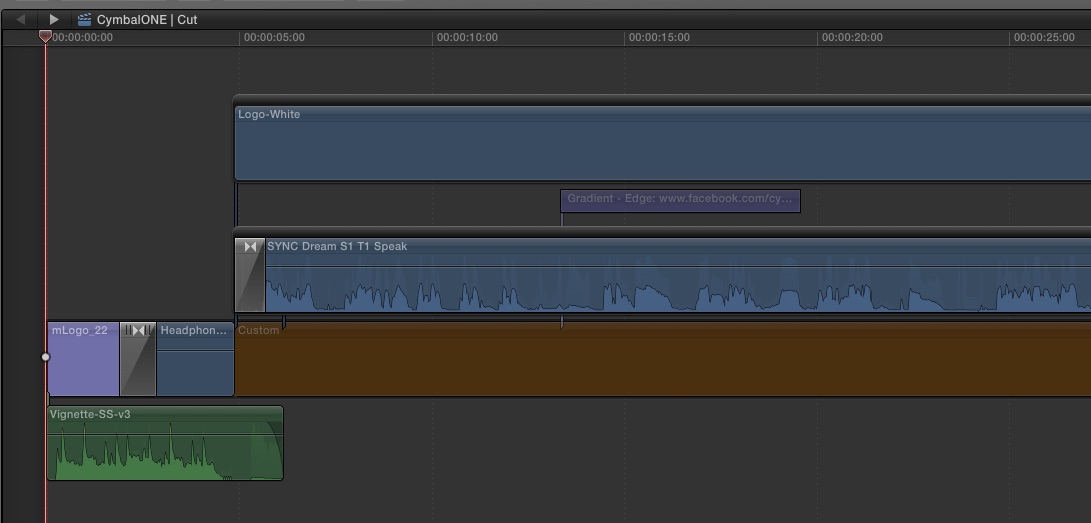
But how do I select the beginning of this clip? Even with the mouse I can't, as the fade in is in the way.
What I would like is to select the whole clip, and press a key that just selects the edit point in the beginning of the clip.
Does it makes sense, and what can be done?
I have a compound clip that starts with a fade in. I swap the first clip a lot, as I use it as a template.
Everytime I drop the new clip into the beginning of the compound clip, I need to trim the beginning of the clip in either one of two directions.
But how do I select the beginning of this clip? Even with the mouse I can't, as the fade in is in the way.
What I would like is to select the whole clip, and press a key that just selects the edit point in the beginning of the clip.
Does it makes sense, and what can be done?
Please Log in to join the conversation.
- Tom Wolsky
-

- Offline
- Moderator
-

09 Dec 2014 11:05 - 09 Dec 2014 11:05 #57123
by Tom Wolsky
Replied by Tom Wolsky on topic Selecting edit points with key commands in a compound clip
If you move the playhead to the beginning of the compound and press [ does that do what you want?
Last edit: 09 Dec 2014 11:05 by Tom Wolsky.
Please Log in to join the conversation.
09 Dec 2014 11:15 #57124
by funkpost
Replied by funkpost on topic Selecting edit points with key commands in a compound clip
Unfortunately not - but I believe that would have worked outside the compound clip.
Please Log in to join the conversation.
- Tom Wolsky
-
- Offline
- Moderator
-
09 Dec 2014 11:54 #57125
by Tom Wolsky
Replied by Tom Wolsky on topic Selecting edit points with key commands in a compound clip
Can you post a screen shot of what you're doing and where you're doing it? Where is the transition, inside the compound? Outside the compound? What's it look like? Inside the compound the bracket works for me on the primary storyline.
Please Log in to join the conversation.

09 Dec 2014 13:34 - 09 Dec 2014 13:35 #57129
by BenB
Replied by BenB on topic Selecting edit points with key commands in a compound clip
Be sure you're grabbing the top left (or right) "handles" of a transition to so Ripple Edits with. The "bowtie" in the center does Roll Edits.
Inside a CC, you may see the blackened area not used in the Project timeline. You can still scroll over and grab the head of a clip to ripple edit it, or even grab the handle of a transition to edit with.

Inside a CC, you may see the blackened area not used in the Project timeline. You can still scroll over and grab the head of a clip to ripple edit it, or even grab the handle of a transition to edit with.
Last edit: 09 Dec 2014 13:35 by BenB.
Please Log in to join the conversation.
09 Dec 2014 21:28 #57140
by funkpost
Replied by funkpost on topic Selecting edit points with key commands in a compound clip
Sure!
Please Log in to join the conversation.
09 Dec 2014 21:30 #57141
by funkpost
Replied by funkpost on topic Selecting edit points with key commands in a compound clip
Thanks for that.
Your suggestion works … IF I zoom in first. Otherwise the application won't let me.
But to be honest, I would prefer NOT to grab, but to select by using the keyboard.
Your suggestion works … IF I zoom in first. Otherwise the application won't let me.
But to be honest, I would prefer NOT to grab, but to select by using the keyboard.
Please Log in to join the conversation.
10 Dec 2014 03:05 #57150
by BenB
Replied by BenB on topic Selecting edit points with key commands in a compound clip
Up/down arrow keys take you to edit points.
When on one:
[ selects the left side for a ripple edit.
] selects the right side for a ripple edit.
\ selects for a roll edit.
then
< and > move that selected edit one frame at a time.
or
Hit a plus or minus sign first, with an edit point selected, type in timecode, enter.
As for zooming in, yes, a mouse cursor is only do sensitive. If you're too far zoomed out of any application, you lose detail in controlling screen objects.
When on one:
[ selects the left side for a ripple edit.
] selects the right side for a ripple edit.
\ selects for a roll edit.
then
< and > move that selected edit one frame at a time.
or
Hit a plus or minus sign first, with an edit point selected, type in timecode, enter.
As for zooming in, yes, a mouse cursor is only do sensitive. If you're too far zoomed out of any application, you lose detail in controlling screen objects.
Please Log in to join the conversation.
