


- Posts: 13
- Thank you received: 0
3 Post Moderation Rule for New Boarders (25 Jan 2021)
New boarders will have their posts moderated - Don't worry if you cannot see your post immediately.
Files won't relink - timecode issue on exact same file
08 Dec 2014 22:06 #57103
by diamond3
Files won't relink - timecode issue on exact same file was created by diamond3
Over a year and a half ago, I started a large library in FCPX. I'm not sure which version I was on at the time. There were several different cameras involved, one of which is the Canon 5D Mark III which supports SMPTE. In this library, there's close to 4000 clips, 2100 of them are from the canon. These were located on an external hard drive as was the project library. The clips were in a folder outside of the library, but on the ext. hd (sym links created, media remained in folder and not in project library). I also backed up the videos to our server. Since I was on the road and speed issues, I edited everything from the External HD. Fast forward to now. I want to relink all of the files to pull from our server and not the external.
So I copied the Library off of the external and onto my computer. I then ejected the Ext. HD and then opened up the new library on my computer. Obviously the files are missing. So I go to relink them and thats where the fun begins. After digging around, i've discovered the 5D mark III files aren't being recognized as the same clip. Even if I copy the exact one it's referencing from the ext. hd. What is happening (I believe) is that the newer version of FCPX recognizes the timecode now and treats them like different clips. The only way around this that I can find is to open a video clip in QT 7, delete the timecode, save the file and relink it. That's a time-consuming process for 2100 clips.
Does anyone have any alternate suggestions? I can't find a way to batch export the videos without timecode. I tried automator with no luck.
So I copied the Library off of the external and onto my computer. I then ejected the Ext. HD and then opened up the new library on my computer. Obviously the files are missing. So I go to relink them and thats where the fun begins. After digging around, i've discovered the 5D mark III files aren't being recognized as the same clip. Even if I copy the exact one it's referencing from the ext. hd. What is happening (I believe) is that the newer version of FCPX recognizes the timecode now and treats them like different clips. The only way around this that I can find is to open a video clip in QT 7, delete the timecode, save the file and relink it. That's a time-consuming process for 2100 clips.
Does anyone have any alternate suggestions? I can't find a way to batch export the videos without timecode. I tried automator with no luck.
Please Log in to join the conversation.
- ronny courtens
-

- Offline
- Moderator
-

Less
More
- Posts: 4455
- Thank you received: 962
09 Dec 2014 16:43 #57132
by ronny courtens
Replied by ronny courtens on topic Files won't relink - timecode issue on exact same file
Hi Andrew,
So you have a Library that works perfectly with media stored on your external HD ( drive "A"), and now you want to relink the Library to exactly the same media that are stored on a different drive (drive "B"), but you cannot relink 2000 clips because of the MD5 timecode issue, is that correct?
In that case I think the easiest way to solve this is to open the Library with the external drive A connected, change the Media and Cache locations for the Library to a new "Media" folder on drive B and consolidate the Library. This will copy all the media from drive A to the new Media folder on drive B and your Library will work with these media without needing to relink anything.
When this is finished you can delete the old media on drive B and on drive A if you wish and just keep working with the new Media folder. If later on you want to take that production back on the road all you need to do is re-consolidate the Library to your external HD again. I think this will be faster than trying to fix 2000 files that won't relink.
- Ronny
So you have a Library that works perfectly with media stored on your external HD ( drive "A"), and now you want to relink the Library to exactly the same media that are stored on a different drive (drive "B"), but you cannot relink 2000 clips because of the MD5 timecode issue, is that correct?
In that case I think the easiest way to solve this is to open the Library with the external drive A connected, change the Media and Cache locations for the Library to a new "Media" folder on drive B and consolidate the Library. This will copy all the media from drive A to the new Media folder on drive B and your Library will work with these media without needing to relink anything.
When this is finished you can delete the old media on drive B and on drive A if you wish and just keep working with the new Media folder. If later on you want to take that production back on the road all you need to do is re-consolidate the Library to your external HD again. I think this will be faster than trying to fix 2000 files that won't relink.
- Ronny
Please Log in to join the conversation.
09 Dec 2014 17:27 #57135
by diamond3
Replied by diamond3 on topic Files won't relink - timecode issue on exact same file
The main question then I have with that is if the folder structure remains in tact. Right now they're setup in a folder structure (Location; person; cam a/cam b/cam c/audio. I don't want to lose this file structure that's in place. By copying referenced media on Drive A to a new folder on Drive B, take out all the clips and dump them into one folder? I've been looking at the white book and can't seem to find a clear answer.
Please Log in to join the conversation.
- ronny courtens
-
- Offline
- Moderator
-
Less
More
- Posts: 4455
- Thank you received: 962
09 Dec 2014 20:47 - 09 Dec 2014 20:49 #57139
by ronny courtens
Replied by ronny courtens on topic Files won't relink - timecode issue on exact same file
If for some reason the original folder structure on your drive is important to you I'm afraid we will have to find another way, because Consolidating to a new media folder will indeed create a new folder structure.
I have done some testing trying to reproduce your workflow, and here's something you should try. It is a special solution that I would not advise in any other cases, but it worked for me every time during the tests and it cannot do any harm:
1. Connect your external drive A to your system and open the Library.
Select the Library in the browser and choose File > Export XML. Make sure to set the Metadata View to "Extended".
Save the XML to your desktop, then in FCP X close all open Libraries.
2. Close FCP X, disconnect the external drive A and launch FCP X again.
Create a new Library on drive B. The Library will open with an empty Event.
Import the media from the media folder on drive B with "Leave Files in Place". This only takes a minute as nothing gets imported in the Library.
Now choose File > Import > XML and import the XML from your desktop.
This will add the Event from drive A to your Library and although your external drive A is disconnected the media should be online, no need for relinking.
- Ronny
I have done some testing trying to reproduce your workflow, and here's something you should try. It is a special solution that I would not advise in any other cases, but it worked for me every time during the tests and it cannot do any harm:
1. Connect your external drive A to your system and open the Library.
Select the Library in the browser and choose File > Export XML. Make sure to set the Metadata View to "Extended".
Save the XML to your desktop, then in FCP X close all open Libraries.
2. Close FCP X, disconnect the external drive A and launch FCP X again.
Create a new Library on drive B. The Library will open with an empty Event.
Import the media from the media folder on drive B with "Leave Files in Place". This only takes a minute as nothing gets imported in the Library.
Now choose File > Import > XML and import the XML from your desktop.
This will add the Event from drive A to your Library and although your external drive A is disconnected the media should be online, no need for relinking.
- Ronny
Last edit: 09 Dec 2014 20:49 by ronny courtens.
Please Log in to join the conversation.
09 Dec 2014 22:40 #57143
by diamond3
Replied by diamond3 on topic Files won't relink - timecode issue on exact same file
I just went through those steps and had no luck. I'm beginning to think the only real solution is to delete the time codes manually on each file. I wish FCPX would allow you the option to ignore timecode.
Please Log in to join the conversation.
- ronny courtens
-
- Offline
- Moderator
-
Less
More
- Posts: 4455
- Thank you received: 962
09 Dec 2014 22:49 #57144
by ronny courtens
Replied by ronny courtens on topic Files won't relink - timecode issue on exact same file
Sorry to hear that. Ignoring timecode is something no NLE does, because time code is the basis for editing. So I don't think that will be an option 
- Ronny
- Ronny
Please Log in to join the conversation.
09 Dec 2014 23:45 #57148
by diamond3
Replied by diamond3 on topic Files won't relink - timecode issue on exact same file
Yeah. It's unfortunate. I think FCPX must have ignored the timecode early on when I imported them and now it recognizes it. I did discover an app called QTChange that I may buy if i decide to go through with it. The project is so large and ongoing, that trying to keep it all on an external drive won't work, so keeping it on a server makes more sense. Thanks for your help though. It was a great effort on your part.
Please Log in to join the conversation.
- claes.krokeide@digitalvideo.no
-

- Offline
- New Member
-

Less
More
- Posts: 1
- Thank you received: 0
11 Dec 2014 06:57 #57217
by claes.krokeide@digitalvideo.no
Replied by claes.krokeide@digitalvideo.no on topic Files won't relink - timecode issue on exact same file
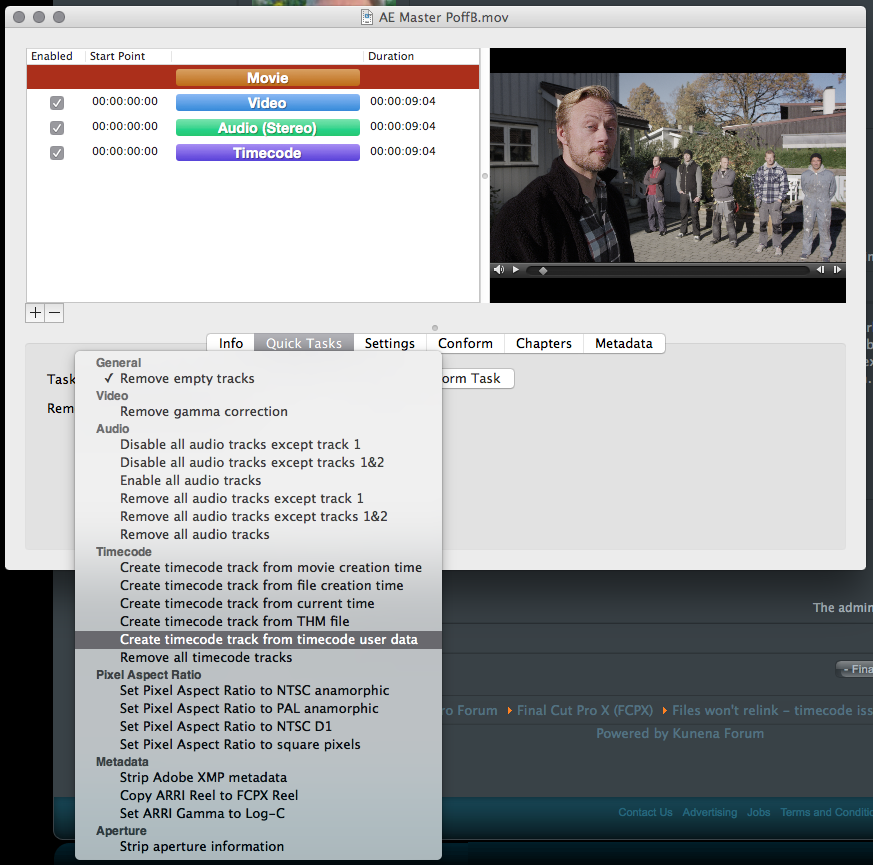
For batch processing, have a look at the tools from Digital Rebellion. QT Edit can remove the time code tracks for you. You should of course back up your media first...
Claes
Claes
Please Log in to join the conversation.
