


- Posts: 479
- Thank you received: 5
3 Post Moderation Rule for New Boarders (25 Jan 2021)
New boarders will have their posts moderated - Don't worry if you cannot see your post immediately.
multicam problem
08 Dec 2014 16:00 #57086
by parkerhqj
multicam problem was created by parkerhqj
I have a two person interview with two cameras. The close-up camera has the good audio, the wide shot the camera mic. I've synced the angles in multicam. The wide shot appears on top when I open the clips. I have chosen the close-up audio to use for the edit. When I play it in multicam, I get the right audio. When I drop the multicam clip into the timeline to edit, it reverts to the wide shot audio. I'm obviously doing something wrong. I just can't figure out what. I've put the close-up shot on top of the wide shot and it doesn't make any difference. thx
Please Log in to join the conversation.
08 Dec 2014 16:06 #57087
by parkerhqj
Replied by parkerhqj on topic multicam problem
Just figured it out. I went to channel configurations and chose the right audio there. I'll leave this up here in case someone else makes the same mistake. thx
Please Log in to join the conversation.
- Karsten Schlüter
-

- Offline
- Moderator
-

Less
More
- Posts: 3790
- Thank you received: 718
10 Dec 2014 12:20 - 10 Dec 2014 12:20 #57164
by Karsten Schlüter
maybe, I translate 'channel configuration' differently, but in a Multicam, there's no need to do any settings there. What you HAVE to do is:
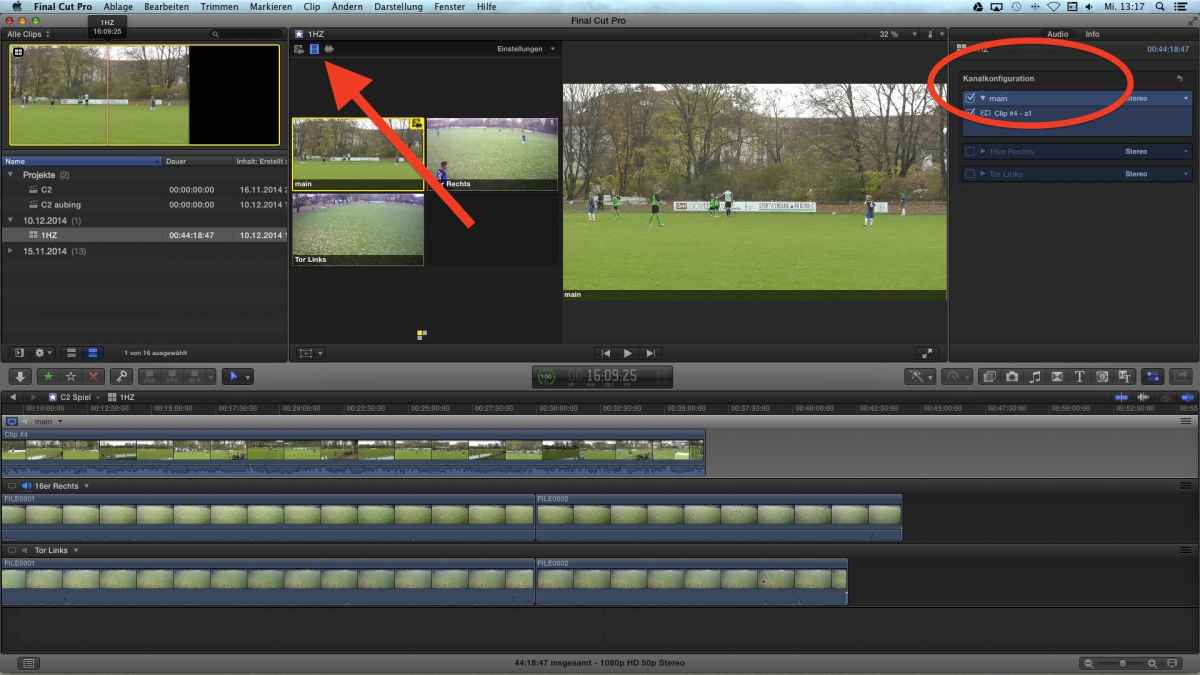
… tell FCPX:
This is the master-track, and switch "Video only" (where my red arrow points to..)
Then, when hitting 1,2,3, it keeps the audio from - in my example: - 'main'-track, but switches to the video of the synch others...
but the Channel Configurator (red circle on the right) is kept untouched....
Replied by Karsten Schlüter on topic multicam problem
parkerhqj wrote: … I've put the close-up shot on top of the wide shot and it doesn't make any difference.
maybe, I translate 'channel configuration' differently, but in a Multicam, there's no need to do any settings there. What you HAVE to do is:
… tell FCPX:
This is the master-track, and switch "Video only" (where my red arrow points to..)
Then, when hitting 1,2,3, it keeps the audio from - in my example: - 'main'-track, but switches to the video of the synch others...
but the Channel Configurator (red circle on the right) is kept untouched....
Last edit: 10 Dec 2014 12:20 by Karsten Schlüter.
Please Log in to join the conversation.
