


- Posts: 10
- Thank you received: 0
3 Post Moderation Rule for New Boarders (25 Jan 2021)
New boarders will have their posts moderated - Don't worry if you cannot see your post immediately.
Library Wont open PLZZZZZ HELP ME!!!!!
- fb_100001184235824
-
 Topic Author
- Offline
- New Member
-

Less
More
06 Dec 2014 10:04 - 06 Dec 2014 10:26 #57025
by fb_100001184235824
Library Wont open PLZZZZZ HELP ME!!!!! was created by fb_100001184235824
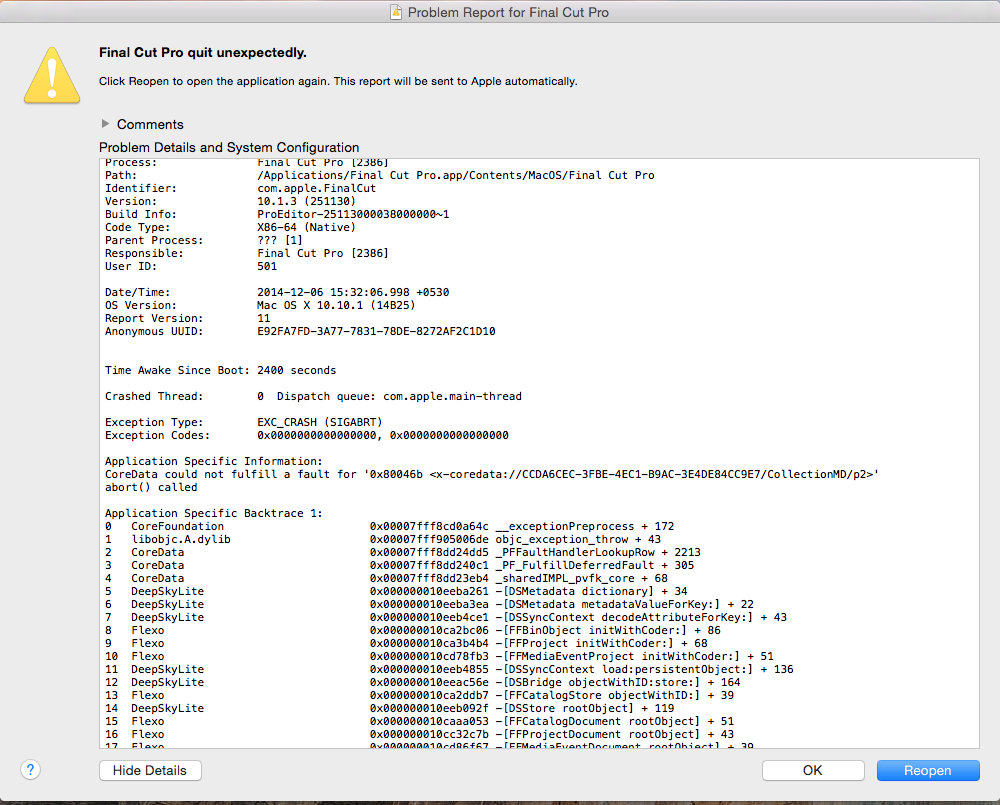
i worked 3 days on this Library , after a power failure my mac reopened and fcpx is opened and im unable to open one Library , im having total 5 Labraries every library is opening except the one which im working when i tried to open this particular Library FCPX is suddenly automatically force closing ang im getting this message see below attachment
and just now i tried to create new library and again same problem FCP is Crashing
Sorry for my English
and just now i tried to create new library and again same problem FCP is Crashing
Sorry for my English
Last edit: 06 Dec 2014 10:26 by fb_100001184235824.
Please Log in to join the conversation.
- ronny courtens
-

- Offline
- Moderator
-

Less
More
- Posts: 4455
- Thank you received: 962
06 Dec 2014 11:22 #57027
by ronny courtens
Replied by ronny courtens on topic Library Wont open PLZZZZZ HELP ME!!!!!
Power failures can be devastating. The good news is that at least you can open the other Libraries, which means your drive has not been damaged.
This is what you do:
1. Close FCP X and launch it again while holding the CMD+ALT keys pressed down. You will get a message asking you if you want to delete your FCP X preferences, confirm and let FCP X launch. FCP X will open with a new empty Library.
2. Now choose File > Open Library > Other... The Open Library window will launch. In that window press Locate, which will open a Finder window. In the Finder window select the problematic Library and press Open.
- If the Library opens without crashing, your problem is solved.
- If FCP X crashes while opening the Library this means you have a corrupt Library database, a corrupt Event database or corrupted clips due to the power interruption. In this case post back so we can further assist you.
- Ronny
This is what you do:
1. Close FCP X and launch it again while holding the CMD+ALT keys pressed down. You will get a message asking you if you want to delete your FCP X preferences, confirm and let FCP X launch. FCP X will open with a new empty Library.
2. Now choose File > Open Library > Other... The Open Library window will launch. In that window press Locate, which will open a Finder window. In the Finder window select the problematic Library and press Open.
- If the Library opens without crashing, your problem is solved.
- If FCP X crashes while opening the Library this means you have a corrupt Library database, a corrupt Event database or corrupted clips due to the power interruption. In this case post back so we can further assist you.
- Ronny
Please Log in to join the conversation.
- Tom Wolsky
-

- Offline
- Moderator
-
06 Dec 2014 11:23 - 06 Dec 2014 11:23 #57028
by Tom Wolsky
Replied by Tom Wolsky on topic Library Wont open PLZZZZZ HELP ME!!!!!
Try opening a recent backup of the library.
Last edit: 06 Dec 2014 11:23 by Tom Wolsky.
Please Log in to join the conversation.
- fb_100001184235824
-
Topic Author
- Offline
- New Member
-
Less
More
- Posts: 10
- Thank you received: 0
06 Dec 2014 11:58 #57029
by fb_100001184235824
Replied by fb_100001184235824 on topic Library Wont open PLZZZZZ HELP ME!!!!!
I did as u told
Crashed Library didnt recovered and i understood it will never recover
atleast now im able to create new library and project
Thank you very much ronny
Crashed Library didnt recovered and i understood it will never recover
atleast now im able to create new library and project
Thank you very much ronny
Please Log in to join the conversation.
- ronny courtens
-
- Offline
- Moderator
-
Less
More
- Posts: 4455
- Thank you received: 962
06 Dec 2014 12:39 #57030
by ronny courtens
Replied by ronny courtens on topic Library Wont open PLZZZZZ HELP ME!!!!!
There is one more thing you should try to recover your Library:
- Close FCP X.
- Open a Finder window and look for the problematic Library. R-click the Library and choose "Open Package Contents".
- In the package you will see a file called "CurrentVersion.flexolibrary". Put that file to the Trash and empty the Trash.
- Then launch FCP X and try to open the Problematic Library.
There is a chance that by doing this FCP X will restore the Library database and that the Library will open without crashing. However, if it still crashes there is indeed not much you can do anymore.
- Ronny
- Close FCP X.
- Open a Finder window and look for the problematic Library. R-click the Library and choose "Open Package Contents".
- In the package you will see a file called "CurrentVersion.flexolibrary". Put that file to the Trash and empty the Trash.
- Then launch FCP X and try to open the Problematic Library.
There is a chance that by doing this FCP X will restore the Library database and that the Library will open without crashing. However, if it still crashes there is indeed not much you can do anymore.
- Ronny
Please Log in to join the conversation.
- fb_593657333
-
- Offline
- New Member
-
Less
More
- Posts: 3
- Thank you received: 0
17 Jul 2015 21:03 #66607
by fb_593657333
Replied by fb_593657333 on topic Library Wont open PLZZZZZ HELP ME!!!!!
Hi Ronny, I have tried all of the above, I am so frustrated. I am running 10.2.1.
Please Log in to join the conversation.
- ronny courtens
-
- Offline
- Moderator
-
Less
More
- Posts: 4455
- Thank you received: 962
20 Jul 2015 05:35 #66668
by ronny courtens
Replied by ronny courtens on topic Library Wont open PLZZZZZ HELP ME!!!!!
Hi Javier, welcome to the forum.
Can you describe what happened ?
- Ronny
Can you describe what happened ?
- Ronny
Please Log in to join the conversation.

20 Jul 2015 14:11 #66672
by tpayton
Replied by tpayton on topic Library Wont open PLZZZZZ HELP ME!!!!!
To add to Ronny's excellent comments and to reiterate Tom's, locate a backup of the library in your movies/final cut backups folder. Unless you for some reason changed the default preferences Libraries are organized in folders and then time stamped with dates. Double clicking is all your need to do an FCPX will guide you through additional steps.
In a likelihood this will work, but if it doesn't open then it is likely corrupted media or even a plugin.
Please let us know how it goes.
In a likelihood this will work, but if it doesn't open then it is likely corrupted media or even a plugin.
Please let us know how it goes.
Please Log in to join the conversation.
- fb_593657333
-
- Offline
- New Member
-
Less
More
- Posts: 3
- Thank you received: 0
22 Jul 2015 23:38 #66749
by fb_593657333
Replied by fb_593657333 on topic Library Wont open PLZZZZZ HELP ME!!!!!
I was exporting to a masterfile, when FCPX quit, I tried all the suggestions you mentioned above, I also tried loading from a backup file also, which didn't work either. I finally did a system restore from a backup, opened it and that seemed to have worked, this is after 48 hours of struggle.
Please Log in to join the conversation.
- ronny courtens
-
- Offline
- Moderator
-
Less
More
- Posts: 4455
- Thank you received: 962
23 Jul 2015 19:54 #66780
by ronny courtens
Replied by ronny courtens on topic Library Wont open PLZZZZZ HELP ME!!!!!
Good to hear the problem has been solved. Thank you for keeping us updated.
- Ronny
- Ronny
Please Log in to join the conversation.
23 Jul 2015 20:15 #66785
by tpayton
Replied by tpayton on topic Library Wont open PLZZZZZ HELP ME!!!!!
So just for others who might see this thread, when you said you did a system restore from a backup, can you share your steps?
Without seeing things further, It sounds to me like you had some corrupted media, or possibly a corrupted user account.
Without seeing things further, It sounds to me like you had some corrupted media, or possibly a corrupted user account.
Please Log in to join the conversation.
- fb_593657333
-
- Offline
- New Member
-
Less
More
- Posts: 3
- Thank you received: 0
28 Jul 2015 18:41 #66930
by fb_593657333
Replied by fb_593657333 on topic Library Wont open PLZZZZZ HELP ME!!!!!
Sure tpayton. What I did was go to TimeMaching Backups and restore my whole system from a back up from earlier that morning, a few hours before the corrupted file happened. I was aware that some of my effects and edits would no longer be there, but at least I didn't lose most of it. I had to do some "re-link files" but nothing out of the ordinary.
Please Log in to join the conversation.
29 Jul 2015 16:16 #66975
by tpayton
it probably wasn't the FCPX Library itself but something else. Glad you got it going!
Replied by tpayton on topic Library Wont open PLZZZZZ HELP ME!!!!!
fb_593657333 wrote: I did was go to TimeMaching Backups and restore my whole system from a back up from earlier that morning
it probably wasn't the FCPX Library itself but something else. Glad you got it going!
Please Log in to join the conversation.
