


- Posts: 7
- Thank you received: 0
3 Post Moderation Rule for New Boarders (25 Jan 2021)
New boarders will have their posts moderated - Don't worry if you cannot see your post immediately.
Problems when Importing Images
- fb_515137154
-
 Topic Author
- Offline
- New Member
-

Less
More
04 Dec 2014 12:42 #56902
by fb_515137154
Problems when Importing Images was created by fb_515137154
Hi everyone! I've found a few similar problems to mine posted before, but I can't find the solution for my exact problem.
I volunteer by editing some language learning videos, and in the final process I need to import between 50 and 70 psd files with the subtitles. I've changed the "duration" for importing files from the Preferences window, but they still come in being very, very long.
I then try with the workaround tip of ctrl+d to change the duration of all the clips, but am then left with large gaps between each file, and I haven't found any explanation (if it even exists) of how to delete the gaps between all the files, instead of having to to move each one individually (sooo time consuming) in FCPX.
Any help would be SO greatly appreciated. Thank you!
Christian
I volunteer by editing some language learning videos, and in the final process I need to import between 50 and 70 psd files with the subtitles. I've changed the "duration" for importing files from the Preferences window, but they still come in being very, very long.
I then try with the workaround tip of ctrl+d to change the duration of all the clips, but am then left with large gaps between each file, and I haven't found any explanation (if it even exists) of how to delete the gaps between all the files, instead of having to to move each one individually (sooo time consuming) in FCPX.
Any help would be SO greatly appreciated. Thank you!
Christian
Please Log in to join the conversation.

04 Dec 2014 13:40 #56906
by BenB
Replied by BenB on topic Problems when Importing Images
Duration is how long they will be in the Timeline. I think they default to 10 seconds in the Browser no matter what.
Specifically, what are you setting the Preference parameter to, and how long are they once in a Project timeline?
Specifically, what are you setting the Preference parameter to, and how long are they once in a Project timeline?
Please Log in to join the conversation.
- fb_515137154
-
Topic Author
- Offline
- New Member
-
Less
More
- Posts: 7
- Thank you received: 0
04 Dec 2014 13:45 #56908
by fb_515137154
Replied by fb_515137154 on topic Problems when Importing Images
Hi Ben, thanks for the quick response!
I've set my Preferences/Editing/Still Images duration to 1 second, hoping that would do it, but then when I import my psd files, they're always imported with a duration of 59:22 (??) for some reason. I'm sure there has to be something I'm not doing right?
Thanks again!
I've set my Preferences/Editing/Still Images duration to 1 second, hoping that would do it, but then when I import my psd files, they're always imported with a duration of 59:22 (??) for some reason. I'm sure there has to be something I'm not doing right?
Thanks again!
Please Log in to join the conversation.
04 Dec 2014 13:47 - 04 Dec 2014 13:50 #56909
by BenB
Replied by BenB on topic Problems when Importing Images
OK, tested, and yes, we have a new BUG! Was a time when they'ed show up in the Browser as 10 seconds. Should conform to the Preference parameter when dropped into a timeline, as I said before. Well, they now show up in the Browser as a full 1 minute, and drop into timelines as a full 1 minute. That sucks! Will make some time lapse and other workflows a bit of a pain. Let's fill out the feedback form with this bug.
Last edit: 04 Dec 2014 13:50 by BenB.
Please Log in to join the conversation.
- fb_515137154
-
Topic Author
- Offline
- New Member
-
Less
More
- Posts: 7
- Thank you received: 0
04 Dec 2014 13:49 #56910
by fb_515137154
Replied by fb_515137154 on topic Problems when Importing Images
Ah, shame... ok! So at least now I know it's not just me!
And perhaps would you happen to know if there's any way of getting rid of all that empty space between each file when ctrl+d'ing all of my files down to 3 secs or so?
And perhaps would you happen to know if there's any way of getting rid of all that empty space between each file when ctrl+d'ing all of my files down to 3 secs or so?
Please Log in to join the conversation.
04 Dec 2014 13:50 #56911
by BenB
Replied by BenB on topic Problems when Importing Images
If they're in the Primary Storyline, you select them all, Cntrl-D and set a new duration, they should all conform to this with no spaces in between. I just tested this also, and it works fine.
The exception is if you have the Position tool active when you do Cntrl-D, then they don't magnetically ripple, you get gap clips in-between. So be sure to hit "A" before Control-D and you'll be fine.
The exception is if you have the Position tool active when you do Cntrl-D, then they don't magnetically ripple, you get gap clips in-between. So be sure to hit "A" before Control-D and you'll be fine.
Please Log in to join the conversation.
- fb_515137154
-
Topic Author
- Offline
- New Member
-
Less
More
- Posts: 7
- Thank you received: 0
04 Dec 2014 13:58 #56913
by fb_515137154
Replied by fb_515137154 on topic Problems when Importing Images
Not sure if my last message when through but jsut wanted to thank you soo so much, it finally worked! I think perhaps I didn't have them in my main storyline before. THANK YOU!
Please Log in to join the conversation.
04 Dec 2014 14:03 - 04 Dec 2014 14:04 #56916
by BenB
Replied by BenB on topic Problems when Importing Images
Right, connected clips don't have magnetic properties. But you could select them all, and create a Connected Storyline, and then have the magnetic properties back, without touching the Primary Storyline.
Last edit: 04 Dec 2014 14:04 by BenB.
Please Log in to join the conversation.
- ronny courtens
-

- Offline
- Moderator
-

Less
More
- Posts: 4455
- Thank you received: 962
04 Dec 2014 17:38 - 04 Dec 2014 17:43 #56930
by ronny courtens
Replied by ronny courtens on topic Problems when Importing Images
I will give you a fast solution for your problem at the end, but first allow me to explain how importing graphics works in FCP X.
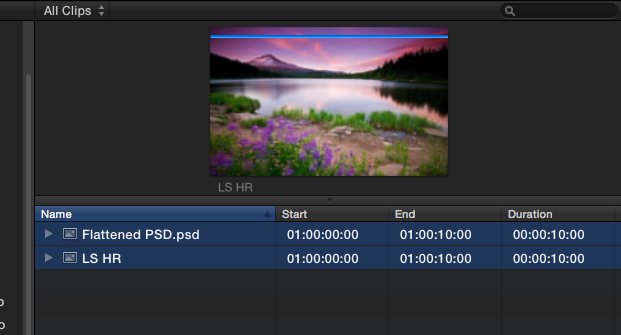
- When you import a still image or a flattened PSD file the duration of the imported clip is ALWAYS 10 seconds:
- When you import a layered PSD file (more than one physical layer inside the graphic file) the duration of the imported clip is ALWAYS 60 seconds:
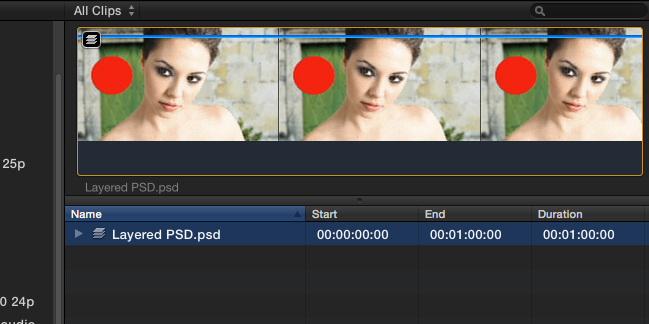
The reason for this is that a layered PSD is often used for animating the different layers over time in FCP X, and having a 60 second multilayer clip to work with is better than only having 10 seconds. While you can stretch a regular still to any length on the timeline, you cannot do this with a layered PSD. If even 60 seconds is not long enough to do your animation you always can open the layered PSD in its own timeline and make each layer longer, just like you would do with a compound clip.
- The Still Image Editing Duration that you can set in the FCP X Preferences pane has nothing to do with the duration of your imported still image in the Clip Browser. This preference only sets the duration of the selection when you click on an imported still to edit it in the timeline.
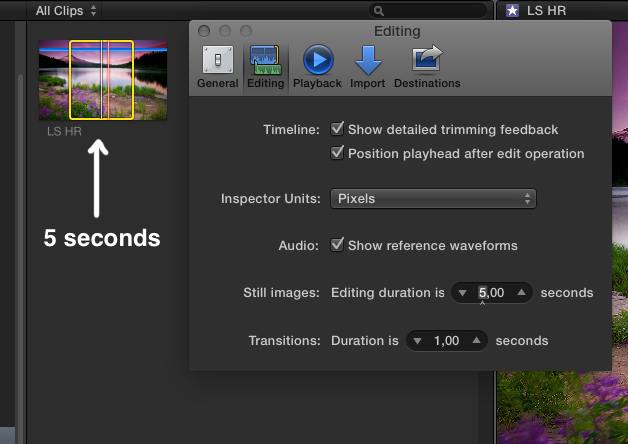
When you set the Still Image Editing Duration to 5 seconds and you click on the clip in the browser, your selection will be 5 seconds long:
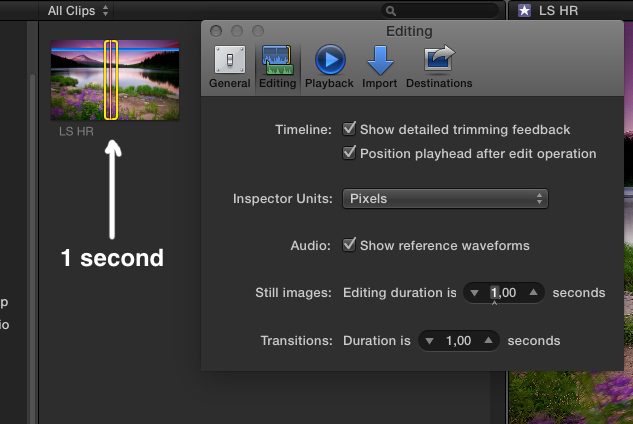
When you set the Still Image Editing Duration to 1 second and you click on the clip in the browser, your selection will be 1 second long:
Now here's the caveat. Because a layered PSD is not treated as a still image, the Still Image Editing Duration preference has absolutely no influence on an imported layered PSD. When you click on a layered PSD in the Clip Browser your selection will always be the full length of the clip (60 seconds).
So to edit only 3 seconds of a layered PSD into the timeline you have to set a 3 second Range on the clip. If you have 100 layered graphics it would be very time consuming to set a 3 second Range on every clip.
So here's the solution:
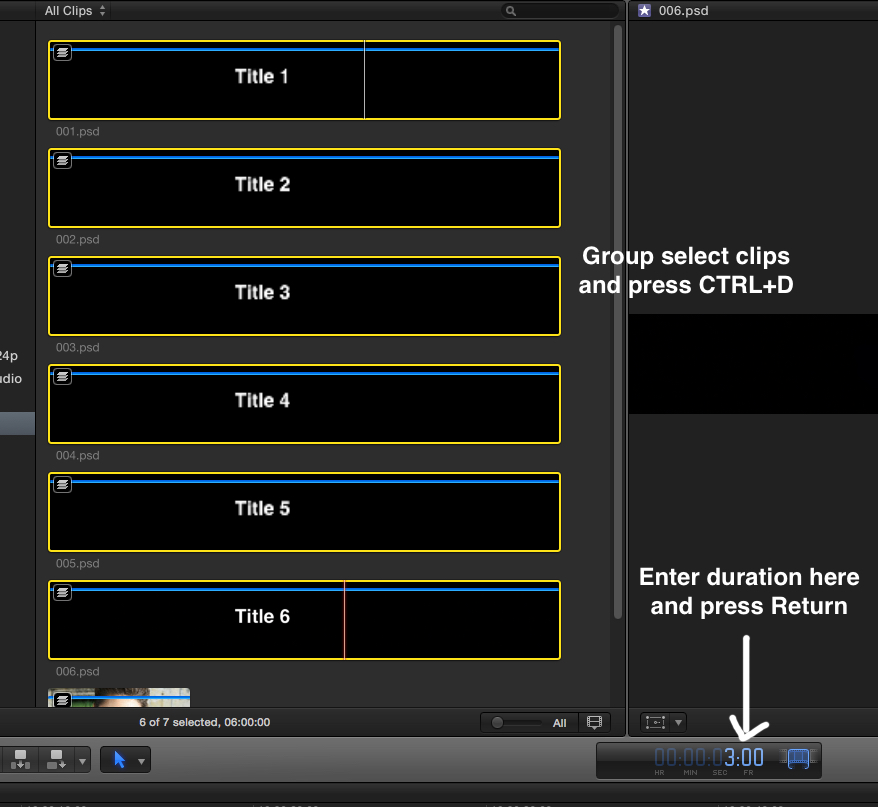
Group-select all your layered PSD files in the Clip Browser and press CTRL+D. Enter the desired duration in the timecode HUD (type 300 for 3 seconds) and press Enter:
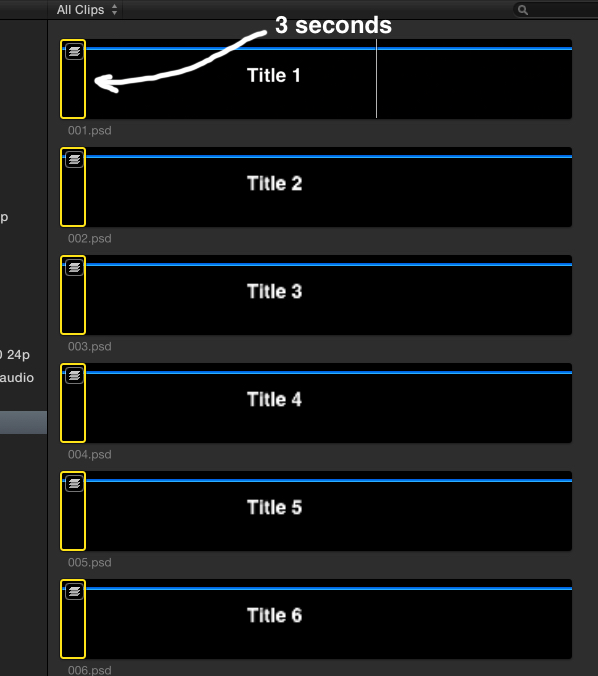
You will see that a 3 second selection will be added to all your clips:
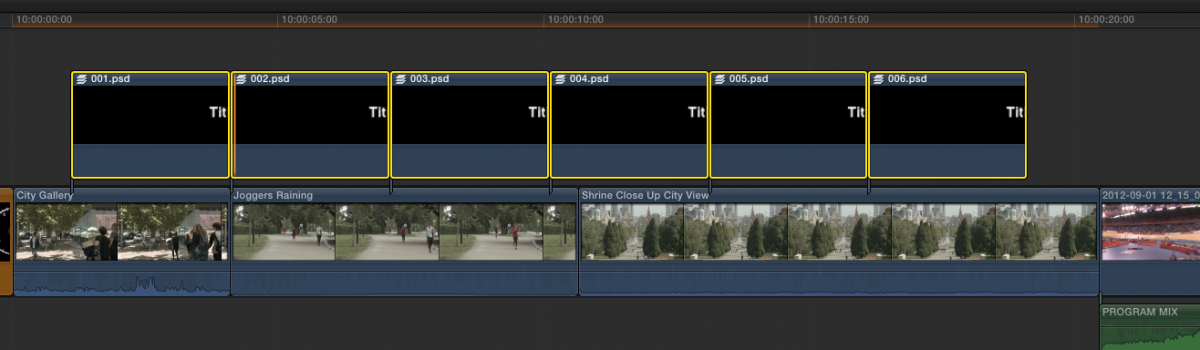
Then press Q to add all the selections above your timeline. Every layered PSD clip you have added to the timeline will have a duration of exactly 3 seconds:
Now you can drag each clip to its correct position on the timeline and you can lengthen or shorten each individual clip as you wish:

In short: group-select, press CTRL+D, enter duration, press Q. Done.
- Ronny
- When you import a still image or a flattened PSD file the duration of the imported clip is ALWAYS 10 seconds:
- When you import a layered PSD file (more than one physical layer inside the graphic file) the duration of the imported clip is ALWAYS 60 seconds:
The reason for this is that a layered PSD is often used for animating the different layers over time in FCP X, and having a 60 second multilayer clip to work with is better than only having 10 seconds. While you can stretch a regular still to any length on the timeline, you cannot do this with a layered PSD. If even 60 seconds is not long enough to do your animation you always can open the layered PSD in its own timeline and make each layer longer, just like you would do with a compound clip.
- The Still Image Editing Duration that you can set in the FCP X Preferences pane has nothing to do with the duration of your imported still image in the Clip Browser. This preference only sets the duration of the selection when you click on an imported still to edit it in the timeline.
When you set the Still Image Editing Duration to 5 seconds and you click on the clip in the browser, your selection will be 5 seconds long:
When you set the Still Image Editing Duration to 1 second and you click on the clip in the browser, your selection will be 1 second long:
Now here's the caveat. Because a layered PSD is not treated as a still image, the Still Image Editing Duration preference has absolutely no influence on an imported layered PSD. When you click on a layered PSD in the Clip Browser your selection will always be the full length of the clip (60 seconds).
So to edit only 3 seconds of a layered PSD into the timeline you have to set a 3 second Range on the clip. If you have 100 layered graphics it would be very time consuming to set a 3 second Range on every clip.
So here's the solution:
Group-select all your layered PSD files in the Clip Browser and press CTRL+D. Enter the desired duration in the timecode HUD (type 300 for 3 seconds) and press Enter:
You will see that a 3 second selection will be added to all your clips:
Then press Q to add all the selections above your timeline. Every layered PSD clip you have added to the timeline will have a duration of exactly 3 seconds:
Now you can drag each clip to its correct position on the timeline and you can lengthen or shorten each individual clip as you wish:
In short: group-select, press CTRL+D, enter duration, press Q. Done.
- Ronny
Last edit: 04 Dec 2014 17:43 by ronny courtens.
Please Log in to join the conversation.
04 Dec 2014 17:48 #56933
by BenB
Replied by BenB on topic Problems when Importing Images
So layer PSD's are treated differently? Hmm... That's interesting. But 60 seconds is a REALLY long time for a default duration of anything that's not video. Good to know.
Please Log in to join the conversation.
- fb_515137154
-
Topic Author
- Offline
- New Member
-
Less
More
- Posts: 7
- Thank you received: 0
12 Dec 2014 14:33 #57275
by fb_515137154
Replied by fb_515137154 on topic Problems when Importing Images
What a fantastic explanation and solution, thank you so, so much!
Please Log in to join the conversation.
- fb_515137154
-
Topic Author
- Offline
- New Member
-
Less
More
- Posts: 7
- Thank you received: 0
12 Dec 2014 14:37 #57276
by fb_515137154
Replied by fb_515137154 on topic Problems when Importing Images
I don't know why, after I do ctr+d and then type 300, to get 3 seconds, it then deselects my files, so I can't "q" them in, and when I select them again, it's back to 60 seconds. 
Please Log in to join the conversation.
- fb_515137154
-
Topic Author
- Offline
- New Member
-
Less
More
- Posts: 7
- Thank you received: 0
12 Dec 2014 14:40 #57277
by fb_515137154
Replied by fb_515137154 on topic Problems when Importing Images
Ohhh, I finally got it! Hallelujah!  I just had to change the clip view to filmstrip view! Doh! Thank you again!
 Please Log in to join the conversation.
- ronny courtens
-
- Offline
- Moderator
-
Less
More
- Posts: 4455
- Thank you received: 962
12 Dec 2014 14:44 #57278
by ronny courtens
Replied by ronny courtens on topic Problems when Importing Images
That's correct. You cannot modify the duration of multiple clips at once when in List view. Good you figured it out!
- Ronny
- Ronny
Please Log in to join the conversation.
15 Dec 2014 12:50 - 15 Dec 2014 12:57 #57379
by BenB
Replied by BenB on topic Problems when Importing Images
Ronny,
I just tested, and there is a bug. ALL still formats on my 10.1.4 system are totally ignoring the 4 second default duration I set for stills in Preferences. PDF, PNG, TIFF, JPEG, they all default to 10 seconds, except PSDs, which default to 60 seconds (as documented in the User Manual). This I will consider a bug, not how it is supposed to work.
I just tested, and there is a bug. ALL still formats on my 10.1.4 system are totally ignoring the 4 second default duration I set for stills in Preferences. PDF, PNG, TIFF, JPEG, they all default to 10 seconds, except PSDs, which default to 60 seconds (as documented in the User Manual). This I will consider a bug, not how it is supposed to work.
Last edit: 15 Dec 2014 12:57 by BenB.
Please Log in to join the conversation.
