


- Posts: 3790
- Thank you received: 718
3 Post Moderation Rule for New Boarders (25 Jan 2021)
New boarders will have their posts moderated - Don't worry if you cannot see your post immediately.
Adding/synching a forgotten clip to a Multicam?
- Karsten Schlüter
-
 Topic Author
- Offline
- Moderator
-

Less
More
02 Dec 2014 17:29 #56775
by Karsten Schlüter
Adding/synching a forgotten clip to a Multicam? was created by Karsten Schlüter
reading the other thread about synching audio in a MC, brings up a Q I wanted to ask for quiet a while:
MC is created from, say six clips/three angles, everything's beautifully in synch and whoops! I missed #7 (bad tagging) in selecting the sources …
How to you add a clip to a given MC and to a given cam angle automatically synched to its correct position?
Usually, when that happens to me, I trash the MC and recreate, that's done in a second, 'cause I synch on FirstMarker+Time Stamp.
But on a school-project we synch on Audio, and clips are not continuously taken, so to Position the stray clip manually is no real option ...
MC is created from, say six clips/three angles, everything's beautifully in synch and whoops! I missed #7 (bad tagging) in selecting the sources …
How to you add a clip to a given MC and to a given cam angle automatically synched to its correct position?
Usually, when that happens to me, I trash the MC and recreate, that's done in a second, 'cause I synch on FirstMarker+Time Stamp.
But on a school-project we synch on Audio, and clips are not continuously taken, so to Position the stray clip manually is no real option ...
Please Log in to join the conversation.


02 Dec 2014 17:42 #56777
by lichinho
Replied by lichinho on topic Adding/synching a forgotten clip to a Multicam?
Just a quick and maybe stupid idea, I haven't tried it, but what if you add the 7th clip to a new angle, sync that clip to the monitoring angle, and then drag the clip to the angle it was supposed to be in, holding the shift key so it does not lose sync?
Please Log in to join the conversation.
- Karsten Schlüter
-
Topic Author
- Offline
- Moderator
-
Less
More
- Posts: 3790
- Thank you received: 718
02 Dec 2014 18:05 #56779
by Karsten Schlüter
I fail to synch in the MCs timeline (option grey out, both clips selected) - what am I doing wrong?
.. and if it works, charming idea!
Replied by Karsten Schlüter on topic Adding/synching a forgotten clip to a Multicam?
lichinho wrote: … sync that clip to the monitoring angle, ..
I fail to synch in the MCs timeline (option grey out, both clips selected) - what am I doing wrong?
.. and if it works, charming idea!
Please Log in to join the conversation.
- Tom Wolsky
-

- Offline
- Moderator
-
02 Dec 2014 18:38 - 02 Dec 2014 18:39 #56780
by Tom Wolsky
Replied by Tom Wolsky on topic Adding/synching a forgotten clip to a Multicam?
What Luis said. You click on any triangle on an angle in the angle editor and select Add Angle.
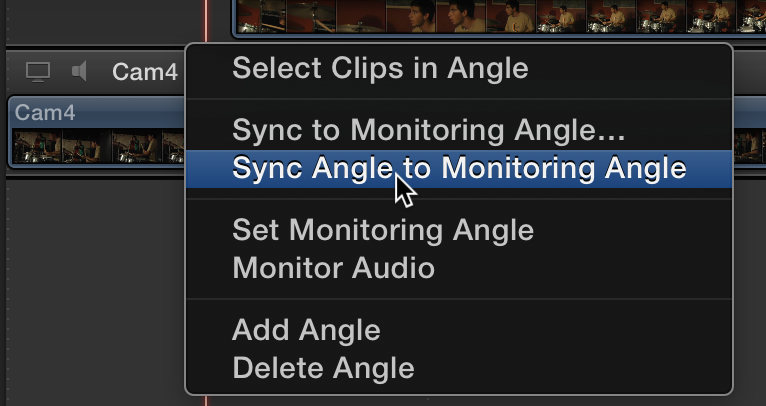
You drag the new file into the new empty lane. You select the clip and from the triangle popup select sync to monitoring angle.
www.fcpxbook.com/updates/multicam1/multicam2.html
You drag the new file into the new empty lane. You select the clip and from the triangle popup select sync to monitoring angle.
www.fcpxbook.com/updates/multicam1/multicam2.html
Last edit: 02 Dec 2014 18:39 by Tom Wolsky.
Please Log in to join the conversation.

02 Dec 2014 18:45 #56781
by BenB
Replied by BenB on topic Adding/synching a forgotten clip to a Multicam?
It is all right there in the user manual.
help.apple.com/finalcutpro/mac/10.1/#ver23c76b1a
help.apple.com/finalcutpro/mac/10.1/#ver23c76b1a
Please Log in to join the conversation.
- ronny courtens
-

- Offline
- Moderator
-
Less
More
- Posts: 4455
- Thank you received: 962
02 Dec 2014 18:51 - 02 Dec 2014 18:53 #56782
by ronny courtens
Replied by ronny courtens on topic Adding/synching a forgotten clip to a Multicam?
Hi Karsten,
First add the forgotten clip to a new angle in the Angle Editor. When it has been added to the new angle you can drag the top right side of the angle to change its order in the angle editor.
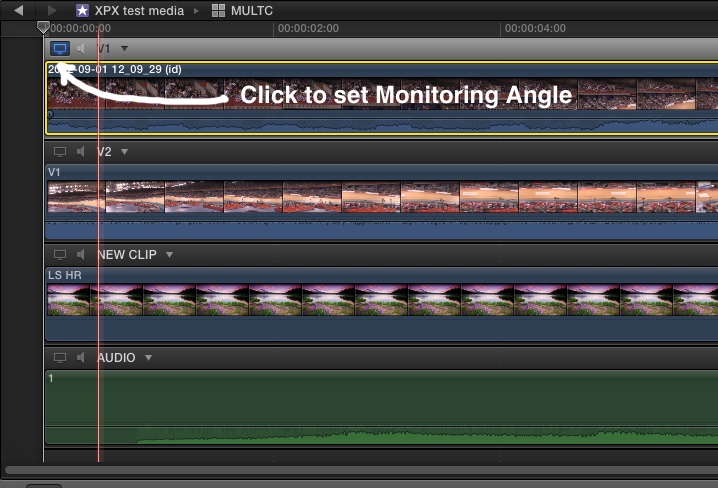
Then go to the angle you want to use as the Monitoring Angle and click on the little television icon at the top left side of the angle to set the angle as the Monitoring Angle:
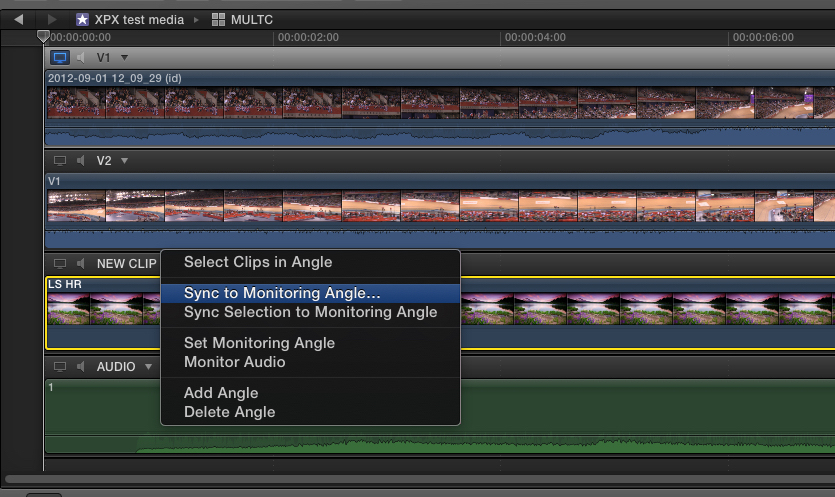
Finally click on the little triangle above the newly added angle and choose "Sync to Monitoring Angle". The new angle will be synced to the Monitoring Angle:
EDIT: I see a lot of people have been answering this while I was typing (-:
- Ronny
First add the forgotten clip to a new angle in the Angle Editor. When it has been added to the new angle you can drag the top right side of the angle to change its order in the angle editor.
Then go to the angle you want to use as the Monitoring Angle and click on the little television icon at the top left side of the angle to set the angle as the Monitoring Angle:
Finally click on the little triangle above the newly added angle and choose "Sync to Monitoring Angle". The new angle will be synced to the Monitoring Angle:
EDIT: I see a lot of people have been answering this while I was typing (-:
- Ronny
Last edit: 02 Dec 2014 18:53 by ronny courtens.
Please Log in to join the conversation.
- Karsten Schlüter
-
Topic Author
- Offline
- Moderator
-
Less
More
- Posts: 3790
- Thank you received: 718
02 Dec 2014 19:02 - 02 Dec 2014 19:08 #56783
by Karsten Schlüter
ahhh, those nasty triangles ... AGAIN!
always missing the best parts, 'cause I never look 'under' those tiny triangles!
... my first test with some of my soccer-recordings failed but FCPX gave me a hint ("audio not suitable for synching") .. with some 'music video clip'-stuff down in seconds!
THANK YOU, Tom!
@ Luis: right on track ... I missed the triangle ...
@ Ben: hey, that's usually MY phrase (at ASC)
@ Ronny: last but not least, superb illustration, lacking a few red arrows... for my taste ...
Did i mention: This board is awesome, very helpful AND fun!!!
Replied by Karsten Schlüter on topic Adding/synching a forgotten clip to a Multicam?
Tom Wolsky wrote: … and from the triangle popup select sync to monitoring angle.… l
ahhh, those nasty triangles ... AGAIN!
always missing the best parts, 'cause I never look 'under' those tiny triangles!
... my first test with some of my soccer-recordings failed but FCPX gave me a hint ("audio not suitable for synching") .. with some 'music video clip'-stuff down in seconds!
THANK YOU, Tom!
@ Luis: right on track ... I missed the triangle ...
@ Ben: hey, that's usually MY phrase (at ASC)
@ Ronny: last but not least, superb illustration, lacking a few red arrows... for my taste ...
Did i mention: This board is awesome, very helpful AND fun!!!
Last edit: 02 Dec 2014 19:08 by Karsten Schlüter.
Please Log in to join the conversation.
