


- Posts: 3
- Thank you received: 0
3 Post Moderation Rule for New Boarders (25 Jan 2021)
New boarders will have their posts moderated - Don't worry if you cannot see your post immediately.
Updating/resyncing audio in a multicam project
02 Dec 2014 09:45 - 02 Dec 2014 09:47 #56760
by deadwing
Updating/resyncing audio in a multicam project was created by deadwing
Hi all,
I started experimenting with multicam and prepared a first multicam clip (imported two cameras footage with audio, a third audio track that was recorded directly, and FCPX correctly synced the audio file with the audio from cameras mics).
Now I worked again on the audio file, meaning that I improved its sound quality and also had to slightly cut the start/end for technical reasons.
My question is....is there any way I can tell FCPX to keep my multicam montage as it is and simply re-import and re-sync a new updated/remastered audio file? I tried doing it manually but there's no way I can be as precise as FCPX automatic sync done at the start before I started editing the multicam.
Thanks!
I started experimenting with multicam and prepared a first multicam clip (imported two cameras footage with audio, a third audio track that was recorded directly, and FCPX correctly synced the audio file with the audio from cameras mics).
Now I worked again on the audio file, meaning that I improved its sound quality and also had to slightly cut the start/end for technical reasons.
My question is....is there any way I can tell FCPX to keep my multicam montage as it is and simply re-import and re-sync a new updated/remastered audio file? I tried doing it manually but there's no way I can be as precise as FCPX automatic sync done at the start before I started editing the multicam.
Thanks!
Last edit: 02 Dec 2014 09:47 by deadwing.
Please Log in to join the conversation.
- ronny courtens
-

- Offline
- Moderator
-

Less
More
- Posts: 4455
- Thank you received: 962
02 Dec 2014 10:50 #56761
by ronny courtens
Replied by ronny courtens on topic Updating/resyncing audio in a multicam project
Welcome to the forum.
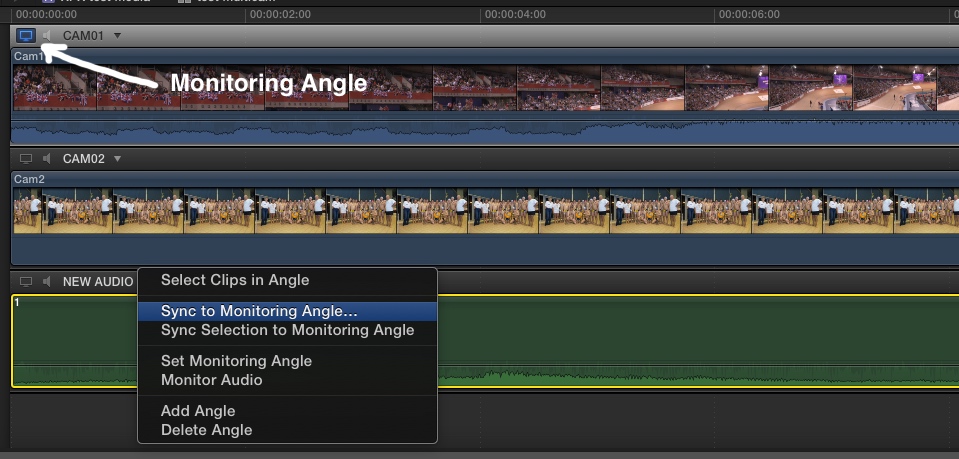
If you hadn't cut the start/end of the remastered audio you could simply have relinked the original audio clip to the improved one. But as you have created a new audio clip that cannot be relinked to the original one because it does not have the same length, you will have to replace the original audio clip in the Angle Editor with the updated one and let FCP X synch it to your audio from the camera. This is how you do this:
1. R-click the multiclip in the clip browser and choose "Open in Angle Editor".
2. In the Angle editor delete the original audio clip from its angle and drag the new audio clip into the angle.
3. Click the tv icon on the angle with the camera audio to make it the Monitoring Angle.
4. Click on the little triangle above the new audio clip and choose "Sync to Monitoring Angle".
FCP X will re-synchronize your new audio to the audio of the camera in the Monitoring Angle. As the new audio is in the same Angle as your original audio was (you have replaced it) your multicam montage will stay intact.
- Ronny
If you hadn't cut the start/end of the remastered audio you could simply have relinked the original audio clip to the improved one. But as you have created a new audio clip that cannot be relinked to the original one because it does not have the same length, you will have to replace the original audio clip in the Angle Editor with the updated one and let FCP X synch it to your audio from the camera. This is how you do this:
1. R-click the multiclip in the clip browser and choose "Open in Angle Editor".
2. In the Angle editor delete the original audio clip from its angle and drag the new audio clip into the angle.
3. Click the tv icon on the angle with the camera audio to make it the Monitoring Angle.
4. Click on the little triangle above the new audio clip and choose "Sync to Monitoring Angle".
FCP X will re-synchronize your new audio to the audio of the camera in the Monitoring Angle. As the new audio is in the same Angle as your original audio was (you have replaced it) your multicam montage will stay intact.
- Ronny
Please Log in to join the conversation.
02 Dec 2014 12:39 #56765
by deadwing
Replied by deadwing on topic Updating/resyncing audio in a multicam project
Hi,
thanks for the warm welcome! I followed your instructions, very clear, but somehow the sync did not work out well.
I mean that original sync was perfect, this time instead FCPX synced on the drums correctly, but it's moved a full bar ahead...meaning that it was unable to correctly detect any vocals or anything else apart from the beat of drums...might be because the final mastered version of the audio has obviously another kind of range and does not allow FCPX to correctly detect it.
In the end I had resync manually zooming in to maximum and aligning the start/first beat....but I hope for the future your method will work
Otherwise to precisely sync and check it I need to disable any video filter on the clips, manual align (to get a fast enough realtime preview) and then re-enable everything.
thanks for the warm welcome! I followed your instructions, very clear, but somehow the sync did not work out well.
I mean that original sync was perfect, this time instead FCPX synced on the drums correctly, but it's moved a full bar ahead...meaning that it was unable to correctly detect any vocals or anything else apart from the beat of drums...might be because the final mastered version of the audio has obviously another kind of range and does not allow FCPX to correctly detect it.
In the end I had resync manually zooming in to maximum and aligning the start/first beat....but I hope for the future your method will work
Otherwise to precisely sync and check it I need to disable any video filter on the clips, manual align (to get a fast enough realtime preview) and then re-enable everything.
Please Log in to join the conversation.
- ronny courtens
-
- Offline
- Moderator
-
Less
More
- Posts: 4455
- Thank you received: 962
02 Dec 2014 12:53 #56768
by ronny courtens
Replied by ronny courtens on topic Updating/resyncing audio in a multicam project
Yes it is very much possible that, if there is too much of a difference between the original audio and the modified one, the automatic syncing may be off. That's why for multicam work we always insist on either having jam-locked time code, or at least a clapper slate at the beginning of each take.
Next time you need to manipulate an audio angle after you have been cutting the multiclip: do it right in the Angle Editor using the very powerful audio tools that are inside FCP X. For single-channel audio there is very little you can do in a dedicated DAW that you cannot do right inside FCP X.
If you really need to modify the audio outside of FCP X: make sure not to change the length of the audio clip. This way you can just relink it to the original one or you can just replace the original audio with the new clip in the Angle editor without losing sync.
- Ronny
Next time you need to manipulate an audio angle after you have been cutting the multiclip: do it right in the Angle Editor using the very powerful audio tools that are inside FCP X. For single-channel audio there is very little you can do in a dedicated DAW that you cannot do right inside FCP X.
If you really need to modify the audio outside of FCP X: make sure not to change the length of the audio clip. This way you can just relink it to the original one or you can just replace the original audio with the new clip in the Angle editor without losing sync.
- Ronny
Please Log in to join the conversation.
02 Dec 2014 12:57 #56769
by deadwing
Replied by deadwing on topic Updating/resyncing audio in a multicam project
Hi Ronny,
yes what I'll do is actually avoid to change length outside, I'll need anyway to produce the audio in my studio because we talk mostly of live gigs with multitrack recorded in Pro Tools, so although FCPX has AU plugins the editing/mixing/production must happen in Pro Tools, but I can more easily cut/fade start and end in FCPX so I can relink the file more simply.
Thanks for suggestions
yes what I'll do is actually avoid to change length outside, I'll need anyway to produce the audio in my studio because we talk mostly of live gigs with multitrack recorded in Pro Tools, so although FCPX has AU plugins the editing/mixing/production must happen in Pro Tools, but I can more easily cut/fade start and end in FCPX so I can relink the file more simply.
Thanks for suggestions
Please Log in to join the conversation.
- ronny courtens
-
- Offline
- Moderator
-
Less
More
- Posts: 4455
- Thank you received: 962
02 Dec 2014 13:09 #56770
by ronny courtens
Replied by ronny courtens on topic Updating/resyncing audio in a multicam project
Ah, I understand. If this is a multitrack recording you need to remix then your workflow absolutely makes sense.
Here's a tip:
Put all the clips you need to import for a specific project in a dedicated project media folder on your external hard drive and import your clips in FCP X using "Leave Files In Place".
Now when you need to remix the multitrack audio in ProTools just export the remixed version as a new audio file making sure that the name, the length and the audio channel configuration of the new file is the same as the original one you have imported in FCP X. Drop the remixed file in the media folder and choose "replace". The original file will be replaced by the improved one and when you launch FCP X everything will be relinked automatically.
- Ronny
Here's a tip:
Put all the clips you need to import for a specific project in a dedicated project media folder on your external hard drive and import your clips in FCP X using "Leave Files In Place".
Now when you need to remix the multitrack audio in ProTools just export the remixed version as a new audio file making sure that the name, the length and the audio channel configuration of the new file is the same as the original one you have imported in FCP X. Drop the remixed file in the media folder and choose "replace". The original file will be replaced by the improved one and when you launch FCP X everything will be relinked automatically.
- Ronny
Please Log in to join the conversation.
