


- Posts: 23
- Thank you received: 0
3 Post Moderation Rule for New Boarders (25 Jan 2021)
New boarders will have their posts moderated - Don't worry if you cannot see your post immediately.
How to make it look like an iPhone
01 Dec 2014 22:57 - 01 Dec 2014 22:58 #56725
by largeadam
How to make it look like an iPhone was created by largeadam
So, i record something with my iPhone or iPad; then i tinker with it in FCP and export it..but during the export a black border is added...I embed these videos into an iPhone or iPad frame in Keynote and they fit perfectly without an edit..
When I edit in FCP and export I end up with black borders...does this make sense to anyone??
So, how do I export iPhone footage to look like iPhone footage without the humungous black slabs either side??
When I edit in FCP and export I end up with black borders...does this make sense to anyone??
So, how do I export iPhone footage to look like iPhone footage without the humungous black slabs either side??
Last edit: 01 Dec 2014 22:58 by largeadam. Reason: spelling
Please Log in to join the conversation.
- Tom Wolsky
-

- Offline
- Moderator
-

01 Dec 2014 23:25 #56727
by Tom Wolsky
Replied by Tom Wolsky on topic How to make it look like an iPhone
Black borders where? Post screen shots. What are the exact specs of the media and your project properties?
Please Log in to join the conversation.
01 Dec 2014 23:37 #56728
by largeadam
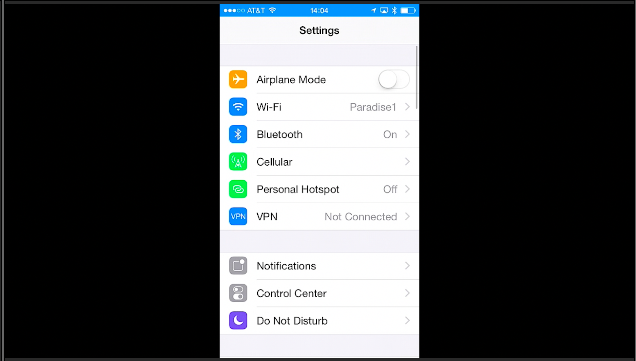
Replied by largeadam on topic How to make it look like an iPhone
Please Log in to join the conversation.
- Tom Wolsky
-
- Offline
- Moderator
-
01 Dec 2014 23:45 #56730
by Tom Wolsky
Replied by Tom Wolsky on topic How to make it look like an iPhone
What's that your project with the iPhone video in it? What are the specs of your media exactly? Please give complete information. Create a custom project size that matches the specs of your media.
Please Log in to join the conversation.
01 Dec 2014 23:57 #56731
by largeadam
Replied by largeadam on topic How to make it look like an iPhone
Yes, this is an iPhone video brought into a custom project...but to me the project only changes the format from 1080 p or i to other choices...such as 720 hd..is this what you refer to?
This I tried and I still get the black borders on export...
This I tried and I still get the black borders on export...
Please Log in to join the conversation.
- Tom Wolsky
-
- Offline
- Moderator
-
02 Dec 2014 00:02 #56733
by Tom Wolsky
Replied by Tom Wolsky on topic How to make it look like an iPhone
Are you using an old version of the software? What version is it?
Please Log in to join the conversation.
02 Dec 2014 00:05 #56734
by largeadam
Replied by largeadam on topic How to make it look like an iPhone
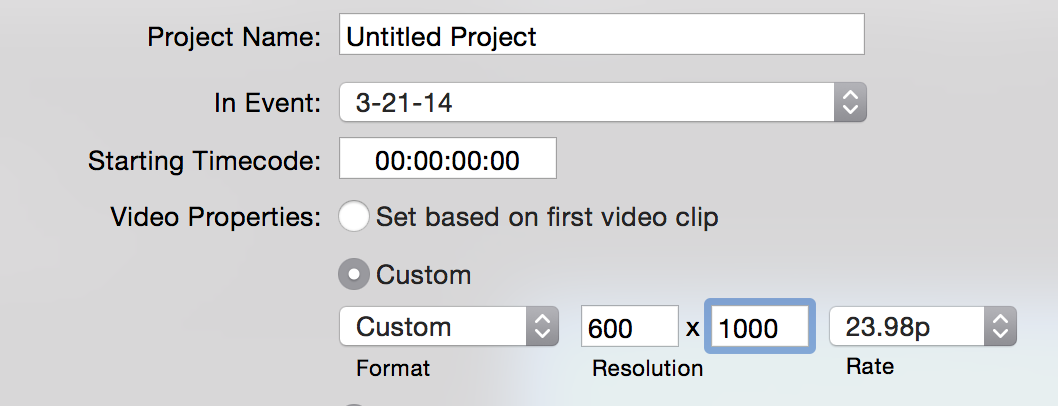
Version 10.1.3 I saw this and thought this would only dial up or down the resolution..perhaps I am being a muppet here..
Do you understand what I am talking about? I think I am not describing this clearly..I could fire up a weber or GoToMeet and show you? or is that verboten?
Do you understand what I am talking about? I think I am not describing this clearly..I could fire up a weber or GoToMeet and show you? or is that verboten?
Please Log in to join the conversation.
- Tom Wolsky
-
- Offline
- Moderator
-
02 Dec 2014 00:24 #56735
by Tom Wolsky
Replied by Tom Wolsky on topic How to make it look like an iPhone
If you select custom you can dial in whatever horizontal and vertical resolution you want. What are the specs of the media? You've imported the iPhone video. You can get the details of the media from the Info inspector in FCP or from the inspector in the QuickTime player.
Please Log in to join the conversation.
