


- Posts: 4
- Thank you received: 0
3 Post Moderation Rule for New Boarders (25 Jan 2021)
New boarders will have their posts moderated - Don't worry if you cannot see your post immediately.
Punching in on 1080p footage in a 720p project?
- thegarethlloyd
-
 Topic Author
- Offline
- New Member
-

Less
More
01 Dec 2014 22:20 #56723
by thegarethlloyd
Punching in on 1080p footage in a 720p project? was created by thegarethlloyd
So I hear people talking about 4k footage and how amazing it is that you can punch in / zoom in and select part of the frame that gives you a nice 1080p shot getting rid of edges you don't want...
So my question is if I have some 1080p footage but my project is in 720p how do I punch in?
How do I zoom in / crop in to reframe my shot getting rid of the edges?
I get that I can put the 1080p footage on my timeline and open the inspector and use the transform feature and increase the scale percentage but how do I know when I've scaled in to exactly 1280x720 pixels of my original 1080 footage.
I don't want to scale in too much and have final cut stretching pixels but I don't want to not scale in enough and not use the zoom to the full extent.
I guess I'm asking how do you know your cutting an exact 1280 x 720 frame out of a 1920x1080 original frame?
Many thanks,
G
So my question is if I have some 1080p footage but my project is in 720p how do I punch in?
How do I zoom in / crop in to reframe my shot getting rid of the edges?
I get that I can put the 1080p footage on my timeline and open the inspector and use the transform feature and increase the scale percentage but how do I know when I've scaled in to exactly 1280x720 pixels of my original 1080 footage.
I don't want to scale in too much and have final cut stretching pixels but I don't want to not scale in enough and not use the zoom to the full extent.
I guess I'm asking how do you know your cutting an exact 1280 x 720 frame out of a 1920x1080 original frame?
Many thanks,
G
Please Log in to join the conversation.

02 Dec 2014 03:02 #56744
by BenB
Replied by BenB on topic Punching in on 1080p footage in a 720p project?
In the Inspector, Video section, very bottom, look for Spacial Conform. Set it to "None", then the clip will be its native size.
Please Log in to join the conversation.

02 Dec 2014 12:00 #56764
by lichinho
Replied by lichinho on topic Punching in on 1080p footage in a 720p project?
Just a little addition to BenB's solid advice: once you do what he said, you just have to drag around in the viewer to select the part of the image you want. There is no calculation or guessing needed.
I use this all the time. My camcorder records in 1080p and I choose to output in 720p for several reasons. This allows for easily adjusting the framing in post (see the picture).
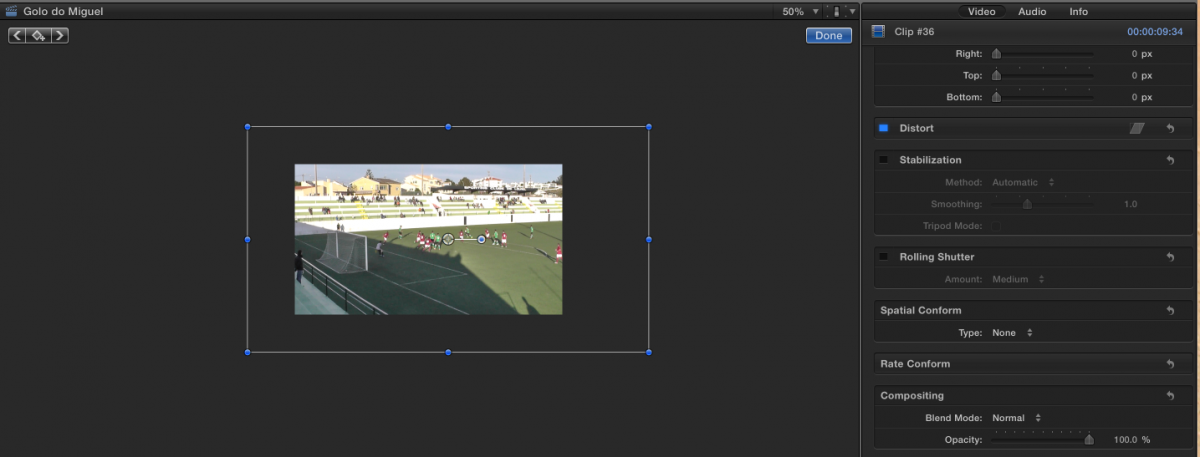
I use this all the time. My camcorder records in 1080p and I choose to output in 720p for several reasons. This allows for easily adjusting the framing in post (see the picture).
Please Log in to join the conversation.
- Karsten Schlüter
-

- Offline
- Moderator
-

Less
More
- Posts: 3790
- Thank you received: 718
02 Dec 2014 17:18 #56774
by Karsten Schlüter
sorry for thread-jacking, but
Never realized, you're editing soccer-games too, Luis??
hey, another one!! cool …
Replied by Karsten Schlüter on topic Punching in on 1080p footage in a 720p project?
lichinho wrote: … (see the picture).…
sorry for thread-jacking, but
Never realized, you're editing soccer-games too, Luis??
hey, another one!! cool …
Please Log in to join the conversation.
02 Dec 2014 17:31 #56776
by lichinho
Replied by lichinho on topic Punching in on 1080p footage in a 720p project?
Yes, I have been editing soccer-games, too... or rather, I should say, *football* games 
I can't do multicam editing, though. I have to do it with just one camera.
You can't discern from the screenshot, but my son is about to score a nice goal
I can't do multicam editing, though. I have to do it with just one camera.
You can't discern from the screenshot, but my son is about to score a nice goal
Please Log in to join the conversation.
- Karsten Schlüter
-
- Offline
- Moderator
-
Less
More
- Posts: 3790
- Thank you received: 718
02 Dec 2014 17:50 - 02 Dec 2014 17:50 #56778
by Karsten Schlüter
lobbing the ball over the keeper (…who doesn't stand on his line, stupido!), and 'his' defender in red too far away to attack him - excellence, Miguel! :silly:
… my son plays left defender, rarely shooting goals ...
His best is meanwhile seven years (gosh!!) ago
ohh, miniDV, iMovie ... looong time ago.
meanwhile, Daddy's using HD, the Prince Of Cool got a lil' older
… but I'm still utilizing my same old music-tracks LOL :silly:
Replied by Karsten Schlüter on topic Punching in on 1080p footage in a 720p project?
lichinho wrote: … my son is about to score a nice goal
lobbing the ball over the keeper (…who doesn't stand on his line, stupido!), and 'his' defender in red too far away to attack him - excellence, Miguel! :silly:
… my son plays left defender, rarely shooting goals ...
His best is meanwhile seven years (gosh!!) ago
ohh, miniDV, iMovie ... looong time ago.
meanwhile, Daddy's using HD, the Prince Of Cool got a lil' older
… but I'm still utilizing my same old music-tracks LOL :silly:
Last edit: 02 Dec 2014 17:50 by Karsten Schlüter.
Please Log in to join the conversation.
