


- Posts: 6
- Thank you received: 0
3 Post Moderation Rule for New Boarders (25 Jan 2021)
New boarders will have their posts moderated - Don't worry if you cannot see your post immediately.
A question about titles...
30 Nov 2014 17:26 #56673
by Tom.B
A question about titles... was created by Tom.B
Hi there!
Many apologies if this question has already been asked, but does anyone know if and how I can trim down a title (one with multiple input areas of text) so that I can put some at the start/middle/end of my video?
Thanks in advance,
Tom.B
Many apologies if this question has already been asked, but does anyone know if and how I can trim down a title (one with multiple input areas of text) so that I can put some at the start/middle/end of my video?
Thanks in advance,
Tom.B
Please Log in to join the conversation.

30 Nov 2014 17:33 #56674
by BenB
Replied by BenB on topic A question about titles...
By "trim" do you mean alter the duration of the title clip? You can do that by dragging the head or tail to where you want them.
Do you mean how to "control" when those text areas come in and out? If making it the duration you need doesn't make them line up properly, then right-click that title template in the title browser, select "Open Copy In Motion". Then alter it there.
Do you mean how to "control" when those text areas come in and out? If making it the duration you need doesn't make them line up properly, then right-click that title template in the title browser, select "Open Copy In Motion". Then alter it there.
Please Log in to join the conversation.
30 Nov 2014 17:36 #56675
by Tom.B
Replied by Tom.B on topic A question about titles...
Hi.
I mean controlling when the clips come in and out. Can you help at all?
I mean controlling when the clips come in and out. Can you help at all?
Please Log in to join the conversation.
30 Nov 2014 18:42 #56676
by BenB
Replied by BenB on topic A question about titles...
Specifically what title template are you using?
And specifically, what do you mean? When the clip starts and stops, or when the titles animate in and out?
And specifically, what do you mean? When the clip starts and stops, or when the titles animate in and out?
Please Log in to join the conversation.
30 Nov 2014 19:43 #56678
by Tom.B
Specifically the Activate one, and specifically when it animates in and out.
For example, I want my title to start here instead of at the beginning of the title animation. When I split the clip to start where I want it to, it essentially duplicates the title clip, making it exactly the same just faster.
I hope you understand now.
Replied by Tom.B on topic A question about titles...
BenB wrote: Specifically what title template are you using?
And specifically, what do you mean? When the clip starts and stops, or when the titles animate in and out?
Specifically the Activate one, and specifically when it animates in and out.
For example, I want my title to start here instead of at the beginning of the title animation. When I split the clip to start where I want it to, it essentially duplicates the title clip, making it exactly the same just faster.
I hope you understand now.
Please Log in to join the conversation.
- Squamish ed
-

- Offline
- Elite Member
-

Less
More
- Posts: 238
- Thank you received: 20
30 Nov 2014 21:14 #56680
by Squamish ed
Ed
Replied by Squamish ed on topic A question about titles...
The title you've selected has very few controls available inside FCPX (with the inspector). If you're wanting to play with the animation timing do what Ben suggests (he really knows this stuff): Open a copy in Motion. There you'll have the options to modify anything you can imagine.
Ed
Please Log in to join the conversation.
30 Nov 2014 23:00 #56683
by BenB
Replied by BenB on topic A question about titles...
Yes. The clip will dynamically re-time itself from where ever the start and end are. It isn't static. You'll have to go into Motion and doctor it up to your personal tastes.
Please Log in to join the conversation.
01 Dec 2014 15:47 #56705
by Tom.B
Will I have to buy Motion separately? I was using the trial version of FCPX, and couldn't see it come with it.

Replied by Tom.B on topic A question about titles...
BenB wrote: Yes. The clip will dynamically re-time itself from where ever the start and end are. It isn't static. You'll have to go into Motion and doctor it up to your personal tastes.
Will I have to buy Motion separately? I was using the trial version of FCPX, and couldn't see it come with it.
Please Log in to join the conversation.
01 Dec 2014 18:32 #56711
by BenB
Replied by BenB on topic A question about titles...
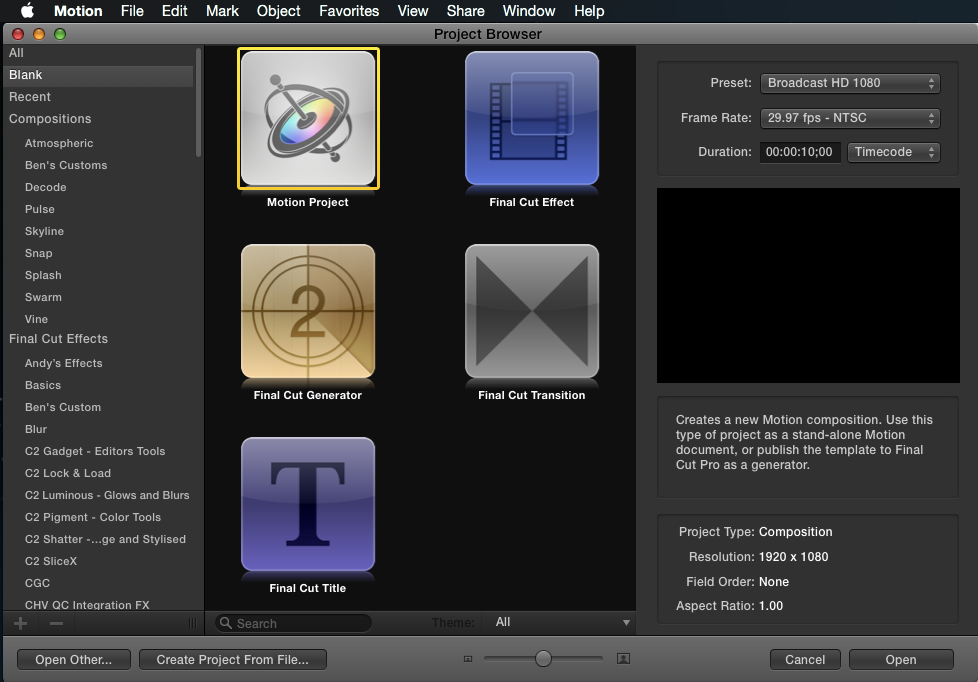
Yes, Motion 5 is a different application you'd have to purchase. But the prices for FCPX, Motion, and Compressor, for what you get, are super cheap. Motion creates templates for FCPX: filters, titles, transitions, generators.
Please Log in to join the conversation.
06 Dec 2014 13:14 #57031
by Tom.B
Hi again, I apologise for the delay in replying!
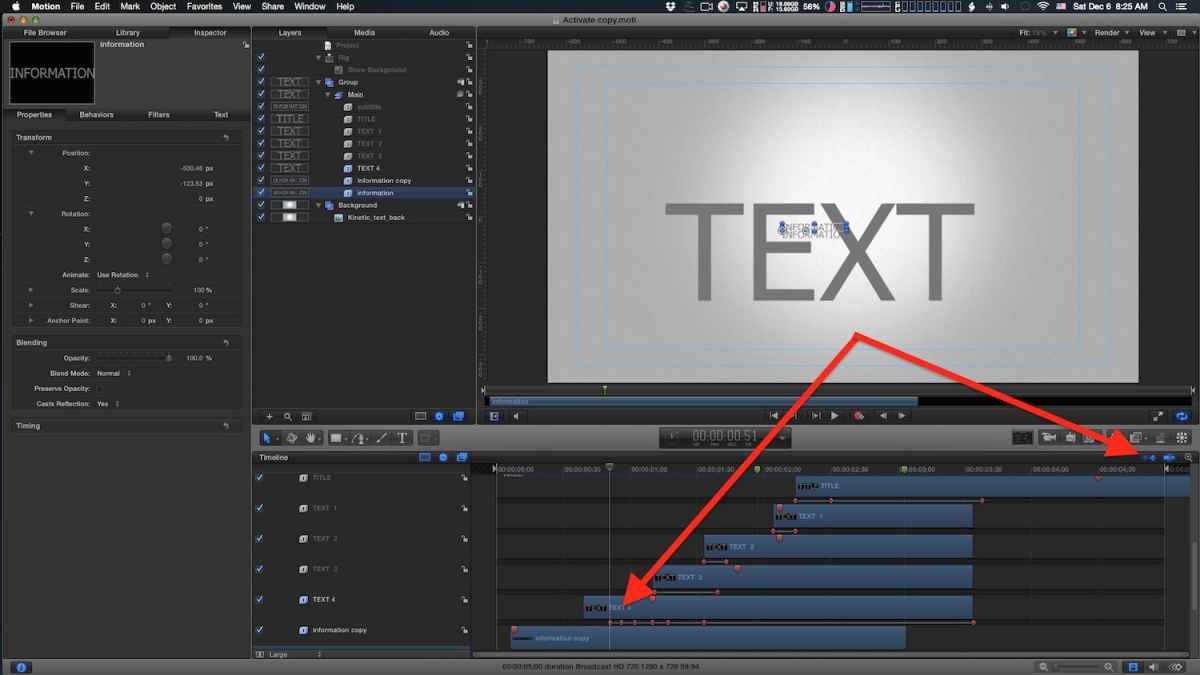
I now have motion and have the title I want opened in there. All is going fine, apart from the length of the title. I can click and drag to make it physically longer, but that doesn't alter how long it takes to build in.
Any ideas?
Replied by Tom.B on topic A question about titles...
BenB wrote: Yes, Motion 5 is a different application you'd have to purchase. But the prices for FCPX, Motion, and Compressor, for what you get, are super cheap. Motion creates templates for FCPX: filters, titles, transitions, generators.
Hi again, I apologise for the delay in replying!
I now have motion and have the title I want opened in there. All is going fine, apart from the length of the title. I can click and drag to make it physically longer, but that doesn't alter how long it takes to build in.
Any ideas?
Please Log in to join the conversation.
06 Dec 2014 14:36 #57035
by Tom.B
Thank you VERY much!
Replied by Tom.B on topic A question about titles...
BenB wrote: Reposition the keyframes. You can turn their visibility on in the timeline which makes repositioning them very easy.
Thank you VERY much!
Please Log in to join the conversation.
