


- Posts: 59
- Thank you received: 1
3 Post Moderation Rule for New Boarders (25 Jan 2021)
New boarders will have their posts moderated - Don't worry if you cannot see your post immediately.
Export settings - Need advice ASAP
27 Nov 2014 20:11 #56597
by frandu
Export settings - Need advice ASAP was created by frandu
Hello all,
I need help. I need to export from FCPX 10.1.3 or Compressor 4.1.3 a movie file with the following specs:
1. Format: MOV self-contained.
2. Video:
CODEC: DVCPRO HD
Bit rate: 100 Mbit/s
Width: 1920 pixels
Height: 1080 pixels
Display aspect ratio: 16:9
Frame rate mode: constant
Frame rate: 29.970 fps
Standard: NTSC
Color space: YUV
Chroma subsampling: 4:2:2
Scan type: Interlaced
3. Audio
Format: PCM
Format settings, Endianness: Little
Bit rate mode: Constant
Channel(s): 2 channel
Sampling rate: 48.0 KHz
Bit depth: 16 bits
How can I do it? Tough deadline...
Thank you.
I need help. I need to export from FCPX 10.1.3 or Compressor 4.1.3 a movie file with the following specs:
1. Format: MOV self-contained.
2. Video:
CODEC: DVCPRO HD
Bit rate: 100 Mbit/s
Width: 1920 pixels
Height: 1080 pixels
Display aspect ratio: 16:9
Frame rate mode: constant
Frame rate: 29.970 fps
Standard: NTSC
Color space: YUV
Chroma subsampling: 4:2:2
Scan type: Interlaced
3. Audio
Format: PCM
Format settings, Endianness: Little
Bit rate mode: Constant
Channel(s): 2 channel
Sampling rate: 48.0 KHz
Bit depth: 16 bits
How can I do it? Tough deadline...
Thank you.
Please Log in to join the conversation.
- Tom Wolsky
-

- Offline
- Moderator
-

27 Nov 2014 20:27 #56598
by Tom Wolsky
Replied by Tom Wolsky on topic Export settings - Need advice ASAP
Import your file to Compressor and when the drop down sheet appears select the ProRes 422 setting, which will output a QuickTime movie. Select the setting in the job and in the Video inspector click Change next to QuickTime settings. Select the DVCPRO HD setting you want either 1080i60 or 1080p30. Either will produce a 1280x1080 output file. That's the anamorphic format used by DVCPRO HD.
Please Log in to join the conversation.
27 Nov 2014 20:34 #56600
by frandu
Replied by frandu on topic Export settings - Need advice ASAP
Hello Tom, thanks for the reply.
I tried what you said, but I can't change the audio settings. Are there any way to choose the Little Endianness?
Anotther question: This DVCPRO is YUV and 4:2:2 and Interlaced, right?
All the best,
I tried what you said, but I can't change the audio settings. Are there any way to choose the Little Endianness?
Anotther question: This DVCPRO is YUV and 4:2:2 and Interlaced, right?
All the best,
Please Log in to join the conversation.
- Tom Wolsky
-
- Offline
- Moderator
-
27 Nov 2014 20:38 #56601
by Tom Wolsky
Replied by Tom Wolsky on topic Export settings - Need advice ASAP
DVCPRO HD is YUV 422. It can be either interlaced or progressive.
You can change the audio. The default is to pass through the audio. Uncheck copy audio tracks. Click on change. Select the settings you need.
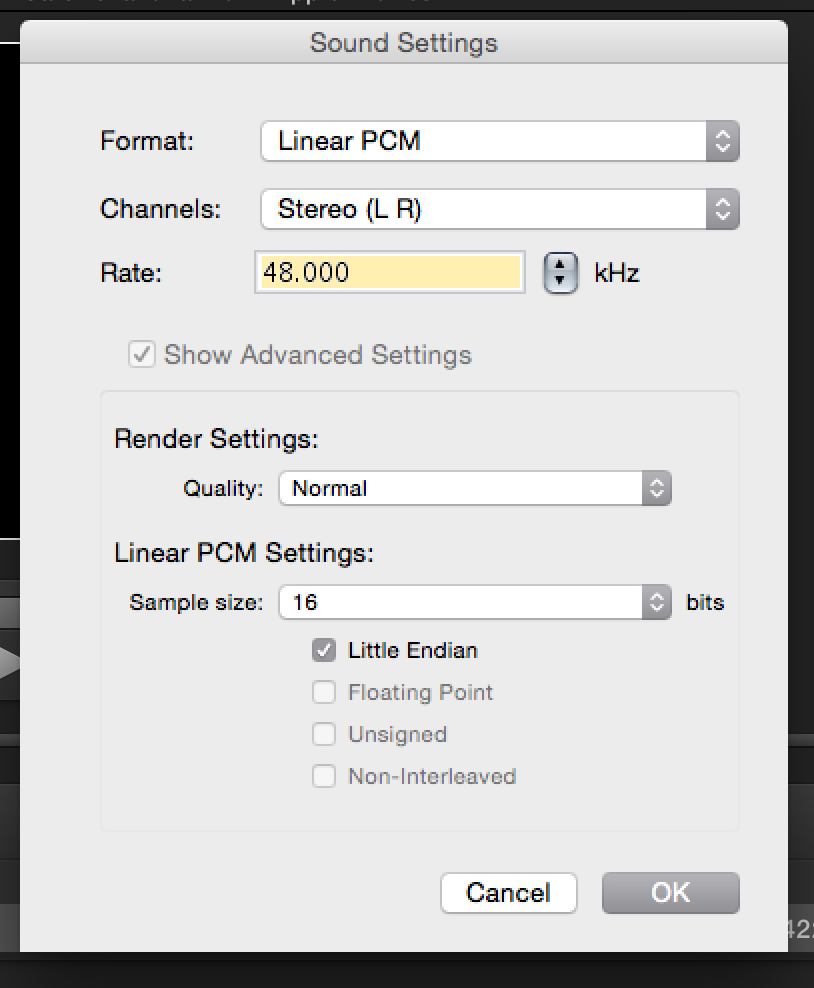
You can change the audio. The default is to pass through the audio. Uncheck copy audio tracks. Click on change. Select the settings you need.
Please Log in to join the conversation.
