


- Posts: 25
- Thank you received: 0
3 Post Moderation Rule for New Boarders (25 Jan 2021)
New boarders will have their posts moderated - Don't worry if you cannot see your post immediately.
Conforming RED to MOV files in FCPX
25 Nov 2014 20:45 #56511
by vfxwolf
Conforming RED to MOV files in FCPX was created by vfxwolf
Greetings all,
New to the forums, seems like a lot of knowledgable people around, and hoping to get some help with a new workflow we're trying out.
We recently shot on the RED EPIC, and the offline has been done in Premiere using the .R3D files. In the meantime, the same R3D files were graded in Davinci on our FCPX suite, and final finishing will be done in FCPX. We did a full reel grade, so all clips have been graded, whether or not they are used in the final edit, just in case the client wants to do another edit. Graded clips were exported from Davinci using source filenames to Prores files.
At any rate, we've exported the offline XML from Premiere, and used 72X to send it into FCPX. Timeline appears to be fine, but clips are all offline. We of course want to relink all the .R3D files to the .MOV files that Davinci rendered.
How do we go about this most efficiently?
Grateful for any assistance.
New to the forums, seems like a lot of knowledgable people around, and hoping to get some help with a new workflow we're trying out.
We recently shot on the RED EPIC, and the offline has been done in Premiere using the .R3D files. In the meantime, the same R3D files were graded in Davinci on our FCPX suite, and final finishing will be done in FCPX. We did a full reel grade, so all clips have been graded, whether or not they are used in the final edit, just in case the client wants to do another edit. Graded clips were exported from Davinci using source filenames to Prores files.
At any rate, we've exported the offline XML from Premiere, and used 72X to send it into FCPX. Timeline appears to be fine, but clips are all offline. We of course want to relink all the .R3D files to the .MOV files that Davinci rendered.
How do we go about this most efficiently?
Grateful for any assistance.
Please Log in to join the conversation.
- Darren Roark
-

- Offline
- Platinum Member
-

25 Nov 2014 21:36 #56512
by Darren Roark
Replied by Darren Roark on topic Conforming RED to MOV files in FCPX
When you tried to relink the r3d files what happened?
Please Log in to join the conversation.
25 Nov 2014 21:49 #56513
by vfxwolf
Replied by vfxwolf on topic Conforming RED to MOV files in FCPX
I haven't tried to relink the .r3d files. I'm sure that would be simple to do, but I don't want to. I want to relink the .r3d references to their .mov counterparts from Davinci. Only the suffix is different.
In other words, I want to recreate the offline edit done with .r3d files, but using the .mov files.
In other words, I want to recreate the offline edit done with .r3d files, but using the .mov files.
Please Log in to join the conversation.
- Darren Roark
-
- Offline
- Platinum Member
-
25 Nov 2014 21:52 #56514
by Darren Roark
Replied by Darren Roark on topic Conforming RED to MOV files in FCPX
In resolve there is a "Make FCPXML" option, however, I haven't tried it the way you got in and out of Resolve through Premiere. Usually I round trip the Red files from FCP X, to Resolve, then FCPXML back to FCP X.
FCP X won't let you swap file formats.
Let me know if that works. (And sorry I misunderstood what your initial question was)
FCP X won't let you swap file formats.
Let me know if that works. (And sorry I misunderstood what your initial question was)
Please Log in to join the conversation.
25 Nov 2014 22:18 #56516
by vfxwolf
Replied by vfxwolf on topic Conforming RED to MOV files in FCPX
Thanks Darren,
I've done the FCPX<->DaVinci roundtrip a hundred times, and it works very well. On this shoot however, we had to outsource the offline to a premiere suite - hence we are where we are.
I feel like there's something we're missing - seems like an obvious need.
I've done the FCPX<->DaVinci roundtrip a hundred times, and it works very well. On this shoot however, we had to outsource the offline to a premiere suite - hence we are where we are.
I feel like there's something we're missing - seems like an obvious need.
Please Log in to join the conversation.
- ronny courtens
-

- Offline
- Moderator
-

Less
More
- Posts: 4455
- Thank you received: 962
25 Nov 2014 22:25 - 25 Nov 2014 22:26 #56519
by ronny courtens
Replied by ronny courtens on topic Conforming RED to MOV files in FCPX
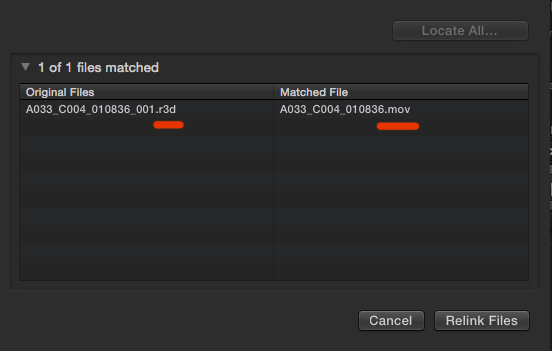
If the graded ProRes files exported from Resolve have the same length and the same audio channels as the original R3D files you should be able to relink the offline R3D clips in FCP X to the ProRes files from Resolve without any problems. Here's an example:
I have an offline R3D file in the FCP X browser:
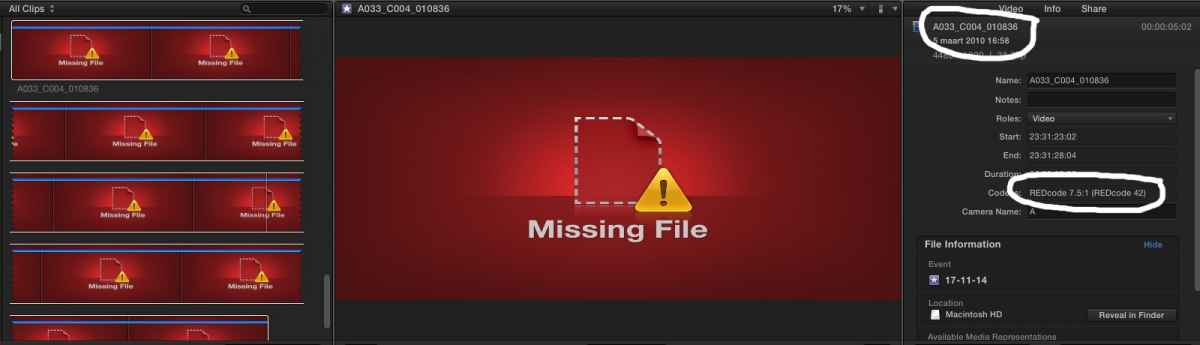
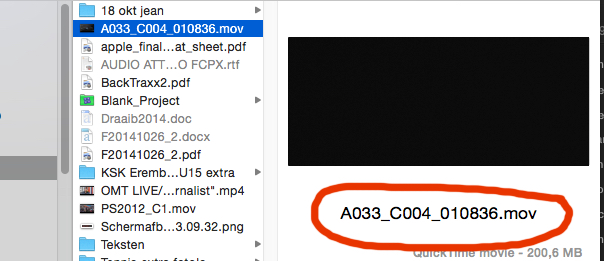
On my desktop I have a ProRes 422 file created from the same R3D file in Resolve:
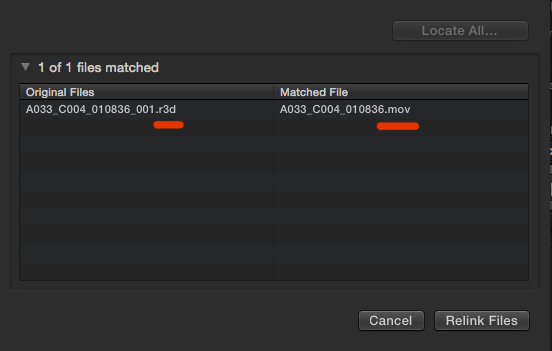
When I relink the offline R3D clip in FCP X to the .mov file on my desktop I get a file match:
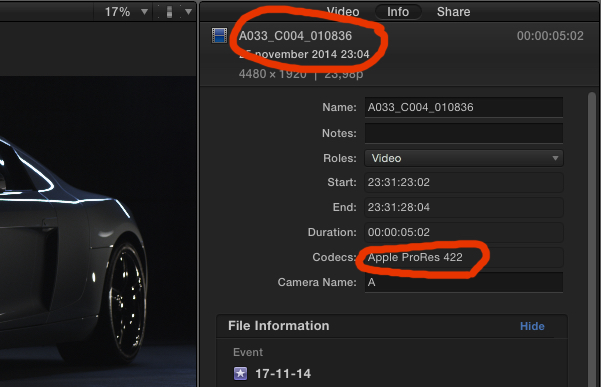
The clip in FCP X is successfully relinked to the .mov file:
- Ronny
I have an offline R3D file in the FCP X browser:
On my desktop I have a ProRes 422 file created from the same R3D file in Resolve:
When I relink the offline R3D clip in FCP X to the .mov file on my desktop I get a file match:
The clip in FCP X is successfully relinked to the .mov file:
- Ronny
Last edit: 25 Nov 2014 22:26 by ronny courtens.
Please Log in to join the conversation.
- Darren Roark
-
- Offline
- Platinum Member
-
25 Nov 2014 22:32 #56520
by Darren Roark
Replied by Darren Roark on topic Conforming RED to MOV files in FCPX
Did you try what Ronny mentioned? I have had mixed results with this as many of my clients aren't as precise as Mr. Courtens.
What if you take the Premiere project into Resolve and then to FCP X? Not exactly the most efficient way, but it will most likely solve the relinking issue.
What if you take the Premiere project into Resolve and then to FCP X? Not exactly the most efficient way, but it will most likely solve the relinking issue.
Please Log in to join the conversation.
- ronny courtens
-
- Offline
- Moderator
-
Less
More
- Posts: 4455
- Thank you received: 962
25 Nov 2014 23:53 #56526
by ronny courtens
Replied by ronny courtens on topic Conforming RED to MOV files in FCPX
Hi Adrian,
I saw your PM, but I'm going to reply here in case anyone is following this thread.
When you need to relink clips to files that have a different format than the original media the clips are referencing to, you will only be able to do this one clip at a time. First let me explain why this happens, then I will explain a little trick to work around this.
There is a bug in the relinking procedure that prevents FCP X from recognizing a folder with media that you can relink to if the file extension of the original media is different from the file extension of the media you want to relink to. When you do this clip by clip all clips will perfectly relink, so it should be perfectly possible to do it as a batch as well. This is a bug that needs to be fixed. Please submit a bug report about this.
So, if you don't have too many clips in your project you can relink the clips one by one.
But if you have tons of clips to relink this can be a major pain. We have had a similar case a few months ago, and we found a little trick to work around this. If you find no other solution and you think relinking one by one will take too much time, this is what you can do:
1. Relink the FCP X Event to the original R3D files. That should be no problem and it will take only a minute.
2. Select the clips in the browser, R-click the selection and choose Convert Media > Proxy Media. This can take some time, but it will be much less of a pain than manually relinking your clips one by one, and you can let it happen during a break or overnight.
3. When the proxy media have been created: close FCP X, open the Library in Finder, open the Transcoded Media > Proxy Media folder and drag all your graded ProRes 422 files into the Proxy Media folder. As the proxy files and the graded 422 files have the same name you will get a message asking if you want to replace the existing files with the new ones. Confirm this for all files so the Proxy media get replaced by the graded ProRes 422 media.
4. Launch FCP X, set your Viewer to Proxy mode and you will see all your graded clips in the browser and on the timeline. Finish the edit and just make sure to leave the Viewer in Proxy mode to export your finished edit with the graded clips.
- Ronny
I saw your PM, but I'm going to reply here in case anyone is following this thread.
When you need to relink clips to files that have a different format than the original media the clips are referencing to, you will only be able to do this one clip at a time. First let me explain why this happens, then I will explain a little trick to work around this.
There is a bug in the relinking procedure that prevents FCP X from recognizing a folder with media that you can relink to if the file extension of the original media is different from the file extension of the media you want to relink to. When you do this clip by clip all clips will perfectly relink, so it should be perfectly possible to do it as a batch as well. This is a bug that needs to be fixed. Please submit a bug report about this.
So, if you don't have too many clips in your project you can relink the clips one by one.
But if you have tons of clips to relink this can be a major pain. We have had a similar case a few months ago, and we found a little trick to work around this. If you find no other solution and you think relinking one by one will take too much time, this is what you can do:
1. Relink the FCP X Event to the original R3D files. That should be no problem and it will take only a minute.
2. Select the clips in the browser, R-click the selection and choose Convert Media > Proxy Media. This can take some time, but it will be much less of a pain than manually relinking your clips one by one, and you can let it happen during a break or overnight.
3. When the proxy media have been created: close FCP X, open the Library in Finder, open the Transcoded Media > Proxy Media folder and drag all your graded ProRes 422 files into the Proxy Media folder. As the proxy files and the graded 422 files have the same name you will get a message asking if you want to replace the existing files with the new ones. Confirm this for all files so the Proxy media get replaced by the graded ProRes 422 media.
4. Launch FCP X, set your Viewer to Proxy mode and you will see all your graded clips in the browser and on the timeline. Finish the edit and just make sure to leave the Viewer in Proxy mode to export your finished edit with the graded clips.
- Ronny
Please Log in to join the conversation.
26 Nov 2014 00:12 #56527
by vfxwolf
Replied by vfxwolf on topic Conforming RED to MOV files in FCPX
Brilliant work around, Ronny! Haven't tried it yet, but will right now. Tried the relinking you suggested earlier, and it works - but doing them one by one will be a royal pain. I was just about to ask if there was a batch approach.
I'll try what you suggest and feedback.
One thing though, even doing it one by one, it initially failed because the .r3d had audio and the corresponding .mov did not. I don't know why the .r3d had audio - we certainly weren't recording sound on set, and in DaVinci, quite a few clips had audio, and I don't know why. Knowing the audio was unimportant, I set Davinci to render the clips without audio. Now I have to go back and re-render the 200 clips with audio out of Davinci.
Question is.. only some of the clips in DaVinci had audio, not all.. if I render all the .mov's with audio and try to relink an .r3d that doesn't have any audio to a .mov that does, will I have the same problem?
I'm guessing that the proxy replacement approach circumvents this.
I'll try what you suggest and feedback.
One thing though, even doing it one by one, it initially failed because the .r3d had audio and the corresponding .mov did not. I don't know why the .r3d had audio - we certainly weren't recording sound on set, and in DaVinci, quite a few clips had audio, and I don't know why. Knowing the audio was unimportant, I set Davinci to render the clips without audio. Now I have to go back and re-render the 200 clips with audio out of Davinci.
Question is.. only some of the clips in DaVinci had audio, not all.. if I render all the .mov's with audio and try to relink an .r3d that doesn't have any audio to a .mov that does, will I have the same problem?
I'm guessing that the proxy replacement approach circumvents this.
Please Log in to join the conversation.
- haysoos123
-
- Offline
- Platinum Member
-
Less
More
- Posts: 402
- Thank you received: 72
26 Nov 2014 00:21 #56528
by haysoos123
Replied by haysoos123 on topic Conforming RED to MOV files in FCPX
What about using Da Vinci to relink? We do this all the time, where we bring in the RAW media into the media pool, and then import an XML with an offline that used ProRes files (uncheck "automatically create clips" or something like that when you import the XML). It will be pretty smart and just relink everything to the RAW instantly, as long as it was already in the media pool. You could probably do the reverse, where you bring in your graded ProRes in the media pool first, and the imported XML should relink to those.
You could do this: export Premiere XML->7toX->export FCPXML. Import graded clips into media pool, then import the FCPXML. It's important to NOT have the .r3d in the media pool! Things should automatically relink. Then export FCPXML, which you can take into FCPX.
You could do this: export Premiere XML->7toX->export FCPXML. Import graded clips into media pool, then import the FCPXML. It's important to NOT have the .r3d in the media pool! Things should automatically relink. Then export FCPXML, which you can take into FCPX.
Please Log in to join the conversation.
26 Nov 2014 01:11 #56530
by vfxwolf
Replied by vfxwolf on topic Conforming RED to MOV files in FCPX
Hmm.. I'm attempting a simple re-link to the .r3d files to kick off Ronny's process, and I'm getting an error I've never gotten before:
"INCOMPATIBLE FILE: The original file and new file have different audio source and channel counts. "
Now these are the original .r3d files that were copied to the Premiere machine for the offline. Don't know whats causing this.. is it an Premiere xml export problem or faulty 72X translation. Regardless, I can't seem to relink to the .r3d files in FCPX.
I'm going to attempt a reconform in DaVinci as Haysoos suggested.
"INCOMPATIBLE FILE: The original file and new file have different audio source and channel counts. "
Now these are the original .r3d files that were copied to the Premiere machine for the offline. Don't know whats causing this.. is it an Premiere xml export problem or faulty 72X translation. Regardless, I can't seem to relink to the .r3d files in FCPX.
I'm going to attempt a reconform in DaVinci as Haysoos suggested.
Please Log in to join the conversation.
26 Nov 2014 01:24 - 26 Nov 2014 01:46 #56531
by vfxwolf
Replied by vfxwolf on topic Conforming RED to MOV files in FCPX
Trying this now.. imported all the graded clips into the Master media pool, then imported the fcpxml, timeline is blank... how do I get it to see and use the graded clips?
EDIT
Turns out the timeline wasn't blank.. just zoomed out to infinity .. now to get it back into FCPX...
EDIT
Turns out the timeline wasn't blank.. just zoomed out to infinity
.. now to get it back into FCPX...
Last edit: 26 Nov 2014 01:46 by vfxwolf.
Please Log in to join the conversation.
26 Nov 2014 01:45 #56532
by vfxwolf
WOW!! That worked like a charm! Thanks Haysoos! Why can't this sort of intelligence be programmed into FCPX's relinking? Its only made by the largest tech company in the world...
Onwards.. thanks again to all the great suggestions. Loving this forum..
Replied by vfxwolf on topic Conforming RED to MOV files in FCPX
haysoos123 wrote: You could do this: export Premiere XML->7toX->export FCPXML. Import graded clips into media pool, then import the FCPXML. It's important to NOT have the .r3d in the media pool! Things should automatically relink. Then export FCPXML, which you can take into FCPX.
WOW!! That worked like a charm! Thanks Haysoos! Why can't this sort of intelligence be programmed into FCPX's relinking? Its only made by the largest tech company in the world...
Onwards.. thanks again to all the great suggestions. Loving this forum..
Please Log in to join the conversation.
- Darren Roark
-
- Offline
- Platinum Member
-
26 Nov 2014 02:05 #56535
by Darren Roark
Replied by Darren Roark on topic Conforming RED to MOV files in FCPX
vfxwolf wrote:
haysoos123 wrote:
WOW!! That worked like a charm! Thanks Haysoos! Why can't this sort of intelligence be programmed into FCPX's relinking? Its only made by the largest tech company in the world...
I think part of the reason is that with FCP 7 and back, it would relink to anything you wanted it to, and it caused me personally a lot of problems. On larger DSLR projects that sometimes had files of the same name it got really messy.
Apple seems to be trying to make things simpler and more foolproof.
Please Log in to join the conversation.
- ievgeniilarin
-
- Offline
- New Member
-

04 Jul 2015 19:23 #66183
by ievgeniilarin
Replied by ievgeniilarin on topic Conforming RED to MOV files in FCPX
Unfortunately the bug is still there (FCPX 10.2.1).ronny courtens wrote: There is a bug in the relinking procedure that prevents FCP X from recognizing a folder with media that you can relink to if the file extension of the original media is different from the file extension of the media you want to relink to. When you do this clip by clip all clips will perfectly relink, so it should be perfectly possible to do it as a batch as well. This is a bug that needs to be fixed. Please submit a bug report about this.
Please Log in to join the conversation.
