


- Posts: 80
- Thank you received: 5
3 Post Moderation Rule for New Boarders (25 Jan 2021)
New boarders will have their posts moderated - Don't worry if you cannot see your post immediately.
Database or not ? Inconsequence in naming channels in FCPX
25 Nov 2014 13:40 #56484
by petersxs
Hello,
I do a lot of multi cam work with 6-8 Kameras and PGM of the live edit.
the audio tracks are recorded on the 4 tracks of the Video. For Example : KAM 1 has Mic 1 and Mic 2
and stereo audience, KAM 2 has PGM and Music playback, and so on ..
after import I name the audio channels respectively in the audio inspector
wich brings me so some problems and basic understanding Questions
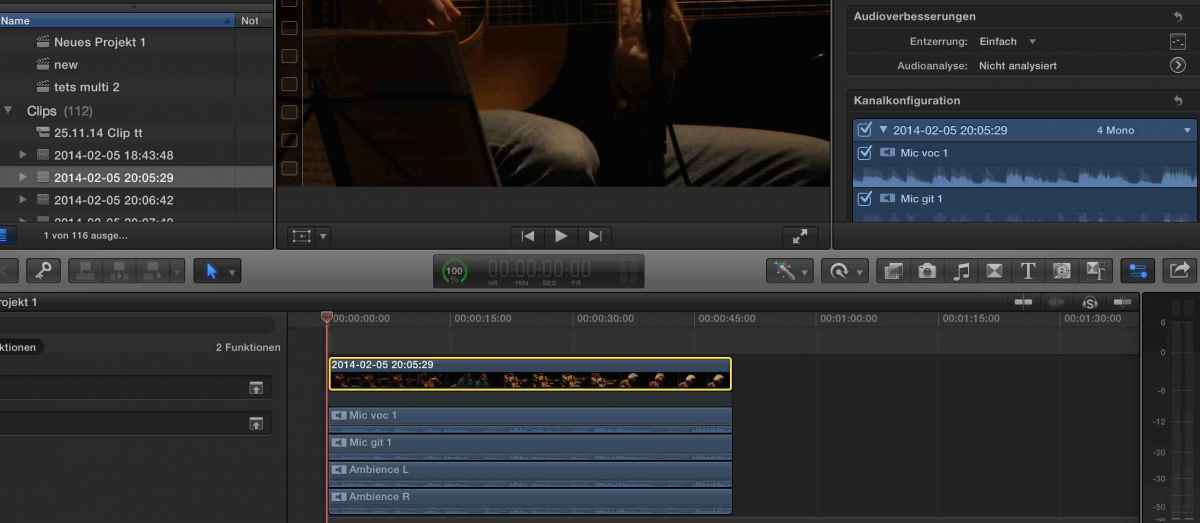
1. in the audio Inspector only 4 mono and 2 stereo can be chosen .
and not 2 mono and one stereo a bug ? , reserved for future updates
2. only on role for ALL 4 tracks can be defined , well more than one roll, but only for all tracks
no individual assignment
Well. so i tried „open in Timeline „ and here audio tracks can be assign to different roles
BUT the names are NOT taken from the clips !! which is incredibly stupid as this is the only place to assign the roles, and the names are just A1-A2
4 mono tracks btw , no matter what you assign in the audio inspector.
3.) so wants the use of this ? an effect i put on a clip in „ open in Timeline “ is taken to the edit. ok - that´s useful. but why not the naming ??
even if i name the tracks in“ Open in TL „ they do not come across .
The naming & roles in the audio inspector is taken to the edit and the multicam clip, at the time of the edit, any change later will not reflect in the edit (project). so the roles & names should be done in advance
and the audio channel configuration is not available in Open in TL“ this could be a very powerful tool but this is not thought trough at all. #
its very confusing and makes exporting audio for post a real mess
so one Mic channel can have so may different names and is alway the same Audio . thats not database management
and metadata oriented editing at all .
or am i missing something ?
what are your thoughts on this ? hope i didn’t confuse too much … the more i try out the more i am
any help and input is very appreciated
I do a lot of multi cam work with 6-8 Kameras and PGM of the live edit.
the audio tracks are recorded on the 4 tracks of the Video. For Example : KAM 1 has Mic 1 and Mic 2
and stereo audience, KAM 2 has PGM and Music playback, and so on ..
after import I name the audio channels respectively in the audio inspector
wich brings me so some problems and basic understanding Questions
1. in the audio Inspector only 4 mono and 2 stereo can be chosen .
and not 2 mono and one stereo a bug ? , reserved for future updates
2. only on role for ALL 4 tracks can be defined , well more than one roll, but only for all tracks
no individual assignment
Well. so i tried „open in Timeline „ and here audio tracks can be assign to different roles
BUT the names are NOT taken from the clips !! which is incredibly stupid as this is the only place to assign the roles, and the names are just A1-A2
4 mono tracks btw , no matter what you assign in the audio inspector.
3.) so wants the use of this ? an effect i put on a clip in „ open in Timeline “ is taken to the edit. ok - that´s useful. but why not the naming ??
even if i name the tracks in“ Open in TL „ they do not come across .
The naming & roles in the audio inspector is taken to the edit and the multicam clip, at the time of the edit, any change later will not reflect in the edit (project). so the roles & names should be done in advance
and the audio channel configuration is not available in Open in TL“ this could be a very powerful tool but this is not thought trough at all. #
its very confusing and makes exporting audio for post a real mess
so one Mic channel can have so may different names and is alway the same Audio . thats not database management
and metadata oriented editing at all .
or am i missing something ?
what are your thoughts on this ? hope i didn’t confuse too much … the more i try out the more i am
any help and input is very appreciated
Please Log in to join the conversation.


25 Nov 2014 16:45 #56496
by BenB
Replied by BenB on topic Database or not ? Inconsequence in naming channels in FCPX
"and the audio channel configuration is not available in Open in TL"
Actually, if you open a clip in its own Timeline, you do have access to audio configuration.
Actually, if you open a clip in its own Timeline, you do have access to audio configuration.
Please Log in to join the conversation.
25 Nov 2014 16:54 #56498
by petersxs
Replied by petersxs on topic Database or not ? Inconsequence in naming channels in FCPX
nope not here , if you open a source clip in its timeline the inspector follows the selection : if you select one or more audio clips
the text beneath the Audio Configuration Says " audio configuration not possible ....."
please try it, but be shure you elect the audio so so see the timeline and not the source clip -- can you change something ?
do you have an idea to the other point's e.g. naming ?
the text beneath the Audio Configuration Says " audio configuration not possible ....."
please try it, but be shure you elect the audio so so see the timeline and not the source clip -- can you change something ?
do you have an idea to the other point's e.g. naming ?
Please Log in to join the conversation.
- ronny courtens
-

- Offline
- Moderator
-

Less
More
- Posts: 4455
- Thank you received: 962
25 Nov 2014 20:04 #56510
by ronny courtens
Replied by ronny courtens on topic Database or not ? Inconsequence in naming channels in FCPX
Let's do this with an example.
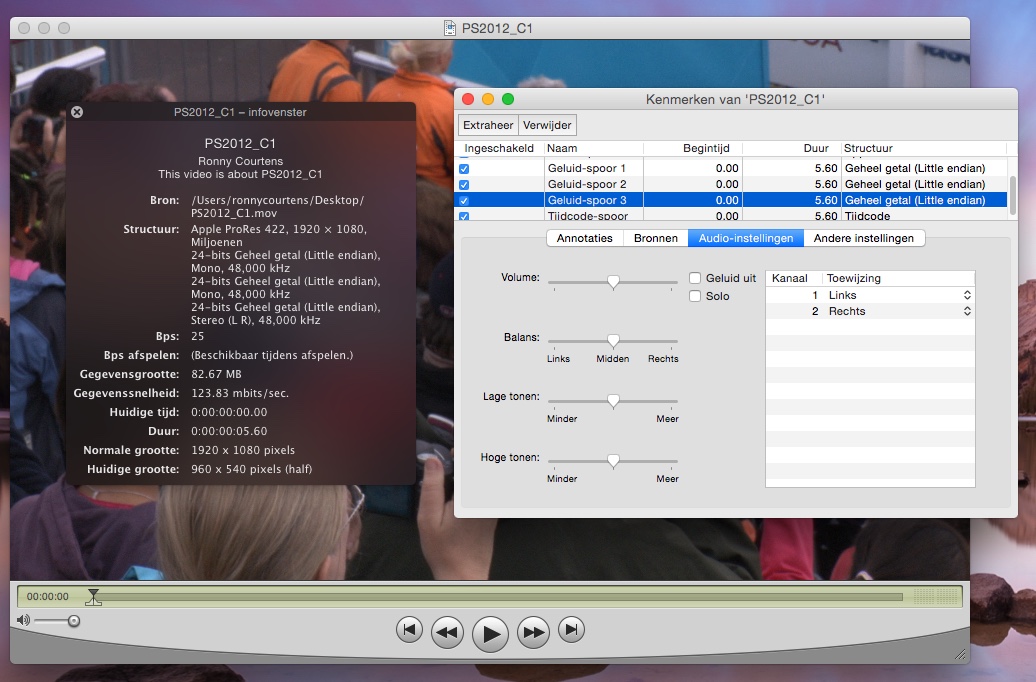
Here you have a camera clip "PS_2012_C1" with 2 mono audio tracks (A1 and A2) and one stereo track (A3):
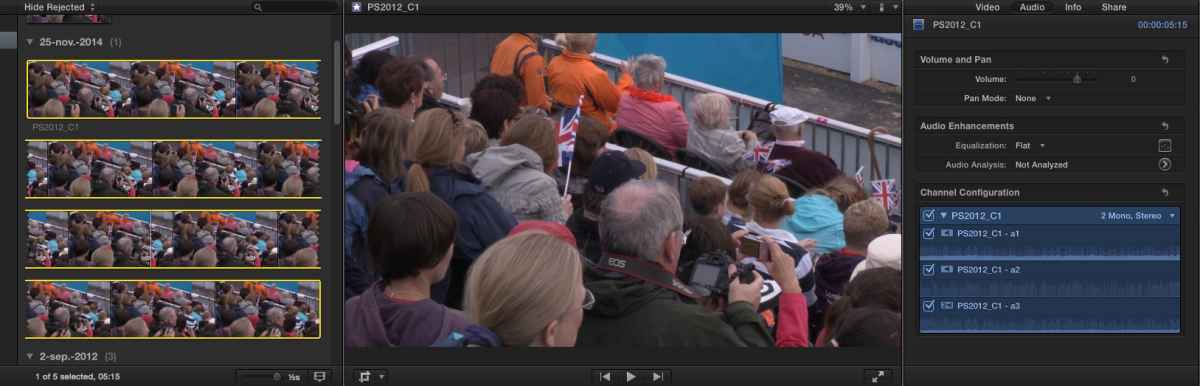
I import the clip in FCP X. The clip is imported with the correct name and the correct channel configuration (2 mono, 1 stereo):
If your clips don't get imported with the correct channel configuration you should speak to your audio guy and tell him to set his audio channels correctly. If he is recording 4 mono channels the clip will come in as 4 mono, or what would you expect?
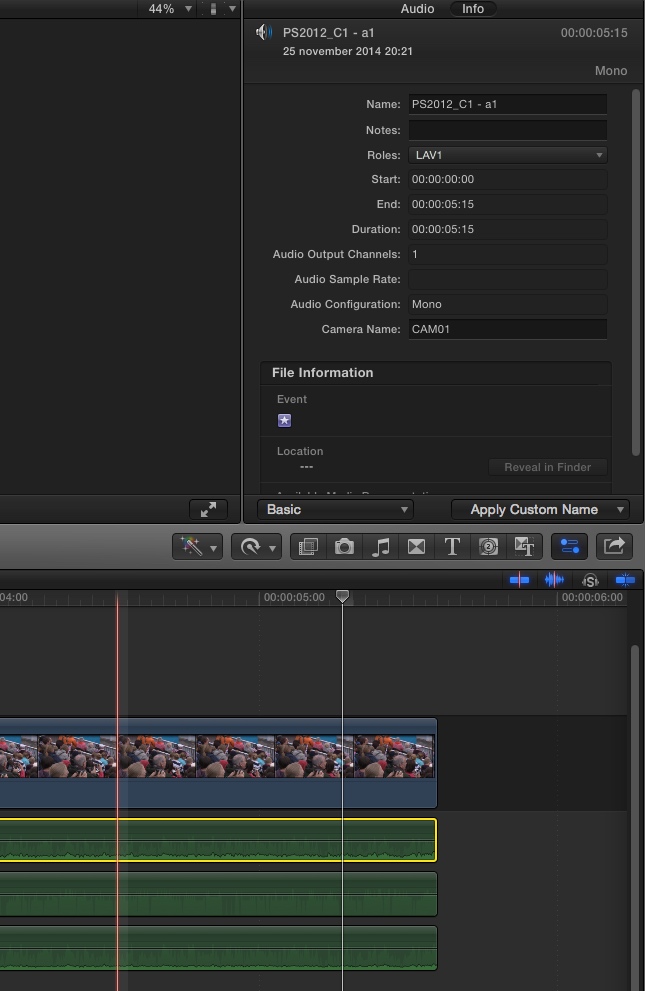
Open the imported clip in its timeline and in the Info tab you can assign a Role to each of your audio channels. If you want to assign custom Roles just select Edit Roles and create as many custom Roles as you wish. Here I have assigned the Role "LAV1" to my A1 mono audio channel:
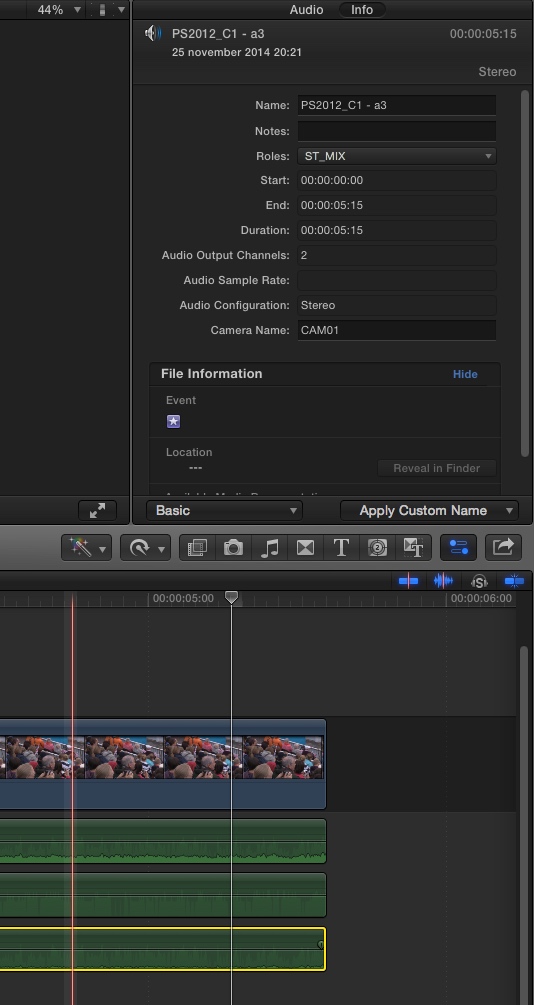
And here I have assigned the Role "ST_MIX" to my A3 stereo channel:
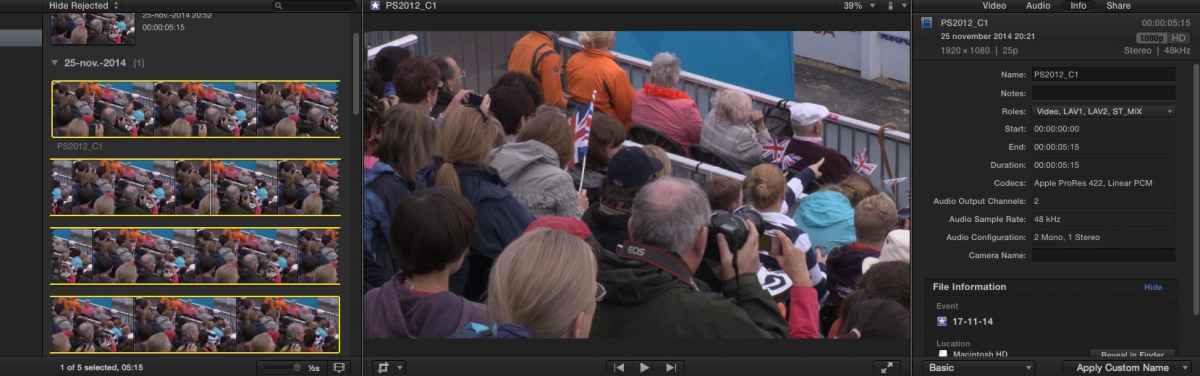
When I return to my clip in the clip browser I now see that the clip has 4 Roles assigned to it: Video, LAV1, LAV2 and ST_MIX:
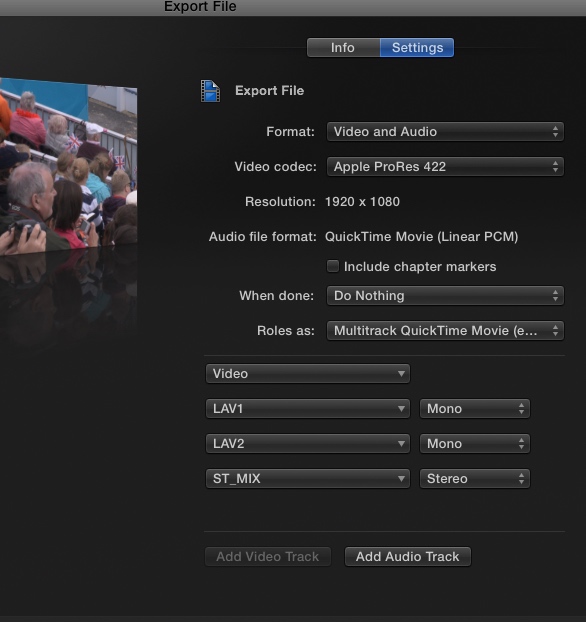
And when I export an Audio XML to LogicX or ProTools, or when I export a multitrack audio file or QT movie, the Roles are perfectly respected:
So my conclusion: IMO the FCP X database works fine, I think you must be doing something wrong.
- Ronny
Here you have a camera clip "PS_2012_C1" with 2 mono audio tracks (A1 and A2) and one stereo track (A3):
I import the clip in FCP X. The clip is imported with the correct name and the correct channel configuration (2 mono, 1 stereo):
If your clips don't get imported with the correct channel configuration you should speak to your audio guy and tell him to set his audio channels correctly. If he is recording 4 mono channels the clip will come in as 4 mono, or what would you expect?
Open the imported clip in its timeline and in the Info tab you can assign a Role to each of your audio channels. If you want to assign custom Roles just select Edit Roles and create as many custom Roles as you wish. Here I have assigned the Role "LAV1" to my A1 mono audio channel:
And here I have assigned the Role "ST_MIX" to my A3 stereo channel:
When I return to my clip in the clip browser I now see that the clip has 4 Roles assigned to it: Video, LAV1, LAV2 and ST_MIX:
And when I export an Audio XML to LogicX or ProTools, or when I export a multitrack audio file or QT movie, the Roles are perfectly respected:
So my conclusion: IMO the FCP X database works fine, I think you must be doing something wrong.
- Ronny
Please Log in to join the conversation.
25 Nov 2014 22:45 #56521
by petersxs
Replied by petersxs on topic Database or not ? Inconsequence in naming channels in FCPX
Hi Ronny
Thank you very much for your detailed reply - i see i have to make my point clearer
its not the Role assigment - its the naming of the channels and configuration ( which help the role Assigment a lot )
lets do this example
a clip is imported with 4 Channels of audio
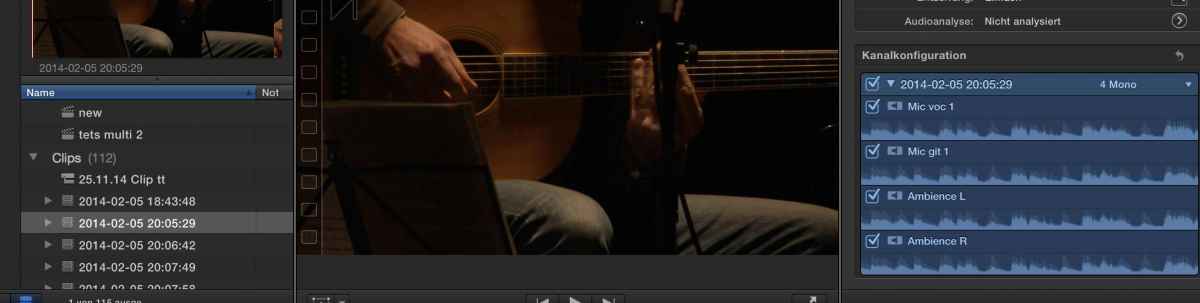
in the audio inspector the channels are named mic ...etc
now to assign the roles open in timeline
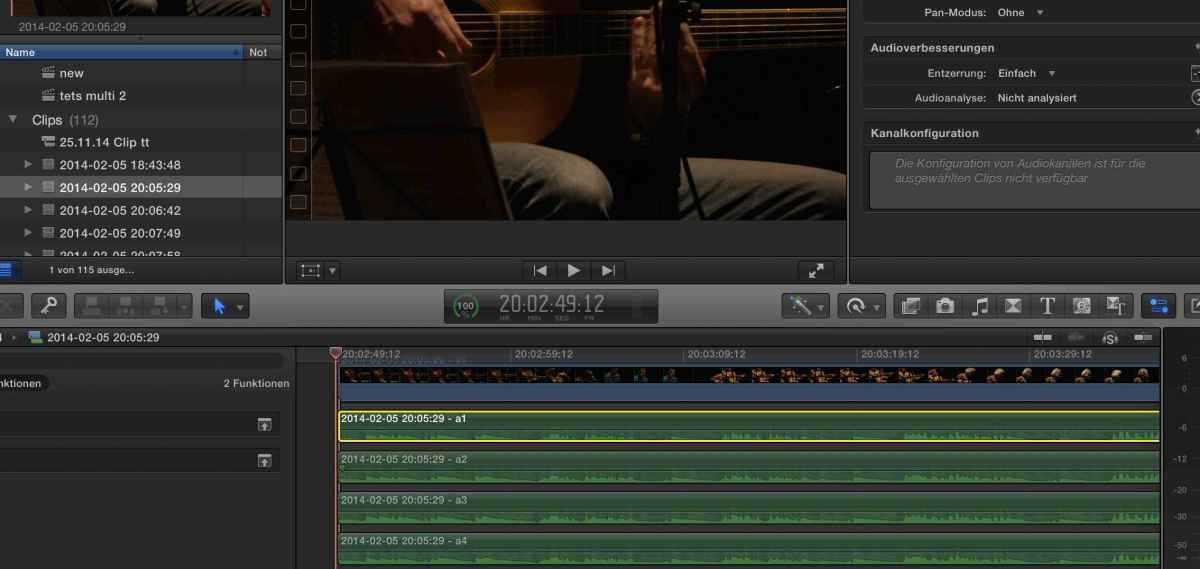
voila look at the names -- no mic ..
so to assign the roles you have to remember the track names which is easy in the case but with 16-24 channels , spread on 8 Cameras quite an annoying challenge -- WHY are the names different ??
now in the project timeline the names are correct
the second thing ist the audio configuration . I don't know a camera that delivers your 2 mono 1 stereo config
BTW what camera is it ? )
the XDCAM HD camera i work with put out 4 times mono on the XDCAM disks
and when i capture live with HD SDI embedded Audio they are all mono . 16 Channels mono.that's quite standard
So what i need is a way to CHANGE / or define the Audio Configuration . to say this is mono , this is stereo , this is suround.
Like in FCP 7-- select 2 audio tracks and there was the command "combine to stereo " finished ..
that i guess should be possible in the "own Timeline" of the clips where the roles are assigned .. but is is not possible as you can see in the picture e-- it is grayed out. only predefined configurations are possible
do you know now what i mean ?
with regards peter
Thank you very much for your detailed reply - i see i have to make my point clearer
its not the Role assigment - its the naming of the channels and configuration ( which help the role Assigment a lot )
lets do this example
a clip is imported with 4 Channels of audio
in the audio inspector the channels are named mic ...etc
now to assign the roles open in timeline
voila look at the names -- no mic ..
so to assign the roles you have to remember the track names which is easy in the case but with 16-24 channels , spread on 8 Cameras quite an annoying challenge -- WHY are the names different ??
now in the project timeline the names are correct
the second thing ist the audio configuration . I don't know a camera that delivers your 2 mono 1 stereo config
BTW what camera is it ? )
the XDCAM HD camera i work with put out 4 times mono on the XDCAM disks
and when i capture live with HD SDI embedded Audio they are all mono . 16 Channels mono.that's quite standard
So what i need is a way to CHANGE / or define the Audio Configuration . to say this is mono , this is stereo , this is suround.
Like in FCP 7-- select 2 audio tracks and there was the command "combine to stereo " finished ..
that i guess should be possible in the "own Timeline" of the clips where the roles are assigned .. but is is not possible as you can see in the picture e-- it is grayed out. only predefined configurations are possible
do you know now what i mean ?
with regards peter
Please Log in to join the conversation.
25 Nov 2014 22:50 - 25 Nov 2014 23:02 #56522
by BenB
Replied by BenB on topic Database or not ? Inconsequence in naming channels in FCPX
Yep, I was mistaken, you can't change configuration in a clip Timeline, but you can when the clip is selected in the Browser, or in another Timeline.
In the Browser, I split a stereo pair into dual mono channels.
i rename each.
When I edit them into the timeline, they have those names still.
If I rename them while in the timeline, the new name sticks.
I can assign each different mono channel a Role, and it sticks.
Would be nice to have access to the individual channels in the clip timeline, too.
And would be nice to assign each channel a role while in the Browser, also.
In the Browser, I split a stereo pair into dual mono channels.
i rename each.
When I edit them into the timeline, they have those names still.
If I rename them while in the timeline, the new name sticks.
I can assign each different mono channel a Role, and it sticks.
Would be nice to have access to the individual channels in the clip timeline, too.
And would be nice to assign each channel a role while in the Browser, also.
Last edit: 25 Nov 2014 23:02 by BenB.
Please Log in to join the conversation.
26 Nov 2014 12:14 - 26 Nov 2014 12:15 #56548
by petersxs
Replied by petersxs on topic Database or not ? Inconsequence in naming channels in FCPX
hi Ben , with
the problem with assigning roles in the edit timeline ( project) ist that this is only valid for this timeline, and does not
count for the source clip . so if you edit different versions from the same source you would have to do this again and again. So yes, it would be very good to do this in advance in the Browser.
you mean in the inspector when the clip in the browser is selected, right ? --- and here only 4 mono or 2 stereo is possible - not any mixed combinationIn the Browser, I split a stereo pair into dual mono channels.
the problem with assigning roles in the edit timeline ( project) ist that this is only valid for this timeline, and does not
count for the source clip . so if you edit different versions from the same source you would have to do this again and again. So yes, it would be very good to do this in advance in the Browser.
Last edit: 26 Nov 2014 12:15 by petersxs.
Please Log in to join the conversation.
