


- Posts: 6
- Thank you received: 0
3 Post Moderation Rule for New Boarders (25 Jan 2021)
New boarders will have their posts moderated - Don't worry if you cannot see your post immediately.
exporting panned audio channels
23 Nov 2014 14:44 #56387
by robodean
exporting panned audio channels was created by robodean
I am working with a sound designer who needs to have quicktime videos with dialogue on the right and the music & effects on the left channels respectively. The only way I have found to do this was to create a container for all my dialogue, another for my sound effects and finally one for my music, panning each individually for the export. This seems very inefficient. In order to export a “normal” quicktime for everyone else, I then need to manually undo the panning or worse still, create another set of copies without the audio panned. Is there no way to do this automatically when exporting roles perhaps?
thanks
thanks
Please Log in to join the conversation.

23 Nov 2014 14:49 #56388
by BenB
Replied by BenB on topic exporting panned audio channels
I do sound design, and I don't understand the need for this "panning". First, your music and effects are in Stereo, so panning it going to screw that totally up. You can only pan mono track, stereo track when panned simply move channels closer to the center, or further to opposite sides. I'd send him media stems as is more of the norm. Assign rolls, export each roll as a separate file. He can assemble them super easy and fast in his NLE. I mean, how is he going to work with stereo track music if the whole thing is made mono and panned hard left? It is no longer stereo, and you can't "mix" the various sound "together" like that. What exactly is he doing?
Please Log in to join the conversation.
23 Nov 2014 14:52 #56389
by robodean
Replied by robodean on topic exporting panned audio channels
Over the years I have learned not to question the requirements of my post-production partners.
If he says he needs a quicktime with the dialogue on left and music and effects on the right, that's what I give him. I'm not going to pick apart his workflow or force him to adapt to me.
I appreciate your reply, but I'm not looking to make him change, rather to find an expedient way to give him what he needs.
If he says he needs a quicktime with the dialogue on left and music and effects on the right, that's what I give him. I'm not going to pick apart his workflow or force him to adapt to me.
I appreciate your reply, but I'm not looking to make him change, rather to find an expedient way to give him what he needs.
Please Log in to join the conversation.
24 Nov 2014 03:43 - 24 Nov 2014 03:44 #56427
by BenB
Replied by BenB on topic exporting panned audio channels
I never said "force" anyone to change. I simply asked a question, similar to ones I've asked my business patterns daily. Open communication with your partners is vital to healthy and productive working relationships. You help each other grow and do better work. I've never had anyone get upset that I wanted to learn why they needed stuff in a specific format. It helps us both work together better. Win/Win! But that aside...
You'll have to make everything dual or single mono in the Channel Configuration for every clip. Then pan each clip hard left or right. There's no magical reconfigure-and-pan-by-role button.
You'll have to make everything dual or single mono in the Channel Configuration for every clip. Then pan each clip hard left or right. There's no magical reconfigure-and-pan-by-role button.
Last edit: 24 Nov 2014 03:44 by BenB.
Please Log in to join the conversation.

24 Nov 2014 04:53 #56429
by plysat
Can't sleep? Try this: fcpxpert.net ;-)
Replied by plysat on topic exporting panned audio channels
"Is there no way to do this automatically when exporting roles..."
Easy. Make sure you have Correct Roles assigned. Share a master file (or file... whatever) as a multichannel Quicktime. If dialog is mono, assign it to the first (mono) channel as is. If it's stereo, select it all and make it a compound clip, give it lower it -3db, and assign it to the first (mono) channel. Same with stereo m&e. Comp the fx and music separately, lower each comp -3db, and assign both those roles to the second (mono) channel. Export, done. You can keep that set of comps if needed, or just break 'em apart when done. I was exporting 10 channel qt's last week... Stereo comp, 5 mono splits, MOS, and stereo M&E all in one pass. Took a little set up time, but no problem.
Easy. Make sure you have Correct Roles assigned. Share a master file (or file... whatever) as a multichannel Quicktime. If dialog is mono, assign it to the first (mono) channel as is. If it's stereo, select it all and make it a compound clip, give it lower it -3db, and assign it to the first (mono) channel. Same with stereo m&e. Comp the fx and music separately, lower each comp -3db, and assign both those roles to the second (mono) channel. Export, done. You can keep that set of comps if needed, or just break 'em apart when done. I was exporting 10 channel qt's last week... Stereo comp, 5 mono splits, MOS, and stereo M&E all in one pass. Took a little set up time, but no problem.
Can't sleep? Try this: fcpxpert.net ;-)
Please Log in to join the conversation.
- Roadswitcher
-

- Offline
- Senior Member
-

Less
More
- Posts: 56
- Thank you received: 4
24 Nov 2014 15:33 #56455
by Roadswitcher
Replied by Roadswitcher on topic exporting panned audio channels
Your Sound Designer is still thinking in terms of Tracks, as if you were editing in FCP7 or else.
The ORF News Bureau here in Paris was working that way to route ambient/interview sound elements to Output ch 1 ( or Left in the old Stereo convention ) and the mix of voice-over and that ambient/interview track to ch 2 ( or Right ).
Nowadays, still with legacy FCP, the output is a 4 channel config ( which could also be interpreted as 2 stereo pairs ), edited in native XDCAM w/MXF wrapper and exported as such, to be able to transfer via Internet that many audio "tracks".
The first pair is a clean stereo rendition of the ambient sound together with a centerd interview part, those tracks are routed/panned in FCP7 to L/R. The second pair is all of that plus the mixed-in voice-over, still routed to a stereo pair track ( 3&4 ) but kept in mono/centered.
This pair will go on air while the first pair will serve for re-use as archival/stock-shot material.
Thats a typical news config, more or less used by german speaking TV stations but not only them.
What your guy possibly meant to achieve is a simple separation of elements, to be able to isolate his sources that are supposed to live on defined tracks.
Even if your edit is not made for news/doc style operations, you could/should simply assign the three classic roles for your audio elements and in the export dialogue "route" those elements to the 2 available output tracks in the Settings Pane of the Export Dialogue this way :
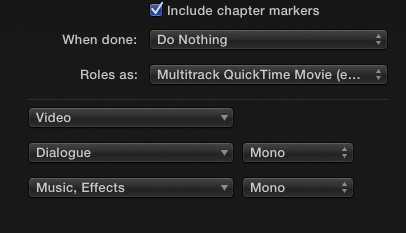
In any case, ask your Designer if he knows how a trackless FCPX works .. he might still be attached to the classic track paradigm.
Alex
The ORF News Bureau here in Paris was working that way to route ambient/interview sound elements to Output ch 1 ( or Left in the old Stereo convention ) and the mix of voice-over and that ambient/interview track to ch 2 ( or Right ).
Nowadays, still with legacy FCP, the output is a 4 channel config ( which could also be interpreted as 2 stereo pairs ), edited in native XDCAM w/MXF wrapper and exported as such, to be able to transfer via Internet that many audio "tracks".
The first pair is a clean stereo rendition of the ambient sound together with a centerd interview part, those tracks are routed/panned in FCP7 to L/R. The second pair is all of that plus the mixed-in voice-over, still routed to a stereo pair track ( 3&4 ) but kept in mono/centered.
This pair will go on air while the first pair will serve for re-use as archival/stock-shot material.
Thats a typical news config, more or less used by german speaking TV stations but not only them.
What your guy possibly meant to achieve is a simple separation of elements, to be able to isolate his sources that are supposed to live on defined tracks.
Even if your edit is not made for news/doc style operations, you could/should simply assign the three classic roles for your audio elements and in the export dialogue "route" those elements to the 2 available output tracks in the Settings Pane of the Export Dialogue this way :
In any case, ask your Designer if he knows how a trackless FCPX works .. he might still be attached to the classic track paradigm.
Alex
Please Log in to join the conversation.
