


- Posts: 37
- Thank you received: 1
3 Post Moderation Rule for New Boarders (25 Jan 2021)
New boarders will have their posts moderated - Don't worry if you cannot see your post immediately.
mark split in fcpx
22 Nov 2014 20:35 #56341
by Xan
mark split in fcpx was created by Xan
Is there an equivalent to mark>mark split in fcpx?
Thanks!!
Thanks!!
Please Log in to join the conversation.

22 Nov 2014 21:48 - 22 Nov 2014 21:52 #56344
by BenB
Replied by BenB on topic mark split in fcpx
Ah, Split Edits, J and L cuts. Super easy, easier than anything else.
Select a clip and either double-click the lower half (audio portion) or use the Control+S shortcut. It is called "Expand Audio/Video". You can then trim the audio and video portions of a clip independently of each other.
You can also use the "Expand Audio Components" command (Control+Option+S) to trim each independent audio channel separately.
Select a clip and either double-click the lower half (audio portion) or use the Control+S shortcut. It is called "Expand Audio/Video". You can then trim the audio and video portions of a clip independently of each other.
You can also use the "Expand Audio Components" command (Control+Option+S) to trim each independent audio channel separately.
Last edit: 22 Nov 2014 21:52 by BenB.
Please Log in to join the conversation.
22 Nov 2014 21:54 #56345
by Xan
Replied by Xan on topic mark split in fcpx
Sorry!! I meant to the mark split´s feature in legacy fcp. Mark>Mark Split>Video In, Video Out, Audio In...
Please Log in to join the conversation.
22 Nov 2014 22:01 #56348
by BenB
Replied by BenB on topic mark split in fcpx
Remembered last minute what a "Split Edit" was. Revised my response.
Please Log in to join the conversation.

22 Nov 2014 22:25 #56349
by NewVideo
Replied by NewVideo on topic mark split in fcpx
Just a quick addition - the magnetic timeline and clip collision avoidance makes this super easy, because even if you want to overlap dialog between two characters, simply extending the audio edit from one character will push the other character's audio aside, rather than overwriting it. So it's much easier to trim tight dialog with slight overlaps if that's the style of dialog cutting you need to do.
Please Log in to join the conversation.
- Tom Wolsky
-

- Offline
- Moderator
-

22 Nov 2014 22:32 #56351
by Tom Wolsky
Replied by Tom Wolsky on topic mark split in fcpx
Legacy had a function that allowed you to create a split edit in Viewer/Source monitor whatever, before you edited a clip into the timeline. Used it a couple of times in the many years. It was kind of wonky because the edit wouldn't drop in right if you had extended audio, which you did most of the time. To avoid it you had to mark corresponding split I/O in the sequence, plus you had to target tracks correctly. If you didn't the edit would drop in with the video offset. Much easier and quicker to do everything in the timeline, and much easier and quicker in X.
Please Log in to join the conversation.
22 Nov 2014 23:48 #56358
by Xan
Replied by Xan on topic mark split in fcpx
Sorry but the only way that I´ve found to do it in final cut 10 is overwrite the audio in the timeline move the playhead to the place that I want to place the video, and then select the audio clip and reveal it in the browser pulse I to mark a new enter and connect the video without audio to the primary storyline. In legacy I positioned the playhead press commnd option I move the playhead and press control i to add a video only In point and overwrite.
thanks a lot!!
thanks a lot!!
Please Log in to join the conversation.
- Tom Wolsky
-
- Offline
- Moderator
-
23 Nov 2014 00:20 - 23 Nov 2014 00:21 #56359
by Tom Wolsky
Replied by Tom Wolsky on topic mark split in fcpx
I think Ben explained how to do this. You edit the video and audio into the timeline. You double click the audio portion of the clip or use the expand audio/video function. You can then either drag the audio to make the split edit or use keyboard shortcuts by selecting the audio edit point in the timeline. It can look something like this
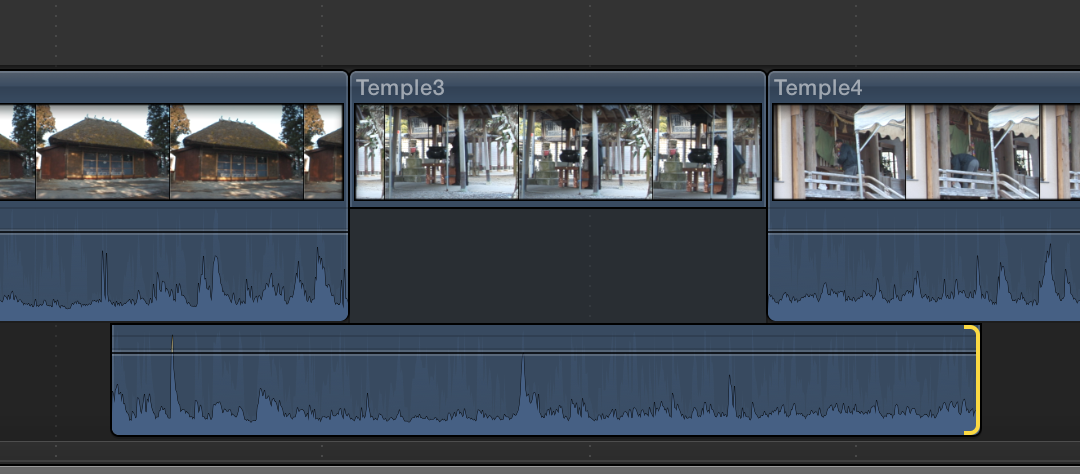
And when you're done you double-click the audio to collapse it back.
And when you're done you double-click the audio to collapse it back.
Last edit: 23 Nov 2014 00:21 by Tom Wolsky.
Please Log in to join the conversation.

23 Nov 2014 01:00 - 23 Nov 2014 01:00 #56364
by plysat
Mark video I/O, SHIFT-1, D, CNTRL-S, trim out J or L cut in Audio. As everyone here says, way quicker than a "split edit". The time you spend setting split marks in a tracked NLE is unnecessary in X.
Can't sleep? Try this: fcpxpert.net ;-)
Replied by plysat on topic mark split in fcpx
Xan wrote: Sorry but the only way that I´ve found to do it in final cut 10 is overwrite the audio in the timeline move the playhead to the place that I want to place the video, and then select the audio clip and reveal it in the browser pulse I to mark a new enter and connect the video without audio to the primary storyline. In legacy I positioned the playhead press commnd option I move the playhead and press control i to add a video only In point and overwrite.
thanks a lot!!
Mark video I/O, SHIFT-1, D, CNTRL-S, trim out J or L cut in Audio. As everyone here says, way quicker than a "split edit". The time you spend setting split marks in a tracked NLE is unnecessary in X.
Can't sleep? Try this: fcpxpert.net ;-)
Last edit: 23 Nov 2014 01:00 by plysat.
Please Log in to join the conversation.
23 Nov 2014 08:04 #56371
by Xan
Replied by Xan on topic mark split in fcpx
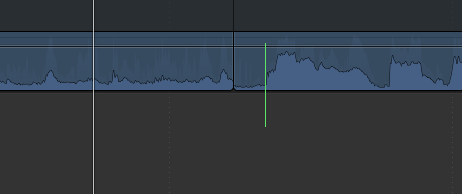
Thanks to everyone, but if I split the edit in the timeline, J-edit, I extend the handle of the audio and In this particular case not work for me, I attached a picture, what I want is that the audio´s segment marked with a green line begins where is located the playhead, forgive if I'm a bit silly, but with the mark split feature was almost instantaneous for me.
Please Log in to join the conversation.
23 Nov 2014 08:17 - 23 Nov 2014 08:25 #56372
by plysat
OK, I see what you want to do. Very easy. Mark the in point in the source where you'd like the audio to begin. Cut the A/V clip in where you want as a *connected clip*. CNTRL-S to expand, trim the video portion to where you'd like it, and then CMD-OPTION- Down Arrow to dump it to the primary. FWIW, I assemble parts as connected clips, do all my Split edits etc, and then "commit" to the primary. It's different, but very quick. Here's a little thing I wrote about it that might be of interest... library.creativecow.net/austin_charlie/FCPX-Timeline/1
Another way, maybe better for narrative, would be to cut it in as you have in your picture, expand A/V, and then just trim the in point of your second video clip, which will pull the preceding video clip up over your audio in point and create a J cut. Try that too, possibly even faster once you get used to how it works...
Can't sleep? Try this: fcpxpert.net ;-)
Replied by plysat on topic mark split in fcpx
Xan wrote: Thanks to everyone, but if I split the edit in the timeline, J-edit, I extend the handle of the audio and In this particular case not work for me, I attached a picture, what I want is that the audio´s segment marked with a green line begins where is located the playhead, forgive if I'm a bit silly, but with the mark split feature was almost instantaneous for me.
OK, I see what you want to do. Very easy. Mark the in point in the source where you'd like the audio to begin. Cut the A/V clip in where you want as a *connected clip*. CNTRL-S to expand, trim the video portion to where you'd like it, and then CMD-OPTION- Down Arrow to dump it to the primary. FWIW, I assemble parts as connected clips, do all my Split edits etc, and then "commit" to the primary. It's different, but very quick. Here's a little thing I wrote about it that might be of interest... library.creativecow.net/austin_charlie/FCPX-Timeline/1
Another way, maybe better for narrative, would be to cut it in as you have in your picture, expand A/V, and then just trim the in point of your second video clip, which will pull the preceding video clip up over your audio in point and create a J cut. Try that too, possibly even faster once you get used to how it works...
Can't sleep? Try this: fcpxpert.net ;-)
Last edit: 23 Nov 2014 08:25 by plysat.
Please Log in to join the conversation.
23 Nov 2014 08:35 #56373
by Xan
Replied by Xan on topic mark split in fcpx
Thanks plysat!! but when I dump it to the primary storyline the "original" audio remains, anyway your way is much faster than I did, thanks again
Please Log in to join the conversation.
23 Nov 2014 08:45 - 23 Nov 2014 08:45 #56374
by plysat
By "original audio" do you mean the audio from the clip that's in the primary before you drop your trimmed clip in? If you don't want that to happen, and you're cutting in sequence - meaning one clip after the other, like assembling a scene - then do it the second way... cut the whole clip in so the audio works, expand A/V, and just trim the picture to where you want it, creating your J or L cut as you do. I'm probably not explaining it well, but mess around with that method and I think you'll find it does just what you want. The primary works more like media composer (in ripple mode) than like the old FCP timeline, but it's really nice once it makes sense....
Can't sleep? Try this: fcpxpert.net ;-)
Replied by plysat on topic mark split in fcpx
Xan wrote: Thanks plysat!! but when I dump it to the primary storyline the "original" audio remains, anyway your way is much faster than I did, thanks again
By "original audio" do you mean the audio from the clip that's in the primary before you drop your trimmed clip in? If you don't want that to happen, and you're cutting in sequence - meaning one clip after the other, like assembling a scene - then do it the second way... cut the whole clip in so the audio works, expand A/V, and just trim the picture to where you want it, creating your J or L cut as you do. I'm probably not explaining it well, but mess around with that method and I think you'll find it does just what you want. The primary works more like media composer (in ripple mode) than like the old FCP timeline, but it's really nice once it makes sense....
Can't sleep? Try this: fcpxpert.net ;-)
Last edit: 23 Nov 2014 08:45 by plysat.
Please Log in to join the conversation.
23 Nov 2014 09:14 #56375
by Xan
Replied by Xan on topic mark split in fcpx
Yes I mean that, I know it´s a unusual situation as the previous clip in the timeline is a cutaway without audio, the picture that I attached the outgoing audio belongs to the previous clip to this particular cutaway. Anyway it´s the first time that i miss the mark split feature.
Thank you very much
Thank you very much
Please Log in to join the conversation.
23 Nov 2014 09:18 #56376
by plysat
Not that unusual really. For me, the best way to figure out X has been to not think in terms of what I'm used to, but just, in a way, messing around and doing things with a "what happens if i do this?" attitude. Good luck!
Can't sleep? Try this: fcpxpert.net ;-)
Replied by plysat on topic mark split in fcpx
Xan wrote: Yes I mean that, I know it´s a unusual situation as the previous clip in the timeline is a cutaway without audio, the picture that I attached the outgoing audio belongs to the previous clip to this particular cutaway. Anyway it´s the first time that i miss the mark split feature.
Thank you very much
Not that unusual really. For me, the best way to figure out X has been to not think in terms of what I'm used to, but just, in a way, messing around and doing things with a "what happens if i do this?" attitude. Good luck!
Can't sleep? Try this: fcpxpert.net ;-)
Please Log in to join the conversation.
- Bluebicycle
-

- Offline
- Premium Member
-

Less
More
- Posts: 80
- Thank you received: 5
23 Nov 2014 09:39 #56377
by Bluebicycle
Replied by Bluebicycle on topic mark split in fcpx
What I find hard to get, and maybe its because I'm old and have been a tape editor, is that rather than J and L, Edits are either vision based or audio based. an action cut would be vision based and you might then want to overlap the audio. But most editing I find is narrative based, and so driven by the audio. FCP X has this wonderful storyline for narrative, so in drama, certainly as a starting point, I would cut for audio and then roll the vision later or earlier, as i refine. I worry that FCP treats audio as less important than vision, i.e shouldn't it be "detach video" not audio. If you do want to roll the vision edit later or earlier, without moving any audio, am I right in thinking you have to expand out both sides of the cut's audio first, otherwise the unexpanded side rolls the audio as well?
Maybe I'm overthinking, as a split edit is a split, but the default seems wrong.
Maybe I'm overthinking, as a split edit is a split, but the default seems wrong.
Please Log in to join the conversation.
23 Nov 2014 09:47 #56378
by Xan
Replied by Xan on topic mark split in fcpx
You are absolutely right!! anyway I always tend to complicate things a lot. I did what you told me: a connected clip but instead of overwrite to the primary storyline after connected I did a gap before and then overwrite it
Please Log in to join the conversation.
23 Nov 2014 14:37 #56383
by BenB
Replied by BenB on topic mark split in fcpx
I will still insist that the "Expanding Audio/Video" technique is EXACTLY what you DO want to do, and is much faster and easier. You can adjust audio and video edit points independently of each other, in any direction. You are very much over complicating this. First, forget everything you ever knew about editing with any other NLE or system, there is no "translation" for any of that into FCPX.
Please Log in to join the conversation.
