


- Posts: 103
- Thank you received: 2
3 Post Moderation Rule for New Boarders (25 Jan 2021)
New boarders will have their posts moderated - Don't worry if you cannot see your post immediately.
Fade out in a generator
20 Nov 2014 12:53 #56244
by Brinky
Fade out in a generator was created by Brinky
Perhaps an easy answer for this one. I use a key as a background for a lower third title. I'd like to have a fade out on the right site of the screen. Is this possible in X or do I have to go for motion for that?
tia
tia
Please Log in to join the conversation.

20 Nov 2014 13:25 #56245
by BenB
Replied by BenB on topic Fade out in a generator
What exactly are you trying to fade out? Can we see a screen shot of what you're working with?
Please Log in to join the conversation.
20 Nov 2014 13:28 #56246
by Brinky
Replied by Brinky on topic Fade out in a generator
Of course. I'd like the right site to fade out so it doesn't completely fill the screen. Other suggestions are of course also welcome 

Please Log in to join the conversation.
- Andreas Kiel
-

- Offline
- Platinum Member
-

Less
More
- Posts: 1077
- Thank you received: 189
20 Nov 2014 13:42 #56247
by Andreas Kiel
Replied by Andreas Kiel on topic Fade out in a generator
Why not create a PNG with Pixelmator or PS.
- Andreas
- Andreas
Please Log in to join the conversation.
20 Nov 2014 13:44 #56248
by Brinky
Replied by Brinky on topic Fade out in a generator
Hi Andreas. (used your title tool a lot in 7 ) PS is possible but if possible in X would be easier ?
) PS is possible but if possible in X would be easier ? Please Log in to join the conversation.
20 Nov 2014 13:57 - 20 Nov 2014 13:58 #56250
by BenB
Replied by BenB on topic Fade out in a generator
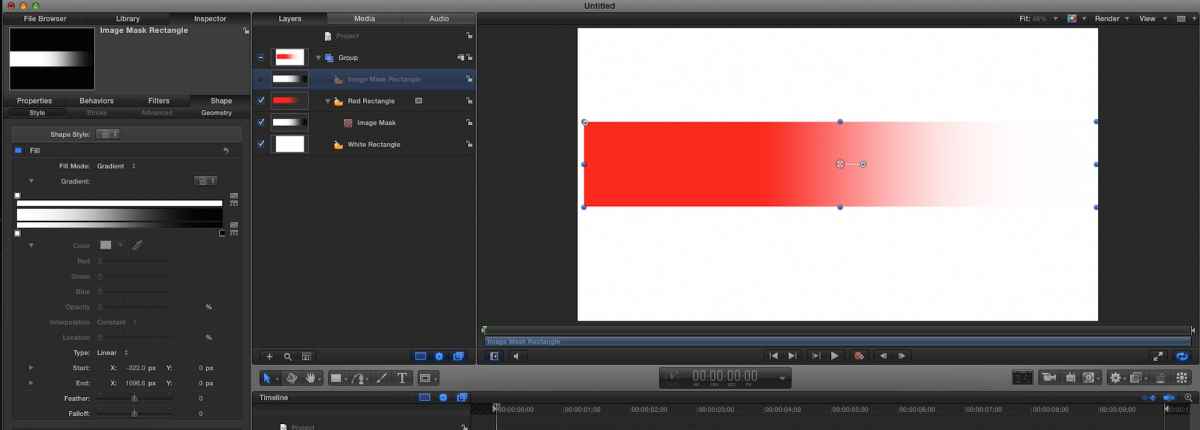
Ah, easy to do in Motion. Could be done in FCPX, but it has no shape generator that lets you apply and tweak a gradient. Otherwise you could put that gradient shape on top, and apply a Blend Mode. At least I don't remember a shape with a gradient being natively inside of FCPX's generators.
In Motion, I'd right click that shape's layer, Cmd+D to duplicate it, then right-click it and apply an Image Mask. Use the duplicated layer as the Image Mask source.
Take that duplicated layer on top, change its fill to a gradient. Change both Y's to 0, and the X's to -330 (start) and 1000 (end), just as a place to start. Adjust the End's X position to taste.
In Motion, I'd right click that shape's layer, Cmd+D to duplicate it, then right-click it and apply an Image Mask. Use the duplicated layer as the Image Mask source.
Take that duplicated layer on top, change its fill to a gradient. Change both Y's to 0, and the X's to -330 (start) and 1000 (end), just as a place to start. Adjust the End's X position to taste.
Last edit: 20 Nov 2014 13:58 by BenB.
Please Log in to join the conversation.
20 Nov 2014 14:00 #56252
by Brinky
Replied by Brinky on topic Fade out in a generator
Thanks I'll try that
Please Log in to join the conversation.
20 Nov 2014 14:02 #56253
by BenB
Replied by BenB on topic Fade out in a generator
In Motion, you could publish those Start and End X parameters to give you some control in FCPX.
Please Log in to join the conversation.
Less
More
- Posts: 971
- Thank you received: 46
20 Nov 2014 14:05 #56254
by MsJustine
Replied by MsJustine on topic Fade out in a generator
That sounds like a great solution...Send a feedback to Apple via Motion feedback page..
Please Log in to join the conversation.
20 Nov 2014 15:13 #56257
by Brinky
Replied by Brinky on topic Fade out in a generator
Think I found an easier way.
I just choose the red rectangle fade. Changed the color and fidlled a bit with the gradient sliders.

I just choose the red rectangle fade. Changed the color and fidlled a bit with the gradient sliders.
Please Log in to join the conversation.
- Karsten Schlüter
-

- Offline
- Moderator
-

Less
More
- Posts: 3790
- Thank you received: 718
20 Nov 2014 16:27 #56267
by Karsten Schlüter
Replied by Karsten Schlüter on topic Fade out in a generator
1) open a copy of 'Gradient Edge' in Motion
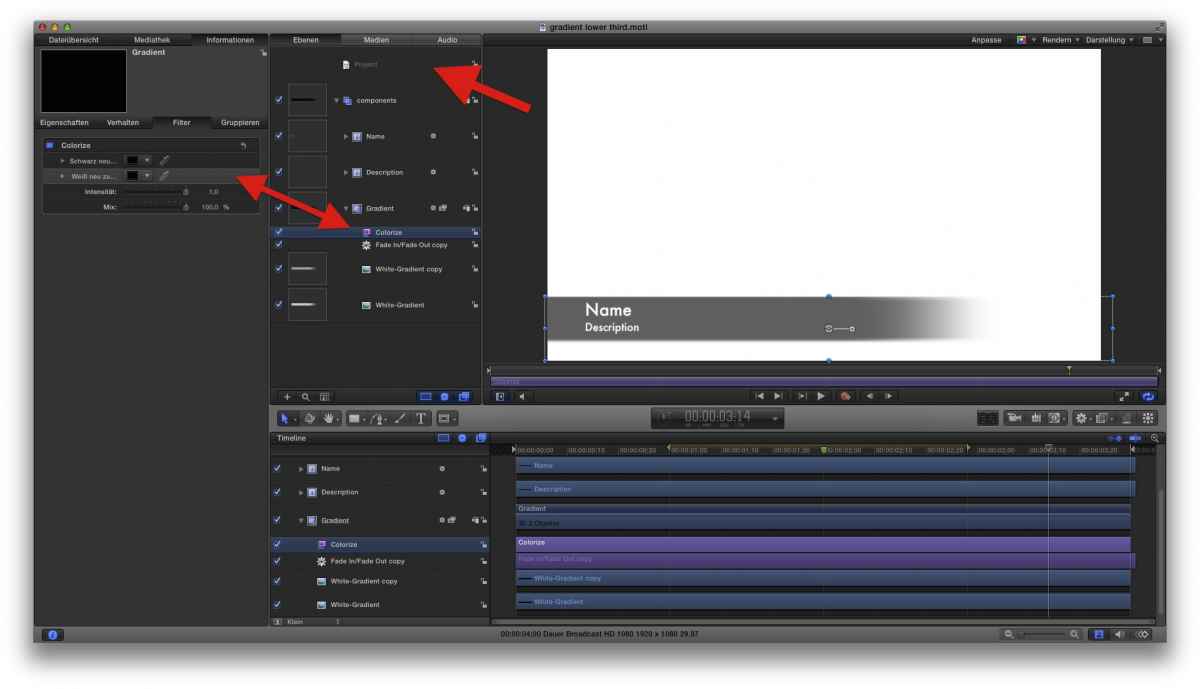
'kill' the rig
'publish' the second entry for Colorize
give it in the Project settings a descriptive name, here 'BarColor'
use it in FCPX:
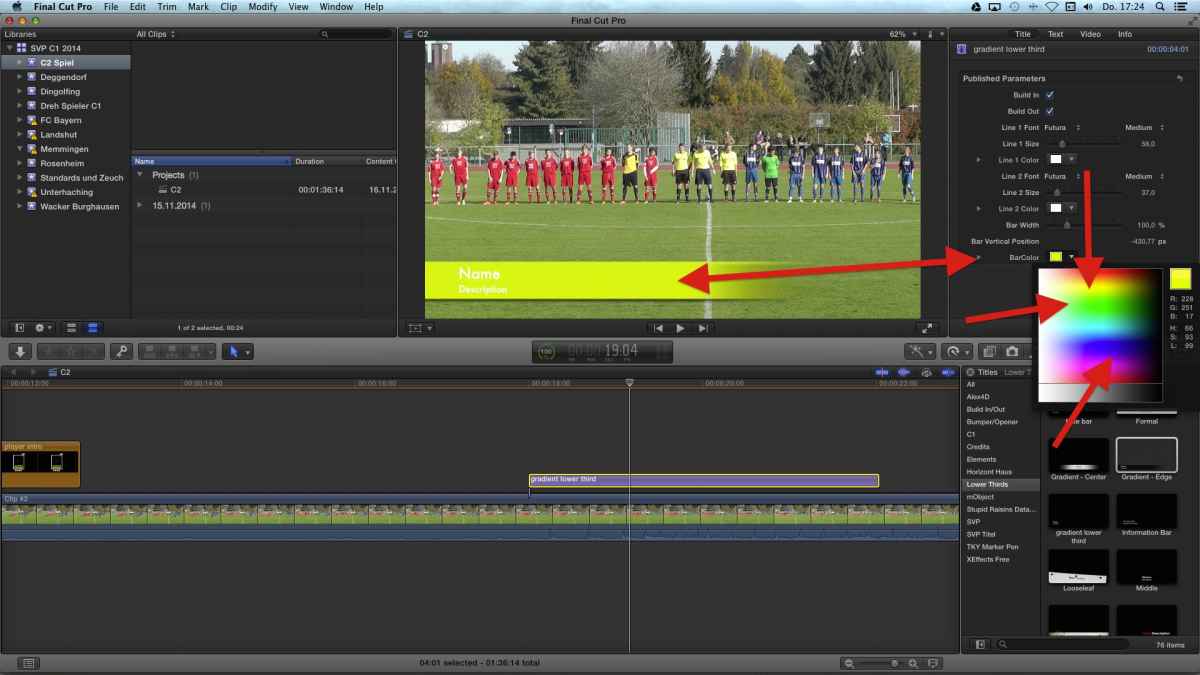
now, you can select any color for the bar you like, plus you keep the functionality of the original (fade-in/-out, etc)
'kill' the rig
'publish' the second entry for Colorize
give it in the Project settings a descriptive name, here 'BarColor'
use it in FCPX:
now, you can select any color for the bar you like, plus you keep the functionality of the original (fade-in/-out, etc)
Please Log in to join the conversation.
20 Nov 2014 16:28 #56268
by BenB
Ulm, to request a solution that already exists?
Replied by BenB on topic Fade out in a generator
MsJustine wrote: That sounds like a great solution...Send a feedback to Apple via Motion feedback page..
Ulm, to request a solution that already exists?
Please Log in to join the conversation.
