


- Posts: 102
- Thank you received: 4
3 Post Moderation Rule for New Boarders (25 Jan 2021)
New boarders will have their posts moderated - Don't worry if you cannot see your post immediately.
Multicam question for 10.1.3 users please.
19 Nov 2014 19:40 - 19 Nov 2014 19:42 #56223
by dfphoto
Multicam question for 10.1.3 users please. was created by dfphoto
Hi group, this is my 2nd job using fcpx I'm learning multicam and have a problem/question.
I have a simple 2 camera interview, I created a multicam clip, and I was hoping I could remove pauses and such using the blade tool and then pick the camera angle at a later time after the rough cut. However, I was practicing and switched between the two cameras before I started blading.
I thought I could go back to the beginning of the multiclip and then re-pick the camera angle but I'm seeing some odd behavior where I play back and then want to switch a section and the new camera is only selected for a second or two then fcpx goes back to the original angle.
Wondering if anyone can shed light on what's going on and what the correct method to use multicam is. Thanks Dave
I have a simple 2 camera interview, I created a multicam clip, and I was hoping I could remove pauses and such using the blade tool and then pick the camera angle at a later time after the rough cut. However, I was practicing and switched between the two cameras before I started blading.
I thought I could go back to the beginning of the multiclip and then re-pick the camera angle but I'm seeing some odd behavior where I play back and then want to switch a section and the new camera is only selected for a second or two then fcpx goes back to the original angle.
Wondering if anyone can shed light on what's going on and what the correct method to use multicam is. Thanks Dave
Last edit: 19 Nov 2014 19:42 by dfphoto. Reason: grammar
Please Log in to join the conversation.
- Karsten Schlüter
-

- Offline
- Moderator
-

Less
More
- Posts: 3790
- Thank you received: 718
20 Nov 2014 16:36 #56275
by Karsten Schlüter
why blading??
You select your wanted parts as in any other clip in the Event browser and add to your project
Then, you select the angle at any given position of the playhead, at the beginning of the clip or somewhere in the middle.
...ehm... you 'edit' in a Project, not in the MC's own timeline, correct ...?
Replied by Karsten Schlüter on topic Multicam question for 10.1.3 users please.
dfphoto wrote: … I could remove pauses and such using the blade tool and then pick the camera angle … later …
why blading??
You select your wanted parts as in any other clip in the Event browser and add to your project
Then, you select the angle at any given position of the playhead, at the beginning of the clip or somewhere in the middle.
...ehm... you 'edit' in a Project, not in the MC's own timeline, correct ...?
Please Log in to join the conversation.
20 Nov 2014 16:54 #56277
by dfphoto
Replied by dfphoto on topic Multicam question for 10.1.3 users please.
Thanks Karsten,
I did find out my concept of changing the angle would work after the fact, but I will try your comments, I'm dumb not an expert at all with this editing stuff.
Just trying to learn the in and outs... no pun intended.
I did find out my concept of changing the angle would work after the fact, but I will try your comments, I'm dumb not an expert at all with this editing stuff.
Just trying to learn the in and outs... no pun intended.
Please Log in to join the conversation.
- Karsten Schlüter
-
- Offline
- Moderator
-
Less
More
- Posts: 3790
- Thank you received: 718
20 Nov 2014 17:20 - 20 Nov 2014 17:48 #56280
by Karsten Schlüter
any expert started dumb .. and I'm just a enthusiastic hobbyist ...
But I've 'taught ' a few friends FCPX and EVERY one of them started to use the Blade-tool-thingie for editing, "You have to cut the film, don't?…no scissors here, agh, a blade…" :woohoo:
I really, really recommend to spend some hours with the usual suspects, izzyvideo, Larry Jordan, and my favorites ripple training. I love to spend an evening with AppleTV before my telly, watching the literally hundreds of free and profound videos, Mark & Steve publish everyweek... for free on YouTube!!
… believe it or not: you don't use the blade for 'cutting' movies in FCPX ......
Replied by Karsten Schlüter on topic Multicam question for 10.1.3 users please.
dfphoto wrote: … I'm dumb not an expert at all with this editing stuff.….
any expert started dumb .. and I'm just a enthusiastic hobbyist ...
But I've 'taught ' a few friends FCPX and EVERY one of them started to use the Blade-tool-thingie for editing, "You have to cut the film, don't?…no scissors here, agh, a blade…" :woohoo:
I really, really recommend to spend some hours with the usual suspects, izzyvideo, Larry Jordan, and my favorites ripple training. I love to spend an evening with AppleTV before my telly, watching the literally hundreds of free and profound videos, Mark & Steve publish everyweek... for free on YouTube!!
… believe it or not: you don't use the blade for 'cutting' movies in FCPX ......
Last edit: 20 Nov 2014 17:48 by Karsten Schlüter.
Please Log in to join the conversation.
20 Nov 2014 17:25 #56281
by dfphoto
Replied by dfphoto on topic Multicam question for 10.1.3 users please.
Thanks Karsten... I'll look at them, Larry is a bit annoying I'm in LA and seen him present a few times...
LOL my personal opinion
LOL my personal opinion
Please Log in to join the conversation.
- Karsten Schlüter
-
- Offline
- Moderator
-
Less
More
- Posts: 3790
- Thank you received: 718
20 Nov 2014 17:47 - 20 Nov 2014 17:50 #56282
by Karsten Schlüter
… don't know him in person, I would call his style a bit 'pastoral'… which is GOOD for me, as an alien, not schpeaking English so well, his 'pace' is nice ........ for me, ol' man.-
Speaking of Mark&Steve: don't miss their new '… In Under Five Minutes'-tutorials, and, in regards to 'Listening Comprehension Tests', don't miss the FCPX Virtual User Group meetings, hosted by Alex The Mumble Lindsay ...
another hour (two...) with valuable tipps&tricks ............
They did four shows meanwhile … grab a beer, sitting at the table with the Big Boys - nice!
(in case Mr Lindsay is reading here: no personal offense meant, communication is a game for two… I'M the alien)
Replied by Karsten Schlüter on topic Multicam question for 10.1.3 users please.
dfphoto wrote: … Larry is a bit annoying…
… don't know him in person, I would call his style a bit 'pastoral'… which is GOOD for me, as an alien, not schpeaking English so well, his 'pace' is nice ........ for me, ol' man.-
Speaking of Mark&Steve: don't miss their new '… In Under Five Minutes'-tutorials, and, in regards to 'Listening Comprehension Tests', don't miss the FCPX Virtual User Group meetings, hosted by Alex The Mumble Lindsay ...
another hour (two...) with valuable tipps&tricks ............
They did four shows meanwhile … grab a beer, sitting at the table with the Big Boys - nice!
(in case Mr Lindsay is reading here: no personal offense meant, communication is a game for two… I'M the alien)
Last edit: 20 Nov 2014 17:50 by Karsten Schlüter.
Please Log in to join the conversation.

22 Nov 2014 17:53 #56338
by VidGreg
Replied by VidGreg on topic Multicam question for 10.1.3 users please.
Karsten,
What do you have against blading?
I use it all the time.
While you can select a range(s) to append to the timeline, removing sections within the clip like what the OP wants to do is where you use the Blade. How else do you eliminate a second or two of … of…ahh… ahhs?
Thank goodness for magnetic timeline. FCP7 would always mess up about here for me and go out of sync.
I think Dave has other issues
Dave are you using the Angle Editor? Simply clicking on the angle you want in the angle editor icon will do a blade cut to that viewer. If you only want to switch the viewer or you want to change the angle in the timeline without a cut, hold down the option key & click to switch the angle. You can also use the number keys, in your case 1&2. You can do this in real time as it is playing.
Be sure to pick your audio you want to use and then edit video only unless you want to switch audio sources as well.
Karsten is correct that MacBreak Studios has lots of great vids available.
Here is a short 3 minute vid on camera angle editing in multi cam. (not MacBreak) Lots of vids available.
Hope this helps, Greg
What do you have against blading?
I use it all the time.
While you can select a range(s) to append to the timeline, removing sections within the clip like what the OP wants to do is where you use the Blade. How else do you eliminate a second or two of … of…ahh… ahhs?
Thank goodness for magnetic timeline. FCP7 would always mess up about here for me and go out of sync.
I think Dave has other issues
Dave are you using the Angle Editor? Simply clicking on the angle you want in the angle editor icon will do a blade cut to that viewer. If you only want to switch the viewer or you want to change the angle in the timeline without a cut, hold down the option key & click to switch the angle. You can also use the number keys, in your case 1&2. You can do this in real time as it is playing.
Be sure to pick your audio you want to use and then edit video only unless you want to switch audio sources as well.
Karsten is correct that MacBreak Studios has lots of great vids available.
Here is a short 3 minute vid on camera angle editing in multi cam. (not MacBreak) Lots of vids available.
Hope this helps, Greg
Please Log in to join the conversation.
22 Nov 2014 19:15 #56339
by dfphoto
Replied by dfphoto on topic Multicam question for 10.1.3 users please.
Hi guys,
what my specific issue is I have a 2 camera interview I ended up with 25 min of usable dialog that I'm cutting into a series of 1-2 min segments dealing with a specific topic.
What I'm testing and trying is to have the multicam in the project and as the last poster mentioned; I am trying to remove pauses and dead air time. but I want to have the option of editing which camera angle at a later time. I cannot understand the best way to do this as I can only get the blade to do this to both clips so I don't lose the audio sync and still be able to trim.
as mention previously if I try to do this with the multicam on its own I see spaces and not snapping. I like ripple might need to buy the tutorial but 50 - 80 per is a lot to me at this time.
what my specific issue is I have a 2 camera interview I ended up with 25 min of usable dialog that I'm cutting into a series of 1-2 min segments dealing with a specific topic.
What I'm testing and trying is to have the multicam in the project and as the last poster mentioned; I am trying to remove pauses and dead air time. but I want to have the option of editing which camera angle at a later time. I cannot understand the best way to do this as I can only get the blade to do this to both clips so I don't lose the audio sync and still be able to trim.
as mention previously if I try to do this with the multicam on its own I see spaces and not snapping. I like ripple might need to buy the tutorial but 50 - 80 per is a lot to me at this time.
Please Log in to join the conversation.

22 Nov 2014 21:57 #56346
by BenB
Replied by BenB on topic Multicam question for 10.1.3 users please.
"While you can select a range(s) to append to the timeline, removing sections within the clip like what the OP wants to do is where you use the Blade."
I think the point is to use ranges to delete. Hit R, select the range you don't want, delete, move on. One mouse click and drag, done.
In a Multicam, doing this in the Project Timeilne, that it has been edited in, works just fine. Option-click angles to switch a specific clip from one to the other, as explained previously. So Range-Delete and Option-click should work pretty quick and easy for these tasks. Pretty simple, unless I'm not understanding properly.
I think the point is to use ranges to delete. Hit R, select the range you don't want, delete, move on. One mouse click and drag, done.
In a Multicam, doing this in the Project Timeilne, that it has been edited in, works just fine. Option-click angles to switch a specific clip from one to the other, as explained previously. So Range-Delete and Option-click should work pretty quick and easy for these tasks. Pretty simple, unless I'm not understanding properly.
Please Log in to join the conversation.
22 Nov 2014 22:35 #56352
by dfphoto
Replied by dfphoto on topic Multicam question for 10.1.3 users please.
Thanks Ben,
you're right on, that's what I have been doing glad that's one way to do it. This app is getting better a long learning curve!!!
Thanks to all, Dave
you're right on, that's what I have been doing glad that's one way to do it. This app is getting better a long learning curve!!!
Thanks to all, Dave
Please Log in to join the conversation.
22 Nov 2014 22:38 #56354
by VidGreg
Replied by VidGreg on topic Multicam question for 10.1.3 users please.
Dave
Can you post a screen shot of the "gaps/spaces" and a segment of the timeline?
Thanks, Greg
Can you post a screen shot of the "gaps/spaces" and a segment of the timeline?
Thanks, Greg
Please Log in to join the conversation.
22 Nov 2014 22:48 #56355
by dfphoto
Replied by dfphoto on topic Multicam question for 10.1.3 users please.
Hi as mentioned if I am viewing the multicam clip and I blade I see a gap as per here.
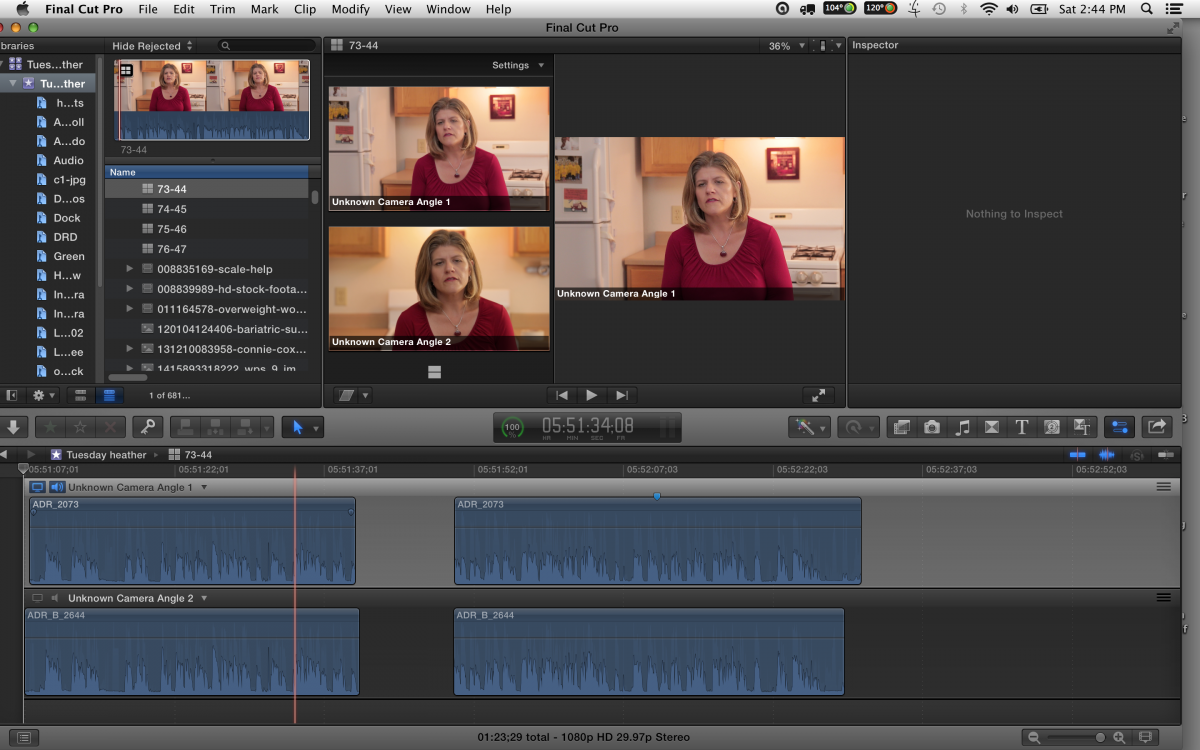
Please Log in to join the conversation.
22 Nov 2014 22:50 #56356
by dfphoto
Replied by dfphoto on topic Multicam question for 10.1.3 users please.
if I am in the project and blade it snaps together like this both images are on the same project, I have a place gap between them as I am looking at two options.
Sorry never added images before...
Sorry never added images before...
Please Log in to join the conversation.
22 Nov 2014 22:52 #56357
by dfphoto
Replied by dfphoto on topic Multicam question for 10.1.3 users please.
of course this is different than playing and clicking 1-2 etc to switch angles this is when you have a delicate selection process. However saying that I can go back and switch angles but if I have used the 1-2 angle selector first, then I am stuck with seeing jump cuts.
I might be doing all of this incorrectly as this is my first real test of using multicam.
I might be doing all of this incorrectly as this is my first real test of using multicam.
Please Log in to join the conversation.
23 Nov 2014 00:42 #56360
by VidGreg
Replied by VidGreg on topic Multicam question for 10.1.3 users please.
Hey Dave,
We should be able to work this out.
Is there an extra clip or audio clip that is not showing up in the attachment?
In the Multicam angle viewer (shift command 7) is the Audio Clip at the top? Drag to bottom. Select video clip as source.
Try holding down the Shift key when you make a Blade cut. Shift+Command+B = Blade All
Once you blade all, then you should be able to delete segment. Does this work?
Here I am assuming that you wish to remove a section from the multi clip. Yes/No?
You said…
"if I am in the project and blade it snaps together like this both images are on the same project, I have a place gap between them as I am looking at two options."
Furthermore, you said…
"of course this is different than playing and clicking 1-2 etc to switch angles this is when you have a delicate selection process. However saying that I can go back and switch angles but if I have used the 1-2 angle selector first, then I am stuck with seeing jump cuts"
When you switch angles it is a jump cut. All you are really doing is switching camera angles, not cutting out a section.
Looks like what you are doing is selecting a segment of video only and deleting with the audio clip being the source clip, therefore it is only deleting the section of the video, but since the audio is the source clip and you are not through blading all clips it is leaving the audio portion. Go to multi clip angle viewer, move audio down, select video as source and use Blade all command and see if this works.
Hope this helps, Greg
We should be able to work this out.
Is there an extra clip or audio clip that is not showing up in the attachment?
In the Multicam angle viewer (shift command 7) is the Audio Clip at the top? Drag to bottom. Select video clip as source.
Try holding down the Shift key when you make a Blade cut. Shift+Command+B = Blade All
Once you blade all, then you should be able to delete segment. Does this work?
Here I am assuming that you wish to remove a section from the multi clip. Yes/No?
You said…
"if I am in the project and blade it snaps together like this both images are on the same project, I have a place gap between them as I am looking at two options."
Furthermore, you said…
"of course this is different than playing and clicking 1-2 etc to switch angles this is when you have a delicate selection process. However saying that I can go back and switch angles but if I have used the 1-2 angle selector first, then I am stuck with seeing jump cuts"
When you switch angles it is a jump cut. All you are really doing is switching camera angles, not cutting out a section.
Looks like what you are doing is selecting a segment of video only and deleting with the audio clip being the source clip, therefore it is only deleting the section of the video, but since the audio is the source clip and you are not through blading all clips it is leaving the audio portion. Go to multi clip angle viewer, move audio down, select video as source and use Blade all command and see if this works.
Hope this helps, Greg
Please Log in to join the conversation.
23 Nov 2014 00:54 #56361
by dfphoto
Replied by dfphoto on topic Multicam question for 10.1.3 users please.
Hi not sure if I just sent this in to the forum,
I tried shift b and that works but it also cut my music layer but I will examine this further.
You guys are all great for sharing with me, I appreciate it very much!!! I will add the karma ranks but I can only add one every 6 hours... so sorry I have slacked on that.
I tried shift b and that works but it also cut my music layer but I will examine this further.
You guys are all great for sharing with me, I appreciate it very much!!! I will add the karma ranks but I can only add one every 6 hours... so sorry I have slacked on that.
Please Log in to join the conversation.
23 Nov 2014 01:24 #56366
by VidGreg
Replied by VidGreg on topic Multicam question for 10.1.3 users please.
Hi Dave,
Sounds like we might be getting closer.
If you have a background music that you are cutting to, you can add it as a separate clip, not part of the multi cam clip and not blade through it. You can add it later if you want.
See if this video by MacBreak Studio helps you to understand FCPX multi cam edits. It is a little old but still relevant.
Some important stuff for you happens around 3 mins in.
the next in series shows some refined trim edits and switching angles.
Hope this helps, Greg
Sounds like we might be getting closer.
If you have a background music that you are cutting to, you can add it as a separate clip, not part of the multi cam clip and not blade through it. You can add it later if you want.
See if this video by MacBreak Studio helps you to understand FCPX multi cam edits. It is a little old but still relevant.
Some important stuff for you happens around 3 mins in.
the next in series shows some refined trim edits and switching angles.
Hope this helps, Greg
Please Log in to join the conversation.
23 Nov 2014 02:02 #56367
by dfphoto
Replied by dfphoto on topic Multicam question for 10.1.3 users please.
Hi Greg,
I was trying your technique on my project timeline not the multicam clip.
I believe you're talking about using the multicam clip and cutting before I drop it on my timeline.
slightly off subject: I found this video to help with jump cuts such as my interview video.
You kick ass esp. on a sat. night!!!
I was trying your technique on my project timeline not the multicam clip.
I believe you're talking about using the multicam clip and cutting before I drop it on my timeline.
slightly off subject: I found this video to help with jump cuts such as my interview video.
You kick ass esp. on a sat. night!!!
Please Log in to join the conversation.
- Karsten Schlüter
-
- Offline
- Moderator
-
Less
More
- Posts: 3790
- Thank you received: 718
23 Nov 2014 12:47 #56380
by Karsten Schlüter
a) The blade is not for editing. … ok, that sounds a bit nuts, but how I meant it is:
the CONCEPT in FCPX, and perhaps the difference to other NLEs is, you select a range/set IO in the Event first, not in the timeline, and apply this selection then to your storyline, and so on… you can do that rough in the Event browser, and you can 'trim' precisely in the storyline by using shortcuts (you've seen Sam Mestman editing without a mouse? ) ...
In my humble understanding of the Blade-tool, it is for splitting material, e.g. you like to apply an effect to just part of some continuous action.-
b) by concept you don't edit in the MultiiCam's own timeline… the 'marvel' of a MC-clip is, it behaves and can be treated like a single clip. A MC is for synching. 'Gaps' can only happen, when the clips, the MC is made of, are not continuously shot. What is no problem, and can be done intentionally … but the concept of a multi-angle synched recording is: one 'action', continuously shown in various angles to one audio. When you start to edit in the MC's timeline, you edit in tracks…
c) ehms&ahhs … as mentioned above: 'range' the unwanted part in the audio-timeline of your project and zero the loudness. When you blade it, you have to cover the 'jump' with a cut-away. Or, with some tricky morphing...
I'm not in the positon to tell you, or anybody, how you should use the various options in FCPX to 'cut' :silly:
But for editing, in terms of selecting wanted from unwanted parts of a+v or a or v only, my understanding is, you use the various options to set I/O-points - with shortcuts J/K/L/I/O in the Event, or Option-L/R bracket/backslash in the storyline, or with mouse&skimmer, or with the range tool, ...
Blading is for splitting. Not editing. On my Mac
Replied by Karsten Schlüter on topic Multicam question for 10.1.3 users please.
VidGreg wrote: Karsten,
What do you have against blading? … How else do you eliminate a second or two of … of…ahh… ahhs? …
a) The blade is not for editing. … ok, that sounds a bit nuts, but how I meant it is:
the CONCEPT in FCPX, and perhaps the difference to other NLEs is, you select a range/set IO in the Event first, not in the timeline, and apply this selection then to your storyline, and so on… you can do that rough in the Event browser, and you can 'trim' precisely in the storyline by using shortcuts (you've seen Sam Mestman editing without a mouse? ) ...
In my humble understanding of the Blade-tool, it is for splitting material, e.g. you like to apply an effect to just part of some continuous action.-
b) by concept you don't edit in the MultiiCam's own timeline… the 'marvel' of a MC-clip is, it behaves and can be treated like a single clip. A MC is for synching. 'Gaps' can only happen, when the clips, the MC is made of, are not continuously shot. What is no problem, and can be done intentionally … but the concept of a multi-angle synched recording is: one 'action', continuously shown in various angles to one audio. When you start to edit in the MC's timeline, you edit in tracks…
c) ehms&ahhs … as mentioned above: 'range' the unwanted part in the audio-timeline of your project and zero the loudness. When you blade it, you have to cover the 'jump' with a cut-away. Or, with some tricky morphing...
I'm not in the positon to tell you, or anybody, how you should use the various options in FCPX to 'cut' :silly:
But for editing, in terms of selecting wanted from unwanted parts of a+v or a or v only, my understanding is, you use the various options to set I/O-points - with shortcuts J/K/L/I/O in the Event, or Option-L/R bracket/backslash in the storyline, or with mouse&skimmer, or with the range tool, ...
Blading is for splitting. Not editing. On my Mac
Please Log in to join the conversation.
23 Nov 2014 16:48 #56391
by VidGreg
Replied by VidGreg on topic Multicam question for 10.1.3 users please.
Hey Dave,
If the TPayton method works, it is a great way to cover up short (very short) gaps. While he doesn't show how the gaps were originally created, I assume here he did indeed blade cut some ahmmms out from one angle(clip).
T's contributions are great (Peter has elevated several of his "tutorials" from comments to Posts) and I have learned lots from him including this "morphing" technique.
His last bit about maintaining timing may apply to what you are doing if using(timing to) a sound track.
Actually, the blading I was talking about was on a project timeline.
I use Ranges or I/O and Shift I/O for initial selection as Karsten and Ben said, but then I append to a timeline and make refined edits either by lengthening or shorting edit points, or by blading and removing sections I don't want. Hope this is clear. You can change the angle in the timeline to whatever you want as discussed earlier.
In the case of removing the "ahhs/emms" etc… I almost always do this in the timeline as I just don't catch/hear them in my original Range selection.
Some of Apple's terminology and naming can get confusing. Angle viewer/Angle view editor, Timelines and what you do in each is a part of the learning curve.
Karsten and I may be debating different names for the same thing or maybe we just have different workflows and methods. I agree with him that whatever works for you is the "best" method at least till you "discover" a better way.
I do use blading in the timeline for fine tuning "edits", maybe Karsten only calls "editing" the selection of material to include. "Edits/editing", including blade cuts (splitting), is everything I do to get to the finished project.
While Karsten's method of attenuating the sound out of a section of the clip can work, it leaves a glaring dead sound space if you do not add a background sound clip back in. If using this method, remember to add some overlapping fade-ins/outs to the added background sound.
"To each their own, said the little old lady as she kissed the cow".
Let us know how it is going.
Hope this helps, Greg
If the TPayton method works, it is a great way to cover up short (very short) gaps. While he doesn't show how the gaps were originally created, I assume here he did indeed blade cut some ahmmms out from one angle(clip).
T's contributions are great (Peter has elevated several of his "tutorials" from comments to Posts) and I have learned lots from him including this "morphing" technique.
His last bit about maintaining timing may apply to what you are doing if using(timing to) a sound track.
Actually, the blading I was talking about was on a project timeline.
I use Ranges or I/O and Shift I/O for initial selection as Karsten and Ben said, but then I append to a timeline and make refined edits either by lengthening or shorting edit points, or by blading and removing sections I don't want. Hope this is clear. You can change the angle in the timeline to whatever you want as discussed earlier.
In the case of removing the "ahhs/emms" etc… I almost always do this in the timeline as I just don't catch/hear them in my original Range selection.
Some of Apple's terminology and naming can get confusing. Angle viewer/Angle view editor, Timelines and what you do in each is a part of the learning curve.
Karsten and I may be debating different names for the same thing or maybe we just have different workflows and methods. I agree with him that whatever works for you is the "best" method at least till you "discover" a better way.
I do use blading in the timeline for fine tuning "edits", maybe Karsten only calls "editing" the selection of material to include. "Edits/editing", including blade cuts (splitting), is everything I do to get to the finished project.
While Karsten's method of attenuating the sound out of a section of the clip can work, it leaves a glaring dead sound space if you do not add a background sound clip back in. If using this method, remember to add some overlapping fade-ins/outs to the added background sound.
"To each their own, said the little old lady as she kissed the cow".
Let us know how it is going.
Hope this helps, Greg
Please Log in to join the conversation.
