


3 Post Moderation Rule for New Boarders (25 Jan 2021)
New boarders will have their posts moderated - Don't worry if you cannot see your post immediately.
Export to AAF/OMF: alternative to X2Pro ?

My question is slightly more complex than it seems.
Some of you (esp. Ronny) know that I'm about to finish a shortfilm with a complex timeline.
Due to a problem with the SDK of RED, there is a delay of 1ms each second of a consecutive clip. This might lead to delays of up to 90ms in my dialogues. It is NOT the fault of X2Pro, but of RED (see thread here x2pro.net/Forum/12-x2pro-professional/74...sing-audio.html#1626 ) however I am concerned:
* Is 90ms of delay in a dialogue something people will notice ?
* Is there an alternative to X2Pro I can try in order to see if I get the same issue ?
Thank you!
Please Log in to join the conversation.
- Tom Wolsky
-

- Offline
- Moderator
-

Please Log in to join the conversation.
- ronny courtens
-

- Offline
- Moderator
-
- Posts: 4455
- Thank you received: 962
I entirely agree with Tom. Don't worry about 90ms delay, I have seen much worse. You will be the only one knowing it's there.
Actually audio sync slip is absolutely non-detectable from -100ms (delayed) to +25ms (advanced).
There have been many advanced technical studies about this, if you want to knock yourself out you can read one here: www.atsc.org/cms/pdf/audio_seminar/12%20...onization-Status.pdf
- Ronny
Please Log in to join the conversation.
Also interesting that:
– Our brains are used to sound being delayed in nature (by distance)
– Our brains are confused when sound precedes the vision

OK, I'm relieved then, thank you!
Please Log in to join the conversation.
- ronny courtens
-
- Offline
- Moderator
-
- Posts: 4455
- Thank you received: 962
Humans are such funny creatures

- Ronny
Please Log in to join the conversation.
(The RED video footage plays at 99.9% of its speed while sound goes on to 100%)
However they clearly state its judged by EXPERT viewers.
Sorry, a very senior feature sound designer is going to give me 4 days of his life, so I really need to make sure there will be no technical issue
Please Log in to join the conversation.
- Tom Wolsky
-
- Offline
- Moderator
-
Please Log in to join the conversation.
- ronny courtens
-
- Offline
- Moderator
-
- Posts: 4455
- Thank you received: 962
I have had a look at this thread on the X2Pro forum. Boy, RED really has this messed up big time. My thoughts on this:
- If your original RED clips play at 99% of the speed they actually should play, and your audio plays at 100%, your audio will indeed advance by 1ms /sec with respect to the video. But...
- On your longest clip (which is 92 seconds) this means the audio will be advanced by 2 frames at the very end of this clip. Two frames is indeed a limit that could be noticed by expert viewers in ideal circumstances. But that is the worst case scenario. And it only occurs at the very end of this clip and not on the rest of the clip, nor on any shorter clips.
- So I think you still will be fairly safe. But should anyone notice the audio drift anyway, you always can speed up any problematic video clips by 1% and extend them to fit after you have brought the final audio mix back into FCP X. This will bring your final output perfectly back in sync.
- Ronny
Please Log in to join the conversation.
One last question: wouldn't it be preferable to slow down the final audio of 1% rather than speeding up the video by 1% ? Calculation/safety wise I mean.
Please Log in to join the conversation.
- ronny courtens
-
- Offline
- Moderator
-
- Posts: 4455
- Thank you received: 962
- Ronny
Please Log in to join the conversation.
I'm back from Audio Mix (boy, it's unbelievable how much it improves a film).
So now I need to try this speeding up. However last time we talked about 99% when actually I think it should be 99,9%. Problem: FCPX doesn't allow a retiming of 0,001% (when I try it puts it back to 100%).
Any idea of what I should do ?
Please Log in to join the conversation.
- ronny courtens
-
- Offline
- Moderator
-
- Posts: 4455
- Thank you received: 962
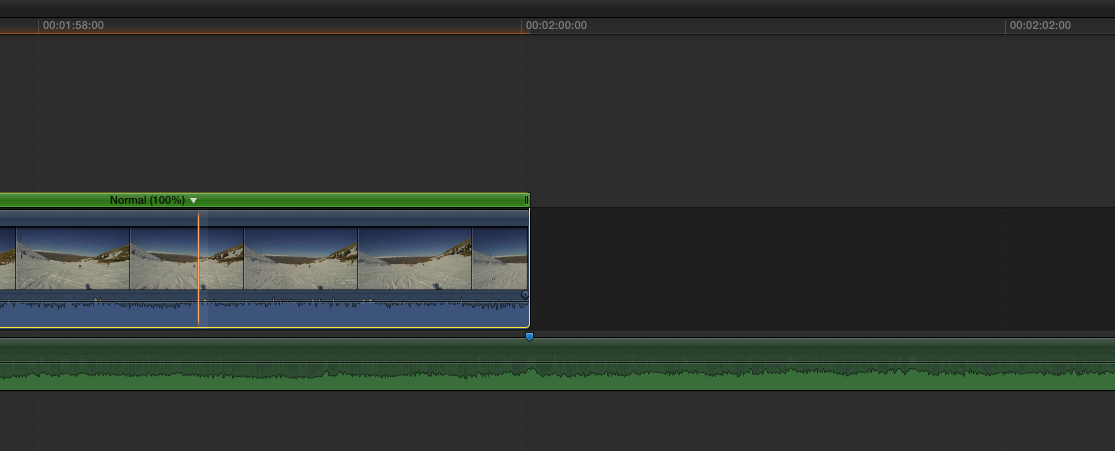
Video can only be sped up or slowed down by whole frames. If your project is 24p (I think that's the case here) this means the minimum amount of retiming you can apply to a video clip is 1/24th of a second. Here you see a 24p timeline with a 2 minute video clip. I have set a marker on the audio as a reference point:
Now I have retimed this clip to 99,8%. I could not choose 99,9% because this does not correspond with 1 video frame. You see the video indeed plays slower as it is 1 frame longer with respect to the marker:
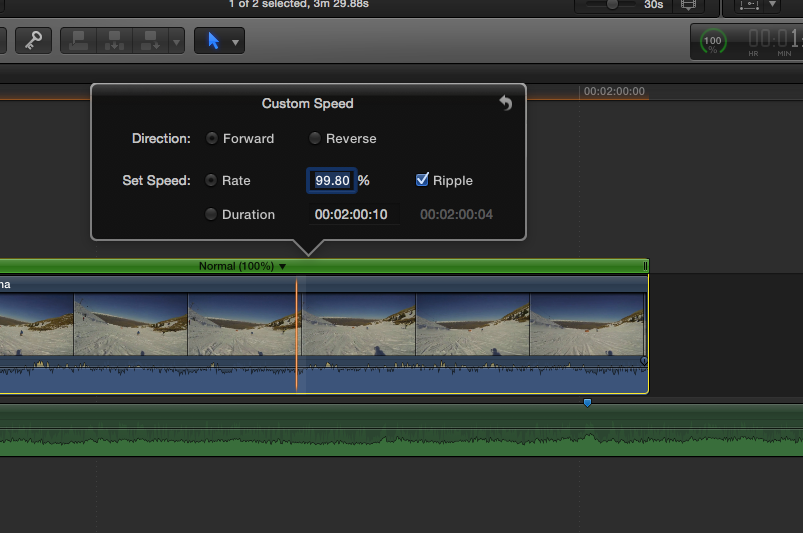
But the % indicator on the clip will still show 100% because this indicator only shows whole numbers.
Things are easier with audio, because you can manipulate audio at subframe level. So if you only need to do a very small adjustment it would be better to adjust the audio instead of the video. In your case the audio would have to be sped up by 100.1%, which is perfectly possible.
The real question is: do you need to retime?
- Do you see a noticeable out-of-sync issue when you play the film? As I said before, if this happens it will only be on very long clips, which you can easily retime by small percentages.
- Is your mixed audio track longer than you video? In this case you can easily retime the audio by dragging it to te same length as your video.
Ronny
Please Log in to join the conversation.
I don't know yet if I really need to retime. I do notice an audio drift, as it was expected. Your advice is probably the best: just let it be and see if it's notieceable.
In general I think I do not understand the issue very well. I find it confusing because I have a credit sequence etc. and those I guess do not cause any audio drift. So if I do a global retiming it probably doesn't make any sense. But if I do it by chunks, I will get micro gaps in my timeline.
Please Log in to join the conversation.
- ronny courtens
-
- Offline
- Moderator
-
- Posts: 4455
- Thank you received: 962
But the speed difference is so minimal that you only should notice minor sync issues with the longer RED clips. It is always possible to retime these long video clips individually, which would probably bring the rest of the sequence perfectly in sync. As you have to slow them down this will not leave any gaps. It certainly is worth trying, and if this causes any other issues you always can get back.
- Ronny
Please Log in to join the conversation.
- Andreas Kiel
-

- Offline
- Platinum Member
-

- Posts: 1077
- Thank you received: 189
With Avid it was more likely everything worked since in most cases the audio crew was well informed what to do (there was always a cheat sheet flying around about which sample rate for what kind of project).
Just a list of possible WAVE files.
Standard: no metadata except sampling rate otherwise only data.
Broadcast WAVE: BEXT header showing some basic metadata, in some cases a "virtual sampling rate" this was followed by the data.
"Extended" Broadcast WAVE: Beside the BEXT header, there is an iXML chunk in the file. This iXML chunk can be located at 3 places with the file. iXML is a way more extended version of the BEXT chunk and allows to control playback speed in case the NLE accepts the iXML.
FCP up from 5.1 was able to reed the BEXT, but always till the FCP EOL was confusing since it used the last selected template to interpret the file,
FCP X more or less ignores the BEXT but uses the iXML if it can find it - that where the problem is buried. FCP X expects the iXML to be at a special place (out of the 3 options). If it isn't found there it is ignored.
But finally all the problems come from the video side or better the NTSC against Non NTSC war.
So what means "real time playback" with NTSC, finally nothing cause it's not there. An additional confusion is created by using DF or NDF.
Coming back to the audio. A standard reply for out of sync is: is your audio 48000 Hz?
This is a bad answer in several regards. So sample rate could be anything as long as it is handled correctly and what about CD Quality audio or 96000 Hz which are standard as well?
Better reply would have been: Do all you settings match?
But this implies a lot of additional questions and answers which are hard to track and to solve.
Coming back to the original question. If the RED file plays back at 99.9% and the audio at 100% there is some NTSC magic somewhere involved (regardless whether it is a RED error or another error).
As Ronny said you can never match/retime the video inside the NLE to match the audio. But you can match the audio to the video (just because it has way more "frames").
If the audio playback is longer than the matching video it's playing to slow obviously. This means you have to change the "playback sample rate". This can be done with Wave Agent.
In this case it needs to be changed to 48048 Hz - means the audio will play faster and match the video.
If it is to short it needs to be adjusted to 47952 Hz.
So like more than a decade ago it's always a good idea to do some checks upfront to have a smooth production workflow.
- Andreas
P.S.
Wave Agent modifies BWAVs with iXML in a way that the iXML chunk can be found by FCP X.
Please Log in to join the conversation.

It is in fact the best first troubleshooting question, since this is the cause of audio drift 99 percent of the time. NLE's all interpret sample rates with the same method, and it has always been, and still is, a very stupid method. But that's life. But saying it is a bad question to ask, that is just totally baseless.
In some cases, newer-isn digital audio recorders assign video timecode to an audio file, which an NLE can interpret and mess up things, but I've found that to be more rare.
Sample rate, that is pretty much the only realistic setting to verify when troubleshooting, period.
Please Log in to join the conversation.
I'm so grateful to all of you Ronny, Andreas, Ben, Tom, etc...
I've already included the fcp.co community in the thanks of the film. Not much I can do, except tell you all how grateful I am.
Please Log in to join the conversation.
- Andreas Kiel
-
- Offline
- Platinum Member
-
- Posts: 1077
- Thank you received: 189
BenB wrote: "This is a bad answer in several regards."
It is in fact the best first troubleshooting question, since this is the cause of audio drift 99 percent of the time. NLE's all interpret sample rates with the same method, and it has always been, and still is, a very stupid method. But that's life. But saying it is a bad question to ask, that is just totally baseless.
In some cases, newer-isn digital audio recorders assign video timecode to an audio file, which an NLE can interpret and mess up things, but I've found that to be more rare.
Sample rate, that is pretty much the only realistic setting to verify when troubleshooting, period.
Ben,
With all respect. You didn't catch the point. Only the "keywords"

I was referring to the "48000 Hz reply". While 48,0 kHz is quite common and usual nowadays it doesn't mean it's the solution.
The real reply should be: "What sample rate are you using in which environment?"
And again as I said this could be complicated and hard to figure out in a given workflow.
This is NOT an FCPX issue (it applies to many NLEs). Standard rates from archive material like 32 kHz, CD quality 44,1 kHz, currently used 48 kHz or advanced 96 kHz are all valid sample rates for all NLEs. Same are the "1.001" variations of those.
NLEs who understand modern BWAV files (with iXML) may correct some issues.
In any case the "Is your audio 48000 Hz?" is not a well thought reply. POINT.
- Andreas
Please Log in to join the conversation.
Please Log in to join the conversation.
- Andreas Kiel
-
- Offline
- Platinum Member
-
- Posts: 1077
- Thank you received: 189
I have no idea why you insist on your "48000 Hz" answer.
Take a 1 second clip recorded at 23.976... (24 NTSC) with 48000 Hz audio.
Audio is measured in samples per real world seconds.
The clip needs 1.001 seconds real world time to play back.
That means only 48000/1001 samples per second (real world) are played. Means rounded 47952 samples.
Let's stop here.
- Andreas
Please Log in to join the conversation.
