


- Posts: 190
- Thank you received: 0
3 Post Moderation Rule for New Boarders (25 Jan 2021)
New boarders will have their posts moderated - Don't worry if you cannot see your post immediately.
trying cover some missing footaage, any cheats/tips.
13 Nov 2014 21:11 #55965
by Seany
trying cover some missing footaage, any cheats/tips. was created by Seany
Anybody know any cheats/tips for this problem, I'm missing some video but i cant cover it with cutaways/b roll etc, I only need to cover 1 sec about.
Please Log in to join the conversation.
13 Nov 2014 21:23 #55966
by Seany
Replied by Seany on topic trying cover some missing footaage, any cheats/tips.
Is it possible to slow down the clip and extend it that extra second as a sort of fix?
Please Log in to join the conversation.
- Karsten Schlüter
-

- Offline
- Moderator
-

Less
More
- Posts: 3790
- Thank you received: 718
14 Nov 2014 07:01 #55984
by Karsten Schlüter
Replied by Karsten Schlüter on topic trying cover some missing footaage, any cheats/tips.
for sure you can slow-down a clip ... I'm missing your point - why not?? That is 'basics'...-
Another option: re-framing.
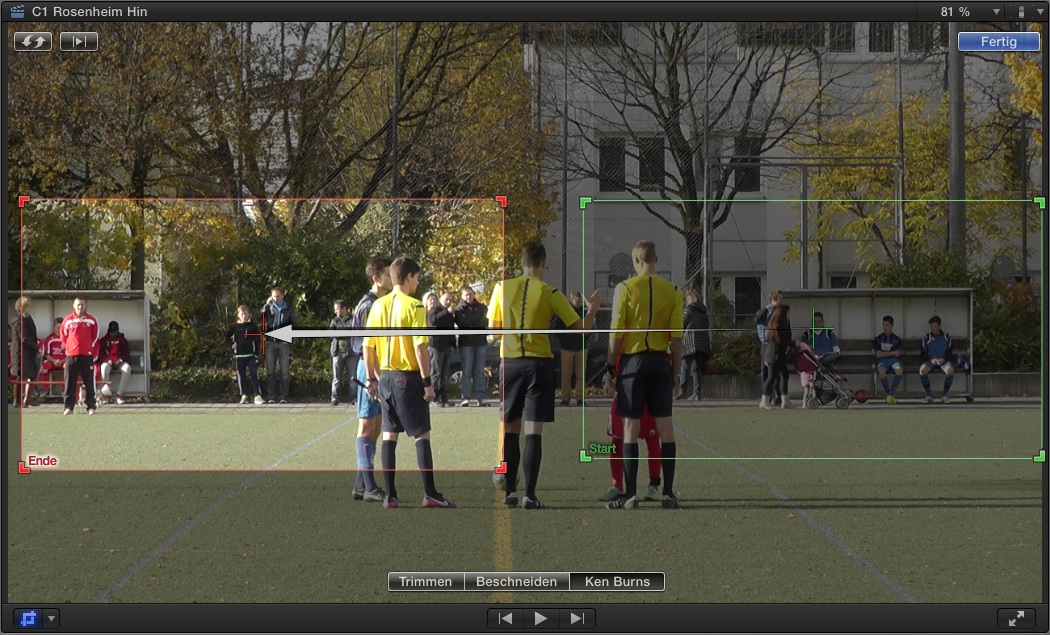
here as a KenBurns-pan, but you can pick-up parts of a shot, and create 'two' shots out of it.
or add a freeze to 'stretch' the material.
Titles?
Graphics?
Schematics?
A summarize of 'what happened so far'? ...
Another option: re-framing.
here as a KenBurns-pan, but you can pick-up parts of a shot, and create 'two' shots out of it.
or add a freeze to 'stretch' the material.
Titles?
Graphics?
Schematics?
A summarize of 'what happened so far'? ...
Please Log in to join the conversation.
14 Nov 2014 07:28 #55985
by Seany
Replied by Seany on topic trying cover some missing footaage, any cheats/tips.
Thanks ! I'll try to freeze it for that second and also how would I do that pan or two shot out of one shot process?
Please Log in to join the conversation.
- Karsten Schlüter
-
- Offline
- Moderator
-
Less
More
- Posts: 3790
- Thank you received: 718
14 Nov 2014 07:38 #55986
by Karsten Schlüter
as shown in my applied screenshot above: Ken Burns..
You're not that familiar with the many features of FCPX, I assume...?
Replied by Karsten Schlüter on topic trying cover some missing footaage, any cheats/tips.
Seany wrote: …… how would I do that pan or two shot out of one shot process?
as shown in my applied screenshot above: Ken Burns..
You're not that familiar with the many features of FCPX, I assume...?
Please Log in to join the conversation.
14 Nov 2014 07:53 #55987
by Seany
Replied by Seany on topic trying cover some missing footaage, any cheats/tips.
Not the Ken Burns effect 
Please Log in to join the conversation.
- Karsten Schlüter
-
- Offline
- Moderator
-
Less
More
- Posts: 3790
- Thank you received: 718
14 Nov 2014 08:40 #55989
by Karsten Schlüter
In terms of 'you don't know how to handle KB in FCPX?
then ask the Manual
help.apple.com/finalcutpro/mac/10.1/?lang=en#verb8e5de9c
or, in terms of 'I don't like the KB effect'?
... sorry, I'm an old man, I'm not used to those 140characters-only-twitter-lingo ... I little more elaboration avoids my psychic abilities...
Replied by Karsten Schlüter on topic trying cover some missing footaage, any cheats/tips.
Seany wrote: Not the Ken Burns effect
In terms of 'you don't know how to handle KB in FCPX?
then ask the Manual
help.apple.com/finalcutpro/mac/10.1/?lang=en#verb8e5de9c
or, in terms of 'I don't like the KB effect'?
... sorry, I'm an old man, I'm not used to those 140characters-only-twitter-lingo ... I little more elaboration avoids my psychic abilities...
Please Log in to join the conversation.
14 Nov 2014 09:15 #55990
by Seany
Replied by Seany on topic trying cover some missing footaage, any cheats/tips.
'You're not that familiar with the many features of FCPX, I assume...?
'Not the Ken Burns effect' can be construed with 'NOT the Ken Burns effect!' but it's fairly obvious I mean the former!

Thanks for the help, I'll see what this Burns chap has to offer.
'Not the Ken Burns effect' can be construed with 'NOT the Ken Burns effect!' but it's fairly obvious I mean the former!
Thanks for the help, I'll see what this Burns chap has to offer.
Please Log in to join the conversation.
14 Nov 2014 09:27 #55991
by Seany
Replied by Seany on topic trying cover some missing footaage, any cheats/tips.
By the way how does the Ken Burns effect cover the 1.12 section I need to cover, it seems to only work for the duration of a clip, I have blank space/no video for 1.12 frames.
Please Log in to join the conversation.
- ronny courtens
-

- Offline
- Moderator
-
Less
More
- Posts: 4455
- Thank you received: 962
14 Nov 2014 10:57 #55993
by ronny courtens
Replied by ronny courtens on topic trying cover some missing footaage, any cheats/tips.
1. Select the clip you need to extend and press ALT+CMD+UP ARROW to lift it from the primary storyline.
2. Press CMD+R on the selected clip, a green retiming bar will appear on top of the clip.
3. Drag the right side of the retiming bar until the clip is long enough to cover the gap you need to fill.
4. Press ALT+CMD+DOWN ARROW to put the clip back into the primary storyline.
- Ronny
2. Press CMD+R on the selected clip, a green retiming bar will appear on top of the clip.
3. Drag the right side of the retiming bar until the clip is long enough to cover the gap you need to fill.
4. Press ALT+CMD+DOWN ARROW to put the clip back into the primary storyline.
- Ronny
Please Log in to join the conversation.
14 Nov 2014 11:20 - 14 Nov 2014 11:20 #55998
by Seany
Replied by Seany on topic trying cover some missing footaage, any cheats/tips.
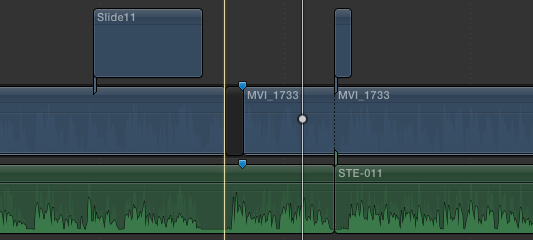
Thanks Ronny, I'm still a little confused ( bare with me I've got sequential dsylexia) , here is a screenshot of my problem, the gap clip is where i'm missing video(damn the Canon mkII!!) but have the audio to cover continuity of meaning underneath. Does your advice still apply?
Last edit: 14 Nov 2014 11:20 by Seany.
Please Log in to join the conversation.
- ronny courtens
-
- Offline
- Moderator
-
Less
More
- Posts: 4455
- Thank you received: 962
14 Nov 2014 12:05 #56004
by ronny courtens
Replied by ronny courtens on topic trying cover some missing footaage, any cheats/tips.
Hi Sean,
No problem, only intelligent people can have dyslexia
Thank you for posting the screenshot, this really helps to see the exact problem.
My advice still applies. But I would need to know if the audio under the MVI 1733 video clip is background audio, or is it directly related to the clip (e.g. the voice of a person you see in the video)?
- Ronny
No problem, only intelligent people can have dyslexia
Thank you for posting the screenshot, this really helps to see the exact problem.
My advice still applies. But I would need to know if the audio under the MVI 1733 video clip is background audio, or is it directly related to the clip (e.g. the voice of a person you see in the video)?
- Ronny
Please Log in to join the conversation.
14 Nov 2014 12:29 #56005
by Seany
Replied by Seany on topic trying cover some missing footaage, any cheats/tips.
Voice of the person, hence I'm looking for the lesser of any evils with regard to in some way covering the missing video without recourse to cutaways.
Please Log in to join the conversation.
- ronny courtens
-
- Offline
- Moderator
-
Less
More
- Posts: 4455
- Thank you received: 962
14 Nov 2014 12:33 #56006
by ronny courtens
Replied by ronny courtens on topic trying cover some missing footaage, any cheats/tips.
Aha, I understand.
In that case slowing down the video clip will probably cause problems because the separate audio will not be in sync with the video anymore.
You could perhaps make the slide11 clip a bit longer so it covers the gap?
- Ronny
In that case slowing down the video clip will probably cause problems because the separate audio will not be in sync with the video anymore.
You could perhaps make the slide11 clip a bit longer so it covers the gap?
- Ronny
Please Log in to join the conversation.
14 Nov 2014 12:39 #56008
by Seany
Replied by Seany on topic trying cover some missing footaage, any cheats/tips.
yeah looks like I wont be able to use any slides
Please Log in to join the conversation.
- Karsten Schlüter
-
- Offline
- Moderator
-
Less
More
- Posts: 3790
- Thank you received: 718
14 Nov 2014 16:17 - 14 Nov 2014 16:18 #56046
by Karsten Schlüter
uhh? You can not do … :
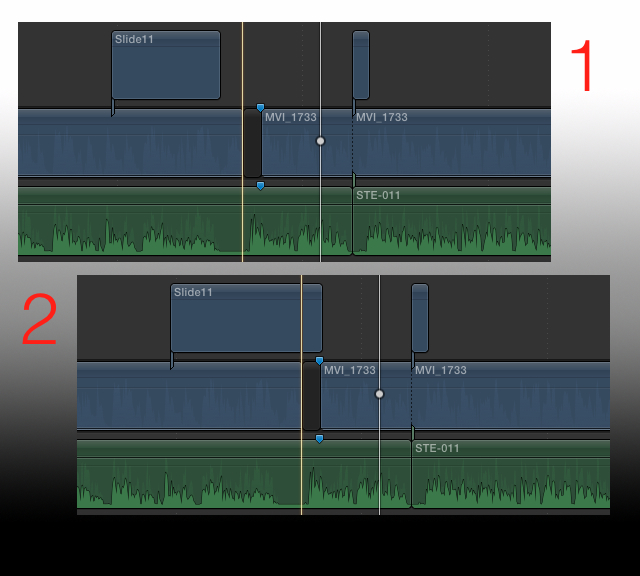
What's wrong with that?
Replied by Karsten Schlüter on topic trying cover some missing footaage, any cheats/tips.
Seany wrote: yeah looks like I wont be able to use any slides
uhh? You can not do … :
What's wrong with that?
Last edit: 14 Nov 2014 16:18 by Karsten Schlüter.
Please Log in to join the conversation.
15 Nov 2014 08:11 #56070
by Seany
Replied by Seany on topic trying cover some missing footaage, any cheats/tips.
Nothing but the client doesn't want to use slides or cutaways if it can be helped!
Please Log in to join the conversation.
- Karsten Schlüter
-
- Offline
- Moderator
-
Less
More
- Posts: 3790
- Thank you received: 718
15 Nov 2014 08:28 - 15 Nov 2014 08:29 #56071
by Karsten Schlüter
You ARE using slides = those screenshot I applied is YOURS! ... :S
Plus, as the audio-tracks indicates, there's a pause in the lecture's audio anyhow ....
.... depends on your dependencies ... but Who's the editor? You or the client?
J- and L-cuts are in 90% better anyhow ........
....... sorry, I'm outta here ...
looks like, we're a talking about a few seconds ... for 2 days now ......
You'll find a solution... or your client will..........
Replied by Karsten Schlüter on topic trying cover some missing footaage, any cheats/tips.
Seany wrote: Nothing but the client doesn't want to use slides …
You ARE using slides = those screenshot I applied is YOURS! ... :S
Plus, as the audio-tracks indicates, there's a pause in the lecture's audio anyhow ....
.... depends on your dependencies ... but Who's the editor? You or the client?
J- and L-cuts are in 90% better anyhow ........
....... sorry, I'm outta here ...
looks like, we're a talking about a few seconds ... for 2 days now ......
You'll find a solution... or your client will..........
Last edit: 15 Nov 2014 08:29 by Karsten Schlüter.
Please Log in to join the conversation.
15 Nov 2014 09:38 #56073
by Seany
Replied by Seany on topic trying cover some missing footaage, any cheats/tips.
I'm using slides for cover but the client does not want to use them now, it's fairly simple. Obviously the screenshot is mine(I'm not stupid mate).
Please Log in to join the conversation.
- ronny courtens
-
- Offline
- Moderator
-
Less
More
- Posts: 4455
- Thank you received: 962
16 Nov 2014 09:13 #56093
by ronny courtens
Replied by ronny courtens on topic trying cover some missing footaage, any cheats/tips.
If you cannot use anything to cover up that blank space your only solution is to slow down the video clip that is too short, so it covers the gap.
- Ronny
- Ronny
Please Log in to join the conversation.
