


- Posts: 41
- Thank you received: 5
3 Post Moderation Rule for New Boarders (25 Jan 2021)
New boarders will have their posts moderated - Don't worry if you cannot see your post immediately.
How do I get the first frame you see on an output file?
12 Nov 2014 19:05 #55889
by hepler
How do I get the first frame you see on an output file? was created by hepler
So I have a 10 min video that I am outputting as a .mov file, but the client wants a .wmv file, no big deal I use wondershare to convert it and upload it to a dropbox. But when they look at that file, there is a still frame they see before they play the video that they hate. I can't seem to find a way to change it. I put a chapter marker where they want to see but that doesn't seem to change the freeze frame they see on the file. When you play the file it starts at the beginning but it is the image they see when the file is just delivered that is the problem. I hope I am explaining this clearly enough.
thanks for the help
thanks for the help
Please Log in to join the conversation.
- Squamish ed
-

- Offline
- Elite Member
-

Less
More
- Posts: 238
- Thank you received: 20
12 Nov 2014 21:10 #55892
by Squamish ed
Ed
Replied by Squamish ed on topic How do I get the first frame you see on an output file?
If zooming way in on the original clip doesn't show the offending image it may have become corrupted somewhere along the way. Have you tried replacing that first clip and re-exporting the video?
Ed
Please Log in to join the conversation.
12 Nov 2014 21:23 #55893
by hepler
Replied by hepler on topic How do I get the first frame you see on an output file?
I have set a chapter marker where I want the poster frame to be, I then modified the chapter marker and set the poster frame. Then I did the export, no change the poster frame was at the five second mark. I then extended the first clip to seven seconds to see if it would use a different frame, to no avail it picked the exact same frame which is now seven seconds down the timeline.
Please Log in to join the conversation.
- ronny courtens
-

- Offline
- Moderator
-

Less
More
- Posts: 4455
- Thank you received: 962
12 Nov 2014 21:28 #55894
by ronny courtens
Replied by ronny courtens on topic How do I get the first frame you see on an output file?
You mean the poster frame or thumbnail.
You can set a poster frame for your movie in QuickTime player X. I'm not sure if that poster frame will stay put in the wmv file once you convert the movie with the converter you are using, but it is worth a try.
Here's how you set the poster frame for a quicktime movie:
- Open the movie in QuickTime player, navigate to the frame you want to use as poster frame and press CMD+C (copy).
- Close QT player, select the movie in Finder and press CMD+I (Get Info). At the top of the info window, upper left, you will see a small QT image. Click on it, then press CMD+V (paste). The thumbnail of the video file will show the frame you have selected in QT player.
Here's a video with its original poster frame:
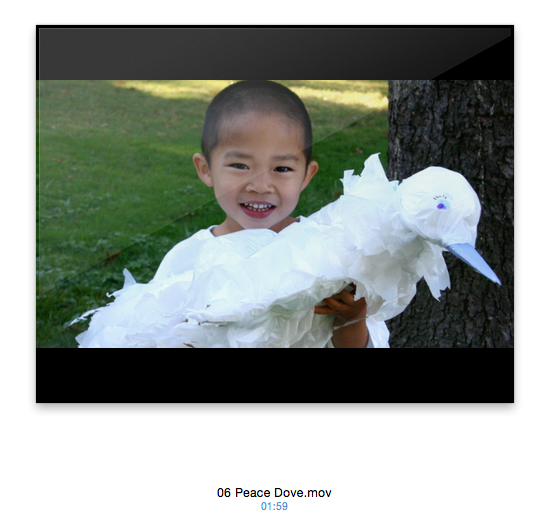
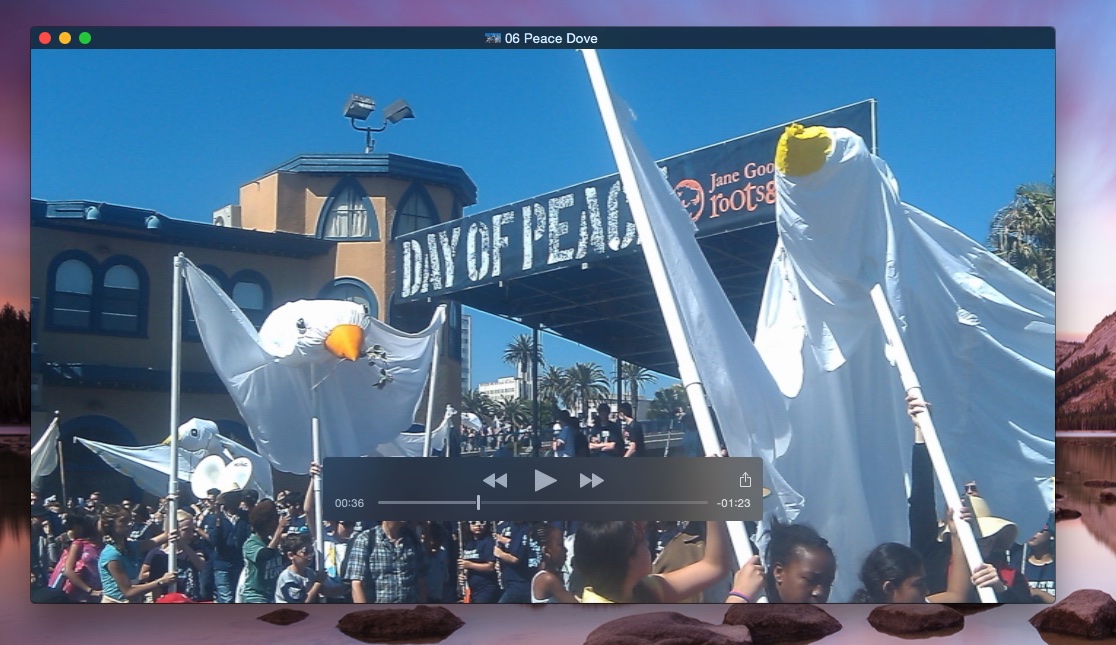
I open the video in QTX, I choose a frame I want to use as the new poster frame and I press CMD+V:
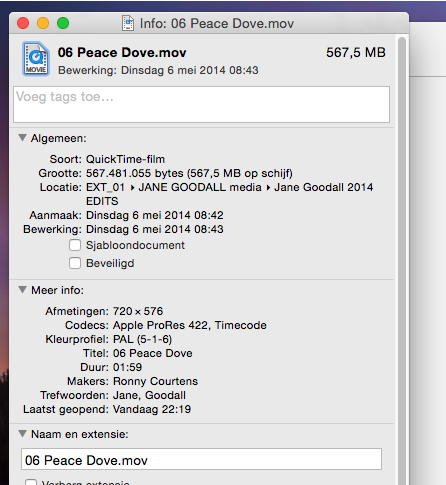
I close QTX, select the video in Finder and press CMD+I. In the Info window I select the QuickTime symbol and press CMD+V:
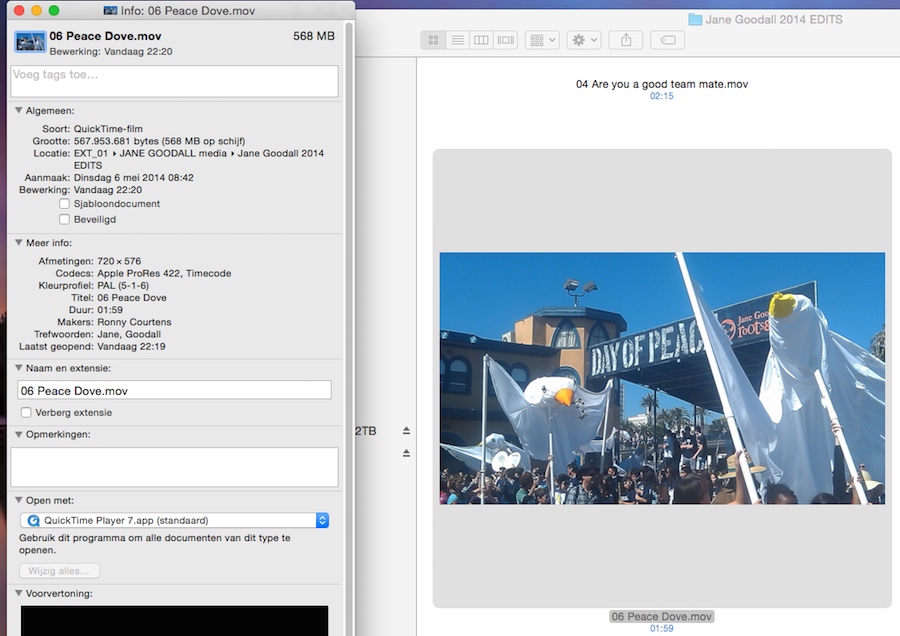
The poster frame for my video has now been modified:
- Ronny
You can set a poster frame for your movie in QuickTime player X. I'm not sure if that poster frame will stay put in the wmv file once you convert the movie with the converter you are using, but it is worth a try.
Here's how you set the poster frame for a quicktime movie:
- Open the movie in QuickTime player, navigate to the frame you want to use as poster frame and press CMD+C (copy).
- Close QT player, select the movie in Finder and press CMD+I (Get Info). At the top of the info window, upper left, you will see a small QT image. Click on it, then press CMD+V (paste). The thumbnail of the video file will show the frame you have selected in QT player.
Here's a video with its original poster frame:
I open the video in QTX, I choose a frame I want to use as the new poster frame and I press CMD+V:
I close QTX, select the video in Finder and press CMD+I. In the Info window I select the QuickTime symbol and press CMD+V:
The poster frame for my video has now been modified:
- Ronny
Please Log in to join the conversation.
12 Nov 2014 22:00 #55897
by hepler
Replied by hepler on topic How do I get the first frame you see on an output file?
Ronny, your my hero. sometimes the simple things don't occur to me. I would have thought that the export in FCPX would have worked, I would have never thought that the preview thumbnail in the get info window would have any bearing on the poster frame.
Thanks so much
Thanks so much
Please Log in to join the conversation.
- ronny courtens
-
- Offline
- Moderator
-
Less
More
- Posts: 4455
- Thank you received: 962
12 Nov 2014 22:12 #55900
by ronny courtens
Replied by ronny courtens on topic How do I get the first frame you see on an output file?
You are very welcome. Glad this works for you.
- Ronny
- Ronny
Please Log in to join the conversation.
