



- Posts: 17
- Thank you received: 0
3 Post Moderation Rule for New Boarders (25 Jan 2021)
New boarders will have their posts moderated - Don't worry if you cannot see your post immediately.
Super Impose Logo on StopMotion Sequence?
12 Nov 2014 18:23 - 12 Nov 2014 18:36 #55886
by erickp
Super Impose Logo on StopMotion Sequence? was created by erickp
I need some advice from the WAY more knowledgeable people here. It would be greatly appreciated.
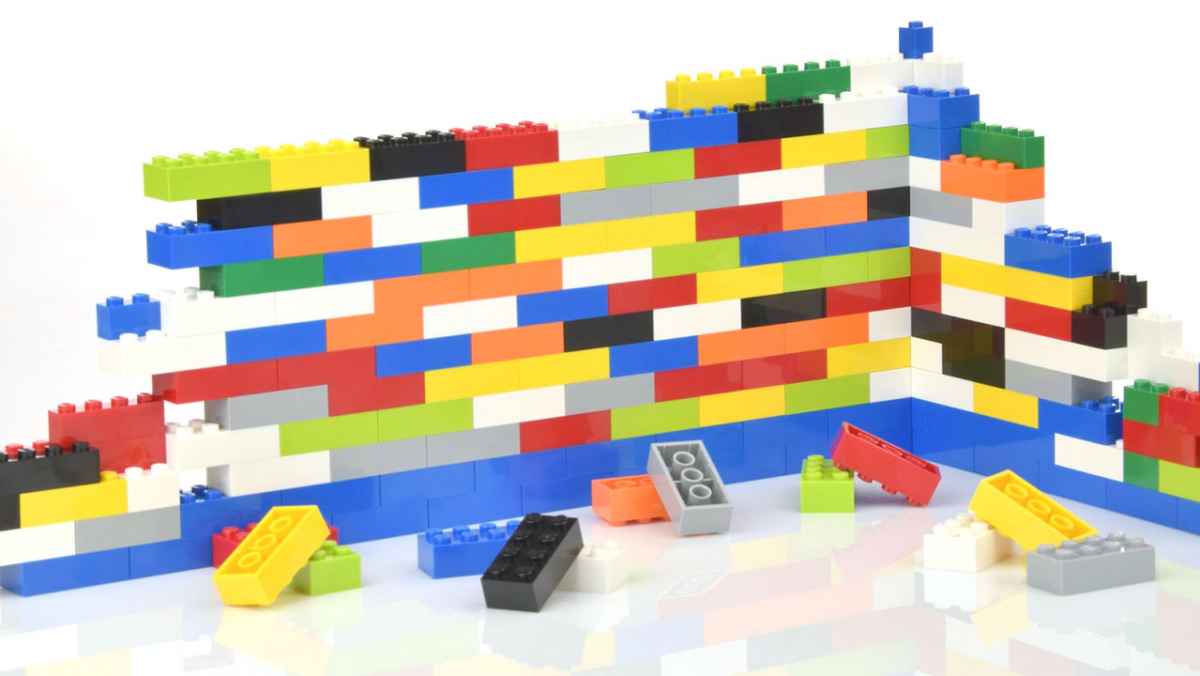
I have a short stop-motion video sequence of a Lego wall being built. I would like to super impose various logos on a variety of the lego blocks. The don't necessarily have to be on the lego block as it comes into the scene (although that would be sweet) The just need to fade onto the block once it's on the wall.
The sequence was shot on an angle and although it's static, there are slight movements in the wall throughout. I wasn't sure if bringing in the logos with a transparent background then overlaying would be best or using something like SliceX/TrackX would be a better solution. Or can Motion be a solution. Confused on best way for best results.
Any advice would be appreciated. Attached is still of the lego wall in question.
I have a short stop-motion video sequence of a Lego wall being built. I would like to super impose various logos on a variety of the lego blocks. The don't necessarily have to be on the lego block as it comes into the scene (although that would be sweet) The just need to fade onto the block once it's on the wall.
The sequence was shot on an angle and although it's static, there are slight movements in the wall throughout. I wasn't sure if bringing in the logos with a transparent background then overlaying would be best or using something like SliceX/TrackX would be a better solution. Or can Motion be a solution. Confused on best way for best results.
Any advice would be appreciated. Attached is still of the lego wall in question.
Last edit: 12 Nov 2014 18:36 by erickp. Reason: adding to third paragraph that I missed.
Please Log in to join the conversation.
- ronny courtens
-

- Offline
- Moderator
-

Less
More
- Posts: 4455
- Thank you received: 962
12 Nov 2014 21:52 #55896
by ronny courtens
Replied by ronny courtens on topic Super Impose Logo on StopMotion Sequence?
Making the logos appear as the blocks come onto the screen is possible. But that will require a lot of masking and animation, depending on how many logos you need to add.
Fading the logos onto the blocks once the blocks are in place is much easier, but as the wall is moving throughout every logo will certainly need to be tracked so it follows the movement of the block on which it is positioned.
This can easily be done in Motion 5 because the tracking is not very complex and you can corner pin each logo to the lego block on which it appears. If you have no experience with this, post back and I will explain how to do it.
If I'm not online anymore when you post back I'm sure Ben or someone else who is familiar with Motion will be willing to help you.
- Ronny
Fading the logos onto the blocks once the blocks are in place is much easier, but as the wall is moving throughout every logo will certainly need to be tracked so it follows the movement of the block on which it is positioned.
This can easily be done in Motion 5 because the tracking is not very complex and you can corner pin each logo to the lego block on which it appears. If you have no experience with this, post back and I will explain how to do it.
If I'm not online anymore when you post back I'm sure Ben or someone else who is familiar with Motion will be willing to help you.
- Ronny
Please Log in to join the conversation.


12 Nov 2014 23:47 #55911
by BenB
Replied by BenB on topic Super Impose Logo on StopMotion Sequence?
About to run kids around for their various extra curricular activities. Let me think about this. Can be done, for sure! I'm thinking TrackX would be sweet for this. But yea, the built-in tracker in Motion handles square shapes quite well.
So the blocks animate up the wall in to place, or fade from nothing in to place?
So the blocks animate up the wall in to place, or fade from nothing in to place?
Please Log in to join the conversation.
13 Nov 2014 14:32 #55931
by erickp
Replied by erickp on topic Super Impose Logo on StopMotion Sequence?
Because of the amount of logos, which are around 70, I keep hearing that doing it Motion is the best way to go.
@Ronny or @BenB : I am familiar with Motion but have never tracked anything to this degree. Would be able to give me a little guidance? It would extremely appreciated.
@BenB: I spoke with Coremelt about using TrackX for this project and below is their response.
"Yes TrackX can be applied more than once to the same clip, however I wouldn't recommend more than 7 or 8 layers. If you wanted to do more than that I would render 8 layers at a time, export the file, bring back in as ProRes and add another 8 layers. Repeat.
However I have to ask why you are doing it this way. I've seen this sort of thing created more and usually the Blocks and the logos are created and animated together in 3D or Motion Graphics so no tracking is required. If you can instead create the effect this way you will save yourself a load of pain."
@Ronny or @BenB : I am familiar with Motion but have never tracked anything to this degree. Would be able to give me a little guidance? It would extremely appreciated.
@BenB: I spoke with Coremelt about using TrackX for this project and below is their response.
"Yes TrackX can be applied more than once to the same clip, however I wouldn't recommend more than 7 or 8 layers. If you wanted to do more than that I would render 8 layers at a time, export the file, bring back in as ProRes and add another 8 layers. Repeat.
However I have to ask why you are doing it this way. I've seen this sort of thing created more and usually the Blocks and the logos are created and animated together in 3D or Motion Graphics so no tracking is required. If you can instead create the effect this way you will save yourself a load of pain."
Please Log in to join the conversation.
- Karsten Schlüter
-

- Offline
- Moderator
-
Less
More
- Posts: 3790
- Thank you received: 718
13 Nov 2014 15:43 - 13 Nov 2014 15:51 #55933
by Karsten Schlüter
Really?
afaiu, the whole set is 'shaking', not individual bricks.. right?
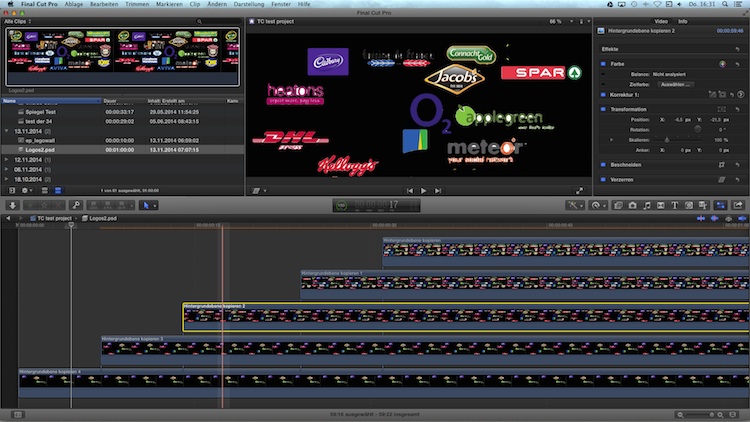
So, in a step#1 I would create a .psd file in Pixelmator, all logos, and each 'phase' as an individual layer. Use a screen grab of your Lego-wall for reference (I fudged here... a 2min-done.demo). Start with 'all', clone layer, erase one logo, clone layer, erase next.. and so on and so on......... safe as psd to keep layers!
Import that to FCPX, in its own timeline, shift the layers/tracks, to make them appear, one after the other.
Then, in your project, you add this file and distort it - to make it fit to the perspective:
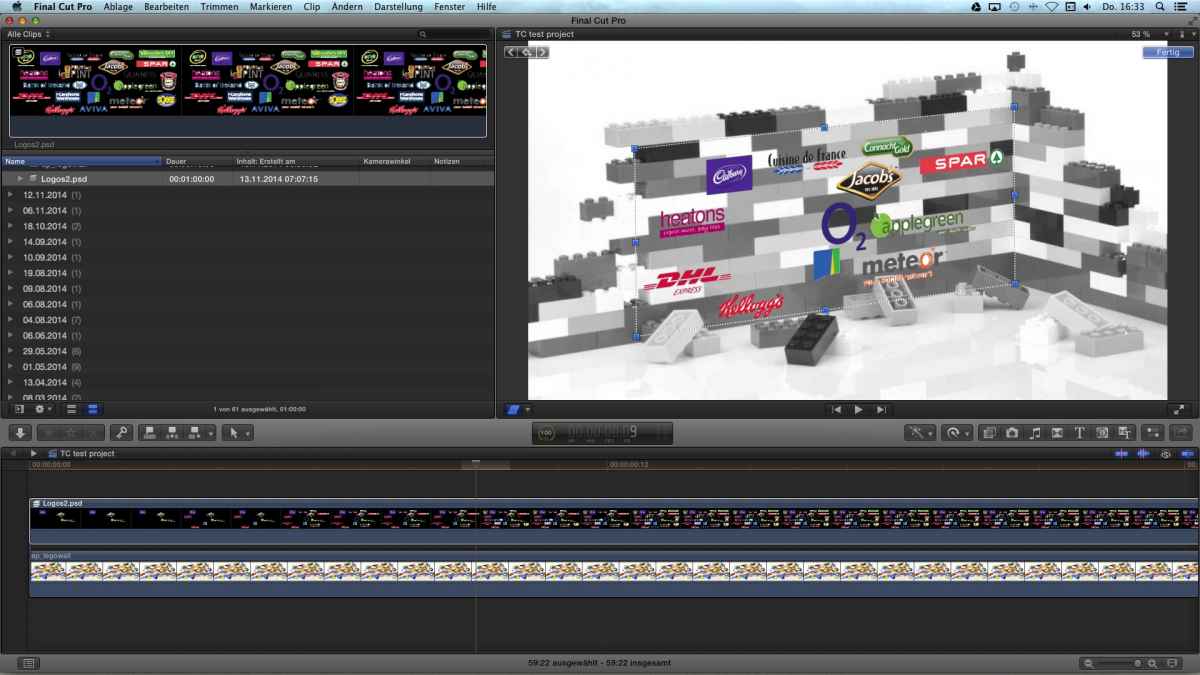
(I made the bricks b/w to show easier what I mean).
TrackX finally adopt any camera shaking to that single overlay....
If needed anyhow..
or, make a simple 4-point tracker in Motion, as mentioned before.
.. as long as you don't want to apply a logo to each brick while moving, that's easy.
But if the logo has to be on each brick while moving it, it would be better/easier to glue the logos to each brick (for real!), and do the stop-motion again............ :silly:
Replied by Karsten Schlüter on topic Super Impose Logo on StopMotion Sequence?
erickp wrote: Because of the amount of logos, which are around 70, I keep hearing that doing it Motion is the best way to go. …
Really?
afaiu, the whole set is 'shaking', not individual bricks.. right?
So, in a step#1 I would create a .psd file in Pixelmator, all logos, and each 'phase' as an individual layer. Use a screen grab of your Lego-wall for reference (I fudged here... a 2min-done.demo). Start with 'all', clone layer, erase one logo, clone layer, erase next.. and so on and so on......... safe as psd to keep layers!
Import that to FCPX, in its own timeline, shift the layers/tracks, to make them appear, one after the other.
Then, in your project, you add this file and distort it - to make it fit to the perspective:
(I made the bricks b/w to show easier what I mean).
TrackX finally adopt any camera shaking to that single overlay....
If needed anyhow..
or, make a simple 4-point tracker in Motion, as mentioned before.
.. as long as you don't want to apply a logo to each brick while moving, that's easy.
But if the logo has to be on each brick while moving it, it would be better/easier to glue the logos to each brick (for real!), and do the stop-motion again............ :silly:
Last edit: 13 Nov 2014 15:51 by Karsten Schlüter.
Please Log in to join the conversation.
- ronny courtens
-
- Offline
- Moderator
-
Less
More
- Posts: 4455
- Thank you received: 962
13 Nov 2014 19:34 #55955
by ronny courtens
Replied by ronny courtens on topic Super Impose Logo on StopMotion Sequence?
If you have 70 logos and the lego bricks are not moving individually I must say that Karsten has found the best solution. I like the idea of the multi-layered PSD!
- Ronny
- Ronny
Please Log in to join the conversation.
- Karsten Schlüter
-
- Offline
- Moderator
-
Less
More
- Posts: 3790
- Thank you received: 718
13 Nov 2014 20:22 #55960
by Karsten Schlüter
… idea [strike]stolen at[/strike] inspired byyyyyy … ripple-training via fcp.co:
www.fcp.co/final-cut-pro/news/816-using-...s-in-final-cut-pro-x
:lol:
Replied by Karsten Schlüter on topic Super Impose Logo on StopMotion Sequence?
ronny courtens wrote: .... I like the idea of the multi-layered PSD!
… idea [strike]stolen at[/strike] inspired byyyyyy … ripple-training via fcp.co:
www.fcp.co/final-cut-pro/news/816-using-...s-in-final-cut-pro-x
:lol:
Please Log in to join the conversation.
14 Nov 2014 13:55 #56017
by erickp
Replied by erickp on topic Super Impose Logo on StopMotion Sequence?
It's funny but I was actually originally and still am going to go with @Karsten's suggestion. Would love to have each logo on the block and have them animate in together but seems like it's going to take a long time to do. I'll go with the "fade in" route first and see if that flies. If not, then I might not have a choice but to animate each one. Fingers crossed. Thanks!
Please Log in to join the conversation.
14 Nov 2014 14:57 #56028
by BenB
Replied by BenB on topic Super Impose Logo on StopMotion Sequence?
To isolate each logo with its own block, put both in a Compound Clip, marry them together properly. Then animate the Compound Clip.
Please Log in to join the conversation.
