


- Posts: 4
- Thank you received: 0
3 Post Moderation Rule for New Boarders (25 Jan 2021)
New boarders will have their posts moderated - Don't worry if you cannot see your post immediately.
I've done it!!!! How can I do it again?
- miassteenberg
-
 Topic Author
- Offline
- New Member
-

Less
More
12 Nov 2014 09:06 #55855
by miassteenberg
I've done it!!!! How can I do it again? was created by miassteenberg
I've done it!!!
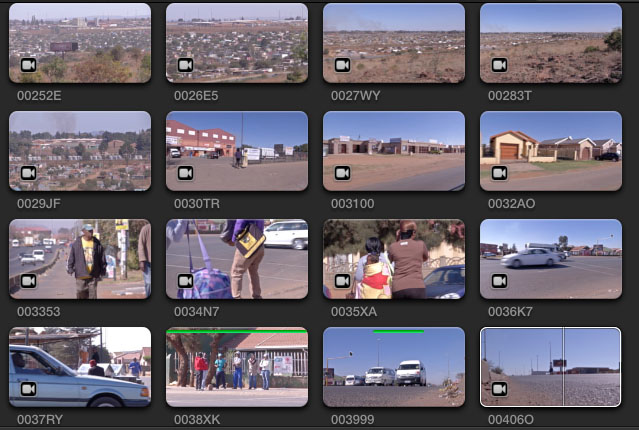
During a huge import FCP X crashed, but some how it added the clips with the small camera icon.
I'm able to scrub, add to project, keyword and favourite the clips. If I want to transcode a proxy or optimised media I need to import it.
Is there a way to replicate this, or a command to make files (not the proxy) off-line (refer back to camera).
Mias
During a huge import FCP X crashed, but some how it added the clips with the small camera icon.
I'm able to scrub, add to project, keyword and favourite the clips. If I want to transcode a proxy or optimised media I need to import it.
Is there a way to replicate this, or a command to make files (not the proxy) off-line (refer back to camera).
Mias
Please Log in to join the conversation.
- ronny courtens
-

- Offline
- Moderator
-

Less
More
- Posts: 4455
- Thank you received: 962
12 Nov 2014 11:24 #55857
by ronny courtens
Replied by ronny courtens on topic I've done it!!!! How can I do it again?
The camera icon means that your clips still reference the camera card. As soon as you remove the camera card these clips will go offline.
It is absolutely not good idea to work off a camera card, so you will need to re-import the clips. You can use the File > Import > Reimport from Camera/Archive menu to do this. Here's a knowledge-base article from Apple explaining how to do this in detail (go to "re-import a clip"):
support.apple.com/kb/PH12739
- Ronny
It is absolutely not good idea to work off a camera card, so you will need to re-import the clips. You can use the File > Import > Reimport from Camera/Archive menu to do this. Here's a knowledge-base article from Apple explaining how to do this in detail (go to "re-import a clip"):
support.apple.com/kb/PH12739
- Ronny
Please Log in to join the conversation.
