


- Posts: 15
- Thank you received: 0
3 Post Moderation Rule for New Boarders (25 Jan 2021)
New boarders will have their posts moderated - Don't worry if you cannot see your post immediately.
Thumbnail not showing in Event Browser of Final Cut Pro
- Circuit Factory
-
 Topic Author
- Offline
- New Member
-

Less
More
10 Nov 2014 12:28 #55750
by Circuit Factory
Hi guys,
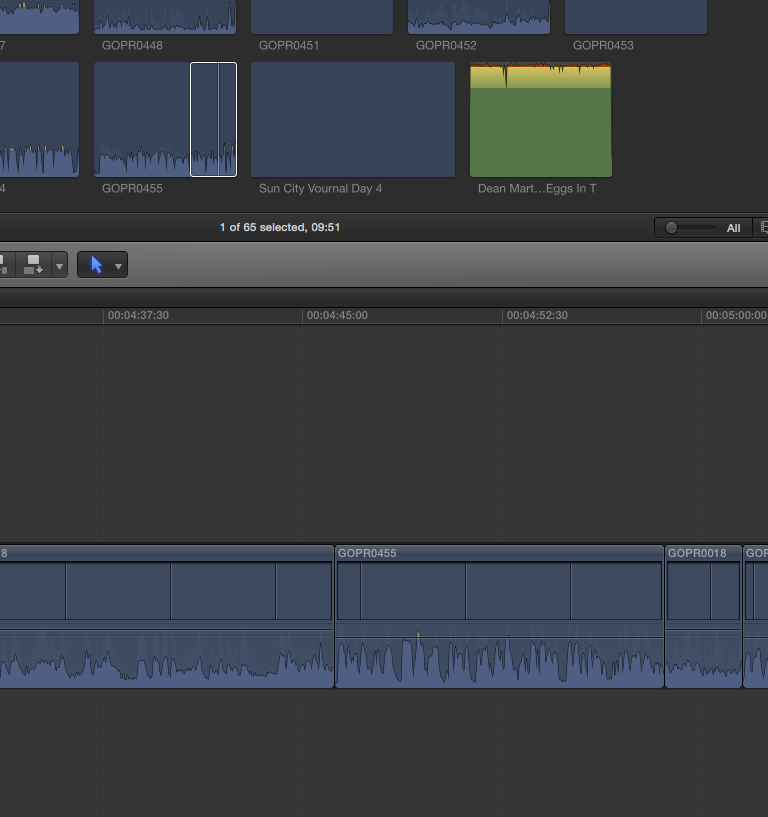
I can't see the pics in the timeline, or the events browser. The pics that go in the thumbnail. When I click play, the video plays fine in the viewer... Just everything else is a blank. I've attached a screenshot.
Is this a memory issue?
Are there any resolutions for this? Ways to get the little pics back?
I'm running new Final Cut Pro X on a new Mac Pro. using Yosemite operating system.
Thanks for any help
Phil
I can't see the pics in the timeline, or the events browser. The pics that go in the thumbnail. When I click play, the video plays fine in the viewer... Just everything else is a blank. I've attached a screenshot.
Is this a memory issue?
Are there any resolutions for this? Ways to get the little pics back?
I'm running new Final Cut Pro X on a new Mac Pro. using Yosemite operating system.
Thanks for any help
Phil
Please Log in to join the conversation.
- ronny courtens
-

- Offline
- Moderator
-

Less
More
- Posts: 4455
- Thank you received: 962
10 Nov 2014 13:53 #55759
by ronny courtens
Replied by ronny courtens on topic Thumbnail not showing in Event Browser of Final Cut Pro
Hi Phil, welcome to the forum.
No, this is not a memory issue. It seems your thumbnail cache needs to be refreshed.
First thing you can do is to close FCP X and launch it again. If you see any background tasks starting, let them finish and this should restore the thumbnails.
If this does not help you can force FCP X to restore your thumbnails.
- Close FCP X and open a Finder window.
- In the Finder window R-click the problematic FCP X Library and select Show Package Content.
- Open the Event folder > Render Files folder > Thumbnail Media folder and trash the content of the Thumbnail Media folder.
Then restart FCP X and give it time to restore the thumbnails for your Event. Depending on the number of clips you have in this Event this may take some time. You can see the progress in the Background Tasks window.
- Ronny
No, this is not a memory issue. It seems your thumbnail cache needs to be refreshed.
First thing you can do is to close FCP X and launch it again. If you see any background tasks starting, let them finish and this should restore the thumbnails.
If this does not help you can force FCP X to restore your thumbnails.
- Close FCP X and open a Finder window.
- In the Finder window R-click the problematic FCP X Library and select Show Package Content.
- Open the Event folder > Render Files folder > Thumbnail Media folder and trash the content of the Thumbnail Media folder.
Then restart FCP X and give it time to restore the thumbnails for your Event. Depending on the number of clips you have in this Event this may take some time. You can see the progress in the Background Tasks window.
- Ronny
Please Log in to join the conversation.

