


- Posts: 59
- Thank you received: 6
3 Post Moderation Rule for New Boarders (25 Jan 2021)
New boarders will have their posts moderated - Don't worry if you cannot see your post immediately.
Subtitle and dub workflow?
07 Nov 2014 01:13 - 07 Nov 2014 15:33 #55635
by rgilman
Subtitle and dub workflow? was created by rgilman
I'm just getting started on internationalizing some videos. I have the human translators covered but I'm pretty clueless about best-practice workflow. I'd love to get some help up the workflow learning curve.
The videos are educational (think TED-like), about 20 minutes in length and currently hosted on vimeo and youtube. We created English transcripts using Dragon Dictate followed by human proof-reading of the machine transcription.
I'm starting to learn about dot.sub and amara as subtitling platforms. I also see that youtube will do automated captioning. The resulting text would, no doubt, need to be corrected but it gives an automated start for the timing. Is this helpful or is it better to do the timing by hand?
More generally, what workflow works for you to create captions and multilingual subtitles? These won't get burned in but uploaded to vimeo and youtube as caption/subtitle tracks. What software do you use?
I have similar start-at-square-one questions about foreign-language dubs. It looks like vimeo and youtube don't support multiple, user-selectable audio tracks, so is it right that each language dub needs to be a separate video file and upload? Is it best to keep some of the original (English) voice in the background or completely replace the original with the foreign-language dub?
Any help on these questions, plus on all the questions I'm still too clueless to know I should have asked, would be greatly appreciated.
The videos are educational (think TED-like), about 20 minutes in length and currently hosted on vimeo and youtube. We created English transcripts using Dragon Dictate followed by human proof-reading of the machine transcription.
I'm starting to learn about dot.sub and amara as subtitling platforms. I also see that youtube will do automated captioning. The resulting text would, no doubt, need to be corrected but it gives an automated start for the timing. Is this helpful or is it better to do the timing by hand?
More generally, what workflow works for you to create captions and multilingual subtitles? These won't get burned in but uploaded to vimeo and youtube as caption/subtitle tracks. What software do you use?
I have similar start-at-square-one questions about foreign-language dubs. It looks like vimeo and youtube don't support multiple, user-selectable audio tracks, so is it right that each language dub needs to be a separate video file and upload? Is it best to keep some of the original (English) voice in the background or completely replace the original with the foreign-language dub?
Any help on these questions, plus on all the questions I'm still too clueless to know I should have asked, would be greatly appreciated.
Last edit: 07 Nov 2014 15:33 by rgilman.
Please Log in to join the conversation.
- ronny courtens
-

- Offline
- Moderator
-

Less
More
- Posts: 4455
- Thank you received: 962
10 Nov 2014 20:55 #55784
by ronny courtens
Replied by ronny courtens on topic Subtitle and dub workflow?
Hi Robert,
I have no experience with subtitles for Youtube or Vimeo, only for broadcast delivery. But your question intrigued me, so I have been doing some research.
I have watched the training videos for Amara and this software seems to be quite accessible while it offers very precise tools for timing and fine-tuning your captions. It is certainly something I would be looking into if I need to create captions for internet videos. If you already have the English transcripts it should be very easy to turn them into captions using this program. You can use the subtitle list create with Amara to load your captions both to Youtube and Vimeo, which certainly seems more straightforward than doing the captions separately on every platform using their proprietary tools.
AFAIK neither Vimeo nor Youtube support multiple language tracks. So you are correct that you will need to upload a separate video for each language dub. From pour experience it is best to completely replace the original with the dubbed voice for any voice-overs, but to slightly keep the original voice under the dubbed voice for interviews. This gives the viewer a better feel of the person who is being interviewed.
For recording, editing and mixing the dubbed narration FCP X will be a perfect tool, and it allows you to instantly upload your dubbed videos to your favorite platform.
- Ronny
I have no experience with subtitles for Youtube or Vimeo, only for broadcast delivery. But your question intrigued me, so I have been doing some research.
I have watched the training videos for Amara and this software seems to be quite accessible while it offers very precise tools for timing and fine-tuning your captions. It is certainly something I would be looking into if I need to create captions for internet videos. If you already have the English transcripts it should be very easy to turn them into captions using this program. You can use the subtitle list create with Amara to load your captions both to Youtube and Vimeo, which certainly seems more straightforward than doing the captions separately on every platform using their proprietary tools.
AFAIK neither Vimeo nor Youtube support multiple language tracks. So you are correct that you will need to upload a separate video for each language dub. From pour experience it is best to completely replace the original with the dubbed voice for any voice-overs, but to slightly keep the original voice under the dubbed voice for interviews. This gives the viewer a better feel of the person who is being interviewed.
For recording, editing and mixing the dubbed narration FCP X will be a perfect tool, and it allows you to instantly upload your dubbed videos to your favorite platform.
- Ronny
Please Log in to join the conversation.

11 Nov 2014 02:25 #55790
by BenB
Replied by BenB on topic Subtitle and dub workflow?
Also look at MacCaption, perhaps.
Please Log in to join the conversation.

11 Nov 2014 13:58 #55796
by zzchu
Replied by zzchu on topic Subtitle and dub workflow?
Please Log in to join the conversation.
- Andreas Kiel
-

- Offline
- Platinum Member
-

Less
More
- Posts: 1077
- Thank you received: 189
12 Nov 2014 08:55 #55854
by Andreas Kiel
Replied by Andreas Kiel on topic Subtitle and dub workflow?
Robert,
Sorry to chime in so late after you sent the PM.
Regarding the audio dubs Ronny explained everything perfectly.
Regarding subtitles I would go another route.
MacCaption is targeted for other things and quite pricy.
Aegisub is free but complicated and also targeted for other uses.
Both YouTube and VImeo accept SRT subtitle files to be added to video files.
If you already timed your English transcript using Amara you can export it from there to SRT format on your local machine.
There you can use Jubler/mPlayer to do a further fine tune.
OR
You can use FCP X plus my X-Title tools.
A: In X-Title Importer select a template (Ttle, project settings), select a role (your current language), select "Prject with secondary storyline" and import the SRT. Convert it to XML and open in FCP X.
Copy the secondary storyline and put it on top of your original movie. You can fine tune/correct the subtitles easily from there and always have a perfect preview.
How to get additional languages?
B: Put the double checked subtitles into a new project like "Final Subs English" and export as XML.
Import this XML into X-Title exporter and export as STL.
Here why.
STL (text) is a comma separated text file which is accepted by every spreadsheet app.
This makes it easy to send it to any translator around the world.
TC In, TC out, text.

The file will show up like above.
Now the translator can add his translation.

And maybe remove the orig language column,
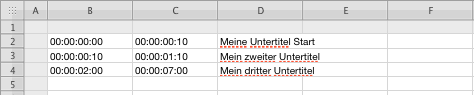
Then export as CSV file.
NOTE Apple's Numbers is not a really CSV friendly app when it comes to export.
So make a selection of the needed rows and columns and press cmd-C. Open a new plain text doc and press cmd-V.
You subtitles will there as tab delimited text. In case ther is no COMMA-TAB but only TABs replace all TABs with COMMA-TAB and save. This is your new STL.
You now can start with step A: but use the STL if you want to fine tune the foreign language – some times a translated text requires a slightly different timing.
So add the new in this example German role to your master project and do you fine tune again.
Do that with all the required languages but take care of the roles for each language – they are ESSENTIAL in a trackless environment.
With all your languages added FCP X allows to switch on and off the languages for preview. No other app can do this easy like that.
Then go again to step B: for every language and with X-Titlle Extractor convert everything to SRT.
If you don't want these steps open the STL files in Jubler and convert to SRT.
Then upload to YouTube and Vimeo.
This all sounds complicated but finally is a very fast process. It additionally has the advantage that you can apply styles (normally only italic is used) to different parts of the subtitle.
The further advantage is that you can work in a collaborative environment and build a "master subtitle data base"
- Andreas
Sorry to chime in so late after you sent the PM.
Regarding the audio dubs Ronny explained everything perfectly.
Regarding subtitles I would go another route.
MacCaption is targeted for other things and quite pricy.
Aegisub is free but complicated and also targeted for other uses.
Both YouTube and VImeo accept SRT subtitle files to be added to video files.
If you already timed your English transcript using Amara you can export it from there to SRT format on your local machine.
There you can use Jubler/mPlayer to do a further fine tune.
OR
You can use FCP X plus my X-Title tools.
A: In X-Title Importer select a template (Ttle, project settings), select a role (your current language), select "Prject with secondary storyline" and import the SRT. Convert it to XML and open in FCP X.
Copy the secondary storyline and put it on top of your original movie. You can fine tune/correct the subtitles easily from there and always have a perfect preview.
How to get additional languages?
B: Put the double checked subtitles into a new project like "Final Subs English" and export as XML.
Import this XML into X-Title exporter and export as STL.
Here why.
STL (text) is a comma separated text file which is accepted by every spreadsheet app.
This makes it easy to send it to any translator around the world.
TC In, TC out, text.
The file will show up like above.
Now the translator can add his translation.
And maybe remove the orig language column,
Then export as CSV file.
NOTE Apple's Numbers is not a really CSV friendly app when it comes to export.
So make a selection of the needed rows and columns and press cmd-C. Open a new plain text doc and press cmd-V.
You subtitles will there as tab delimited text. In case ther is no COMMA-TAB but only TABs replace all TABs with COMMA-TAB and save. This is your new STL.
You now can start with step A: but use the STL if you want to fine tune the foreign language – some times a translated text requires a slightly different timing.
So add the new in this example German role to your master project and do you fine tune again.
Do that with all the required languages but take care of the roles for each language – they are ESSENTIAL in a trackless environment.
With all your languages added FCP X allows to switch on and off the languages for preview. No other app can do this easy like that.
Then go again to step B: for every language and with X-Titlle Extractor convert everything to SRT.
If you don't want these steps open the STL files in Jubler and convert to SRT.
Then upload to YouTube and Vimeo.
This all sounds complicated but finally is a very fast process. It additionally has the advantage that you can apply styles (normally only italic is used) to different parts of the subtitle.
The further advantage is that you can work in a collaborative environment and build a "master subtitle data base"
- Andreas
Please Log in to join the conversation.
12 Nov 2014 18:14 #55885
by rgilman
Replied by rgilman on topic Subtitle and dub workflow?
Thanks everyone for these helpful replies. Andreas, I look forward to trying X-Title importer and the workflow you suggest.
Here is what I've done so far:
* chunked the transcript into phrases with blank lines in between,
* uploaded it to YouTube,
* had YouTube do the timing,
* downloaded the resulting .srt file,
* loaded the video in the free area of Amara,
* and uploaded the .srt file on Amara,
The translator I am working with then uploaded his translation into the Amara editor. I in turn downloaded the .srt file of that translation from Amara and uploaded it to YouTube.
We're still testing but at least that sequence worked.
In my comparison of Amara and Dotsub I find Amara's editor both more user friendly and with more options for import and export.
Since this seems to be a topic without a lot of available how-to info (must be if Ronny needed to research it ), I plan to use this thread to report on my experience and discoveries. I'm still in beginner's mind so I'm likely to notice things that would be helpful to other novices.
However, I hope those of you with more experience will also continue to contribute to this thread. Together we can do our bit to make good video content more multi-culturally assessable.
Thanks!
Here is what I've done so far:
* chunked the transcript into phrases with blank lines in between,
* uploaded it to YouTube,
* had YouTube do the timing,
* downloaded the resulting .srt file,
* loaded the video in the free area of Amara,
* and uploaded the .srt file on Amara,
The translator I am working with then uploaded his translation into the Amara editor. I in turn downloaded the .srt file of that translation from Amara and uploaded it to YouTube.
We're still testing but at least that sequence worked.
In my comparison of Amara and Dotsub I find Amara's editor both more user friendly and with more options for import and export.
Since this seems to be a topic without a lot of available how-to info (must be if Ronny needed to research it
), I plan to use this thread to report on my experience and discoveries. I'm still in beginner's mind so I'm likely to notice things that would be helpful to other novices.However, I hope those of you with more experience will also continue to contribute to this thread. Together we can do our bit to make good video content more multi-culturally assessable.
Thanks!
Please Log in to join the conversation.
- Andreas Kiel
-
- Offline
- Platinum Member
-
Less
More
- Posts: 1077
- Thank you received: 189
13 Nov 2014 09:04 #55924
by Andreas Kiel
Replied by Andreas Kiel on topic Subtitle and dub workflow?
Hi Robert,
This is a much better description of what you do – compared to you original post.
The workflow is valid and should work as long YouTube gives you a matching SRT file.
But why do you need Amara then?
Let the translator do the translation of the SRT and upload directly it to the YouTube video.
My workflow suggestion was based upon experience with non correctly match of YouTube's auto-match and handling more than 3 languages.
- Andreas
This is a much better description of what you do – compared to you original post.
The workflow is valid and should work as long YouTube gives you a matching SRT file.
But why do you need Amara then?
Let the translator do the translation of the SRT and upload directly it to the YouTube video.
My workflow suggestion was based upon experience with non correctly match of YouTube's auto-match and handling more than 3 languages.
- Andreas
Please Log in to join the conversation.
