


- Posts: 9
- Thank you received: 0
3 Post Moderation Rule for New Boarders (25 Jan 2021)
New boarders will have their posts moderated - Don't worry if you cannot see your post immediately.
FCPX 10.1.3 will not recognize/import MXF files
- motionphoto
-
 Topic Author
- Offline
- New Member
-

Less
More
06 Nov 2014 11:54 #55590
by motionphoto
FCPX 10.1.3 will not recognize/import MXF files was created by motionphoto
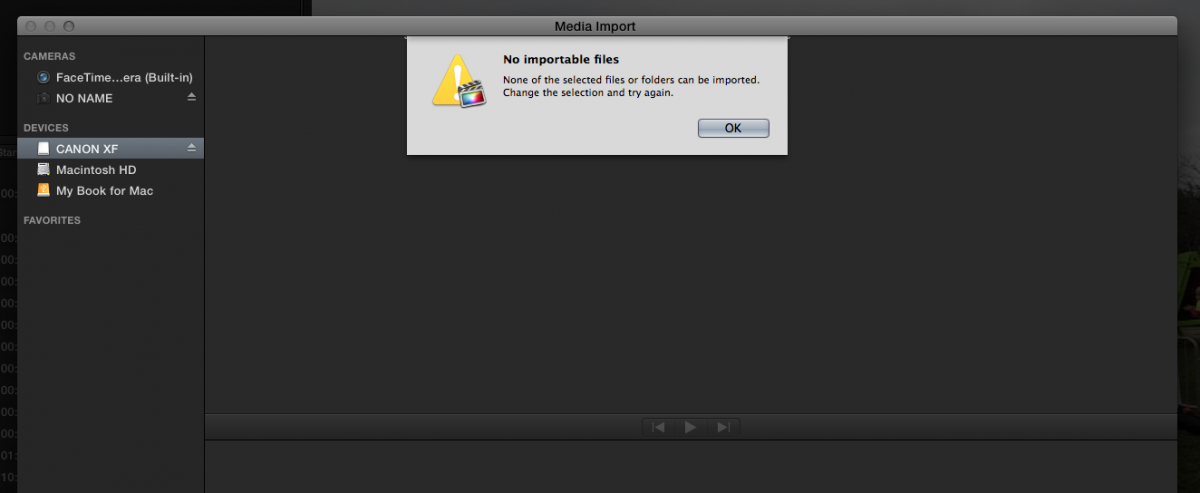
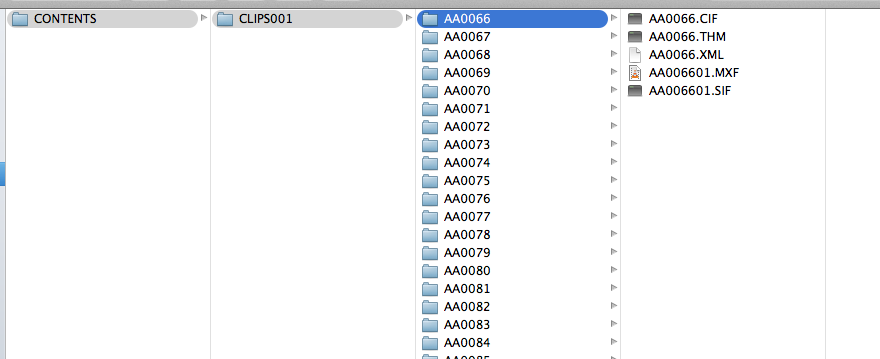
I have a CF card from a Canon XF305, I have downloaded the Canon XF Plugin for Final Cut Pro X 2.2, I have the entire folder structure in place, yet FCPX says there are no importable files? any help would be greatly appreciated
Please Log in to join the conversation.
- ronny courtens
-

- Offline
- Moderator
-

Less
More
- Posts: 4455
- Thank you received: 962
06 Nov 2014 12:50 - 06 Nov 2014 12:50 #55593
by ronny courtens
Replied by ronny courtens on topic FCPX 10.1.3 will not recognize/import MXF files
Hi Jeff, welcome to the forum.
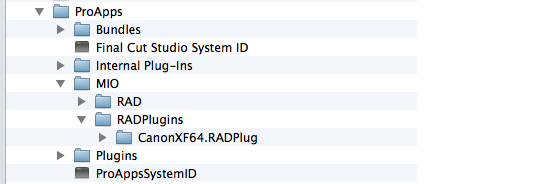
Before anything else, please check if the Canon XF plugin has been properly installed on your system. If it is not installed correctly it won't work.
Go to /library/Application Support/Pro Apps/MIO and check if you see the CanonXF64.RADPlug folder inside the RADPlugins folder.
- Ronny
Before anything else, please check if the Canon XF plugin has been properly installed on your system. If it is not installed correctly it won't work.
Go to /library/Application Support/Pro Apps/MIO and check if you see the CanonXF64.RADPlug folder inside the RADPlugins folder.
- Ronny
Last edit: 06 Nov 2014 12:50 by ronny courtens.
Please Log in to join the conversation.
- motionphoto
-
Topic Author
- Offline
- New Member
-
Less
More
- Posts: 9
- Thank you received: 0
06 Nov 2014 13:02 - 06 Nov 2014 13:17 #55595
by motionphoto
Replied by motionphoto on topic FCPX 10.1.3 will not recognize/import MXF files
Thanks for the welcome, been stalking this forum for a couple years, this is the first time I couldn't find a solution..
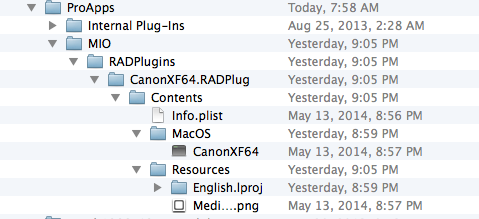
Plug in looks good to me though unless you see something odd:
Plug in looks good to me though unless you see something odd:
Last edit: 06 Nov 2014 13:17 by motionphoto. Reason: misquoted replier
Please Log in to join the conversation.
- motionphoto
-
Topic Author
- Offline
- New Member
-
Less
More
- Posts: 9
- Thank you received: 0
06 Nov 2014 13:13 #55598
by motionphoto
Replied by motionphoto on topic FCPX 10.1.3 will not recognize/import MXF files
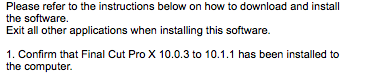
the only thing I can think of is that the plug in only seems to support up to 10.1.1 (?), maybe it hasn't caught up yet?
Please Log in to join the conversation.
- ronny courtens
-
- Offline
- Moderator
-
Less
More
- Posts: 4455
- Thank you received: 962
06 Nov 2014 13:23 #55600
by ronny courtens
Replied by ronny courtens on topic FCPX 10.1.3 will not recognize/import MXF files
What OS are you running?
- Ronny
- Ronny
Please Log in to join the conversation.
- motionphoto
-
Topic Author
- Offline
- New Member
-
Less
More
- Posts: 9
- Thank you received: 0
06 Nov 2014 13:26 #55601
by motionphoto
Replied by motionphoto on topic FCPX 10.1.3 will not recognize/import MXF files
OSX (10.9.5)
Please Log in to join the conversation.
- ronny courtens
-
- Offline
- Moderator
-
Less
More
- Posts: 4455
- Thank you received: 962
06 Nov 2014 13:35 #55603
by ronny courtens
Replied by ronny courtens on topic FCPX 10.1.3 will not recognize/import MXF files
Mmm that should work. I remember we have imported C300 and C500 MXF on different occasions running Mavericks and 10.1.2. But you are correct, they haven't updated the plugin for a long time. Canon is always very slow with such things 
Are you importing directly from a card? If so you should try this: copy the entire card structure to your hard drive and see if you can import from the folder on your drive instead.
- Ronny
Are you importing directly from a card? If so you should try this: copy the entire card structure to your hard drive and see if you can import from the folder on your drive instead.
- Ronny
Please Log in to join the conversation.
- motionphoto
-
Topic Author
- Offline
- New Member
-
Less
More
- Posts: 9
- Thank you received: 0
06 Nov 2014 13:38 #55604
by motionphoto
Replied by motionphoto on topic FCPX 10.1.3 will not recognize/import MXF files
one step ahead of you, lol
tried importing from both the card reader and copying the files to the HD (on a side note all the MXF files playback fine in VLC media player)
I've heard of uninstalling and reinstalling FCPX, but am gun-shy to do so in middle of a project--any opinion on that?
tried importing from both the card reader and copying the files to the HD (on a side note all the MXF files playback fine in VLC media player)
I've heard of uninstalling and reinstalling FCPX, but am gun-shy to do so in middle of a project--any opinion on that?
Please Log in to join the conversation.
- ronny courtens
-
- Offline
- Moderator
-
Less
More
- Posts: 4455
- Thank you received: 962
06 Nov 2014 13:44 #55605
by ronny courtens
Replied by ronny courtens on topic FCPX 10.1.3 will not recognize/import MXF files
Reinstalling FCP X is very easy, but that probably won't be necessary.
Question: Did you install the Canon XF plugin today? If so, have you restarted the computer after installing the plugin?
- Ronny
Question: Did you install the Canon XF plugin today? If so, have you restarted the computer after installing the plugin?
- Ronny
Please Log in to join the conversation.
- motionphoto
-
Topic Author
- Offline
- New Member
-
Less
More
- Posts: 9
- Thank you received: 0
06 Nov 2014 13:45 #55606
by motionphoto
Replied by motionphoto on topic FCPX 10.1.3 will not recognize/import MXF files
installed it last week, uninstalled / reinstalled it last night, restarted computer both times 
Please Log in to join the conversation.
- ronny courtens
-
- Offline
- Moderator
-
Less
More
- Posts: 4455
- Thank you received: 962
06 Nov 2014 13:49 #55607
by ronny courtens
Replied by ronny courtens on topic FCPX 10.1.3 will not recognize/import MXF files
Okay, then I would try on last thing: quit FCP X and launch it again while holding the ALT+CMD keys pressed down. You will get a message asking if you want to delete your preferences, confirm and let FCP X launch. Then open your Library and see if you can import the footage now.
- Ronny
- Ronny
Please Log in to join the conversation.
- motionphoto
-
Topic Author
- Offline
- New Member
-
Less
More
- Posts: 9
- Thank you received: 0
06 Nov 2014 13:51 #55608
by motionphoto
Replied by motionphoto on topic FCPX 10.1.3 will not recognize/import MXF files
will try tonight when I get home, I'll keep ya posted, thanks a bunch
Please Log in to join the conversation.

06 Nov 2014 17:16 #55618
by ddixon
Replied by ddixon on topic FCPX 10.1.3 will not recognize/import MXF files
Just to confirm - that plugin does work with Yosemite. I have an XF100 and it works flawlessly. I import from a card reader into XF Utility for archiving, then import from that into FCPX.
Please Log in to join the conversation.
- motionphoto
-
Topic Author
- Offline
- New Member
-
Less
More
- Posts: 9
- Thank you received: 0
07 Nov 2014 01:44 - 07 Nov 2014 01:44 #55636
by motionphoto
Replied by motionphoto on topic FCPX 10.1.3 will not recognize/import MXF files
Tried your method of deleting preferences, still no dice...contacted Canon, they saying that it might be because I'm running 10.1.3 but they can't explain why even the XF utility doesn't work. If I find an answer I will let you guys know, if you think of anything else let me know
Last edit: 07 Nov 2014 01:44 by motionphoto. Reason: grammar
Please Log in to join the conversation.
07 Nov 2014 03:22 #55640
by ddixon
Replied by ddixon on topic FCPX 10.1.3 will not recognize/import MXF files
So the Finder can see (and I assume, copy from) the card, but XF Utility and FCPX cannot? Is there a chance that the card has a minor corruption? When you said earlier you copied the files to an internal hard drive, I assume you copied the entire card structure and then tried to import from that?
Do you have another card you could do a test record on to see if it does the same thing?
Apologies if you've already tried all this.
Do you have another card you could do a test record on to see if it does the same thing?
Apologies if you've already tried all this.
Please Log in to join the conversation.
- motionphoto
-
Topic Author
- Offline
- New Member
-
Less
More
- Posts: 9
- Thank you received: 0
07 Nov 2014 11:34 #55650
by motionphoto
Replied by motionphoto on topic FCPX 10.1.3 will not recognize/import MXF files
yep, I copied the entire folder/file structure. This card was actually mailed to me after several failed attempts of online transfer.
But just for kicks would anyone be willing to dropbox me a small video (that you know works) that I could test/compare results?
But just for kicks would anyone be willing to dropbox me a small video (that you know works) that I could test/compare results?
Please Log in to join the conversation.

02 Dec 2014 06:20 #56747
by whitemax
Replied by whitemax on topic FCPX 10.1.3 will not recognize/import MXF files
You guys' this thread helped me a lot ! And hope this can help more people. Good job and keep going !
Please Log in to join the conversation.
16 Mar 2015 07:35 #61393
by whitemax
Replied by whitemax on topic FCPX 10.1.3 will not recognize/import MXF files
As I known now, fcp seems already supported MXF natively. But still I have encounted some problem, I have one video with multipel audios which shot with an external mic , I want to keep them all but it didn't allow me to do that, then I searched the net and found one called imximxf, which seemed work well.
Please Log in to join the conversation.
19 Mar 2015 08:56 #61561
by amymomoye
Replied by amymomoye on topic FCPX 10.1.3 will not recognize/import MXF files
Maybe the files' formats recorded on CF card from Canon XF305 don't compatible with FCP X at all. I'm sorry the plug-in didn't work as you want. Search online, why not take format convertion into consideration?
Please Log in to join the conversation.
