


- Posts: 1
- Thank you received: 0
3 Post Moderation Rule for New Boarders (25 Jan 2021)
New boarders will have their posts moderated - Don't worry if you cannot see your post immediately.
Photon Pro not working
06 Nov 2014 04:55 #55580
by apitt1988

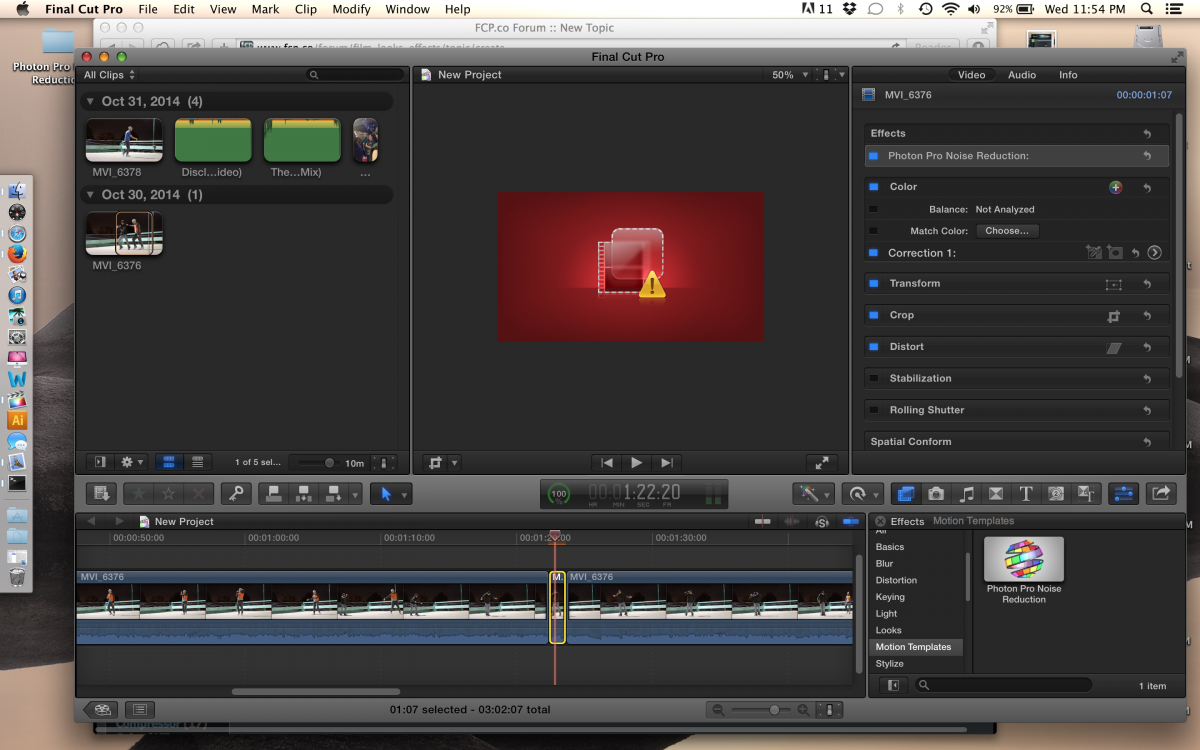
I bought the photon pro plugin. It installed properly and I found it in my effects panel, however when I apply it, it doesn't give me the option to mess with the sliders.. the simply are not there, I have no options.. I just apply the effect and then I get a red window and explanation mark where my video viewer was.. any idea on why this is happening? I spent the last of my money and this plugin and I really need to get this video uploaded a few days ago.. can anyone help?
I'm using a macbook pro 15 in with retina. Processor : 2.4 GHz Intel Core i7. Graphics NVIDIA GeForce GT 650M 1024 MB. I am filming with a cannon T3. Using a 32 gb San Disk Ultra.
Photon Pro not working was created by apitt1988
I bought the photon pro plugin. It installed properly and I found it in my effects panel, however when I apply it, it doesn't give me the option to mess with the sliders.. the simply are not there, I have no options.. I just apply the effect and then I get a red window and explanation mark where my video viewer was.. any idea on why this is happening? I spent the last of my money and this plugin and I really need to get this video uploaded a few days ago.. can anyone help?
I'm using a macbook pro 15 in with retina. Processor : 2.4 GHz Intel Core i7. Graphics NVIDIA GeForce GT 650M 1024 MB. I am filming with a cannon T3. Using a 32 gb San Disk Ultra.
Please Log in to join the conversation.
- ronny courtens
-

- Offline
- Moderator
-

Less
More
- Posts: 4455
- Thank you received: 962
06 Nov 2014 17:02 #55616
by ronny courtens
Replied by ronny courtens on topic Photon Pro not working
Make sure you have downloaded the latest version of the plugin (1.0.2) as this fixes a problem with Nvidia cards.
If you have the latest version and you still have this problem, try deleting the FCP X preferences.
If that does not work try re-installing the plugin.
If this still does not work I think the best thing for you is to contact Photo Pro support: www.fpgarts.com/photon-pro/support
- Ronny
If you have the latest version and you still have this problem, try deleting the FCP X preferences.
If that does not work try re-installing the plugin.
If this still does not work I think the best thing for you is to contact Photo Pro support: www.fpgarts.com/photon-pro/support
- Ronny
Please Log in to join the conversation.
