


- Posts: 190
- Thank you received: 0
3 Post Moderation Rule for New Boarders (25 Jan 2021)
New boarders will have their posts moderated - Don't worry if you cannot see your post immediately.
Shifting multiple clips in timeline
04 Nov 2014 00:43 #55463
by Seany
Shifting multiple clips in timeline was created by Seany
I've forgotten how to shift up mutiple clips in the timeline, what sthe shortcut for this? I want to shift mutiple clips 1 sec.08 frames to sync with audio.
Thanks.
S
Thanks.
S
Please Log in to join the conversation.
- ronny courtens
-

- Offline
- Moderator
-

Less
More
- Posts: 4455
- Thank you received: 962
04 Nov 2014 07:56 #55469
by ronny courtens
Replied by ronny courtens on topic Shifting multiple clips in timeline
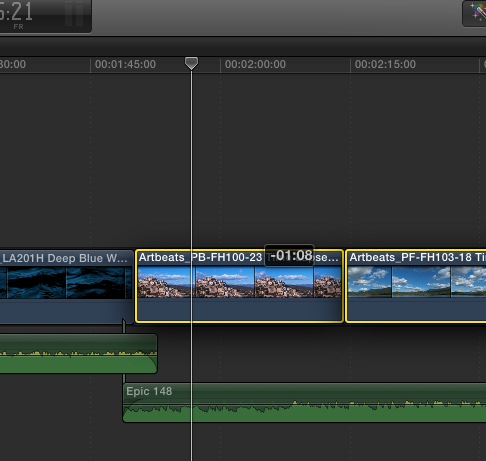
The easiest way for doing this is to just press "P" and drag the clips. While you drag you will see a little indicator showing you how many frames you are moving the clips.
- Ronny
- Ronny
Please Log in to join the conversation.

04 Nov 2014 14:12 #55488
by BenB
Replied by BenB on topic Shifting multiple clips in timeline
The command and period keys are also the less-than and greater-than symbols. They'll move things left and rights.
With the default Arrow (Selection) tool highlighted, select a clip, or group of clips highlighted, use comma and period to nudge one frame at a time.
If you do this with the Position tool highlighted, things will overwrite others, so be careful.
This also works with ripple, roll, slip & slide edits.
With the default Arrow (Selection) tool highlighted, select a clip, or group of clips highlighted, use comma and period to nudge one frame at a time.
If you do this with the Position tool highlighted, things will overwrite others, so be careful.
This also works with ripple, roll, slip & slide edits.
Please Log in to join the conversation.
