


- Posts: 5
- Thank you received: 0
3 Post Moderation Rule for New Boarders (25 Jan 2021)
New boarders will have their posts moderated - Don't worry if you cannot see your post immediately.
Cannot change DVD exporting resolution
Less
More
02 Nov 2014 23:43 - 02 Nov 2014 23:45 #55381
by eggyisme
Cannot change DVD exporting resolution was created by eggyisme
Hi there,
I have been playing around with Final Cut Pro 10.0.8 and am having trouble exporting my video to DVDs.
I finished my project and successfully exported it to the DVD, checked all the settings and it all worked perfectly (settings of project below).

Upon playback, I noticed that it exported at 720x480 | 29.97 fps by default. As this was not a 'choose-able' setting, I did not change it (below).

I tried playing with some of the options but couldn't change the resolution (the project is set at 720HD, with a resolution of 1280x720 at 30fps). I thought it may have something to do with fps v. NTSC, so I lowered the project's fps to 25 (below).

This increased the possible export resolution to 720x576 | 25fps (below).
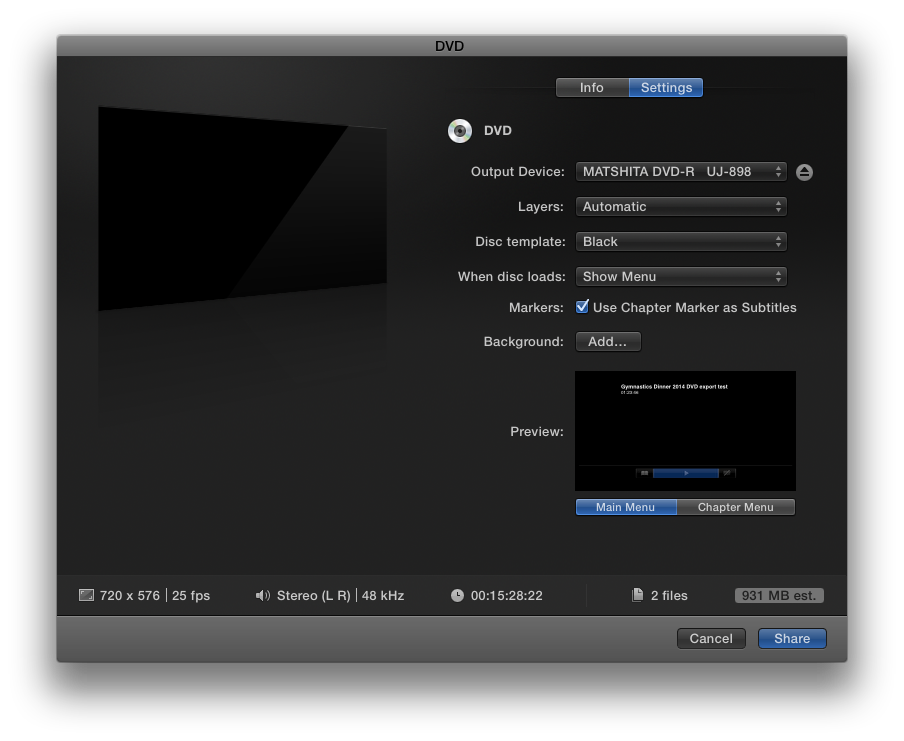
Last year I was able to export at 720p, so I have no idea what has changed between now and then. My question is how (if at all possible) can I export to DVD at 720p? If needed, I can export to the hard drive to create a disk image (*.img) to burn later.
I have been playing around with Final Cut Pro 10.0.8 and am having trouble exporting my video to DVDs.
I finished my project and successfully exported it to the DVD, checked all the settings and it all worked perfectly (settings of project below).
Upon playback, I noticed that it exported at 720x480 | 29.97 fps by default. As this was not a 'choose-able' setting, I did not change it (below).
I tried playing with some of the options but couldn't change the resolution (the project is set at 720HD, with a resolution of 1280x720 at 30fps). I thought it may have something to do with fps v. NTSC, so I lowered the project's fps to 25 (below).
This increased the possible export resolution to 720x576 | 25fps (below).
Last year I was able to export at 720p, so I have no idea what has changed between now and then. My question is how (if at all possible) can I export to DVD at 720p? If needed, I can export to the hard drive to create a disk image (*.img) to burn later.
Last edit: 02 Nov 2014 23:45 by eggyisme.
Please Log in to join the conversation.
- Tom Wolsky
-

- Offline
- Moderator
-

03 Nov 2014 00:20 #55384
by Tom Wolsky
Replied by Tom Wolsky on topic Cannot change DVD exporting resolution
DVD is standard definition only. Perhaps you previously export to Blu-ray.
Please Log in to join the conversation.


03 Nov 2014 00:29 #55386
by Francois
Replied by Francois on topic Cannot change DVD exporting resolution
DVD are always SD "Standard Definition [720 x 480 or 576]" not HD ....
Since your show is less than is 28 minutes , you might try burning a Blu-Ray format on a "DVD disk" using your regular disk burner (not a Blu-Ray disk) then you will have more choices however this DVD disk will only play in a Blu-Ray Player.
cheers
Francois
Since your show is less than is 28 minutes , you might try burning a Blu-Ray format on a "DVD disk" using your regular disk burner (not a Blu-Ray disk) then you will have more choices however this DVD disk will only play in a Blu-Ray Player.
cheers
Francois
Please Log in to join the conversation.
Less
More
- Posts: 5
- Thank you received: 0
03 Nov 2014 00:41 - 03 Nov 2014 00:44 #55387
by eggyisme
I can't remember if I previously exported to Blu-ray or not, but I doubt, as I had to play the DVD back in my drive afterwards, which is not a blu-ray player.
Thanks for your assistance
I did try burning it using the Blu-ray settings, but that's the problem - I do not have a Blu-ray player for playback, so it won't work on any of my devices.
Replied by eggyisme on topic Cannot change DVD exporting resolution
DVD is standard definition only. Perhaps you previously export to Blu-ray.
I can't remember if I previously exported to Blu-ray or not, but I doubt, as I had to play the DVD back in my drive afterwards, which is not a blu-ray player.
Thanks for your assistance
DVD are always SD "Standard Definition [720 x 480 or 576]" not HD ....
Since your show is less than is 28 minutes , you might try burning a Blu-Ray format on a "DVD disk" using your regular disk burner (not a Blu-Ray disk) then you will have more choices however this DVD disk will only play in a Blu-Ray Player.
I did try burning it using the Blu-ray settings, but that's the problem - I do not have a Blu-ray player for playback, so it won't work on any of my devices.
Last edit: 03 Nov 2014 00:44 by eggyisme. Reason: added in more information and quoted authors
Please Log in to join the conversation.
