


3 Post Moderation Rule for New Boarders (25 Jan 2021)
New boarders will have their posts moderated - Don't worry if you cannot see your post immediately.
Rendering Issues
- Betancourt
-
 Topic Author
- Offline
- Premium Member
-

Less
More
02 Nov 2014 21:23 - 02 Nov 2014 21:25 #55375
by Betancourt
Pablo Betancourt
Rendering Issues was created by Betancourt
Hi,
I'm getting a weird rendering with some projects. Here's an example: I wait final cut to render all my timeline, and if I make any edit to the first clip (actually a gap in this example) FCP needs to re render almost everything. Why? I'm just editing that single clip!
I'm using 10.1.3 under Yosemite 10.10, Project comes from older version of FCP (maybe 10.0.6).
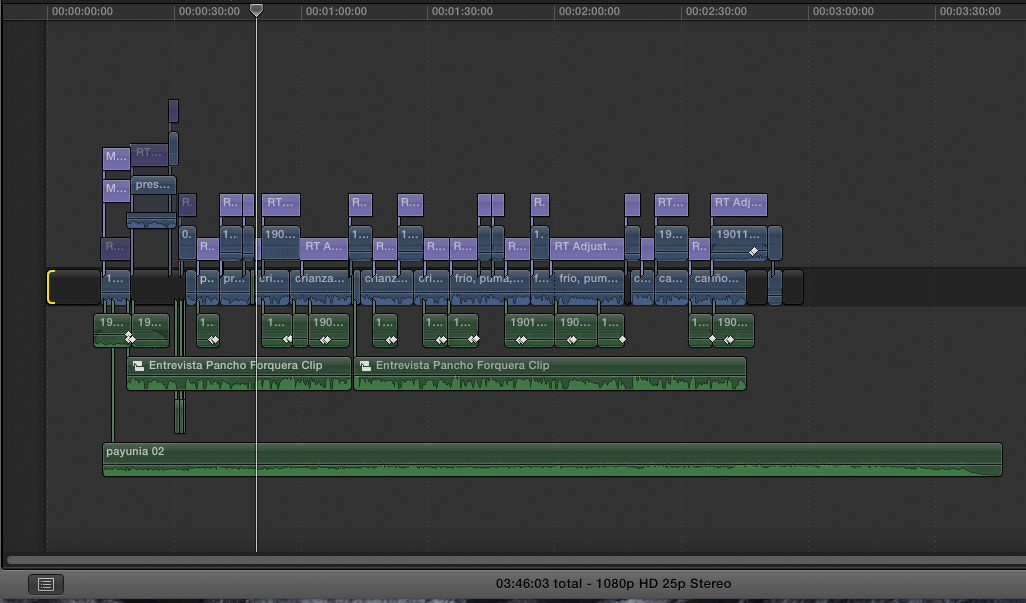
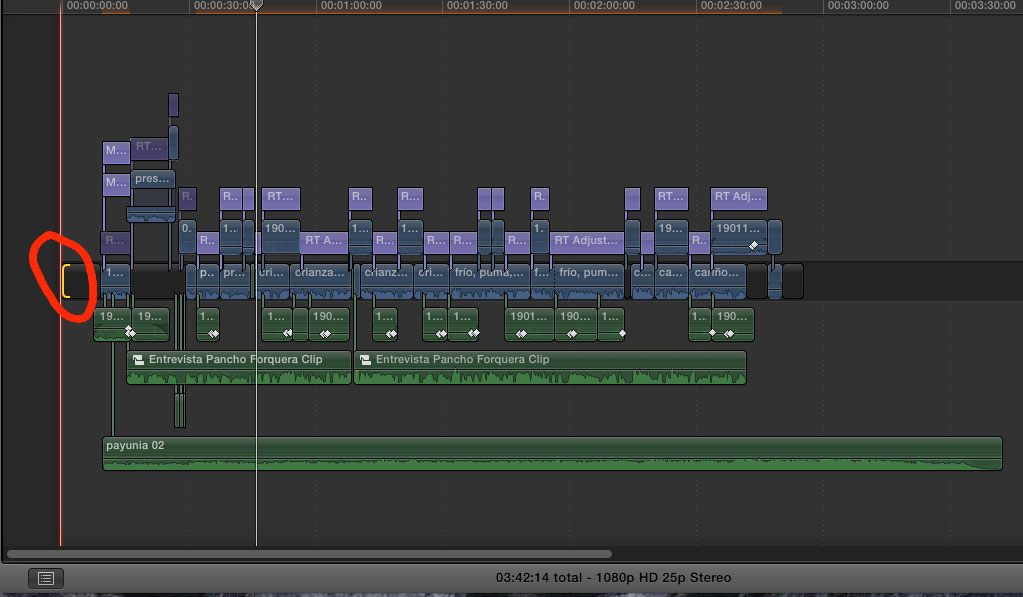
I'm getting a weird rendering with some projects. Here's an example: I wait final cut to render all my timeline, and if I make any edit to the first clip (actually a gap in this example) FCP needs to re render almost everything. Why? I'm just editing that single clip!
I'm using 10.1.3 under Yosemite 10.10, Project comes from older version of FCP (maybe 10.0.6).
Pablo Betancourt
Last edit: 02 Nov 2014 21:25 by Betancourt.
Please Log in to join the conversation.
- Betancourt
-
Topic Author
- Offline
- Premium Member
-
02 Nov 2014 21:29 #55376
by Betancourt
Pablo Betancourt
Replied by Betancourt on topic Rendering Issues
I'm using RT Adjustment layers for color correction. If I disable them then the render is not needed.
Pablo Betancourt
Please Log in to join the conversation.
- ronny courtens
-

- Offline
- Moderator
-

Less
More
- Posts: 4455
- Thank you received: 962
03 Nov 2014 09:45 #55398
by ronny courtens
Replied by ronny courtens on topic Rendering Issues
Hi Pablo,
Trimming the gap clip at the start of your timeline makes the adjustment layers on the timeline move.
An adjustment layer affects everything that is underneath it. When you move an adjustment layer you change what's underneath it (even if it's blank space), so you will have to re-render the adjustment layer.
That's why it is better to only render or re-render adjustment layers at the end of your edit (if you need to render at all).
- Ronny
Trimming the gap clip at the start of your timeline makes the adjustment layers on the timeline move.
An adjustment layer affects everything that is underneath it. When you move an adjustment layer you change what's underneath it (even if it's blank space), so you will have to re-render the adjustment layer.
That's why it is better to only render or re-render adjustment layers at the end of your edit (if you need to render at all).
- Ronny
Please Log in to join the conversation.
- Betancourt
-
Topic Author
- Offline
- Premium Member
-
03 Nov 2014 11:37 #55401
by Betancourt
Pablo Betancourt
Replied by Betancourt on topic Rendering Issues
Hi Ronnie,
But if adjusment layers are all connected to already rendered clips, an nothing is changing between them, why re render is needed? I don't see this behaviour with connected clips, only with adjustment layers. Is there any way to avoid this?
I like to use adjustment layers because I can disable all the effects quickly, but to re render every time I make a trim is a pain.
I'm using filmconvert pro + finisher or tonegrade on adjustmente layers, and they need a lot of time to render.
Pablo
But if adjusment layers are all connected to already rendered clips, an nothing is changing between them, why re render is needed? I don't see this behaviour with connected clips, only with adjustment layers. Is there any way to avoid this?
I like to use adjustment layers because I can disable all the effects quickly, but to re render every time I make a trim is a pain.
I'm using filmconvert pro + finisher or tonegrade on adjustmente layers, and they need a lot of time to render.
Pablo
Pablo Betancourt
Please Log in to join the conversation.
- ronny courtens
-
- Offline
- Moderator
-
Less
More
- Posts: 4455
- Thank you received: 962
03 Nov 2014 11:58 #55403
by ronny courtens
Replied by ronny courtens on topic Rendering Issues
Adjustment layers are very different than connected clips because they influence everything that is lying underneath them, even the empty timeline. When you move adjustment layers you move their relation to the timeline and you have to re-render them. There is no way to avoid this.
Using adjustment layers is indeed very handy. But first do all your trimming editing, then fine-tune and render the adjustment layers.
- Ronny
Using adjustment layers is indeed very handy. But first do all your trimming editing, then fine-tune and render the adjustment layers.
- Ronny
Please Log in to join the conversation.


03 Nov 2014 12:01 #55404
by BenB
Replied by BenB on topic Rendering Issues
You are changing the duration of your timeline. A render is simply a "mixed down" file. ANY changes, even in duration, make this file not match what you have.
If I have 7 audio tracks, mix them down, they sync and are valid. If I change the duration of that audio project, the "mixed down" version no longer syncs, is no longer valid. This, a new mix down is required.
The adjustment layer causes heavy lifting of the CPU/GPU to process all of that filtering. It will cause rendering quickly, as Ronnie said. Are you unable to playback decently without rendering?
Ah, Filmconvert Pro, that sucker is very power hungry!
If I have 7 audio tracks, mix them down, they sync and are valid. If I change the duration of that audio project, the "mixed down" version no longer syncs, is no longer valid. This, a new mix down is required.
The adjustment layer causes heavy lifting of the CPU/GPU to process all of that filtering. It will cause rendering quickly, as Ronnie said. Are you unable to playback decently without rendering?
Ah, Filmconvert Pro, that sucker is very power hungry!
Please Log in to join the conversation.
- Betancourt
-
Topic Author
- Offline
- Premium Member
-
03 Nov 2014 12:53 - 03 Nov 2014 12:59 #55408
by Betancourt
Pablo Betancourt
Replied by Betancourt on topic Rendering Issues
Ok, Understood.
Hope to have a "disable all effects on selected clips" button in the near future.
Is there a way to have all adjustment layers combined to hide them at once? I've tried storylines but you cannot disable (V) it as a group but as single clips. And because storylines create one single connection, I lose the sync if I then make any trim edit on clips.
If I make a compound clip they lose the "adjusment" feature.
For the moment I should go with Ronnie's advice.
Thank you both
Pablo
Hope to have a "disable all effects on selected clips" button in the near future.
Is there a way to have all adjustment layers combined to hide them at once? I've tried storylines but you cannot disable (V) it as a group but as single clips. And because storylines create one single connection, I lose the sync if I then make any trim edit on clips.
If I make a compound clip they lose the "adjusment" feature.
For the moment I should go with Ronnie's advice.
Thank you both
Pablo
Pablo Betancourt
Last edit: 03 Nov 2014 12:59 by Betancourt.
Please Log in to join the conversation.
03 Nov 2014 12:56 #55409
by BenB
Replied by BenB on topic Rendering Issues
If all of them are in the same "lane", you can select the first, shift-click the last, and V. But yes, that is a tricky issue turning them on and off.
As Ronnie said, don't do any effects, coloring, or audio until the final edit is completed.
As Ronnie said, don't do any effects, coloring, or audio until the final edit is completed.
Please Log in to join the conversation.
- ronny courtens
-
- Offline
- Moderator
-
Less
More
- Posts: 4455
- Thank you received: 962
03 Nov 2014 13:10 - 03 Nov 2014 13:10 #55411
by ronny courtens
Replied by ronny courtens on topic Rendering Issues
Open the Roles editor (Modify > Edit Roles), create a new Video sub-role and name it "Adjustment Layers".
Select every adjustment layer you have on the timeline and in the Inspector > Info tab assign the subrole Adjustment Layer to them.
Now in the Timeline Index > Roles you can turn all adjustment layers on and off at once, whenever you wish.
- Ronny
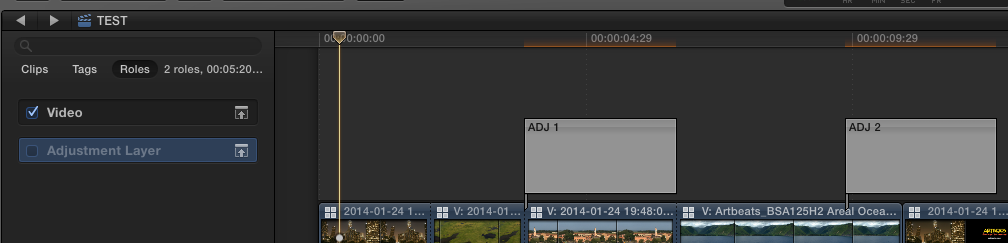
Select every adjustment layer you have on the timeline and in the Inspector > Info tab assign the subrole Adjustment Layer to them.
Now in the Timeline Index > Roles you can turn all adjustment layers on and off at once, whenever you wish.
- Ronny
Last edit: 03 Nov 2014 13:10 by ronny courtens.
Please Log in to join the conversation.
- Betancourt
-
Topic Author
- Offline
- Premium Member
-
03 Nov 2014 14:23 #55413
by Betancourt
Pablo Betancourt
Replied by Betancourt on topic Rendering Issues
Great Ronnie!
This is a perfect solution for what I'm doing right now.
I should explore and learn more on roles
Many thanks
Pablo
This is a perfect solution for what I'm doing right now.
I should explore and learn more on roles
Many thanks
Pablo
Pablo Betancourt
Please Log in to join the conversation.
