


- Posts: 30
- Thank you received: 0
3 Post Moderation Rule for New Boarders (25 Jan 2021)
New boarders will have their posts moderated - Don't worry if you cannot see your post immediately.
about the built-in Ken Burns effect in FCPX
31 Oct 2014 10:07 - 31 Oct 2014 10:08 #55273
by alvarog01
about the built-in Ken Burns effect in FCPX was created by alvarog01
Hello!
I am struggling to achieve a Kern Burns "progressive sequence" on a clip, such:
zoom in -> maintain zoom -> zoom out
This little tutorial shows how to achieve this WITH STILL IMAGES.
Is there an easy way to get something similar WITH VIDEO? This would save me lots of editing time..... many thanks in advance!
I am struggling to achieve a Kern Burns "progressive sequence" on a clip, such:
zoom in -> maintain zoom -> zoom out
This little tutorial shows how to achieve this WITH STILL IMAGES.
Is there an easy way to get something similar WITH VIDEO? This would save me lots of editing time..... many thanks in advance!
Last edit: 31 Oct 2014 10:08 by alvarog01.
Please Log in to join the conversation.

31 Oct 2014 11:05 #55280
by BenB
Replied by BenB on topic about the built-in Ken Burns effect in FCPX
Just apply the exact same Ken Burns effect to a video clip.
Please Log in to join the conversation.
31 Oct 2014 11:43 - 31 Oct 2014 12:05 #55282
by alvarog01
Replied by alvarog01 on topic about the built-in Ken Burns effect in FCPX
Yes, zoom in and out can both be done with video in the same way, but with the middle section (maintain zooming), the "add freeze frame" option would cause to stop the video motion...
Last edit: 31 Oct 2014 12:05 by alvarog01.
Please Log in to join the conversation.
- ronny courtens
-

- Offline
- Moderator
-

Less
More
- Posts: 4455
- Thank you received: 962
31 Oct 2014 12:27 #55289
by ronny courtens
Replied by ronny courtens on topic about the built-in Ken Burns effect in FCPX
1. Put your video clip on the timeline and apply the KB effect to it. Drag the Start OSC to where you want the animation to start, and the End OSC to where you want the animation to end and hold. Then press Done.
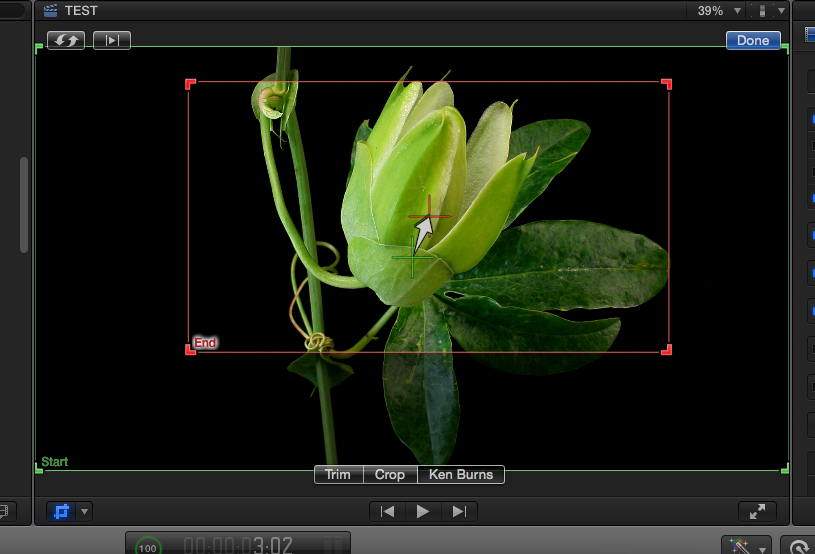
2. Blade your video where you want the animation to stop. You now have two clips with the same animation.
Select the second clip, select Crop>Ken Burns and press the "invert" button to invert the animation.
Now drag on the End OSC until it perfectly matches the Start OSC. Press Done.
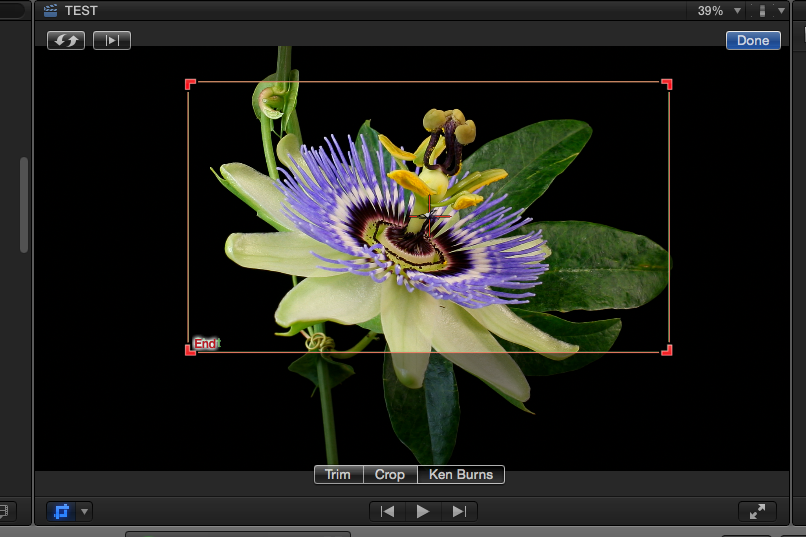
When you play the timeline you will see the second clip will hold the animation.
3. Blade the video again where you want the animation to resume. You now have three clips.
Select the third clip, select Crop>Ken Burns and press the "invert" button to invert the animation.
Now drag the End OSC to where you want the animation to end and press Done.
Play the timeline, the animation will start, it will hold and it will continue to the end. All done in under 30 seconds.
You can easily modify the length of each part of the animation and the length of the hold.
You could do exactly the same thing just using keyframes, the choice is up to you.
If you want I will make a short video tutorial for this, can do it in a few minutes.
- Ronny
2. Blade your video where you want the animation to stop. You now have two clips with the same animation.
Select the second clip, select Crop>Ken Burns and press the "invert" button to invert the animation.
Now drag on the End OSC until it perfectly matches the Start OSC. Press Done.
When you play the timeline you will see the second clip will hold the animation.
3. Blade the video again where you want the animation to resume. You now have three clips.
Select the third clip, select Crop>Ken Burns and press the "invert" button to invert the animation.
Now drag the End OSC to where you want the animation to end and press Done.
Play the timeline, the animation will start, it will hold and it will continue to the end. All done in under 30 seconds.
You can easily modify the length of each part of the animation and the length of the hold.
You could do exactly the same thing just using keyframes, the choice is up to you.
If you want I will make a short video tutorial for this, can do it in a few minutes.
- Ronny
Please Log in to join the conversation.


31 Oct 2014 12:40 #55291
by rjvddoes
Replied by rjvddoes on topic about the built-in Ken Burns effect in FCPX
Hi Ronny,
You can save yourself the time to make the tutorial. Steve Martin has published one here on fcp.co a while ago.
He uses a slightly different approach for holding the animation. The tutorial is the first one in his series FCPX in under five minutes.
Cheers,
Robbert-Jan
www.fcp.co/final-cut-pro/tutorials/1462-...-a-ken-burns-special
You can save yourself the time to make the tutorial. Steve Martin has published one here on fcp.co a while ago.
He uses a slightly different approach for holding the animation. The tutorial is the first one in his series FCPX in under five minutes.
Cheers,
Robbert-Jan
www.fcp.co/final-cut-pro/tutorials/1462-...-a-ken-burns-special
Please Log in to join the conversation.
- ronny courtens
-
- Offline
- Moderator
-
Less
More
- Posts: 4455
- Thank you received: 962
31 Oct 2014 12:44 #55292
by ronny courtens
Replied by ronny courtens on topic about the built-in Ken Burns effect in FCPX
Hey Robbert-Jan,
That tutorial shows how to do this on still frames, but the freeze frame workflow Mark shows does not work with moving video. I think I just might make that tutorial after all.
- Ronny
That tutorial shows how to do this on still frames, but the freeze frame workflow Mark shows does not work with moving video. I think I just might make that tutorial after all.
- Ronny
Please Log in to join the conversation.
31 Oct 2014 13:13 - 31 Oct 2014 13:23 #55299
by alvarog01
Replied by alvarog01 on topic about the built-in Ken Burns effect in FCPX
Thanks so much ronny for taking the effort to explain it so thoroughly.
I used to follow a similar approach, except that on the third clip, I pasted clip #1 Ken Burns setting, and then pushed invert button. With that I ensure that End OSC is exactly the original value and does not mismatch the following clip's crop settings.
The problem for me was always the middle clip, in which Start and End OSC's must exactly match their coordinates. It would be great that Apple implement a way to
a) manually introduce Left/Right/Up/Bottom numbers, instead of developing a surgeon-handling mouse skills
b) copy and paste settings between KB and Crop options
Please disregard my poor English writing.
I used to follow a similar approach, except that on the third clip, I pasted clip #1 Ken Burns setting, and then pushed invert button. With that I ensure that End OSC is exactly the original value and does not mismatch the following clip's crop settings.
The problem for me was always the middle clip, in which Start and End OSC's must exactly match their coordinates. It would be great that Apple implement a way to
a) manually introduce Left/Right/Up/Bottom numbers, instead of developing a surgeon-handling mouse skills
b) copy and paste settings between KB and Crop options
Please disregard my poor English writing.
Last edit: 31 Oct 2014 13:23 by alvarog01.
Please Log in to join the conversation.
- ronny courtens
-
- Offline
- Moderator
-
Less
More
- Posts: 4455
- Thank you received: 962
31 Oct 2014 13:32 #55302
by ronny courtens
Replied by ronny courtens on topic about the built-in Ken Burns effect in FCPX
The Ken Burns feature is fast and very precise, but it is originally intended as a standalone animation effect and not really as a way to do multiple consequent moves. What I have explained is a workaround to do this anyway.
If you want to work with numbers instead of on-screen controls you can use keyframing instead and enter the numbers in the Inspector. You can do the same animation with the hold using Crop keyframes in exactly the same amount of time as you do it with the KB effect.
- Ronny
If you want to work with numbers instead of on-screen controls you can use keyframing instead and enter the numbers in the Inspector. You can do the same animation with the hold using Crop keyframes in exactly the same amount of time as you do it with the KB effect.
- Ronny
Please Log in to join the conversation.
31 Oct 2014 15:21 #55311
by alvarog01
Replied by alvarog01 on topic about the built-in Ken Burns effect in FCPX
For me keyframing isn't a good alternative.. for some reason the zoom effect isn't so smooth, KB has instead ease-in/out curves. Also, KF is not so quick and straight to use.
Please Log in to join the conversation.
- Jonathan Levin
-

- Offline
- Platinum Member
-

Less
More
- Posts: 786
- Thank you received: 21
31 Oct 2014 17:46 #55323
by Jonathan Levin
Replied by Jonathan Levin on topic about the built-in Ken Burns effect in FCPX
Kind of on subject, but I just purchased the "Quick and Easy Ken Burns" plug-ins.
The reason I got these is to be able to start and stop the effect anywhere in the clip/photo. Something that is more difficult to do with FCP X Ken Burns effect without making freeze frames and a few other steps. Just starting to play around with that now.
Jonathan
The reason I got these is to be able to start and stop the effect anywhere in the clip/photo. Something that is more difficult to do with FCP X Ken Burns effect without making freeze frames and a few other steps. Just starting to play around with that now.
Jonathan
Please Log in to join the conversation.
31 Oct 2014 18:56 #55326
by alvarog01
Replied by alvarog01 on topic about the built-in Ken Burns effect in FCPX
I Just made a quick videotutorial of the process I currently follow to achieve this:
Please Log in to join the conversation.
31 Oct 2014 19:03 #55327
by alvarog01
never heard of those plugins... can you please comment your impressions when you try them? thank you!!
Replied by alvarog01 on topic about the built-in Ken Burns effect in FCPX
Jonathan Levin wrote: Kind of on subject, but I just purchased the "Quick and Easy Ken Burns" plug-ins.
The reason I got these is to be able to start and stop the effect anywhere in the clip/photo. Something that is more difficult to do with FCP X Ken Burns effect without making freeze frames and a few other steps. Just starting to play around with that now.
Jonathan
never heard of those plugins... can you please comment your impressions when you try them? thank you!!
Please Log in to join the conversation.

01 Nov 2014 01:16 #55344
by bluefonia
Replied by bluefonia on topic about the built-in Ken Burns effect in FCPX
FXFactory has a free Ken Burns plugin - Pan&Zoom - which according to themselves is more flexible than the KB in FCPX.
fxfactory.com/info/panandzoom/
fxfactory.com/info/panandzoom/
Please Log in to join the conversation.
01 Nov 2014 03:01 - 01 Nov 2014 03:17 #55346
by ddixon
Replied by ddixon on topic about the built-in Ken Burns effect in FCPX
OK, this discussion got me experimenting tonight rather than working on what I should have been editing...
Any plugin that allows for a pause in the start or stop of a move should be able to do this, using the concept of applying it to a clip, then splitting the clip, then reversing the settings on the second clip.
The Quick and Easy Ken Burns plugin is a product from fcpeffects.com
It's intended to be a way to throw a subtle KB effect on a clip in a flash with no configuration. But once applied you can tweak the settings.
So, following up on Ronny's example and that of alvarog01, using the Zoom In Ease plugin from the fcpeffects Quck and Easy KB effect pack, you could...
Apply the plugin to the clip, set the beginning and end settings you want. Split the clip, then on the second clip reverse the settings. It's not one click like in KB, but you can see the settings in a line, on the second clip just swap the numbers in any of the X, Y, Scale, etc. Start and Stop boxes that you've changed.
Then, to make a hold in the middle just go to the first clip and add an End Early setting. Or go to the second clip and add a Start Delay setting. Or do a little of both. The nice part is that you can change the hold time as you wish. You can even use the Trim Tool and Roll the split between the clips and the move and hold are retained (although of course the clip length controls the speed of the move). Or you could even hold at the beginning, middle, AND end of the whole thing. You could also chain these and do multiple moves on a clip as needed.
Further, this plugin allows you to dial in the amount of Ease you want. For me, the ability to change the holds at will, along the customization of the easing, more than makes up for the one button reverse in KB.
A free solution that I also like a lot is Alex4D's Smooth Move, which should also be able to do this. But, in my quick testing, reversing the Start and End settings on the second clip still has a small jump even though the X and Y settings match. Taking time to tweak that is a deal breaker. Maybe somebody smarter than me (or even Alex himself) can figure out how to avoid that jump, thus giving us a free option.
There may be other things that can do this. The free FXFactory Pan and Zoom is a generator, and I think it might not be as flexible as these options, but I'm not sure of that.
OK, have to get back to work.
Edit: That fcpeffects plugin is on sale for <$25.
Any plugin that allows for a pause in the start or stop of a move should be able to do this, using the concept of applying it to a clip, then splitting the clip, then reversing the settings on the second clip.
The Quick and Easy Ken Burns plugin is a product from fcpeffects.com
It's intended to be a way to throw a subtle KB effect on a clip in a flash with no configuration. But once applied you can tweak the settings.
So, following up on Ronny's example and that of alvarog01, using the Zoom In Ease plugin from the fcpeffects Quck and Easy KB effect pack, you could...
Apply the plugin to the clip, set the beginning and end settings you want. Split the clip, then on the second clip reverse the settings. It's not one click like in KB, but you can see the settings in a line, on the second clip just swap the numbers in any of the X, Y, Scale, etc. Start and Stop boxes that you've changed.
Then, to make a hold in the middle just go to the first clip and add an End Early setting. Or go to the second clip and add a Start Delay setting. Or do a little of both. The nice part is that you can change the hold time as you wish. You can even use the Trim Tool and Roll the split between the clips and the move and hold are retained (although of course the clip length controls the speed of the move). Or you could even hold at the beginning, middle, AND end of the whole thing. You could also chain these and do multiple moves on a clip as needed.
Further, this plugin allows you to dial in the amount of Ease you want. For me, the ability to change the holds at will, along the customization of the easing, more than makes up for the one button reverse in KB.
A free solution that I also like a lot is Alex4D's Smooth Move, which should also be able to do this. But, in my quick testing, reversing the Start and End settings on the second clip still has a small jump even though the X and Y settings match. Taking time to tweak that is a deal breaker. Maybe somebody smarter than me (or even Alex himself) can figure out how to avoid that jump, thus giving us a free option.
There may be other things that can do this. The free FXFactory Pan and Zoom is a generator, and I think it might not be as flexible as these options, but I'm not sure of that.
OK, have to get back to work.
Edit: That fcpeffects plugin is on sale for <$25.
Last edit: 01 Nov 2014 03:17 by ddixon.
Please Log in to join the conversation.
