


- Posts: 333
- Thank you received: 40
3 Post Moderation Rule for New Boarders (25 Jan 2021)
New boarders will have their posts moderated - Don't worry if you cannot see your post immediately.
Problem importing MXF from C300, help please!
30 Oct 2014 15:02 #55166
by Overturf
Problem importing MXF from C300, help please! was created by Overturf
Hi guys,
I need your help. I just started editing a documentary and have trouble importing certain MXF files shot with a Canon C300.
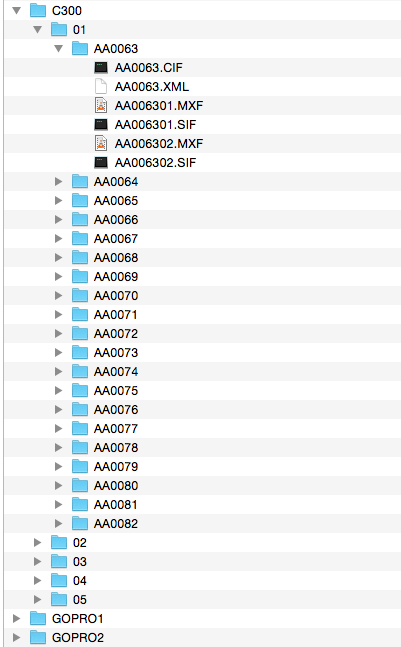
Funny thing is that most of the stuff imports correctly but some files won't. I have the Canon XF plugin installed. The footage was not delivered on CF cards but on HDDs. Please see the screenshot for file structure.
Now say I want to import the whole C300 folder. The folder C300/01 will import with all its subfolders just fine. So will C300/04. 02, 03 and 05 won't, though. I get an error message (in German) saying something like "No importable files. None of the chosen files or folders can be imported. Please change your selection and try again".
VLC will play those files just fine, so they include valid data.
I am lost and any help will be much appreciated!
Thanks a lot in advance,
Sebastian
I need your help. I just started editing a documentary and have trouble importing certain MXF files shot with a Canon C300.
Funny thing is that most of the stuff imports correctly but some files won't. I have the Canon XF plugin installed. The footage was not delivered on CF cards but on HDDs. Please see the screenshot for file structure.
Now say I want to import the whole C300 folder. The folder C300/01 will import with all its subfolders just fine. So will C300/04. 02, 03 and 05 won't, though. I get an error message (in German) saying something like "No importable files. None of the chosen files or folders can be imported. Please change your selection and try again".
VLC will play those files just fine, so they include valid data.
I am lost and any help will be much appreciated!
Thanks a lot in advance,
Sebastian
Please Log in to join the conversation.


30 Oct 2014 16:14 #55170
by smg669
Replied by smg669 on topic Problem importing MXF from C300, help please!
I think FCPX will see the clips correctly if you recreate the proper file structure of the C300 card.
Put the 01 folder into a folder called contents in the root of that C300 folder
Rename the 01 folder to CLIPS001
Then try navigating to that C300 folder in FCPX.
The only thing you're missing is the INDEX.MIF file. Not sure how integral that is to FCPX and the C300 Plug In. If they need that .MIF file, you might be SOL. Try copying a .MIF file from another valid C300 directory and maybe that will work - FCPX may require the .MIF file to be that but might not actually be using the data from it.
Failing that, there are apps that will wrap the .MXF files into QuickTime files for you. Calibrated Q has a solution, but it's pricey. Some of those "no name" media converter companies have cheap apps that they clain will do it (e.g. Pavtube) but I can't vouch for those.
Put the 01 folder into a folder called contents in the root of that C300 folder
Rename the 01 folder to CLIPS001
Then try navigating to that C300 folder in FCPX.
The only thing you're missing is the INDEX.MIF file. Not sure how integral that is to FCPX and the C300 Plug In. If they need that .MIF file, you might be SOL. Try copying a .MIF file from another valid C300 directory and maybe that will work - FCPX may require the .MIF file to be that but might not actually be using the data from it.
Failing that, there are apps that will wrap the .MXF files into QuickTime files for you. Calibrated Q has a solution, but it's pricey. Some of those "no name" media converter companies have cheap apps that they clain will do it (e.g. Pavtube) but I can't vouch for those.
Please Log in to join the conversation.
30 Oct 2014 16:54 #55179
by smg669
Replied by smg669 on topic Problem importing MXF from C300, help please!
Bad news. I just did a test and you do need that .MIF file to import into FCPX using the Canon Import Plug In. And it does need to be the .MIF that actually goes with those clips. And it's a binary file, so it's not like you can take another valid .MIF file and manually alter it.
So, looks like you'll have to look at manually converting the .MXF files into useable video files.
So, looks like you'll have to look at manually converting the .MXF files into useable video files.
Please Log in to join the conversation.
30 Oct 2014 17:47 #55190
by Overturf
Replied by Overturf on topic Problem importing MXF from C300, help please!
I have checked the folders and you are indeed right. The ones that work contain that index.MIF file, the ones that don't work do not have it. Also the working ones have a different structure of subfolders.
So it seems like the guys who shot/copied the stuff had two different approaches of doing so.
Since VLC can play back the files there should be a way of converting them. Do you guys have any ideas/recommendations?
I just tried using XfcpX2 about which I read that it was helpful before Canon delivered its own plug-in. XfcpX2 is not developed any further. It can read/convert the problematic files but the result is not flawless, I get weird color shifts in the lower part of the picture. Can be a Yosemite issue.
Any help would be very much appreciated!
Thanks,
Sebastian
So it seems like the guys who shot/copied the stuff had two different approaches of doing so.
Since VLC can play back the files there should be a way of converting them. Do you guys have any ideas/recommendations?
I just tried using XfcpX2 about which I read that it was helpful before Canon delivered its own plug-in. XfcpX2 is not developed any further. It can read/convert the problematic files but the result is not flawless, I get weird color shifts in the lower part of the picture. Can be a Yosemite issue.
Any help would be very much appreciated!
Thanks,
Sebastian
Please Log in to join the conversation.
30 Oct 2014 17:53 #55191
by smg669
Your best bet is probably this:
www.calibratedsoftware.com/MXFImport_Mac.asp
If you want to save some money, try one of these:
www.auncam.com/aunsoft-transmxf-pro-for-mac
www.pavtube.com/mxf-converter-mac/
S
Replied by smg669 on topic Problem importing MXF from C300, help please!
Overturf wrote: I have checked the folders and you are indeed right. The ones that work contain that index.MIF file, the ones that don't work do not have it. Also the working ones have a different structure of subfolders.
So it seems like the guys who shot/copied the stuff had two different approaches of doing so.
Since VLC can play back the files there should be a way of converting them. Do you guys have any ideas/recommendations?
I just tried using XfcpX2 about which I read that it was helpful before Canon delivered its own plug-in. XfcpX2 is not developed any further. It can read/convert the problematic files but the result is not flawless, I get weird color shifts in the lower part of the picture. Can be a Yosemite issue.
Any help would be very much appreciated!
Thanks,
Sebastian
Your best bet is probably this:
www.calibratedsoftware.com/MXFImport_Mac.asp
If you want to save some money, try one of these:
www.auncam.com/aunsoft-transmxf-pro-for-mac
www.pavtube.com/mxf-converter-mac/
S
Please Log in to join the conversation.
- Darren Roark
-

- Offline
- Platinum Member
-

30 Oct 2014 17:54 #55192
by Darren Roark
Replied by Darren Roark on topic Problem importing MXF from C300, help please!
Clipwrap will do the job. However if any of them are over 4GB it may do them as separate clips without that file.
I'll avoid taking the time to rant about how much I dislike the third party file structures. Grumble...
I'll avoid taking the time to rant about how much I dislike the third party file structures. Grumble...
Please Log in to join the conversation.
30 Oct 2014 18:08 #55194
by smg669
I've got the latest ClipWrap (2.6.9) and Canon C300 .mxf files are greyed out for me. They won't open in ClipWrap for conversion. Am I missing something?
Replied by smg669 on topic Problem importing MXF from C300, help please!
Darren Roark wrote: Clipwrap will do the job. However if any of them are over 4GB it may do them as separate clips without that file.
I'll avoid taking the time to rant about how much I dislike the third party file structures. Grumble...
I've got the latest ClipWrap (2.6.9) and Canon C300 .mxf files are greyed out for me. They won't open in ClipWrap for conversion. Am I missing something?
Please Log in to join the conversation.
- Darren Roark
-
- Offline
- Platinum Member
-
30 Oct 2014 18:19 #55195
by Darren Roark
Replied by Darren Roark on topic Problem importing MXF from C300, help please!
That's odd, usually I can just navigate to the folder and it just does it's thing.
There are converters out there where you should be able to transcode them to ProRes.
There are converters out there where you should be able to transcode them to ProRes.
Please Log in to join the conversation.
30 Oct 2014 19:40 #55199
by Overturf
Replied by Overturf on topic Problem importing MXF from C300, help please!
Thanks guys, will check that out. And yes, Darren, this file structure is troublesome. Same with guys who don't know how to fully clone a card before erasing it 
Just out of curiosity: is there a way to export to ProRes from VLC? Mine offers several codecs but no ProRes. Strange.
Just out of curiosity: is there a way to export to ProRes from VLC? Mine offers several codecs but no ProRes. Strange.
Please Log in to join the conversation.

31 Oct 2014 13:00 #55296
by Francois
Replied by Francois on topic Problem importing MXF from C300, help please!
Hi
the developpers of clipwrap also make a software for mxf files :
www.divergentmedia.com/editready
Francois
the developpers of clipwrap also make a software for mxf files :
www.divergentmedia.com/editready
Francois
Please Log in to join the conversation.
