


- Posts: 59
- Thank you received: 0
3 Post Moderation Rule for New Boarders (25 Jan 2021)
New boarders will have their posts moderated - Don't worry if you cannot see your post immediately.
Is there any way of making a motion project into a Final cut title project?
29 Oct 2014 14:15 #55096
by chk70
Feeling a bit of the old anxiety now. I seem to have built my graphics package in regular motion projects and now I want to use it in FcpX. Is there any way of converting Motion projects in to Final cut title projects. it seems like I can copy the layers but not the rigs, and rigs has been a pain in the butt to make.
/H
/H
Please Log in to join the conversation.
- peteramwiggins
-

- Offline
- Administrator
-

- The Administrator :)
Less
More
- Posts: 1049
- Thank you received: 404
29 Oct 2014 15:56 #55106
by peteramwiggins
Administrator
Replied by peteramwiggins on topic Is there any way of making a motion project into a Final cut title project?
Yes, change the extension. You might have to fiddle around with the drop zone etc, but it can be done
Administrator
Please Log in to join the conversation.
29 Oct 2014 17:16 - 29 Oct 2014 17:37 #55118
by chk70
Replied by chk70 on topic Is there any way of making a motion project into a Final cut title project?
Peter,
No unfortunately that does not work."You cannot save this document with extension “.moti” at the end of the name. The required extension is “.motn”. When I accept both motn and moti the template does not appear in FcpX.
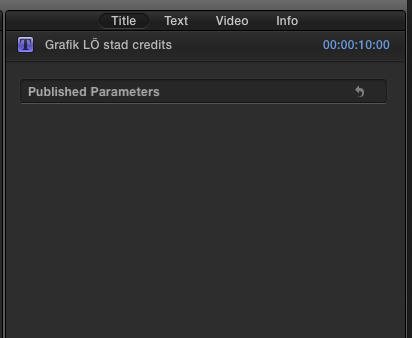
I have published a Moti project to FcpX with published parameters, in FcpX where should the published parameters appear? Where it says "published parameters" there is nothing?
Do you think there is a possibility to make the projects into moti files and make them work in FcpX, or should i bite the bullet and start over?
/H
No unfortunately that does not work."You cannot save this document with extension “.moti” at the end of the name. The required extension is “.motn”. When I accept both motn and moti the template does not appear in FcpX.
I have published a Moti project to FcpX with published parameters, in FcpX where should the published parameters appear? Where it says "published parameters" there is nothing?
Do you think there is a possibility to make the projects into moti files and make them work in FcpX, or should i bite the bullet and start over?
/H
Last edit: 29 Oct 2014 17:37 by chk70.
Please Log in to join the conversation.


29 Oct 2014 18:22 - 29 Oct 2014 18:30 #55123
by anickt
Replied by anickt on topic Is there any way of making a motion project into a Final cut title project?
You should be able to export it as a Generator
File > Publish Template and then check "Publish as Final Cut Generator"
Published parameters show up in the Inspector under "Generator"
File > Publish Template and then check "Publish as Final Cut Generator"
Published parameters show up in the Inspector under "Generator"
Last edit: 29 Oct 2014 18:30 by anickt. Reason: add info
Please Log in to join the conversation.
