


- Posts: 59
- Thank you received: 0
3 Post Moderation Rule for New Boarders (25 Jan 2021)
New boarders will have their posts moderated - Don't worry if you cannot see your post immediately.
Removing a rig icon (joystick)?
29 Oct 2014 09:17 #55072
by chk70
Removing a rig icon (joystick)? was created by chk70
I have copied a shape from another part in a project. When I now try to add this layer to a rig the little joystick icon already is there as the shape I copied has a rig. Is there anyway of removing that? Or do I have to start over?
/H
/H
Please Log in to join the conversation.
- Tom Wolsky
-

- Offline
- Moderator
-

29 Oct 2014 09:38 #55076
by Tom Wolsky
Replied by Tom Wolsky on topic Removing a rig icon (joystick)?
Can you post a screenshot of what you're talking about? Not sure what you mean by rig or joystick. Do you mean on screen controls? They're only visible when the clip is selected or targeted by the playhead.
Please Log in to join the conversation.
29 Oct 2014 12:08 - 29 Oct 2014 13:54 #55085
by chk70
Replied by chk70 on topic Removing a rig icon (joystick)?
Tom,
Wow I see why it is hard to understand . I will rephrase that. When I try to add this layer to a rig the little joystick icon is there before I have added a rig as the layer is copied from another project. However the widgets does not seem to come with the copied layer so now I have to add a rig to this layer. So I have to remove the rig that does not work in this new project but I can´t figure out how to do this. I attached a pic of the "fill" window where the Icon resides.
Thanks in advance
Henrik
Wow I see why it is hard to understand
. I will rephrase that. When I try to add this layer to a rig the little joystick icon is there before I have added a rig as the layer is copied from another project. However the widgets does not seem to come with the copied layer so now I have to add a rig to this layer. So I have to remove the rig that does not work in this new project but I can´t figure out how to do this. I attached a pic of the "fill" window where the Icon resides.Thanks in advance
Henrik
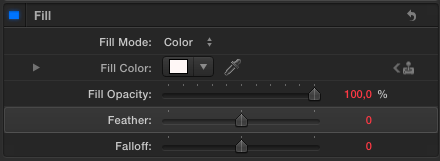
Last edit: 29 Oct 2014 13:54 by chk70.
Please Log in to join the conversation.
- Tom Wolsky
-
- Offline
- Moderator
-
29 Oct 2014 13:37 #55092
by Tom Wolsky
Replied by Tom Wolsky on topic Removing a rig icon (joystick)?
What effect is this?
Please Log in to join the conversation.
29 Oct 2014 14:03 #55094
by chk70
Replied by chk70 on topic Removing a rig icon (joystick)?
Color. I want to be able to change color. I have made a color scale of 6 colors which i want to be able to change in FxpX.
Please Log in to join the conversation.
- Tom Wolsky
-
- Offline
- Moderator
-
29 Oct 2014 14:16 #55098
by Tom Wolsky
Replied by Tom Wolsky on topic Removing a rig icon (joystick)?
Color? Are you talking about something you made in Motion? If so, you have to fix it there.
Please Log in to join the conversation.
29 Oct 2014 14:44 #55100
by chk70
Replied by chk70 on topic Removing a rig icon (joystick)?
Yes, the project is in Motion 5, I am building the templates in Motion 5.
/H
/H
Please Log in to join the conversation.

29 Oct 2014 18:23 #55124
by BenB
Replied by BenB on topic Removing a rig icon (joystick)?
I'd love to get a copy of the Motion project, to see what's going on.
benb at bbalser dot com
benb at bbalser dot com
Please Log in to join the conversation.
30 Oct 2014 17:05 #55183
by chk70
Replied by chk70 on topic Removing a rig icon (joystick)?
Ben,
How would we do that?
/H
How would we do that?
/H
Please Log in to join the conversation.
31 Oct 2014 00:07 #55249
by BenB
Replied by BenB on topic Removing a rig icon (joystick)?
Zip up the project file, email it to me.
Please Log in to join the conversation.


31 Oct 2014 11:48 #55283
by alex4D
Replied by alex4D on topic Removing a rig icon (joystick)?
It is a bad idea to publish a parameter that has been included in a rig. The icon shows that despite making changes to the parameter in Final Cut, the value is being determined by a rig that incorporates that parameter.
Either remove the parameter from the rig in Motion, or don't publish the parameter to Final Cut and publish the rig that controls the parameter.
@Alex4D
Either remove the parameter from the rig in Motion, or don't publish the parameter to Final Cut and publish the rig that controls the parameter.
@Alex4D
Please Log in to join the conversation.
31 Oct 2014 11:51 #55284
by alex4D
Replied by alex4D on topic Removing a rig icon (joystick)?
Sometimes parameters can be associated with invisible rigs - those that change parameters associated with Display Aspect Ratio snapshots. The only way to disconnect a parameter from a DAR rig is to delete all the DAR snapshots.
@Alex4D
@Alex4D
Please Log in to join the conversation.
31 Oct 2014 12:23 #55287
by chk70
Replied by chk70 on topic Removing a rig icon (joystick)?
I think I have misunderstood what a rig is. What I want is for my customer to be able to change between the six colors we have agreed upon in FC. What I don not want is for the editors to be able to tweak the colors. But when i publish the parameters
that´s what I´m doing, right? But I have had problem with geting those fixed parameters over to FC. When I publish I find the widgets in FC (I think) Also every time I save when working on a project in M5 I get a new "window" in the Titles window with the same project. Probably a settings issue, but I can´t find what setting?
Again I´m new at this. So sorry if I seem boonkers.
/H
that´s what I´m doing, right? But I have had problem with geting those fixed parameters over to FC. When I publish I find the widgets in FC (I think) Also every time I save when working on a project in M5 I get a new "window" in the Titles window with the same project. Probably a settings issue, but I can´t find what setting?
Again I´m new at this. So sorry if I seem boonkers.
/H
Please Log in to join the conversation.
31 Oct 2014 12:57 #55295
by alex4D
Replied by alex4D on topic Removing a rig icon (joystick)?
A rig widget is a slider, pop-up menu or checkbox that can be used to change many other parameters at once using 'Rig snapshots'
In Motion you add a rig, and then add the widget of your choice. In this case you add a Pop-up widget. It appears with three empty snapshots (i.e. you can choose between three menu items. Each menu item goes to a widget snapshot).
You want to control the colour of something with that pop-up menu. In Motion go to the colour parameter in the inspector and use it's context menu (to the right of the parameter or control-click) to add the colour parameter to "Add To Rig > Rig > Add to Pop-up" - that is assuming you don't rename the Rig you added or the Pop-up widget.
Now the colour value is now being controlled by the Pop-up widget. Use the inspector to view the Pop-up widget. You'll see the colour parameter listed below the 'Edit Mode' button. The colour chosen is now assigned to Snapshot 1, Snapshot 2 and Snapshot 3 of the widget. The magic happens when you choose Snapshot 2 from the popup and choose a different colour value associated with the 'Color' parameter. If it was white, make it red. Now go back and choose Snapshot 1 from the pop-up, you'll see the colour changes back to the value it was when you added it to the widget. If you then choose Snapshot 3 and then a third colour you now have a pop-up menu that can switch between three colours.
You can rename snapshots by clicking the Rename button, and add snapshots using the + button.
To enable clients to switch between colours, rename the pop-up and then publish it. Make sure the colour parameter you rigged isn't published.
@Alex4D
In Motion you add a rig, and then add the widget of your choice. In this case you add a Pop-up widget. It appears with three empty snapshots (i.e. you can choose between three menu items. Each menu item goes to a widget snapshot).
You want to control the colour of something with that pop-up menu. In Motion go to the colour parameter in the inspector and use it's context menu (to the right of the parameter or control-click) to add the colour parameter to "Add To Rig > Rig > Add to Pop-up" - that is assuming you don't rename the Rig you added or the Pop-up widget.
Now the colour value is now being controlled by the Pop-up widget. Use the inspector to view the Pop-up widget. You'll see the colour parameter listed below the 'Edit Mode' button. The colour chosen is now assigned to Snapshot 1, Snapshot 2 and Snapshot 3 of the widget. The magic happens when you choose Snapshot 2 from the popup and choose a different colour value associated with the 'Color' parameter. If it was white, make it red. Now go back and choose Snapshot 1 from the pop-up, you'll see the colour changes back to the value it was when you added it to the widget. If you then choose Snapshot 3 and then a third colour you now have a pop-up menu that can switch between three colours.
You can rename snapshots by clicking the Rename button, and add snapshots using the + button.
To enable clients to switch between colours, rename the pop-up and then publish it. Make sure the colour parameter you rigged isn't published.
@Alex4D
Please Log in to join the conversation.
31 Oct 2014 13:09 #55298
by chk70
Replied by chk70 on topic Removing a rig icon (joystick)?
It is in the mail...
Please Log in to join the conversation.
31 Oct 2014 13:14 #55300
by chk70
Replied by chk70 on topic Removing a rig icon (joystick)?
Thank´s Alex,
Then I did it right Would you have a tip on how I would get those infernal joysticks/rig of the project that I have copied layers too? It would be such a timesaver to move parts of the project to let´s say Lower thirds or a push trailer etc.
/H
Then I did it right
Would you have a tip on how I would get those infernal joysticks/rig of the project that I have copied layers too? It would be such a timesaver to move parts of the project to let´s say Lower thirds or a push trailer etc./H
Please Log in to join the conversation.
31 Oct 2014 13:23 #55301
by alex4D
Replied by alex4D on topic Removing a rig icon (joystick)?
Rigs and widgets don't copy and paste between Motion documents.
Motion isn't good at handling layers with rigged parameters when pasted from other documents. It is best to take parameters off any rigs before copying. That tells which snapshot values you want to apply to the layer parameter in the new Motion document.
The only direction to go I know to deal with this problem would be to edit the .motn file using a text editor, but I don't know what changes you'd need to make.
@Alex4D
Motion isn't good at handling layers with rigged parameters when pasted from other documents. It is best to take parameters off any rigs before copying. That tells which snapshot values you want to apply to the layer parameter in the new Motion document.
The only direction to go I know to deal with this problem would be to edit the .motn file using a text editor, but I don't know what changes you'd need to make.
@Alex4D
Please Log in to join the conversation.
- Karsten Schlüter
-

- Offline
- Moderator
-
Less
More
- Posts: 3790
- Thank you received: 718
31 Oct 2014 14:20 - 31 Oct 2014 14:22 #55306
by Karsten Schlüter
... you're a bit short in description, what you try to accomplish .. Is this an effect? Then I don't understand the part 'six colors'... (??) Or is this a title/lower third/... , which comes in 6 designs?
If the later, you should create the six optional versions in your Motion/Title project, following Alex' advice; then it's drop dead simple, to select from (just) the 6 options, and everything stays within design-guidleines...
or, how is an effect limited to six colors? Six 'moods', as the Color Boards Presets? ..
Replied by Karsten Schlüter on topic Removing a rig icon (joystick)?
chk70 wrote: I think I have misunderstood what a rig is. What I want is for my customer to be able to change between the six colors we have agreed upon in FC. What I don not want is for the editors to be able to tweak the colors. ...
... you're a bit short in description, what you try to accomplish .. Is this an effect? Then I don't understand the part 'six colors'... (??) Or is this a title/lower third/... , which comes in 6 designs?
If the later, you should create the six optional versions in your Motion/Title project, following Alex' advice; then it's drop dead simple, to select from (just) the 6 options, and everything stays within design-guidleines...
or, how is an effect limited to six colors? Six 'moods', as the Color Boards Presets? ..
Thanks, Alex for this info - never seen this icon before..... :blink:The icon shows that despite making changes to the parameter in Final Cut, the value is being determined by a rig that incorporates that parameter.
Last edit: 31 Oct 2014 14:22 by Karsten Schlüter.
Please Log in to join the conversation.
14 Nov 2014 15:21 #56034
by chk70
Replied by chk70 on topic Removing a rig icon (joystick)?
Had time to look it over?
Please Log in to join the conversation.
04 Mar 2015 14:01 #60829
by chk70
Replied by chk70 on topic Removing a rig icon (joystick)?
It is a lower third package, the background comes in 6 colors. When copied from another title in the same project the rig comes with it. That makes it impossible to create a new rig in the new title. Which unfortunately means that you have to start from scratch every time even though parts would be useful from other parts of the package. :S well well you can´t win them all, though it really seem´s like easy problem to solve but I have tried all the forums and Apple and all agree it is not possible.
Thank you anyway
/H
Thank you anyway
/H
Please Log in to join the conversation.
