


- Posts: 6
- Thank you received: 0
3 Post Moderation Rule for New Boarders (25 Jan 2021)
New boarders will have their posts moderated - Don't worry if you cannot see your post immediately.
.WAV files no longer readable after Yosemite update
- martin.goguen
-
 Topic Author
- Offline
- New Member
-

Less
More
28 Oct 2014 19:48 #55028
by martin.goguen
.WAV files no longer readable after Yosemite update was created by martin.goguen
The issue:
I recently did the switch to Yosemite. I now find some .WAV files to be no longer readable through FCP X, Preview app, QT, etc. BUT, I can open them through VLC, and also Soundtrack Pro.
The problem:
An FCP X project with this .WAV files has already been edited, with multiple cuts (46 to be exact) throughout the 35 minute timeline. The file is still visible on timeline with all cuts but is now silent. Looking to relink that audio with a working file. The original files' timecode starts at 09:46:30:09, with 7 channels of audio.
What I tried to do:
Open in Soundtrack Pro and simply "Save as" a new .wav file. Still not readable. Then brought the original file in to a new Multitrack Project in Soundtrack Pro, exported to .wav, which is now readable by all programs, but cant be relinked since info are not matched (channel count and timecode)
"Incompatible file.
The original file and new file have different audio source and channel counts.
Relinked files must have the same media type and similar audio channels as the original files, and must be long enough to cover all the clips that reference the files."
My system:
FCPX (10.1.3)
OS X 10.10 (Yosemite)
iMac (27 inch, Late 2012)
3.4 GHz Intel Core i7
32 GB 1600 MHz DDR3
NVIDIA GeForce GTX 680MX 2048 MB
I recently did the switch to Yosemite. I now find some .WAV files to be no longer readable through FCP X, Preview app, QT, etc. BUT, I can open them through VLC, and also Soundtrack Pro.
The problem:
An FCP X project with this .WAV files has already been edited, with multiple cuts (46 to be exact) throughout the 35 minute timeline. The file is still visible on timeline with all cuts but is now silent. Looking to relink that audio with a working file. The original files' timecode starts at 09:46:30:09, with 7 channels of audio.
What I tried to do:
Open in Soundtrack Pro and simply "Save as" a new .wav file. Still not readable. Then brought the original file in to a new Multitrack Project in Soundtrack Pro, exported to .wav, which is now readable by all programs, but cant be relinked since info are not matched (channel count and timecode)
"Incompatible file.
The original file and new file have different audio source and channel counts.
Relinked files must have the same media type and similar audio channels as the original files, and must be long enough to cover all the clips that reference the files."
My system:
FCPX (10.1.3)
OS X 10.10 (Yosemite)
iMac (27 inch, Late 2012)
3.4 GHz Intel Core i7
32 GB 1600 MHz DDR3
NVIDIA GeForce GTX 680MX 2048 MB
Please Log in to join the conversation.
- ronny courtens
-

- Offline
- Moderator
-

Less
More
- Posts: 4455
- Thank you received: 962
28 Oct 2014 21:25 #55034
by ronny courtens
Replied by ronny courtens on topic .WAV files no longer readable after Yosemite update
Hi Martin, welcome to the forum.
I am not aware of certain WAV files not being readable in Yosemite.
Could you send me the original WAV file so we can have a look at it?
You can send it to ronnycourtens(at)mac(dot)com
- Ronny
I am not aware of certain WAV files not being readable in Yosemite.
Could you send me the original WAV file so we can have a look at it?
You can send it to ronnycourtens(at)mac(dot)com
- Ronny
Please Log in to join the conversation.
- martin.goguen
-
Topic Author
- Offline
- New Member
-
Less
More
- Posts: 6
- Thank you received: 0
28 Oct 2014 21:47 #55035
by martin.goguen
Replied by martin.goguen on topic .WAV files no longer readable after Yosemite update
Hey Ronny,
that would be great if you could have a look at the file see if you can open it on your side. The file is more then 2GB in size, I don't have access to greater then 2GB online file sharing..
that would be great if you could have a look at the file see if you can open it on your side. The file is more then 2GB in size, I don't have access to greater then 2GB online file sharing..
Please Log in to join the conversation.
- Tom Wolsky
-

- Offline
- Moderator
-
28 Oct 2014 21:55 #55036
by Tom Wolsky
Replied by Tom Wolsky on topic .WAV files no longer readable after Yosemite update
Can you tell what's different about these files compared to other WAV files? Maybe Media Info has some information or even the QT player even if it can't play it back.
Please Log in to join the conversation.
- ronny courtens
-
- Offline
- Moderator
-
Less
More
- Posts: 4455
- Thank you received: 962
28 Oct 2014 22:08 #55037
by ronny courtens
Replied by ronny courtens on topic .WAV files no longer readable after Yosemite update
Over 2GB is indeed big, but if you want to send it to me you can use Airbridge, which can send files till 20 GB for free:
www.myairbridge.com/en/
It's near midnight here in Belgium, so if you send it to me I will have a closer look at the file in the morning.
- Ronny
www.myairbridge.com/en/
It's near midnight here in Belgium, so if you send it to me I will have a closer look at the file in the morning.
- Ronny
Please Log in to join the conversation.
- martin.goguen
-
Topic Author
- Offline
- New Member
-
Less
More
- Posts: 6
- Thank you received: 0
28 Oct 2014 22:10 #55038
by martin.goguen
Replied by martin.goguen on topic .WAV files no longer readable after Yosemite update
Hey Tom,
No big differences seen when applying "Get info" from Finder. Might be coincidental but all working files are under 2GB and all unrecognized files are great then 2GB.. And not openable in QT ("The document “T02.WAV” could not be opened. An unknown error occurred (-12842)")
No big differences seen when applying "Get info" from Finder. Might be coincidental but all working files are under 2GB and all unrecognized files are great then 2GB.. And not openable in QT ("The document “T02.WAV” could not be opened. An unknown error occurred (-12842)")
Please Log in to join the conversation.
- Tom Wolsky
-
- Offline
- Moderator
-
28 Oct 2014 22:10 #55039
by Tom Wolsky
Replied by Tom Wolsky on topic .WAV files no longer readable after Yosemite update
Could I get the link as well?
Tomwolsky at gmail dot com.
Tomwolsky at gmail dot com.
Please Log in to join the conversation.
- Tom Wolsky
-
- Offline
- Moderator
-
28 Oct 2014 22:12 #55040
by Tom Wolsky
Replied by Tom Wolsky on topic .WAV files no longer readable after Yosemite update
What drive is the file on and how is it formatted I wonder?
Please Log in to join the conversation.
- martin.goguen
-
Topic Author
- Offline
- New Member
-
Less
More
- Posts: 6
- Thank you received: 0
28 Oct 2014 22:12 #55041
by martin.goguen
Replied by martin.goguen on topic .WAV files no longer readable after Yosemite update
Was actually able to zip one of the files to 1.85 GB, on the way!
Please Log in to join the conversation.
- martin.goguen
-
Topic Author
- Offline
- New Member
-
Less
More
- Posts: 6
- Thank you received: 0
28 Oct 2014 22:14 #55042
by martin.goguen
Replied by martin.goguen on topic .WAV files no longer readable after Yosemite update
It's unrecognized directly from my iMac desktop, or external drives (formatted to OSX Journaled)
Please Log in to join the conversation.
- Andreas Kiel
-
- Offline
- Platinum Member
-

Less
More
- Posts: 1077
- Thank you received: 189
29 Oct 2014 04:09 - 29 Oct 2014 04:22 #55061
by Andreas Kiel
Replied by Andreas Kiel on topic .WAV files no longer readable after Yosemite update
Martin,
I would be interested as well.
Here all .wav file show up fine - though mine are way smaller.
Only bug (missing feature) I see is that FCP X won't read the metadata of BWAV files. But that's not a Yosemite bug, it's there since FCP X release and is a pain in the ...
- Andreas
kiel(at)spherico(dot)com
I would be interested as well.
Here all .wav file show up fine - though mine are way smaller.
Only bug (missing feature) I see is that FCP X won't read the metadata of BWAV files. But that's not a Yosemite bug, it's there since FCP X release and is a pain in the ...
- Andreas
kiel(at)spherico(dot)com
Last edit: 29 Oct 2014 04:22 by Andreas Kiel.
Please Log in to join the conversation.
- ronny courtens
-
- Offline
- Moderator
-
Less
More
- Posts: 4455
- Thank you received: 962
29 Oct 2014 16:12 #55108
by ronny courtens
Replied by ronny courtens on topic .WAV files no longer readable after Yosemite update
Martin,
I have examined the WAV file you have sent and there seems indeed to be a problem with WAV files that are over 2GB in QT player X and FCP X running on Yosemite. Yosemite has a boatload of AV/Foundation changes under the hood, this may explain why this is happening with Yosemite and not with Mavericks.
Anyway, this does not seem to affect QTKit as I was able to open the poly wav with QT7 PRO. As you have STP installed on your system I'm sure you have QT7 PRO as well.
So I have opened the wav in QT7 and I have selected File > Save As > Standalone movie. This has resulted in a new multitrack audio file that I can open in FCP X without any problems. All 7 tracks show up in the Audio Inspector:
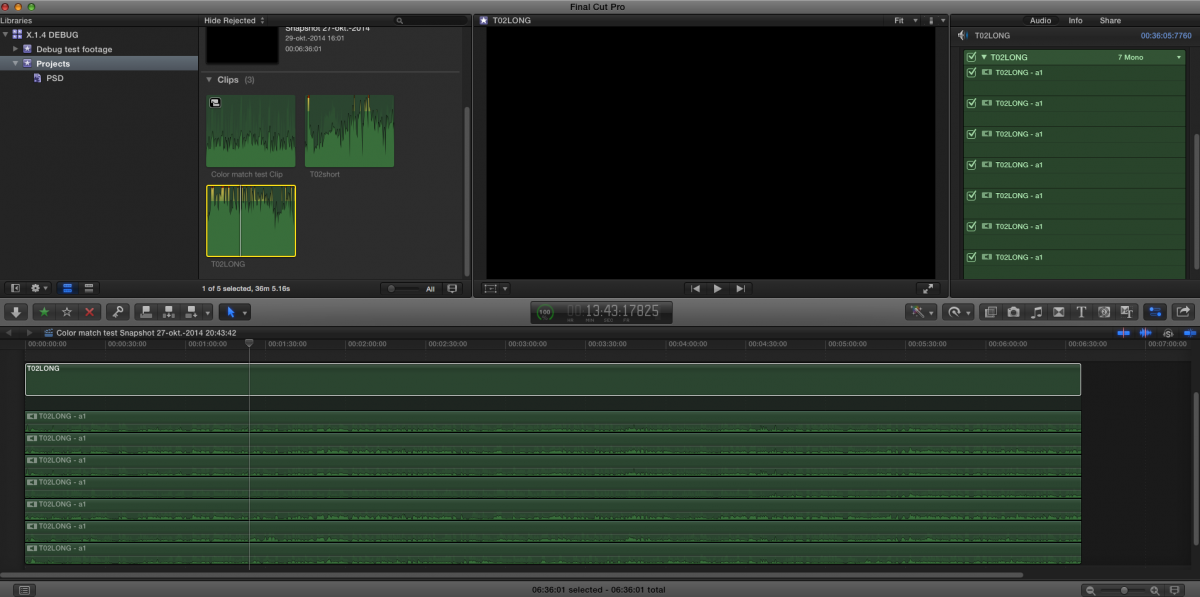
So at this time, WAV files of >2 GB should be saved as multitrack QT audio files before importing them in FCP X.
Unfortunately this may not solve your problem with the long WAV files you have in your older project. The format is not so much of a problem, you can relink WAV files to AIFF or any other format. The audio channels are the same as well. But the multitrack QT audio file will have a different start TC than the original WAV file, which will cause a relinking error. Worth a try, but I don't think it will work.
If it does not work, and unless Andreas or Tom know a way to modify the metadata of the WAV file you have sent so it can be imported in FCP X, you will have to wait until this issue gets solved. You absolutely should post feedback about this to Apple and maybe they will fix it in a next update.
- Ronny
I have examined the WAV file you have sent and there seems indeed to be a problem with WAV files that are over 2GB in QT player X and FCP X running on Yosemite. Yosemite has a boatload of AV/Foundation changes under the hood, this may explain why this is happening with Yosemite and not with Mavericks.
Anyway, this does not seem to affect QTKit as I was able to open the poly wav with QT7 PRO. As you have STP installed on your system I'm sure you have QT7 PRO as well.
So I have opened the wav in QT7 and I have selected File > Save As > Standalone movie. This has resulted in a new multitrack audio file that I can open in FCP X without any problems. All 7 tracks show up in the Audio Inspector:
So at this time, WAV files of >2 GB should be saved as multitrack QT audio files before importing them in FCP X.
Unfortunately this may not solve your problem with the long WAV files you have in your older project. The format is not so much of a problem, you can relink WAV files to AIFF or any other format. The audio channels are the same as well. But the multitrack QT audio file will have a different start TC than the original WAV file, which will cause a relinking error. Worth a try, but I don't think it will work.
If it does not work, and unless Andreas or Tom know a way to modify the metadata of the WAV file you have sent so it can be imported in FCP X, you will have to wait until this issue gets solved. You absolutely should post feedback about this to Apple and maybe they will fix it in a next update.
- Ronny
Please Log in to join the conversation.
- Andreas Kiel
-
- Offline
- Platinum Member
-
Less
More
- Posts: 1077
- Thank you received: 189
29 Oct 2014 16:44 #55111
by Andreas Kiel
Replied by Andreas Kiel on topic .WAV files no longer readable after Yosemite update
I checked the file as well.
As Ronny said there obviously is a problem with the file size. The QT Player way is an option.
Another issue is that Yosemite also doesn't like polyphonic files regardless of file size (I have a real virgin 10.10 with only FCP X, Compressor and Motion installed).
One thing you can do is to download Wave Agent ( www.sounddevices.com/products/waveagent/ )
And split the polyphonic file into mono channels with all metadata preserved. This will work fine but wouldn't help with older projects.
Please file a bug!
- Andreas
As Ronny said there obviously is a problem with the file size. The QT Player way is an option.
Another issue is that Yosemite also doesn't like polyphonic files regardless of file size (I have a real virgin 10.10 with only FCP X, Compressor and Motion installed).
One thing you can do is to download Wave Agent ( www.sounddevices.com/products/waveagent/ )
And split the polyphonic file into mono channels with all metadata preserved. This will work fine but wouldn't help with older projects.
Please file a bug!
- Andreas
Please Log in to join the conversation.
- martin.goguen
-
Topic Author
- Offline
- New Member
-
Less
More
- Posts: 6
- Thank you received: 0
30 Oct 2014 16:46 #55174
by martin.goguen
Replied by martin.goguen on topic .WAV files no longer readable after Yosemite update
Thanks for looking into it guys. I'll probably go to Mavericks for a little while until next updates. How exactly do I submit a bug to apple? online?
Cheers,
Martin
Cheers,
Martin
Please Log in to join the conversation.
- ronny courtens
-
- Offline
- Moderator
-
Less
More
- Posts: 4455
- Thank you received: 962
30 Oct 2014 16:48 #55176
by ronny courtens
Replied by ronny courtens on topic .WAV files no longer readable after Yosemite update
I think that would be a good idea. Here's how you submit feedback in FCP X:
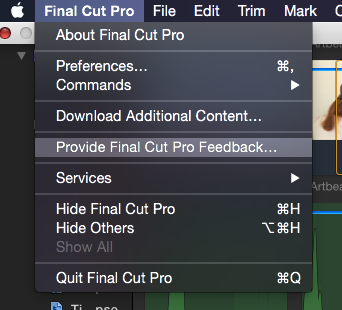
- Ronny
- Ronny
Please Log in to join the conversation.

06 Jan 2015 17:07 #58062
by rgpearson
Replied by rgpearson on topic .WAV files no longer readable after Yosemite update
Has anyone figured out a solution to this problem? I made an attempt a few weeks ago but wasn't able to create a re-linkable file with the correct TC. I tried using QT, Wave Agent, Audition etc, no dice. So I simply went back to Mavericks.
But it seems like a lot of people are on Yosemite here and I'm wondering, are you never dealing with this issue? Seems pretty common to work with large WAV files.
But it seems like a lot of people are on Yosemite here and I'm wondering, are you never dealing with this issue? Seems pretty common to work with large WAV files.
Please Log in to join the conversation.
02 Feb 2015 13:16 #59192
by pzinkyi
Replied by pzinkyi on topic .WAV files no longer readable after Yosemite update
Hello,
I am wondering the same thing. It seems that not many people are having this problem, but it is really bad. I am also having problems with Finder crashing and when this happens I need a full restart...
The last Yosemite update didn't do anything to fix those issues.
I need to access some old projects with large audio files and I am seriously considering going back to Mavericks.
It seems Yosemite was not ready for final release.
Paul
I am wondering the same thing. It seems that not many people are having this problem, but it is really bad. I am also having problems with Finder crashing and when this happens I need a full restart...
The last Yosemite update didn't do anything to fix those issues.
I need to access some old projects with large audio files and I am seriously considering going back to Mavericks.
It seems Yosemite was not ready for final release.
Paul
Please Log in to join the conversation.
02 Feb 2015 17:16 #59202
by rgpearson
Replied by rgpearson on topic .WAV files no longer readable after Yosemite update
Yeah you should probably still be on Mavericks for now. And please file a bug report too
bugreport.apple.com
(you may need to sign up for a free developer account).
Please Log in to join the conversation.
- ronny courtens
-
- Offline
- Moderator
-
Less
More
- Posts: 4455
- Thank you received: 962
02 Feb 2015 17:25 #59203
by ronny courtens
Replied by ronny courtens on topic .WAV files no longer readable after Yosemite update
The best way to submit a bug report is by using the direct link in FCP X, as shown above. You don't need a developer account to do this.
- Ronny
- Ronny
Please Log in to join the conversation.
02 Feb 2015 17:34 #59204
by rgpearson
Replied by rgpearson on topic .WAV files no longer readable after Yosemite update
Yep I did that too Ronny. But this seems like an OS level problem (Core Audio maybe), so it may help to raise the bug priority level within the OSX team.
Please Log in to join the conversation.
