


- Posts: 1213
- Thank you received: 142
3 Post Moderation Rule for New Boarders (25 Jan 2021)
New boarders will have their posts moderated - Don't worry if you cannot see your post immediately.
Pro Quality Audio in FCPX?
- TrixTrax9000
-
 Topic Author
- Offline
- Platinum Member
-

Less
More
27 Oct 2014 19:22 - 28 Oct 2014 04:18 #54931
by TrixTrax9000
Pro Quality Audio in FCPX? was created by TrixTrax9000
Hey guys
Since FCPX first came out, there's been much talk here & elsewhere about bringing the audio tools up to par with the video capabilities of the app. A new plugin called Spectre Spectrograph assists in visualizing audio problems in FCPX.
It's been my experience that most people in the film industry are visually oriented, yet sound many postulate is 50% of film. Translating audio into a visual expression that we can adjust & improve, really harmonizes with artistic wiring.
This may be exactly what some have been clamoring for...
Sara at CrumplePop has given me permission to share my half price discount code, though I'm not sure of Peter's & this site's current relationship with CrumplePop so if you check my Twitter feed ( @GlobalWatchM3 ), I shared the code yesterday. The code will only be good for a couple more days.
I was going to share the link to the CrumplePop page as well, but I don't think that's allowed.
You can find it by websearch, but the price they show for the plug ( $79 ) is halved with the code.
Since FCPX first came out, there's been much talk here & elsewhere about bringing the audio tools up to par with the video capabilities of the app. A new plugin called Spectre Spectrograph assists in visualizing audio problems in FCPX.
It's been my experience that most people in the film industry are visually oriented, yet sound many postulate is 50% of film. Translating audio into a visual expression that we can adjust & improve, really harmonizes with artistic wiring.
This may be exactly what some have been clamoring for...
Sara at CrumplePop has given me permission to share my half price discount code, though I'm not sure of Peter's & this site's current relationship with CrumplePop so if you check my Twitter feed ( @GlobalWatchM3 ), I shared the code yesterday. The code will only be good for a couple more days.
I was going to share the link to the CrumplePop page as well, but I don't think that's allowed.
You can find it by websearch, but the price they show for the plug ( $79 ) is halved with the code.
Last edit: 28 Oct 2014 04:18 by TrixTrax9000 .
Please Log in to join the conversation.
28 Oct 2014 08:04 #54956
by plysat
Can't sleep? Try this: fcpxpert.net ;-)
Replied by plysat on topic Pro Quality Audio in FCPX?
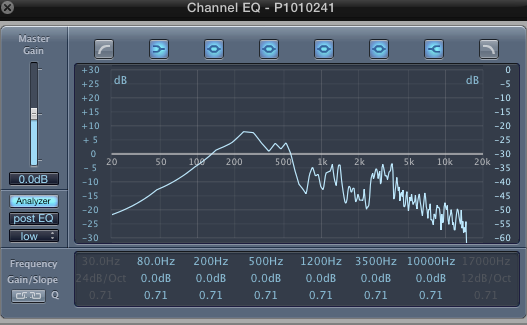
Seems pretty nice, but isn't it just a slightly easier to read version of the stock channel EQ in analyses mode?
Can't sleep? Try this: fcpxpert.net ;-)
Please Log in to join the conversation.

28 Oct 2014 09:41 - 28 Oct 2014 18:02 #54964
by BenB
Replied by BenB on topic Pro Quality Audio in FCPX?
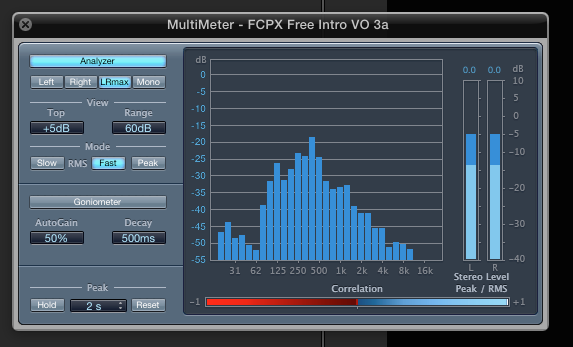
What they're showing is more detailed, more frequencies at once. But you can get similar also with the built-in Multimeter that comes with Logic already.
Last edit: 28 Oct 2014 18:02 by BenB.
Please Log in to join the conversation.
28 Oct 2014 17:29 #55011
by VidGreg
Replied by VidGreg on topic Pro Quality Audio in FCPX?
31 band EQ is also available in FCPX.
Apply Equalizer to clip, use pop down to switch from 10 band to 31 band,
Then apply channel e.g. to clip, click on analyze, and play clip.
You can now adjust the 31 band eq or the 10 band eq.
I would actually like to have things like virtual faders that record changes realtime and master tracks that you can apply effects to within FCP.
Hope this helps, Greg
Apply Equalizer to clip, use pop down to switch from 10 band to 31 band,
Then apply channel e.g. to clip, click on analyze, and play clip.
You can now adjust the 31 band eq or the 10 band eq.
I would actually like to have things like virtual faders that record changes realtime and master tracks that you can apply effects to within FCP.
Hope this helps, Greg
Please Log in to join the conversation.
