


- Posts: 479
- Thank you received: 5
3 Post Moderation Rule for New Boarders (25 Jan 2021)
New boarders will have their posts moderated - Don't worry if you cannot see your post immediately.
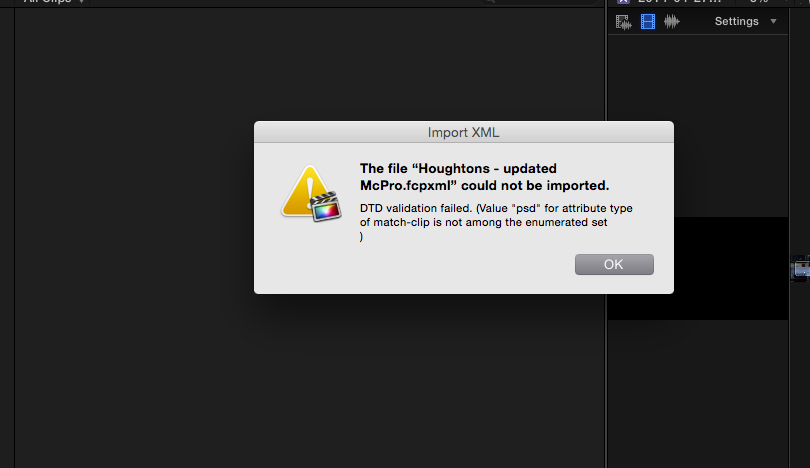
xml issue
- ronny courtens
-

- Offline
- Moderator
-

Less
More
- Posts: 4455
- Thank you received: 962
27 Oct 2014 13:55 #54900
by ronny courtens
Replied by ronny courtens on topic xml issue
Are there Projects with layered PSD files inside this Event?
If so: do not use XML, just copy the clips and the Projects to the back-up event.
- Ronny
If so: do not use XML, just copy the clips and the Projects to the back-up event.
- Ronny
Please Log in to join the conversation.
27 Oct 2014 14:42 #54903
by parkerhqj
Thanks Ronny. There are layered psd files, but why should that be a problem? Is that a bug? I'm trying to send the xml event file because I did my logging using favorites. Copying over the project files won't help me anyway. How can I copy my event changes to favorites, etc. without using xml? This isn't really a problem with this particular edit because I'm going to Carbon Copy the entire edit anyway, but I do a fair bit of work with other editors so i would like to be able to send event xml files back and forth. Can I not do that if there are layered psd files in the event? thx
Please Log in to join the conversation.
- ronny courtens
-
- Offline
- Moderator
-
Less
More
- Posts: 4455
- Thank you received: 962
27 Oct 2014 15:20 #54904
by ronny courtens
Replied by ronny courtens on topic xml issue
I have read reports about layered PSD files leading to errors in FCP X XML, but that was in older versions. I just tested an Event XML transfer with layered PSDs between two Libraries in 10.1.3 and I get no errors. I just hope it's not one of those stupid Adobe XMP issues again.
I am not an XML expert, I hope Andreas Kiel can chime in and maybe shed some light on this problem. In my tests everything works fine.
- Ronny
I am not an XML expert, I hope Andreas Kiel can chime in and maybe shed some light on this problem. In my tests everything works fine.
- Ronny
Please Log in to join the conversation.
- Tom Wolsky
-

- Offline
- Moderator
-
27 Oct 2014 15:20 #54905
by Tom Wolsky
Replied by Tom Wolsky on topic xml issue
Favorites used in projects do transfer when using a transfer library. XML is not required.
Please Log in to join the conversation.
- Andreas Kiel
-

- Offline
- Platinum Member
-

Less
More
- Posts: 1077
- Thank you received: 189
27 Oct 2014 16:32 - 27 Oct 2014 16:41 #54907
by Andreas Kiel
Even though I'm known as an "XML fan boy" I do recommend to use XML only for simple things or to retrieve some information from an event or project. There was a bigger movie project these days (forgot the name) where they needed to control and list effects for rough cuts – that's something XML can do and is helpful for.
But even with my subtitle stuff (which is XML wise pretty simple) there are issues at this time with FCP X.
- Andreas
P.S.
Some fun thing with XML and subtitles. Arabic with arabic numbers transforms fine to an XML without errors. But when displayed the numbers (in case they have a delimiter) are read the other way round.
Was reported to me by someone at Apple
Replied by Andreas Kiel on topic xml issue
I haven't seen that. But if the XML was not modified after export it is a serious bug. Please file that!I'm trying to export an xml event and I receive this message when trying to import it into a back-up event. Has anyone seen this before? thx
That could be a reason. But in any case it's a FCP X bug.I just hope it's not one of those stupid Adobe XMP issues again.
Even though I'm known as an "XML fan boy" I do recommend to use XML only for simple things or to retrieve some information from an event or project. There was a bigger movie project these days (forgot the name) where they needed to control and list effects for rough cuts – that's something XML can do and is helpful for.
But even with my subtitle stuff (which is XML wise pretty simple) there are issues at this time with FCP X.
- Andreas
P.S.
Some fun thing with XML and subtitles. Arabic with arabic numbers transforms fine to an XML without errors. But when displayed the numbers (in case they have a delimiter) are read the other way round.
Was reported to me by someone at Apple
Last edit: 27 Oct 2014 16:41 by Andreas Kiel.
Please Log in to join the conversation.
- ronny courtens
-
- Offline
- Moderator
-
Less
More
- Posts: 4455
- Thank you received: 962
27 Oct 2014 16:53 #54909
by ronny courtens
Replied by ronny courtens on topic xml issue
I wonder why is it working perfectly in different tests for me while Bill gets this error message? There must be something that produces the error on his side that is not happening on our systems. So this is not necessarily a bug.
Bill, can you send me the xml file so we can have a look at it?
ronnycourtens(at)mac(dot)com
Bill, can you send me the xml file so we can have a look at it?
ronnycourtens(at)mac(dot)com
Please Log in to join the conversation.
- Andreas Kiel
-
- Offline
- Platinum Member
-
Less
More
- Posts: 1077
- Thank you received: 189
27 Oct 2014 17:11 #54911
by Andreas Kiel
Replied by Andreas Kiel on topic xml issue
Sorry Ronny,
I know you know everything, but in this case I've to contradict.
If you export a XML from FCP X and import this XML into FCP X and get an error message like Bill got it is definitively a bug without a workaround. So it's a serious one.
I agree that it would be helpful to see the XML for further analysis to write a better bug report or to find a workaround for that.
- Andreas
@Bill: you can send me the XML as well. Maybe Ronny and me can find a solution.
kiel(at)spherico(dot)com
I know you know everything, but in this case I've to contradict.
If you export a XML from FCP X and import this XML into FCP X and get an error message like Bill got it is definitively a bug without a workaround. So it's a serious one.
I agree that it would be helpful to see the XML for further analysis to write a better bug report or to find a workaround for that.
- Andreas
@Bill: you can send me the XML as well. Maybe Ronny and me can find a solution.
kiel(at)spherico(dot)com
Please Log in to join the conversation.
- ronny courtens
-
- Offline
- Moderator
-
Less
More
- Posts: 4455
- Thank you received: 962
27 Oct 2014 17:22 #54912
by ronny courtens
Replied by ronny courtens on topic xml issue
Hey Andreas,
You are correct in saying that an XML exported by FCP X than cannot be read by FCP X is a bug, I agree.
I have opened the XML and there is one strange thing in it.
It shows a string for a Smart Collection named "Graphics" where the Media Type to match the criteria is set to "psd", which is of course not correct. It should be "Stills". This is the string:
<smart-collection name="Graphics" match="all">
<match-clip rule="is" type="psd"/>
Changing the type to "stills" producers another error when importing the XML, so that's not the solution.
Bill, please also send the xml to Andreas so we can look at this together.
- Ronny
You are correct in saying that an XML exported by FCP X than cannot be read by FCP X is a bug, I agree.
I have opened the XML and there is one strange thing in it.
It shows a string for a Smart Collection named "Graphics" where the Media Type to match the criteria is set to "psd", which is of course not correct. It should be "Stills". This is the string:
<smart-collection name="Graphics" match="all">
<match-clip rule="is" type="psd"/>
Changing the type to "stills" producers another error when importing the XML, so that's not the solution.
Bill, please also send the xml to Andreas so we can look at this together.
- Ronny
Please Log in to join the conversation.
- ronny courtens
-
- Offline
- Moderator
-
Less
More
- Posts: 4455
- Thank you received: 962
27 Oct 2014 17:48 - 27 Oct 2014 17:50 #54915
by ronny courtens
Replied by ronny courtens on topic xml issue
Okay guys, I have been able to reproduce the xml error, and... Andreas is correct. Its' a bug and it should be reported to Apple immediately.
Here's what happens:
When you create a Smart Collection and you set the Filter criteria to Media Type = Stills (which is what I did first) everything is fine. The xml shows "stills" as the match-type for the media and this is recognized as a valid match-type when the xml gets imported.
When you create a Smart Collection and you set the Filter criteria to Type = Layered Graphic the xml shows "psd" as the match-type for the media. BUT when the xml gets imported "psd" is not recognized as a valid match-type and you get the error.
Unless Andreas finds a magical solution I don't think there is a workaround for this. It should get fixed by Apple.
So for the time being: if you want to export an XML you should avoid creating a Smart Collection with its filter set to "Type = Layered Graphic".
Bill, if you delete the "Graphics" Smart Collection from your Event I think you will be able to export a valid xml and you will be able to import it in the backup Event. The PSD files will still show in the "Stills" Smart Collection you have in your Event, so it's not a big deal. But it is indeed a bug.
- Ronny
Here's what happens:
When you create a Smart Collection and you set the Filter criteria to Media Type = Stills (which is what I did first) everything is fine. The xml shows "stills" as the match-type for the media and this is recognized as a valid match-type when the xml gets imported.
When you create a Smart Collection and you set the Filter criteria to Type = Layered Graphic the xml shows "psd" as the match-type for the media. BUT when the xml gets imported "psd" is not recognized as a valid match-type and you get the error.
Unless Andreas finds a magical solution I don't think there is a workaround for this. It should get fixed by Apple.
So for the time being: if you want to export an XML you should avoid creating a Smart Collection with its filter set to "Type = Layered Graphic".
Bill, if you delete the "Graphics" Smart Collection from your Event I think you will be able to export a valid xml and you will be able to import it in the backup Event. The PSD files will still show in the "Stills" Smart Collection you have in your Event, so it's not a big deal. But it is indeed a bug.
- Ronny
Last edit: 27 Oct 2014 17:50 by ronny courtens.
Please Log in to join the conversation.
27 Oct 2014 18:07 - 27 Oct 2014 18:09 #54921
by parkerhqj
That did it Ronny. I simply removed the layered graphics parameter from the smart collection, reexported the xml file and it imported fine. Even though that was a mistake on my part, would you consider that a bug anyway? I won't bother reporting it if not. Thanks for your help. Sorry - just saw you referred to it as a bug.
Last edit: 27 Oct 2014 18:09 by parkerhqj.
Please Log in to join the conversation.
- ronny courtens
-
- Offline
- Moderator
-
Less
More
- Posts: 4455
- Thank you received: 962
27 Oct 2014 18:13 #54922
by ronny courtens
Replied by ronny courtens on topic xml issue
It's a bug for sure, so yes please do report this ASAP.
It was no mistake from your part. If the Smart Collection Filter gives you the option to select Layered Graphic as a criteria for Type then this selection should be reflected in the xml. Actually the information is correctly stored, but it is incorrectly interpreted upon import. Major bug indeed because it completely prohibits you from working with any kind of Event XML if you have such a Smart Collection in your Event.
- Ronny
It was no mistake from your part. If the Smart Collection Filter gives you the option to select Layered Graphic as a criteria for Type then this selection should be reflected in the xml. Actually the information is correctly stored, but it is incorrectly interpreted upon import. Major bug indeed because it completely prohibits you from working with any kind of Event XML if you have such a Smart Collection in your Event.
- Ronny
Please Log in to join the conversation.
- Andreas Kiel
-
- Offline
- Platinum Member
-
Less
More
- Posts: 1077
- Thank you received: 189
27 Oct 2014 19:32 - 28 Oct 2014 09:36 #54932
by Andreas Kiel
Replied by Andreas Kiel on topic xml issue
As always - Ronny is faster. 
I could do an XML converter, but that wouldn't make any real sense.
Ronny's suggestion right now is the only solution. And not too difficult to handle.
Bill please file this bug.
I'll file that one as well, but with a more "techie" background about XML handling and DTD handling.
- Andreas
I could do an XML converter, but that wouldn't make any real sense.
Ronny's suggestion right now is the only solution. And not too difficult to handle.
Bill please file this bug.
I'll file that one as well, but with a more "techie" background about XML handling and DTD handling.
- Andreas
Last edit: 28 Oct 2014 09:36 by Andreas Kiel.
Please Log in to join the conversation.
- Andreas Kiel
-
- Offline
- Platinum Member
-
Less
More
- Posts: 1077
- Thank you received: 189
28 Oct 2014 10:05 #54969
by Andreas Kiel
Replied by Andreas Kiel on topic xml issue
I put some time into a little more tech research this morning.
I downloaded the so called DTD for FCP X from the Apple developers site which checks whether a FCPXML is a valid one.
This DTD is not a valid DTD. But it explains why some of my subtitle stuff doesn't work (in case FCP X uses this published DTD).
Fixing the DTD only means you can read an XML for personal fun in an other app a correct way.
Further investigation showed in case of Bill's XML that there is no allowed attribute named "psd". Master Ronny figured out that immediately.
Fixing Bill's XML is quite easy using a text editor like TextWrangler. Just replace all "psd" with "layeredGraphic" - including the quotes.
It will import fine. But as said this is not a solution for reliable XML interchange.
Anyway, this is a major bug or better two or three major bugs.
1) FCP X writes wrong attributes to the XML
2) FCP X doesn't validate it's own exports against it's own DTD
3) The published DTD is not valid (though this only might affect 3rd party developers)
- Andreas
I downloaded the so called DTD for FCP X from the Apple developers site which checks whether a FCPXML is a valid one.
This DTD is not a valid DTD. But it explains why some of my subtitle stuff doesn't work (in case FCP X uses this published DTD).
Fixing the DTD only means you can read an XML for personal fun in an other app a correct way.
Further investigation showed in case of Bill's XML that there is no allowed attribute named "psd". Master Ronny figured out that immediately.
Fixing Bill's XML is quite easy using a text editor like TextWrangler. Just replace all "psd" with "layeredGraphic" - including the quotes.
It will import fine. But as said this is not a solution for reliable XML interchange.
Anyway, this is a major bug or better two or three major bugs.
1) FCP X writes wrong attributes to the XML
2) FCP X doesn't validate it's own exports against it's own DTD
3) The published DTD is not valid (though this only might affect 3rd party developers)
- Andreas
Please Log in to join the conversation.
- ronny courtens
-
- Offline
- Moderator
-
Less
More
- Posts: 4455
- Thank you received: 962
28 Oct 2014 10:11 #54971
by ronny courtens
Replied by ronny courtens on topic xml issue
Hey Andreas,
Thank you for further investigating this problem. I would suggest you file a technical report to Apple about this because this issue is important. I think they will take your feedback more seriously because I am already "bugging" them with so many other things
- Ronny
Thank you for further investigating this problem. I would suggest you file a technical report to Apple about this because this issue is important. I think they will take your feedback more seriously because I am already "bugging" them with so many other things
- Ronny
Please Log in to join the conversation.
- Andreas Kiel
-
- Offline
- Platinum Member
-
Less
More
- Posts: 1077
- Thank you received: 189
28 Oct 2014 12:55 - 28 Oct 2014 12:55 #54983
by Andreas Kiel
Replied by Andreas Kiel on topic xml issue
Bill,
Your feedback to Apple isn't lame in any way. It's very important.
It's always the same old game. I can complain about tech stuff, but as long as no real world users complain about the same issue my complaints mean nothing else than "Okay, he's right. But nobody else is complaining. We'll do it when we have time."
- Andreas
Your feedback to Apple isn't lame in any way. It's very important.
It's always the same old game. I can complain about tech stuff, but as long as no real world users complain about the same issue my complaints mean nothing else than "Okay, he's right. But nobody else is complaining. We'll do it when we have time."
- Andreas
Last edit: 28 Oct 2014 12:55 by Andreas Kiel.
Please Log in to join the conversation.
