


- Posts: 3
- Thank you received: 0
3 Post Moderation Rule for New Boarders (25 Jan 2021)
New boarders will have their posts moderated - Don't worry if you cannot see your post immediately.
My project clips are all black.... Any idea of how to fix?
- Irvinjprod
-
 Topic Author
- Offline
- New Member
-

Less
More
26 Oct 2014 15:28 #54841
by Irvinjprod
My project clips are black now.... I know I messed up a little by moving and renaming some of the footage. I reimported all of the original footage into a new event but it won't relink the files into the project. I was able to relink the audio and all of my edits are in place but the media is all black. Any suggestions?
Please Log in to join the conversation.
- ronny courtens
-

- Offline
- Moderator
-

Less
More
- Posts: 4455
- Thank you received: 962
26 Oct 2014 18:59 #54857
by ronny courtens
Replied by ronny courtens on topic My project clips are all black.... Any idea of how to fix?
Hi Irvin, welcome to the forum.
If you have moved and renamed managed media after having edited the footage in a Project timeline you may have messed up big time
- When you moved/renamed the media, where did you do this? In Original Media folder in the Library package?
- After moving/renaming the media did the clips you had messed with get a "Missing Media" warning in the Browser and on the Timeline?
- Can you post a screenshot of the black media on your timeline?
- Ronny
If you have moved and renamed managed media after having edited the footage in a Project timeline you may have messed up big time
- When you moved/renamed the media, where did you do this? In Original Media folder in the Library package?
- After moving/renaming the media did the clips you had messed with get a "Missing Media" warning in the Browser and on the Timeline?
- Can you post a screenshot of the black media on your timeline?
- Ronny
Please Log in to join the conversation.
- Irvinjprod
-
Topic Author
- Offline
- New Member
-
Less
More
- Posts: 3
- Thank you received: 0
03 Nov 2014 14:35 #55414
by Irvinjprod
Replied by Irvinjprod on topic My project clips are all black.... Any idea of how to fix?
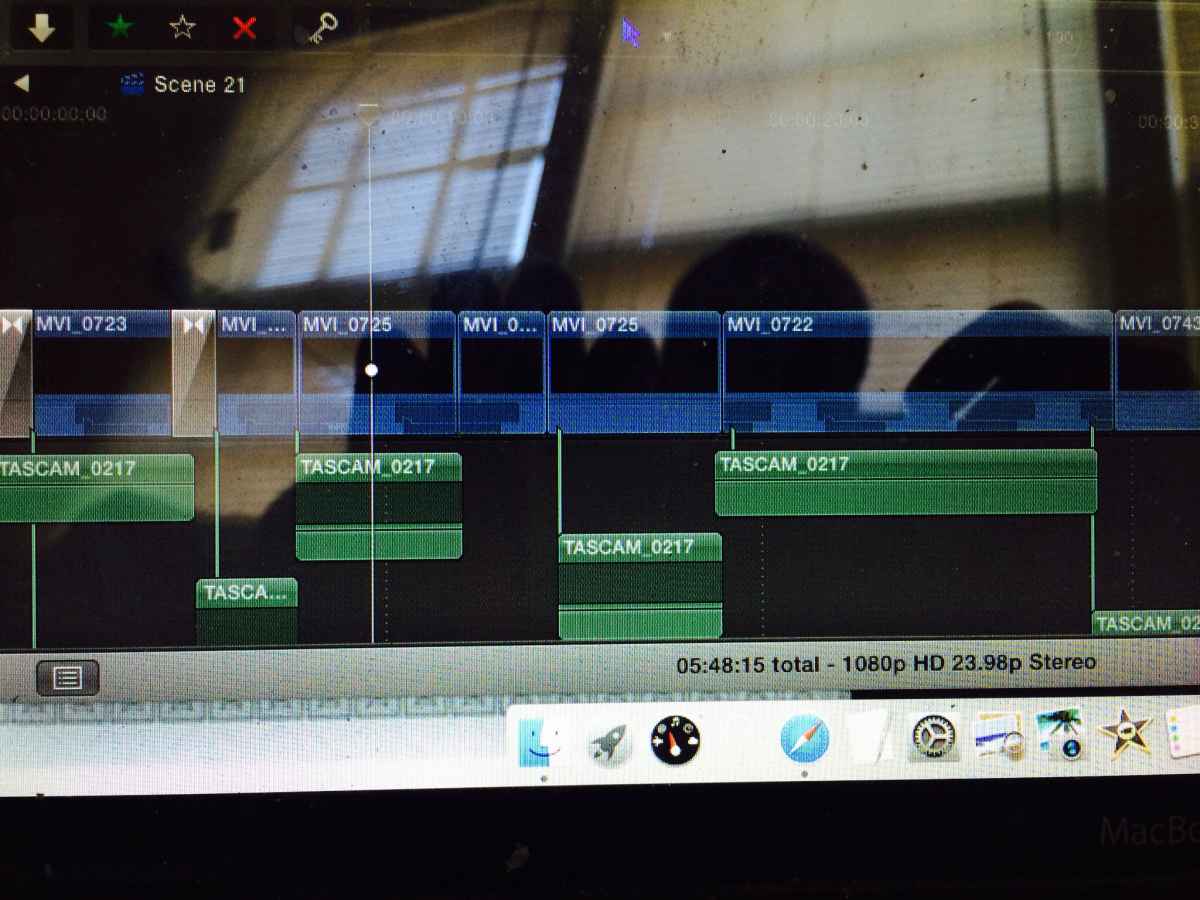
Here is an image of my timeline.... And yes I did move the footage after it was edited in my timeline.
Please Log in to join the conversation.
- ronny courtens
-
- Offline
- Moderator
-
Less
More
- Posts: 4455
- Thank you received: 962
04 Nov 2014 09:11 - 04 Nov 2014 09:13 #55471
by ronny courtens
Replied by ronny courtens on topic My project clips are all black.... Any idea of how to fix?
You never, ever should manually move anything that is inside an FCP X Library. Libraries are closed containers, and there is a reason for this. Never open the content of a Library unless you absolutely know what you are doing.
What you can do:
Either you put the footage back to where it was, you open FCP X and you see if everything gets restored automatically.
Or you try to relink the files to your Project. Select the Project in the clip browser and choose File > Relink.
- If your clips show up as Missing you can click Locate All, go to the folder where you have put the footage and select the corresponding clips in that folder. FCP X will try to match them to the clips in your Library and if they match you will be able to relink them.
- If your clips don't show up as Missing, click the All button to see all the clips, then click Locate All, go to the folder where you have put the footage and select the corresponding clips in that folder. FCP X will try to match them to the clips in your Library and if they match you will be able to relink them.
- Ronny
What you can do:
Either you put the footage back to where it was, you open FCP X and you see if everything gets restored automatically.
Or you try to relink the files to your Project. Select the Project in the clip browser and choose File > Relink.
- If your clips show up as Missing you can click Locate All, go to the folder where you have put the footage and select the corresponding clips in that folder. FCP X will try to match them to the clips in your Library and if they match you will be able to relink them.
- If your clips don't show up as Missing, click the All button to see all the clips, then click Locate All, go to the folder where you have put the footage and select the corresponding clips in that folder. FCP X will try to match them to the clips in your Library and if they match you will be able to relink them.
- Ronny
Last edit: 04 Nov 2014 09:13 by ronny courtens.
Please Log in to join the conversation.
- Irvinjprod
-
Topic Author
- Offline
- New Member
-
Less
More
- Posts: 3
- Thank you received: 0
04 Nov 2014 13:15 #55480
by Irvinjprod
Replied by Irvinjprod on topic My project clips are all black.... Any idea of how to fix?
Thanks for your response. When I click the All button, nothing comes up. I'm assuming this means Final Cut doesn't recognize the clips any longer and my work is lost.
Please Log in to join the conversation.
- ronny courtens
-
- Offline
- Moderator
-
Less
More
- Posts: 4455
- Thank you received: 962
04 Nov 2014 13:26 #55484
by ronny courtens
Replied by ronny courtens on topic My project clips are all black.... Any idea of how to fix?
Ouch. And have you tried re-importing the footage in the same Library? Sometimes this can restore the clips.
- Ronny
- Ronny
Please Log in to join the conversation.
- Karsten Schlüter
-

- Offline
- Moderator
-
Less
More
- Posts: 3790
- Thank you received: 718
04 Nov 2014 13:34 #55485
by Karsten Schlüter
LOL :lol: - just for future reference:
cmd-shift-3 creates a 'whole screen' shot
cmd-shift-4 creates a hair-cross which allows a selection from the screen, click'n drag
cmd-shift-4, then space, then mouse-click creates a screen-shot of selected window (even when covered by others) ...
And some general advice:
look at FCPX as a 'database' - manipulation 'outside' the app destroys it structure, AND e.g. renaming clips is in 99% cases completely useless, due to FCPX' superior handling vie meta-data.
Replied by Karsten Schlüter on topic My project clips are all black.... Any idea of how to fix?
Irvinjprod wrote: Here is an image of my timeline....
LOL :lol: - just for future reference:
cmd-shift-3 creates a 'whole screen' shot
cmd-shift-4 creates a hair-cross which allows a selection from the screen, click'n drag
cmd-shift-4, then space, then mouse-click creates a screen-shot of selected window (even when covered by others) ...
And some general advice:
look at FCPX as a 'database' - manipulation 'outside' the app destroys it structure, AND e.g. renaming clips is in 99% cases completely useless, due to FCPX' superior handling vie meta-data.
Please Log in to join the conversation.
- billy.mcfadden
-
- Offline
- New Member
-
Less
More
- Posts: 1
- Thank you received: 0
23 Oct 2015 20:50 #69767
by billy.mcfadden
Replied by billy.mcfadden on topic My project clips are all black.... Any idea of how to fix?
Hey Irvin , I'm having the same problem. Did you find a solution?
Please Log in to join the conversation.
