


- Posts: 2
- Thank you received: 0
3 Post Moderation Rule for New Boarders (25 Jan 2021)
New boarders will have their posts moderated - Don't worry if you cannot see your post immediately.
Question: Import Splits Files using Handycam DCR-HR19E
26 Oct 2014 10:59 #54828
by baasc0de
Question: Import Splits Files using Handycam DCR-HR19E was created by baasc0de
Hello,
I have a problem while importing video from my 8 year old Sony Handycam DCR-HR-19E. I searched the forum, but i can't find an answer. So sorry if this is already resolved, please let me know where i can find the answer.
I import using Final Cut Pro. When i play the video regularly, it plays continuously. However, when i start importing it flickers every 2 seconds, and then after stopping my import it has split the video in small unusable clips of aprx. 1,7 - 1,8 sec. You'd think that it's easy to fix by combining the clips after the import, but that doesn't do the trick; the video then has a shock in it every 1,8 sec. I just want the entire videotape of 60 min to be imported as 1 .dv file to my computer, no automatic splits. How can i do this?
Thanks in advance!
I have a problem while importing video from my 8 year old Sony Handycam DCR-HR-19E. I searched the forum, but i can't find an answer. So sorry if this is already resolved, please let me know where i can find the answer.
I import using Final Cut Pro. When i play the video regularly, it plays continuously. However, when i start importing it flickers every 2 seconds, and then after stopping my import it has split the video in small unusable clips of aprx. 1,7 - 1,8 sec. You'd think that it's easy to fix by combining the clips after the import, but that doesn't do the trick; the video then has a shock in it every 1,8 sec. I just want the entire videotape of 60 min to be imported as 1 .dv file to my computer, no automatic splits. How can i do this?
Thanks in advance!
Please Log in to join the conversation.

26 Oct 2014 13:24 #54832
by BenB
Replied by BenB on topic Question: Import Splits Files using Handycam DCR-HR19E
FCPX looks for timecode (time of day) breaks to cut up clips automatically. You can't change that. I'd try capturing with QT 7 Pro or some other app.
Please Log in to join the conversation.
- ronny courtens
-

- Offline
- Moderator
-

Less
More
- Posts: 4455
- Thank you received: 962
26 Oct 2014 13:25 - 26 Oct 2014 13:26 #54833
by ronny courtens
Replied by ronny courtens on topic Question: Import Splits Files using Handycam DCR-HR19E
Hoi Barend, welcome to the forum.
Your tape may have time code drops or even a corrupted time code track. That does not lead to any problems when playing back the tape, but FCP X needs continuous time code or else it will chop your video at every time code drop it sees.
The best way to get around this is to capture the tape with QT player 7 or QT player X. Both will recognize your camera and they will capture the tape to a video file. They also ignore time code breaks on the tape. This is for QTX:
- Shut down your Mac and connect the cam to your system.
- Power up the mac, then launch QT player.
- Select Archief > Nieuwe Filmopname, this will open the QT player record window.
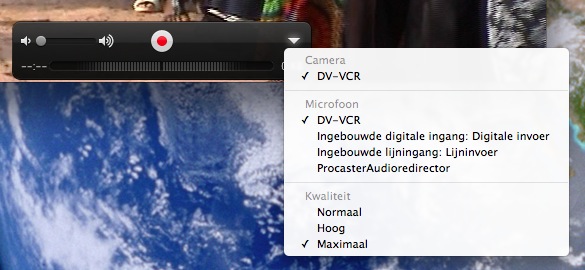
- In the record window click on the little white triangle and make sure Camera and Microphone are set to your camera (this will probably be" DV-VCR").
- Press the play button on your cam and then the record button in the QT player recording window to start the recording. Your tape will be captured to its native format, which is DV.
- At the end of the tape, press the record button again to stop the recording. You will be able to play the captured video in the QT player window and to save it to your hard drive. When the file has been saved you can import it in FCP X.
It takes 2 minutes to explain this, but only 10 seconds to actually do it
Groeten uit België
- Ronny
Your tape may have time code drops or even a corrupted time code track. That does not lead to any problems when playing back the tape, but FCP X needs continuous time code or else it will chop your video at every time code drop it sees.
The best way to get around this is to capture the tape with QT player 7 or QT player X. Both will recognize your camera and they will capture the tape to a video file. They also ignore time code breaks on the tape. This is for QTX:
- Shut down your Mac and connect the cam to your system.
- Power up the mac, then launch QT player.
- Select Archief > Nieuwe Filmopname, this will open the QT player record window.
- In the record window click on the little white triangle and make sure Camera and Microphone are set to your camera (this will probably be" DV-VCR").
- Press the play button on your cam and then the record button in the QT player recording window to start the recording. Your tape will be captured to its native format, which is DV.
- At the end of the tape, press the record button again to stop the recording. You will be able to play the captured video in the QT player window and to save it to your hard drive. When the file has been saved you can import it in FCP X.
It takes 2 minutes to explain this, but only 10 seconds to actually do it
Groeten uit België
- Ronny
Last edit: 26 Oct 2014 13:26 by ronny courtens.
Please Log in to join the conversation.
26 Oct 2014 13:53 #54836
by baasc0de
Replied by baasc0de on topic Question: Import Splits Files using Handycam DCR-HR19E
Aah, this was exactly the answer i was hoping for! I just tried it, and it works. Although it did just stop importing after 3 seconds of darkness, but it's still better then nothing!
Enorm bedankt!
Enorm bedankt!
Please Log in to join the conversation.
