


- Posts: 27
- Thank you received: 0
3 Post Moderation Rule for New Boarders (25 Jan 2021)
New boarders will have their posts moderated - Don't worry if you cannot see your post immediately.
Sharing Library on NAS, Modified file error
- Montezumeflex
-
 Topic Author
- Offline
- Junior Member
-

Less
More
24 Oct 2014 14:32 #54737
by Montezumeflex
Sharing Library on NAS, Modified file error was created by Montezumeflex
Hi guys,
We are a small production company which produces a weekly television show and we've been working on Final Cut Pro 7 ever since we started. We have a 16TB QNAP mounted as AFP share on 5 Macs to acces our media library.
I really want to make the switch to FCPX and I have been doing a few tests to work out a new workflow.
With FCP7 we are used to store the media and the .fcp project file on the QNAP, with X i think the best workflow will be to keep the media on the QNAP and have the libraries on the edit-macs when editing. When a project is finished the library will be transferred to the QNAP. If another editor needs to make adjustments on the edit he can copy the library to his edit-station and start working on it again.
I looked around online and this seems to be the most standard workflow for collaborating with FCPX (please correct me if I'm wrong)
I'm having problems working this out. I create a library on edit1, add the media files (referenced files of course) then start editing and afterward I will copy the library to the QNAP.
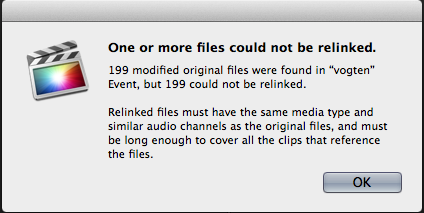
When I copy the library from the QNAp to Edit2 i get the error you can see in the attachment. For some reason the clips are not "missing" or "unlinked", but they are marked as "Modified Media"
It seems that for some reason FCPX thinks that a different program has altered the media, but of course the media files are untouched on the QNAP.
Does anyone know what I am doing wrong? I have looked around on the internet but can't find a lot of help on this topic. Would love to hear your thoughts about my workflow/problem.
Kind Regards,
Martijn
We are a small production company which produces a weekly television show and we've been working on Final Cut Pro 7 ever since we started. We have a 16TB QNAP mounted as AFP share on 5 Macs to acces our media library.
I really want to make the switch to FCPX and I have been doing a few tests to work out a new workflow.
With FCP7 we are used to store the media and the .fcp project file on the QNAP, with X i think the best workflow will be to keep the media on the QNAP and have the libraries on the edit-macs when editing. When a project is finished the library will be transferred to the QNAP. If another editor needs to make adjustments on the edit he can copy the library to his edit-station and start working on it again.
I looked around online and this seems to be the most standard workflow for collaborating with FCPX (please correct me if I'm wrong)
I'm having problems working this out. I create a library on edit1, add the media files (referenced files of course) then start editing and afterward I will copy the library to the QNAP.
When I copy the library from the QNAp to Edit2 i get the error you can see in the attachment. For some reason the clips are not "missing" or "unlinked", but they are marked as "Modified Media"
It seems that for some reason FCPX thinks that a different program has altered the media, but of course the media files are untouched on the QNAP.
Does anyone know what I am doing wrong? I have looked around on the internet but can't find a lot of help on this topic. Would love to hear your thoughts about my workflow/problem.
Kind Regards,
Martijn
Please Log in to join the conversation.

24 Oct 2014 15:40 #54743
by lichinho
Replied by lichinho on topic Sharing Library on NAS, Modified file error
I cannot offer a solution, but I can say that I don't see anything wrong in what you did.
Actually, if the media is referenced in the library and the mount point is the same in two workstations (e.g. /Volumes/QNAP/SomeFolder), the media should not even need relinking. It should just work.
Actually, if the media is referenced in the library and the mount point is the same in two workstations (e.g. /Volumes/QNAP/SomeFolder), the media should not even need relinking. It should just work.
Please Log in to join the conversation.
- ronny courtens
-

- Offline
- Moderator
-

Less
More
- Posts: 4455
- Thank you received: 962
25 Oct 2014 10:45 #54789
by ronny courtens
Replied by ronny courtens on topic Sharing Library on NAS, Modified file error
There is a caveat with AFP and FCP X Libraries. Unlike Final Cut Pro 7 Projects, Final Cut Pro X Libraries cannot be opened from or saved to an AFP or an SMB share point (unless something has changed in the past three months). Even copying Libraries over an AFP system seems to be problematic. That's why we use SFP, but SFP is a protocol you don't want to tamper with unless you really know what you are doing.
Try this:
Create the Library on Edit1 and send the Library straight to Edit2 without copying it onto the QNAP first. Does the Library open on Edit2 and does it properly connect to the media on the QNAP?
- Ronny
Try this:
Create the Library on Edit1 and send the Library straight to Edit2 without copying it onto the QNAP first. Does the Library open on Edit2 and does it properly connect to the media on the QNAP?
- Ronny
Please Log in to join the conversation.
- Montezumeflex
-
Topic Author
- Offline
- Junior Member
-
Less
More
- Posts: 27
- Thank you received: 0
27 Oct 2014 10:11 #54884
by Montezumeflex
Replied by Montezumeflex on topic Sharing Library on NAS, Modified file error
Thanks a lot Lichin and Ronny for replying to my post!
This morning I was able to try ronny's solution to use a USB drive to transfer the library file to the other Edit-station.
I was super amazed to see that the files now finally link up just fine! I'm so exited to finally have this resolved.
At least I can continue to test our setup. The main bottleneck of our production company are 2 24" iMacs running 4Gb ram and Core 2 Duo setup. Since we are always using optimized media (no h264 or .mp4 files, always proress/xdcam) I hope we will be able to cut non complex interviews on them.
Ronny I was wondering you said that you use SFP which is not really user friendly. I've also got the possibility to use NFS as network protocol. Would that be better than AFP in this case? The Qnap is only accessed bij macs running mavericks or higher, but I'm not sure if its a safe/older protocol to use.
Kind regards,
Martijn
This morning I was able to try ronny's solution to use a USB drive to transfer the library file to the other Edit-station.
I was super amazed to see that the files now finally link up just fine! I'm so exited to finally have this resolved.
At least I can continue to test our setup. The main bottleneck of our production company are 2 24" iMacs running 4Gb ram and Core 2 Duo setup. Since we are always using optimized media (no h264 or .mp4 files, always proress/xdcam) I hope we will be able to cut non complex interviews on them.
Ronny I was wondering you said that you use SFP which is not really user friendly. I've also got the possibility to use NFS as network protocol. Would that be better than AFP in this case? The Qnap is only accessed bij macs running mavericks or higher, but I'm not sure if its a safe/older protocol to use.
Kind regards,
Martijn
Please Log in to join the conversation.
- ronny courtens
-
- Offline
- Moderator
-
Less
More
- Posts: 4455
- Thank you received: 962
27 Oct 2014 10:34 #54886
by ronny courtens
Replied by ronny courtens on topic Sharing Library on NAS, Modified file error
Hoi Martijn,
Can you specify the exact model of QNAP you have, and how you connect to the Macs?
Groeten uit België,
Ronny
Can you specify the exact model of QNAP you have, and how you connect to the Macs?
Groeten uit België,
Ronny
Please Log in to join the conversation.
- Montezumeflex
-
Topic Author
- Offline
- Junior Member
-
Less
More
- Posts: 27
- Thank you received: 0
27 Oct 2014 11:04 #54887
by Montezumeflex
Replied by Montezumeflex on topic Sharing Library on NAS, Modified file error
It's a QNAP TS-809u running 4.0.3
We have 2 ports using 2 different local ip's connected to a switch.
Most of the time only 4-5 mac's are connected simultaneously and we have 2 using port1 and the other 2/3 using port 2 via finder (cmd+k) AFP://serverport1 and AFP://serverport2
Coincidence you live in Belgium, our program is broadcasted on "Kanaal Z"
Regards,
Martijn
We have 2 ports using 2 different local ip's connected to a switch.
Most of the time only 4-5 mac's are connected simultaneously and we have 2 using port1 and the other 2/3 using port 2 via finder (cmd+k) AFP://serverport1 and AFP://serverport2
Coincidence you live in Belgium, our program is broadcasted on "Kanaal Z"
Regards,
Martijn
Please Log in to join the conversation.
- ronny courtens
-
- Offline
- Moderator
-
Less
More
- Posts: 4455
- Thank you received: 962
27 Oct 2014 13:34 #54897
by ronny courtens
Replied by ronny courtens on topic Sharing Library on NAS, Modified file error
Thank you for the information, Martijn. I will have a look at that system later today. I see you are connecting over single GigE, what are the average Read/Write speeds you are getting on your client computers?
- As you have noticed, copying FCP X Libraries over AFP or SMB can corrupt the Library databases. You really need NFS if you want to work with FCP X over a fast shared storage network, and I can assure you it is quite hard to set up an optimized NFS server. But once you get it set up it is also much faster than AFP or SMB. Here's a detailed instruction on how you can set up NFS on any system:
www.doubleprecision.be/blog/2014/5/9/how...in-network-using-nfs
- However, some people do work with FCP X on an AFP NAS by using sparse bundle disk images. It does not provide you the high speeds of a fast SAN, but for the kind of setup you are running it might work. I suggest you try this workaround first to see if it works for you and if it gives you sufficient speed for the jobs you are doing.
The workflow is simple: create a new "FCPX" folder on your NAS and inside that folder create a sparse bundle disk image. Here's a video on how to do this:
For testing purposes, create a small sparse bundle first (2 GB or so).
Then launch FCP X on Edit 1 and the Sparse Image should appear as a folder on the client computer.
Now you can create a Library in that folder and import media from anywhere on the NAS, leaving Files in Place.
Every client computer connected to the NAS should now be able to open that Library from the Sparse folder.
Of course a Library can only be accessed by one person at a time, this is imperative to prevent data corruption. So in order to collaborate you will need to make copies of the Master Library for every client, and each edit station can work on its client copy while accessing the same media from the NAS. It is advised to copy the client Libraries over to the local drives of the client computers, because FCP X constantly writes to the Library databases. Storing the client Libraries locally will prevent your system from slowing down.
- Ronny
- As you have noticed, copying FCP X Libraries over AFP or SMB can corrupt the Library databases. You really need NFS if you want to work with FCP X over a fast shared storage network, and I can assure you it is quite hard to set up an optimized NFS server. But once you get it set up it is also much faster than AFP or SMB. Here's a detailed instruction on how you can set up NFS on any system:
www.doubleprecision.be/blog/2014/5/9/how...in-network-using-nfs
- However, some people do work with FCP X on an AFP NAS by using sparse bundle disk images. It does not provide you the high speeds of a fast SAN, but for the kind of setup you are running it might work. I suggest you try this workaround first to see if it works for you and if it gives you sufficient speed for the jobs you are doing.
The workflow is simple: create a new "FCPX" folder on your NAS and inside that folder create a sparse bundle disk image. Here's a video on how to do this:
For testing purposes, create a small sparse bundle first (2 GB or so).
Then launch FCP X on Edit 1 and the Sparse Image should appear as a folder on the client computer.
Now you can create a Library in that folder and import media from anywhere on the NAS, leaving Files in Place.
Every client computer connected to the NAS should now be able to open that Library from the Sparse folder.
Of course a Library can only be accessed by one person at a time, this is imperative to prevent data corruption. So in order to collaborate you will need to make copies of the Master Library for every client, and each edit station can work on its client copy while accessing the same media from the NAS. It is advised to copy the client Libraries over to the local drives of the client computers, because FCP X constantly writes to the Library databases. Storing the client Libraries locally will prevent your system from slowing down.
- Ronny
Please Log in to join the conversation.
- Montezumeflex
-
Topic Author
- Offline
- Junior Member
-
Less
More
- Posts: 27
- Thank you received: 0
27 Oct 2014 15:54 #54906
by Montezumeflex
Replied by Montezumeflex on topic Sharing Library on NAS, Modified file error
Hi Ronny,
Thanks again for your feedback. I'm not really looking forward to work with "sparse-bundle images" but for sure it can be a method to use. I hope to be able to work this out without the need for it. (Sorry I don't want to sound rude, you have been a great help already)
Just to clear something up, the QNAP has dual GigE, but all the clients are connected over single GigE
I've just done a Blackmagic Disk Speed test on our QNAP, following results:
AFP: Read: 91,7 MB/s Write: 88,4
NFS: Read: 99,1 MB/s Write: 102.3 MB/s
Looks like NFS is faster as well. I was already planning not to open the libraries directly from the QNAP, but we would just keep them for backup/collaboration so the editors would copy the file at the /start/end of their day from or or the folder on the QNAP.
Thanks again for your feedback. I'm not really looking forward to work with "sparse-bundle images" but for sure it can be a method to use. I hope to be able to work this out without the need for it. (Sorry I don't want to sound rude, you have been a great help already)
Martijn. I will have a look at that system later today. I see you are connecting over single GigE, what are the average Read/Write speeds you are getting on your client computers?
Just to clear something up, the QNAP has dual GigE, but all the clients are connected over single GigE
I've just done a Blackmagic Disk Speed test on our QNAP, following results:
AFP: Read: 91,7 MB/s Write: 88,4
NFS: Read: 99,1 MB/s Write: 102.3 MB/s
Looks like NFS is faster as well. I was already planning not to open the libraries directly from the QNAP, but we would just keep them for backup/collaboration so the editors would copy the file at the /start/end of their day from or or the folder on the QNAP.
Please Log in to join the conversation.
- ronny courtens
-
- Offline
- Moderator
-
Less
More
- Posts: 4455
- Thank you received: 962
27 Oct 2014 16:34 #54908
by ronny courtens
Replied by ronny courtens on topic Sharing Library on NAS, Modified file error
I agree. The sparse bundle image workflow is not something I would use myself, but at this time it's the only way you can store FCP X Libraries on AFP or SMB servers. That's why I suggested this.
Yes, NFS is always faster when set up properly. Your figures for a split GigE connection are not bad at all. We are getting average speeds of 500 MB/s on new iMacs and between 600 and 700 MB/s on new MacPros (connected via SANLink) for a 20-seat FCP X system on a 128TB 10 GigE SAN using SFP. As the QNAP has an easy setup procedure for NFS I would consider using this protocol with FCP X, that's what most of us do.
- Ronny
Yes, NFS is always faster when set up properly. Your figures for a split GigE connection are not bad at all. We are getting average speeds of 500 MB/s on new iMacs and between 600 and 700 MB/s on new MacPros (connected via SANLink) for a 20-seat FCP X system on a 128TB 10 GigE SAN using SFP. As the QNAP has an easy setup procedure for NFS I would consider using this protocol with FCP X, that's what most of us do.
- Ronny
Please Log in to join the conversation.
- Montezumeflex
-
Topic Author
- Offline
- Junior Member
-
Less
More
- Posts: 27
- Thank you received: 0
26 Mar 2015 16:37 #61940
by Montezumeflex
Replied by Montezumeflex on topic Sharing Library on NAS, Modified file error
Hi Ronny,
Sorry for not replying to this post earlier, I completely forgot to reply to your post!
We've been using the NFS setup on our Qnap for a while and only recently started editing on Final Cut X for a new tv program. Exciting times
So far it's running great, after updating to Yosemite we are having some troubles with user rights but apart from that everything is working fine.
It's been a while since I started this post but I just wanted to say thank you for helping me out and suggesting the NFS protocol!
Groeten,
Martijn
Sorry for not replying to this post earlier, I completely forgot to reply to your post!
We've been using the NFS setup on our Qnap for a while and only recently started editing on Final Cut X for a new tv program. Exciting times
So far it's running great, after updating to Yosemite we are having some troubles with user rights but apart from that everything is working fine.
It's been a while since I started this post but I just wanted to say thank you for helping me out and suggesting the NFS protocol!
Groeten,
Martijn
Please Log in to join the conversation.
- ronny courtens
-
- Offline
- Moderator
-
Less
More
- Posts: 4455
- Thank you received: 962
26 Mar 2015 17:41 #61944
by ronny courtens
Replied by ronny courtens on topic Sharing Library on NAS, Modified file error
Hey Martijn,
Happy to hear you NFS setup works fine.
You say you have problems with user rights. Are you storing your Libraries on the QNap or locally? If you store them on the QNap you must make sure they are created and stored inside the share point folder, and not at the root level of the server drive. Never create folders or Libraries at the root level of a NAS, you will not be able to even move them inside the share point folder without getting user rights issues.
Keep us posted on your FCP X setup, I'm very interested in hearing more about the productions you make with FCP X.
- Ronny
Happy to hear you NFS setup works fine.
You say you have problems with user rights. Are you storing your Libraries on the QNap or locally? If you store them on the QNap you must make sure they are created and stored inside the share point folder, and not at the root level of the server drive. Never create folders or Libraries at the root level of a NAS, you will not be able to even move them inside the share point folder without getting user rights issues.
Keep us posted on your FCP X setup, I'm very interested in hearing more about the productions you make with FCP X.
- Ronny
Please Log in to join the conversation.
- Montezumeflex
-
Topic Author
- Offline
- Junior Member
-
Less
More
- Posts: 27
- Thank you received: 0
30 Mar 2015 19:10 #62097
by Montezumeflex
Replied by Montezumeflex on topic Sharing Library on NAS, Modified file error
Hi Ronny,
We've created a "Shared Folder" on the QNAP and are connecting to this via NFS, so in finder we use:
nfs://serverip/shared_folder_name to connect.
From there we have a folder structure to divide the different programs/episodes.
We do store Video and Libraries on the QNAP but the editor copies the file to his/her desktop before starting the edit. At the end of the day the Libraries are copied back for easy collaboration and a bit of a backup.
On Mavericks I used a special UMASK command to give all the macs Read/Write rights when writing to the server.
On Yosemite for some reason Apple removed this command, so items created by Edit1 are marked as R/W by Edit1, and Edit2 cannot overwrite this file. As long as we keep copying the Library files to our desktop we can work without problems but sometimes this is a problem for additional media like graphics files.
I hope this makes sense We don't have someone looking after our server/workflow full time so I've basically set this up myself and trying to improve on it where possible.
Il try to update this topic as much as I can while we are transitioning to Final Cut X, I hope it will be helpful for someone else who is in the same process. In the meantime, could you send me your e-mail address via PM? I would love to send you an e-mail later on when I have a bit more time to write.
Kind Regards,
Martijn
We've created a "Shared Folder" on the QNAP and are connecting to this via NFS, so in finder we use:
nfs://serverip/shared_folder_name to connect.
From there we have a folder structure to divide the different programs/episodes.
We do store Video and Libraries on the QNAP but the editor copies the file to his/her desktop before starting the edit. At the end of the day the Libraries are copied back for easy collaboration and a bit of a backup.
On Mavericks I used a special UMASK command to give all the macs Read/Write rights when writing to the server.
On Yosemite for some reason Apple removed this command, so items created by Edit1 are marked as R/W by Edit1, and Edit2 cannot overwrite this file. As long as we keep copying the Library files to our desktop we can work without problems but sometimes this is a problem for additional media like graphics files.
I hope this makes sense
We don't have someone looking after our server/workflow full time so I've basically set this up myself and trying to improve on it where possible.Il try to update this topic as much as I can while we are transitioning to Final Cut X, I hope it will be helpful for someone else who is in the same process. In the meantime, could you send me your e-mail address via PM? I would love to send you an e-mail later on when I have a bit more time to write.
Kind Regards,
Martijn
Please Log in to join the conversation.
- ronny courtens
-
- Offline
- Moderator
-
Less
More
- Posts: 4455
- Thank you received: 962
30 Mar 2015 19:33 #62098
by ronny courtens
Replied by ronny courtens on topic Sharing Library on NAS, Modified file error
Hoi Martijn,
My e-mail address is a public secret
ronnycourtens (at) mac (dot) com
Feel free to e-mail me any time you wish.
- Ronny
My e-mail address is a public secret
ronnycourtens (at) mac (dot) com
Feel free to e-mail me any time you wish.
- Ronny
Please Log in to join the conversation.

31 Mar 2015 21:09 #62137
by BenB
Replied by BenB on topic Sharing Library on NAS, Modified file error
umask does exist in Yosemite. I just used it. In Terminal, "man umask", it's there.
Please Log in to join the conversation.
- Montezumeflex
-
Topic Author
- Offline
- Junior Member
-
Less
More
- Posts: 27
- Thank you received: 0
01 Apr 2015 19:38 #62161
by Montezumeflex
Replied by Montezumeflex on topic Sharing Library on NAS, Modified file error
You are correct, in Yosemite it is still possible to set the Umask for files created in the Finder.
However in Mavericks it was possible to change the default R/R/W permission on the system level, so files created with every program have Read/Write permissions for everyone in the same workgroup. A short quote:
Because we duplicate our template Library in the finder we usually don't run into issues, but when we do our QNAP has a command to reset all the permissions to R/R/W so every once in a while I use this to give everyone acces to all the files on the server.
However in Mavericks it was possible to change the default R/R/W permission on the system level, so files created with every program have Read/Write permissions for everyone in the same workgroup. A short quote:
Before Yosemite I used the file /etc/launchd-user.conf file and just added the command umask 0077.
The aim is to get proper file permissions when saving a file in any every GUI program e.g. Finder, Notes & Firefox. To add the umask in /etc/profile or ~/.profile don't solve the problem.
In Yosemite the files /etc/launchd.conf and /etc/launchd-user.conf aren't executed anymore. The man launchctlsays:
The /etc/launchd.conf file is no longer consulted for subcommands to run during early boot time; this functionality was removed for security considerations.
Because we duplicate our template Library in the finder we usually don't run into issues, but when we do our QNAP has a command to reset all the permissions to R/R/W so every once in a while I use this to give everyone acces to all the files on the server.
Please Log in to join the conversation.
- ronny courtens
-
- Offline
- Moderator
-
Less
More
- Posts: 4455
- Thank you received: 962
03 Apr 2015 10:34 #62191
by ronny courtens
Replied by ronny courtens on topic Sharing Library on NAS, Modified file error
Hi Martijn,
There should be no need for Umask at all in this situation.
So you have created a "Shared Folder" on the QNAP and you are connecting to this via NFS using nfs://serverip/shared_folder_name to connect. That's perfect.
Are your media also stored inside the "Shared Folder"?
- Ronny
There should be no need for Umask at all in this situation.
So you have created a "Shared Folder" on the QNAP and you are connecting to this via NFS using nfs://serverip/shared_folder_name to connect. That's perfect.
Are your media also stored inside the "Shared Folder"?
- Ronny
Please Log in to join the conversation.
- Montezumeflex
-
Topic Author
- Offline
- Junior Member
-
Less
More
- Posts: 27
- Thank you received: 0
08 Apr 2015 23:07 - 08 Apr 2015 23:15 #62376
by Montezumeflex
Replied by Montezumeflex on topic Sharing Library on NAS, Modified file error
Hi Ronny,
Thanks for clearing that up. You are correct, our Library files and Media files are both inside the "Shared Folder".
When I switched the QNAP to NFS and ran into permission problems I called the guy who installed the QNAP and he told me this was probably the result of not using Apple's network protocol AFP. That's why I came up with the UMASK fix.
I was discussing your answer this morning with a few colleagues and they pointed out that after we clean installed all our Macs last week we suddenly have the ability to "Tag" files and folders (The colored dots in OSX) on the QNAP again. When we changed from AFP to NFS we were no longer able to do this and we used to keep track of the status of our projects this way.(New/Ready/Work in progress)
I think you might have hit the nail on the head when you said you have to connect to:
nfs://serverip/shared_folder_name/
Because before the reinstall the macs where probably connected:
nfs://serverip/ --> a pop-up will show asking which volume to mount --> select "shared_folder_name"
I'm not 100% sure about this I'll try and test it later this week. I can however confirm that none of my colleagues have ran into a permission issue anymore since our clean install.
Thanks again Ronny and BenB for all your assistance, I really appreciate your help.
Thanks for clearing that up. You are correct, our Library files and Media files are both inside the "Shared Folder".
When I switched the QNAP to NFS and ran into permission problems I called the guy who installed the QNAP and he told me this was probably the result of not using Apple's network protocol AFP. That's why I came up with the UMASK fix.
I was discussing your answer this morning with a few colleagues and they pointed out that after we clean installed all our Macs last week we suddenly have the ability to "Tag" files and folders (The colored dots in OSX) on the QNAP again. When we changed from AFP to NFS we were no longer able to do this and we used to keep track of the status of our projects this way.(New/Ready/Work in progress)
I think you might have hit the nail on the head when you said you have to connect to:
nfs://serverip/shared_folder_name/
Because before the reinstall the macs where probably connected:
nfs://serverip/ --> a pop-up will show asking which volume to mount --> select "shared_folder_name"
I'm not 100% sure about this I'll try and test it later this week. I can however confirm that none of my colleagues have ran into a permission issue anymore since our clean install.
Thanks again Ronny and BenB for all your assistance, I really appreciate your help.
Last edit: 08 Apr 2015 23:15 by Montezumeflex.
Please Log in to join the conversation.
