


- Posts: 11
- Thank you received: 1
3 Post Moderation Rule for New Boarders (25 Jan 2021)
New boarders will have their posts moderated - Don't worry if you cannot see your post immediately.
AVCHD from Sony PXW70 to ProRes on ingest?
24 Oct 2014 09:04 #54711
by VJIse
AVCHD from Sony PXW70 to ProRes on ingest? was created by VJIse
All,
We have just bought Sony PXW-70 cameras. Until Sony gets a plugin to ingest XAVC-L out, we are going to film in AVCHD.
The AVCHD is ingesting without a problem. But, the media is coming in as MPEG4/H.264 (According to VidSpec)
I have 'Create optimised media' checked, and I was expecting the files to come in as ProRes. Is their anyway to force
FCP X to create ProRes files as optimised media? I know I can use ClipWrap to convert the files, but I want to find out if I can do it only with FCP X.
FCP X 10.1.3
Mac OS 10.9.6
iMac 16GB RAM
Thanks
Ise
We have just bought Sony PXW-70 cameras. Until Sony gets a plugin to ingest XAVC-L out, we are going to film in AVCHD.
The AVCHD is ingesting without a problem. But, the media is coming in as MPEG4/H.264 (According to VidSpec)
I have 'Create optimised media' checked, and I was expecting the files to come in as ProRes. Is their anyway to force
FCP X to create ProRes files as optimised media? I know I can use ClipWrap to convert the files, but I want to find out if I can do it only with FCP X.
FCP X 10.1.3
Mac OS 10.9.6
iMac 16GB RAM
Thanks
Ise
Please Log in to join the conversation.
- ronny courtens
-

- Offline
- Moderator
-

Less
More
- Posts: 4455
- Thank you received: 962
24 Oct 2014 09:23 #54713
by ronny courtens
Replied by ronny courtens on topic AVCHD from Sony PXW70 to ProRes on ingest?
Hi Ise, welcome to the forum.
When you import clips FCP X puts the original media in the Original Media folder in the Library. If you have selected "Create Optimized Media" it will at the same time create ProRes versions from the imported clips, which will be put in the Transcoded Media folder in the Library.
It is very easy to check if the ProRes clips have been generated. Just select a clip in the clip browser and in the Inspector > Info tab look under File Information. If you see a green dot next to "Optimized" this means the ProRes clips are available, and that's the media you will be editing with.
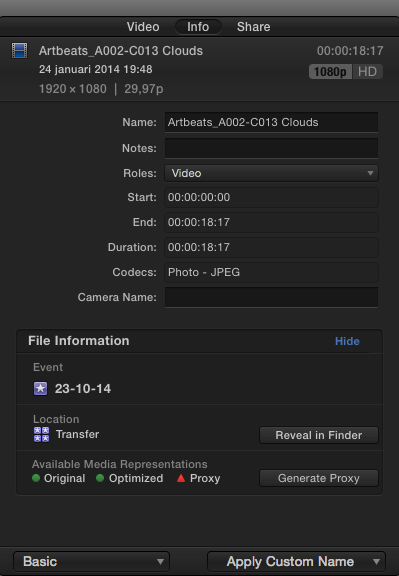
- Ronny
When you import clips FCP X puts the original media in the Original Media folder in the Library. If you have selected "Create Optimized Media" it will at the same time create ProRes versions from the imported clips, which will be put in the Transcoded Media folder in the Library.
It is very easy to check if the ProRes clips have been generated. Just select a clip in the clip browser and in the Inspector > Info tab look under File Information. If you see a green dot next to "Optimized" this means the ProRes clips are available, and that's the media you will be editing with.
- Ronny
Please Log in to join the conversation.
24 Oct 2014 11:00 #54721
by VJIse
Replied by VJIse on topic AVCHD from Sony PXW70 to ProRes on ingest?
Hi Ronny,
Thanks, I did know that. But in my defence, I clicked on the clip and did reveal in finder. That was of course taking me to the original clip and not the optimised clip. And I stupidly didn't look in the inspector. Or check out the folder I had the ingest going to.
Thanks for setting me straight.
Thanks, I did know that. But in my defence, I clicked on the clip and did reveal in finder. That was of course taking me to the original clip and not the optimised clip. And I stupidly didn't look in the inspector. Or check out the folder I had the ingest going to.
Thanks for setting me straight.
Please Log in to join the conversation.
- ronny courtens
-
- Offline
- Moderator
-
Less
More
- Posts: 4455
- Thank you received: 962
24 Oct 2014 11:03 #54723
by ronny courtens
Replied by ronny courtens on topic AVCHD from Sony PXW70 to ProRes on ingest?
No problem, we all make mistakes all the time. If not, life would be boring 
- Ronny
- Ronny
Please Log in to join the conversation.
