


- Posts: 7
- Thank you received: 0
3 Post Moderation Rule for New Boarders (25 Jan 2021)
New boarders will have their posts moderated - Don't worry if you cannot see your post immediately.
Film Looks Washed Out
- fb_1378479969
-
 Topic Author
- Offline
- New Member
-

Less
More
23 Oct 2014 05:12 #54647
by fb_1378479969
Film Looks Washed Out was created by fb_1378479969
Hi.
I've got a gorpo that I'm using to record video for editing in Final Cut Pro X . My videos get uploaded to Youtube.
I've noticed that the video often looks a bit washed out, despite exporting at 1080p
I'm a newbie when it comes to film, and I'm wondering if maybe the lighting just isn't great.
Here's an outdoor example:
Here's an indoor example (I shined a light on the side of my face away from the room's natural light):
Any suggestions for what I could do better?
Thanks!
I've got a gorpo that I'm using to record video for editing in Final Cut Pro X . My videos get uploaded to Youtube.
I've noticed that the video often looks a bit washed out, despite exporting at 1080p
I'm a newbie when it comes to film, and I'm wondering if maybe the lighting just isn't great.
Here's an outdoor example:
Here's an indoor example (I shined a light on the side of my face away from the room's natural light):
Any suggestions for what I could do better?
Thanks!
Please Log in to join the conversation.

23 Oct 2014 07:11 #54652
by Overturf
Replied by Overturf on topic Film Looks Washed Out
Looks like you have shot in a rather flat color profile. Did you have ProTunes on?
You can easily enhance your pictures with a bit of color correction. Enhance contrast first - bring down the shadows a bit and probably adjust the midtones accordingly. Then boost the overall saturation. That alone should go a long way.
Good luck!
You can easily enhance your pictures with a bit of color correction. Enhance contrast first - bring down the shadows a bit and probably adjust the midtones accordingly. Then boost the overall saturation. That alone should go a long way.
Good luck!
Please Log in to join the conversation.

23 Oct 2014 11:25 #54657
by BenB
Replied by BenB on topic Film Looks Washed Out
Contrast, that'll cover it all in these shots. Open the Waveform scope, Luma levels. Be sure highlights to not go beyond about 97 percent (never touch 100 percent), and the darkest shadows are on (or just crossing decently) the 0 percent line. Adjust the mid levels to taste. That should take care of just about 99 percent of your issues. Be careful with adjusting saturation. Adjust if you must, but start with the mid levels for saturation, that should cover you. And make tiny corrections, tiny bit at a time. It usually only takes a smidgeon to make big improvements.
Please Log in to join the conversation.
- fb_1378479969
-
Topic Author
- Offline
- New Member
-
Less
More
- Posts: 7
- Thank you received: 0
21 Nov 2014 01:42 #56290
by fb_1378479969
Replied by fb_1378479969 on topic Film Looks Washed Out
Thanks guys. I'll try all your suggestions.
Please Log in to join the conversation.
- Karsten Schlüter
-

- Offline
- Moderator
-

Less
More
- Posts: 3790
- Thank you received: 718
21 Nov 2014 06:28 - 21 Nov 2014 07:13 #56301
by Karsten Schlüter
hmm, to play here the Advocatus Diabolo ... :
a) Why GoPro? That tiny wide-angle-device is superb for close-to-the-action recordings, .. but blending celery ... ??
b) I added Alex4Ds free wide-angle-fix ..
c) … still crooked … added 2.1° rotation = that is hard to see on the weeny display of a GoPro
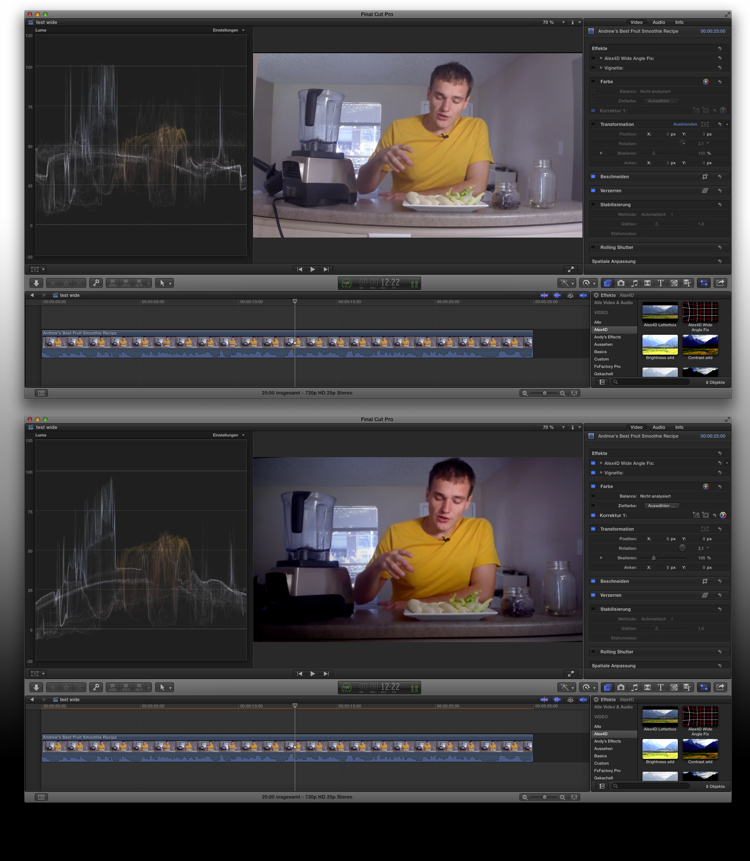
d) watch the Scope: room for improvement! lowering blacks, rising lights, a grain more saturation ...
e) … just personal taste: added a vignette - I'm not interested in your living room, nor what's happening outside your window = you 'catch' everything with such a wide lens in such a wide 'set'. A 'real' camera would allow some shallow-focus, to blur the unwanted background…-
f) … OMG, YouTube-radio!! ........... again: my personal taste, but 99% of 'instructional videos' on YT are radio = one single shot, someone is talking to me, and talks, and talks, and ... what about cut-aways? close-ups? demoes? graphics? 2nd cam? diff. perspectives? for-heavens-sake: EDITS!!! :woohoo:
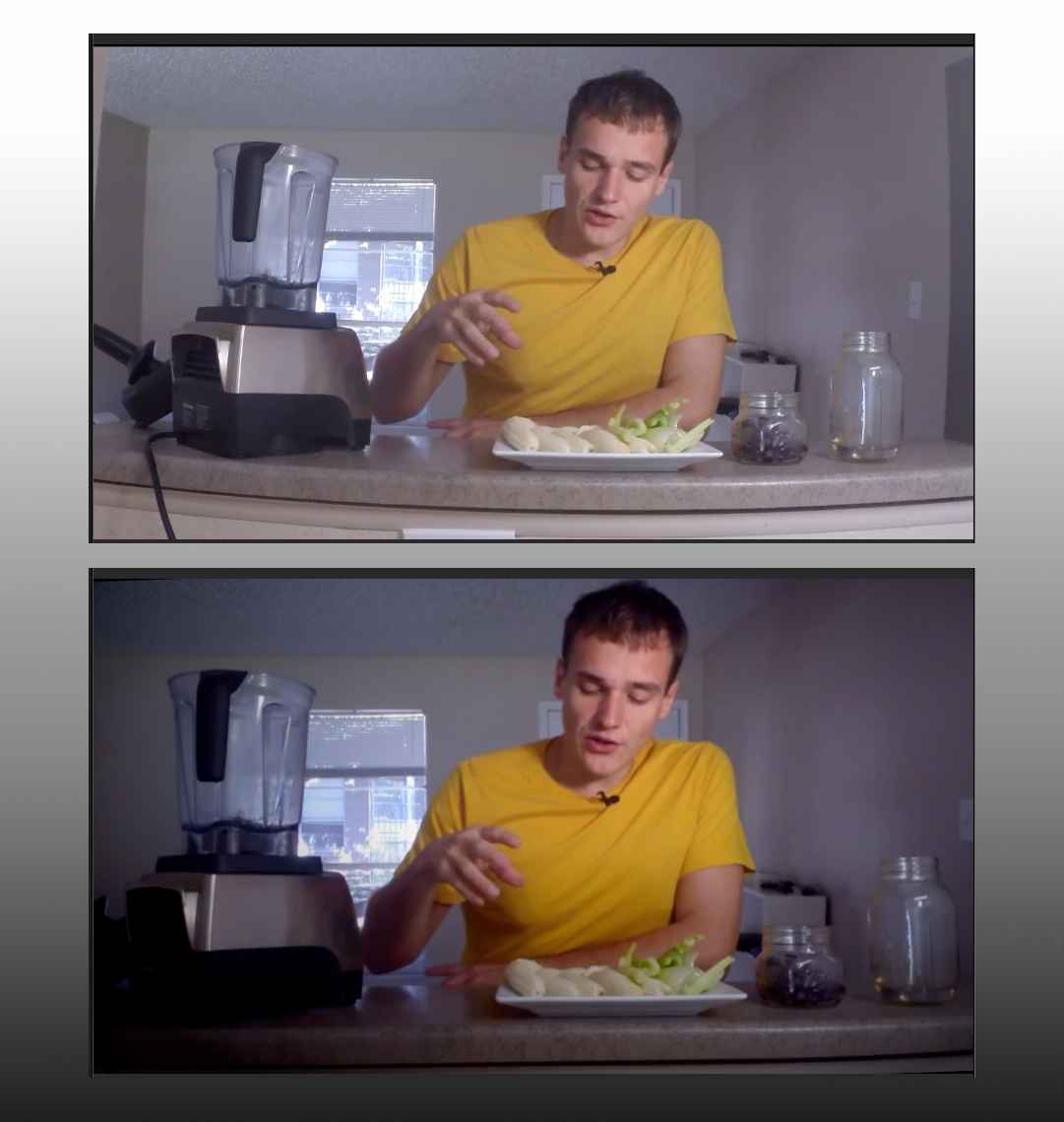
I'm no 'grader', but with a few clicks, you can give your pic a bit more 'boom!' :lol:
...
Replied by Karsten Schlüter on topic Film Looks Washed Out
Any suggestions for what I could do better?
hmm, to play here the Advocatus Diabolo ... :
a) Why GoPro? That tiny wide-angle-device is superb for close-to-the-action recordings, .. but blending celery ... ??
b) I added Alex4Ds free wide-angle-fix ..
c) … still crooked … added 2.1° rotation = that is hard to see on the weeny display of a GoPro
d) watch the Scope: room for improvement! lowering blacks, rising lights, a grain more saturation ...
e) … just personal taste: added a vignette - I'm not interested in your living room, nor what's happening outside your window = you 'catch' everything with such a wide lens in such a wide 'set'. A 'real' camera would allow some shallow-focus, to blur the unwanted background…-
f) … OMG, YouTube-radio!! ........... again: my personal taste, but 99% of 'instructional videos' on YT are radio = one single shot, someone is talking to me, and talks, and talks, and ... what about cut-aways? close-ups? demoes? graphics? 2nd cam? diff. perspectives? for-heavens-sake: EDITS!!! :woohoo:
I'm no 'grader', but with a few clicks, you can give your pic a bit more 'boom!' :lol:
...
Last edit: 21 Nov 2014 07:13 by Karsten Schlüter.
Please Log in to join the conversation.
