


- Posts: 1433
- Thank you received: 64
3 Post Moderation Rule for New Boarders (25 Jan 2021)
New boarders will have their posts moderated - Don't worry if you cannot see your post immediately.
Promise Pegasus2 R8 Help
- Disproportionate Pictures
-
 Topic Author
- Offline
- Platinum Member
-

Less
More
23 Oct 2014 01:04 #54636
by Disproportionate Pictures
Promise Pegasus2 R8 Help was created by Disproportionate Pictures
I've been dealing with this 24TB RAID since I started the show I'm on in April. It's very fast, but I'm forever dealing with it spinning down after 5 minutes, and it takes about 15 seconds to start up.
After all this time, is there any solution out there, since there's no option in Promise's utility to change that sleep duration? There was a command-line fix, but it makes me very nervous to do that.
After all this time, is there any solution out there, since there's no option in Promise's utility to change that sleep duration? There was a command-line fix, but it makes me very nervous to do that.
Please Log in to join the conversation.


23 Oct 2014 02:37 - 23 Oct 2014 02:41 #54640
by BenB
Replied by BenB on topic Promise Pegasus2 R8 Help
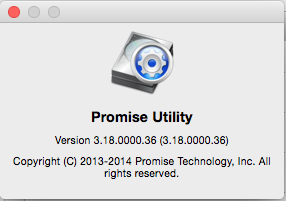
Well, there is a way to control it now. Be sure to run the Promise Utility, and be sure your P2 has the latest firmware update, 5.04.0000.36. Make absolutely sure your system does NOT go to sleep at all while the firmware upgrade is running, and it will require you reboot. Only takes a few minutes.
Then, go to the Device menu, to Component List. Click the Settings button for the Controller. You can enable/disable and set the time for: HDD Park Ahead, HDD Low Rotation Speed, HDD Idle Speed settings.
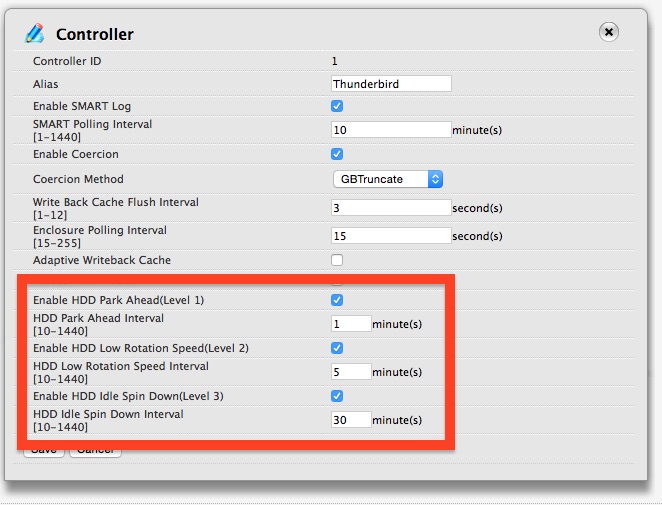
Then, go to the Device menu, to Component List. Click the Settings button for the Controller. You can enable/disable and set the time for: HDD Park Ahead, HDD Low Rotation Speed, HDD Idle Speed settings.
Last edit: 23 Oct 2014 02:41 by BenB.
Please Log in to join the conversation.
- Disproportionate Pictures
-
Topic Author
- Offline
- Platinum Member
-
Less
More
- Posts: 1433
- Thank you received: 64
23 Oct 2014 02:39 #54641
by Disproportionate Pictures
Replied by Disproportionate Pictures on topic Promise Pegasus2 R8 Help
Wonderful, Ben. Thanks.
Are those your setting?
Can/should the firmware be updated with a drive in use?
Are those your setting?
Can/should the firmware be updated with a drive in use?
Please Log in to join the conversation.
23 Oct 2014 02:44 - 23 Oct 2014 03:04 #54642
by BenB
Replied by BenB on topic Promise Pegasus2 R8 Help
I just ran it 30 minutes ago. Be sure to close all other apps, run a backup, run the firmware update. You'll get the controller's firmware update, and the utility app update. It is updating the firmware of the controller card, not touching data on your drives. But always have a backup done first! RAID redundancy is NOT a backup.
What you see are the default settings, I've not customized anything... yet.
What you see are the default settings, I've not customized anything... yet.
Last edit: 23 Oct 2014 03:04 by BenB.
Please Log in to join the conversation.
- Disproportionate Pictures
-
Topic Author
- Offline
- Platinum Member
-
Less
More
- Posts: 1433
- Thank you received: 64
23 Oct 2014 03:32 #54645
by Disproportionate Pictures
Replied by Disproportionate Pictures on topic Promise Pegasus2 R8 Help
That's weird. Downloaded the update from their page but the file isn't being recognized as an .img.
Please Log in to join the conversation.
23 Oct 2014 11:27 #54658
by BenB
Replied by BenB on topic Promise Pegasus2 R8 Help
I didn't download anything from their web site. I just launched Promise Utility and it told me there was an update available. You should launch the app, in the application menu, "Check for updates".
Please Log in to join the conversation.
