


- Posts: 263
- Thank you received: 2
3 Post Moderation Rule for New Boarders (25 Jan 2021)
New boarders will have their posts moderated - Don't worry if you cannot see your post immediately.
matching the same scene from two different cameras?
22 Oct 2014 07:37 - 22 Oct 2014 07:38 #54569
by gaddster
MBP retina 15" 2014
imac 27 i7 2013
G-tech
Panasonic GH4, AC90, Gopro
matching the same scene from two different cameras? was created by gaddster
Hi Everyone
I have been attempting my first interview using a blackened background and 2 cameras (the close up is a prosumer model).. not bad considering it was my kitchen ha..
although both models are made by the same manufacturer I'm trying to get the shots to match better.. The close up seems a little softer and colour slightly different.
I have tried colour matching but its still a noticeable difference.. Can anyone advice what I can do to get a closer match?
Or am I being to picky?

I have been attempting my first interview using a blackened background and 2 cameras (the close up is a prosumer model).. not bad considering it was my kitchen ha..
although both models are made by the same manufacturer I'm trying to get the shots to match better.. The close up seems a little softer and colour slightly different.
I have tried colour matching but its still a noticeable difference.. Can anyone advice what I can do to get a closer match?
Or am I being to picky?
MBP retina 15" 2014
imac 27 i7 2013
G-tech
Panasonic GH4, AC90, Gopro
Last edit: 22 Oct 2014 07:38 by gaddster.
Please Log in to join the conversation.
- ronny courtens
-

- Offline
- Moderator
-

Less
More
- Posts: 4455
- Thank you received: 962
22 Oct 2014 10:16 #54579
by ronny courtens
Replied by ronny courtens on topic matching the same scene from two different cameras?
Hey Phil,
You can never be too picky with color matching
Consumer grade cameras tend to slightly raise the black levels and to boost the colors. This also introduces some color casts. That's not abnormal. It does make these cameras fairly difficult to match up with higher level cameras that also produce sharper images because they have better lenses.
Although the Color Match function in FCP X tends to deliver quite decent results when you match different cams filming the same scene, no automatic color match feature will provide perfect results from the start.
A trick you can apply in such cases is to superimpose the two images in your timeline and use the Color Board to visually match up the superimposed waveforms and the vectorscope:
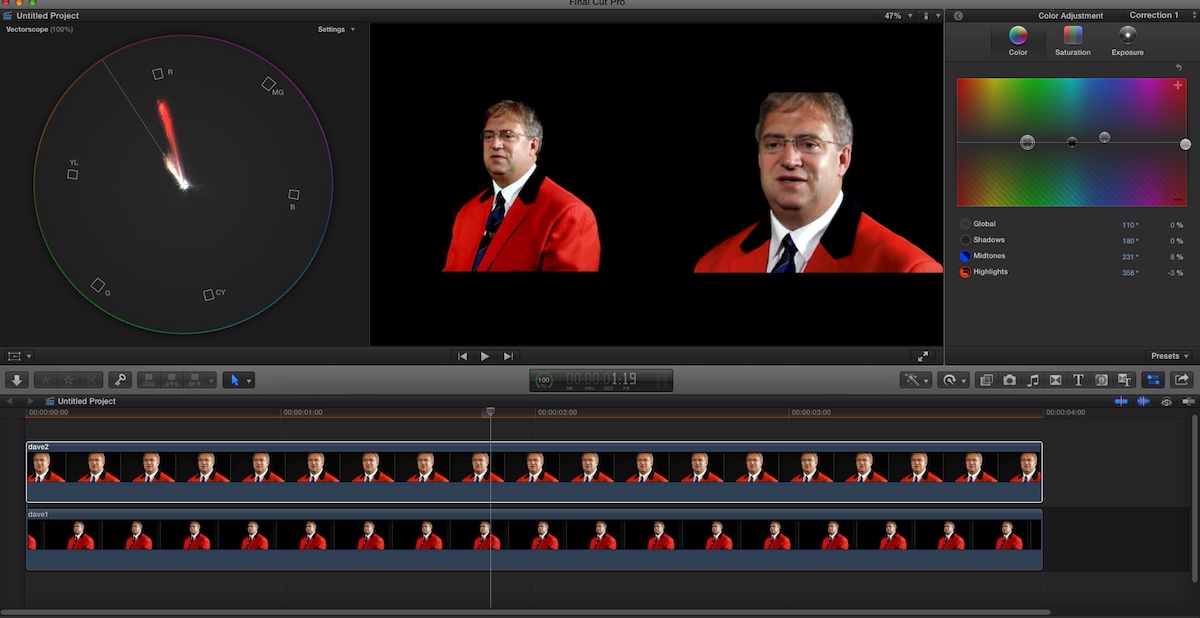
Of course it's hard to give any perfect settings based on a low-res still, but here's what I did on the close up image to make the scopes of both images match:
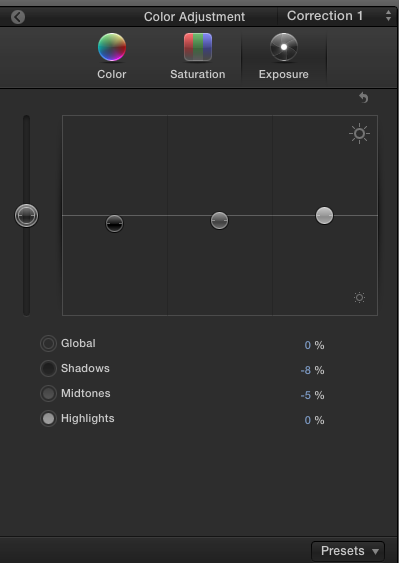
Exposure:
slightly lower the Shadows (-8 %) and the Midtones (-5%)
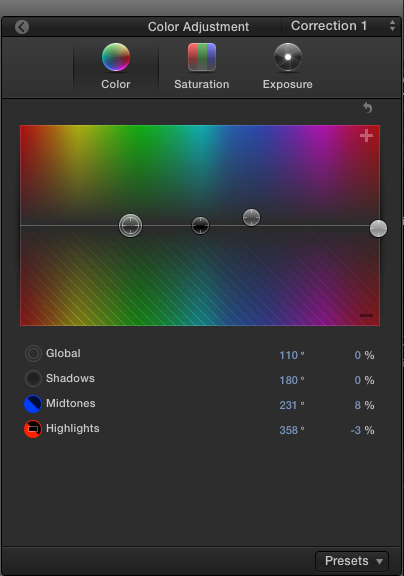
Color:
add some blue to the midtowns and subtract some red from the highlights to make the fleshtones match
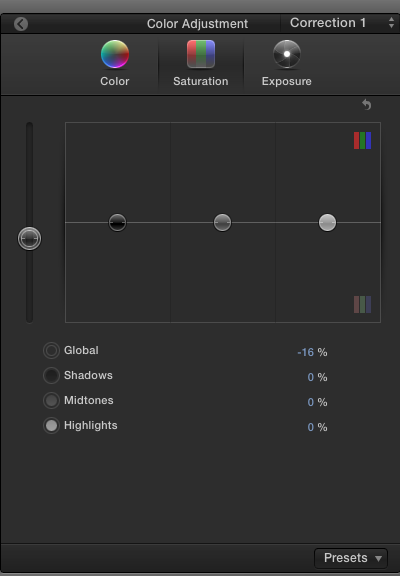
Saturation:
slightly desaturate the Global image (-16%)
This gives a pretty decent result, but the close up is noticeably softer due to the lower quality of the camera:

Finally I have applied a very slight sharpening with the Sharpen filter:

This was based on your low-res still, you may have to tweak a little to get the same results on your original video. But I hope it gives you a good basis to start from.
- Ronny
You can never be too picky with color matching
Consumer grade cameras tend to slightly raise the black levels and to boost the colors. This also introduces some color casts. That's not abnormal. It does make these cameras fairly difficult to match up with higher level cameras that also produce sharper images because they have better lenses.
Although the Color Match function in FCP X tends to deliver quite decent results when you match different cams filming the same scene, no automatic color match feature will provide perfect results from the start.
A trick you can apply in such cases is to superimpose the two images in your timeline and use the Color Board to visually match up the superimposed waveforms and the vectorscope:
Of course it's hard to give any perfect settings based on a low-res still, but here's what I did on the close up image to make the scopes of both images match:
Exposure:
slightly lower the Shadows (-8 %) and the Midtones (-5%)
Color:
add some blue to the midtowns and subtract some red from the highlights to make the fleshtones match
Saturation:
slightly desaturate the Global image (-16%)
This gives a pretty decent result, but the close up is noticeably softer due to the lower quality of the camera:
Finally I have applied a very slight sharpening with the Sharpen filter:
This was based on your low-res still, you may have to tweak a little to get the same results on your original video. But I hope it gives you a good basis to start from.
- Ronny
Please Log in to join the conversation.
22 Oct 2014 10:51 #54581
by gaddster
MBP retina 15" 2014
imac 27 i7 2013
G-tech
Panasonic GH4, AC90, Gopro
Replied by gaddster on topic matching the same scene from two different cameras?
Thanks Ronnie
I followed your instructions and they are great, wasn't quite sure how much to sharpen the image by but the results are so much better. Not tried the trick to superimpose the two images (on a tight deadline, again!!) but I will try this over the weekend..
I am looking to add a GH4 to my setup which will make my old trusty prosumer redundant
I followed your instructions and they are great, wasn't quite sure how much to sharpen the image by but the results are so much better. Not tried the trick to superimpose the two images (on a tight deadline, again!!) but I will try this over the weekend..
I am looking to add a GH4 to my setup which will make my old trusty prosumer redundant
MBP retina 15" 2014
imac 27 i7 2013
G-tech
Panasonic GH4, AC90, Gopro
Please Log in to join the conversation.
